Get Started with Open CTI
Build and integrate third-party computer-telephony integration (CTI) systems with Salesforce Call Center using a browser-based JavaScript API.
| Supported Editions |
|---|
| Available in: Salesforce Classic (not available in all orgs) and Lightning Experience |
| Available in: Essentials, Professional, Enterprise, Performance, Unlimited, and Developer Editions |
Open CTI is in maintenance mode and is scheduled for retirement in February 2028. No new features or enhancements are being added to Open CTI. Effective immediately, Open CTI is deprecated and unavailable for newly created Agentforce Service orgs. To ensure long-term compatibility and access to the latest innovations, we recommend transitioning your development efforts to Salesforce Voice. For more information, see this Knowledge Article.
To enable your contact center users to take advantage of the latest phone channel innovations, Salesforce recommends that you modernize your experience by moving to Salesforce Voice. Salesforce Voice offers many of the Open CTI features that you love and more. Unlike Open CTI, Salesforce Voice is natively integrated with Omni-Channel and Command Center for Service, providing a seamless experience for contact center reps and supervisors across all digital channels. See Get to Know Salesforce Voice.
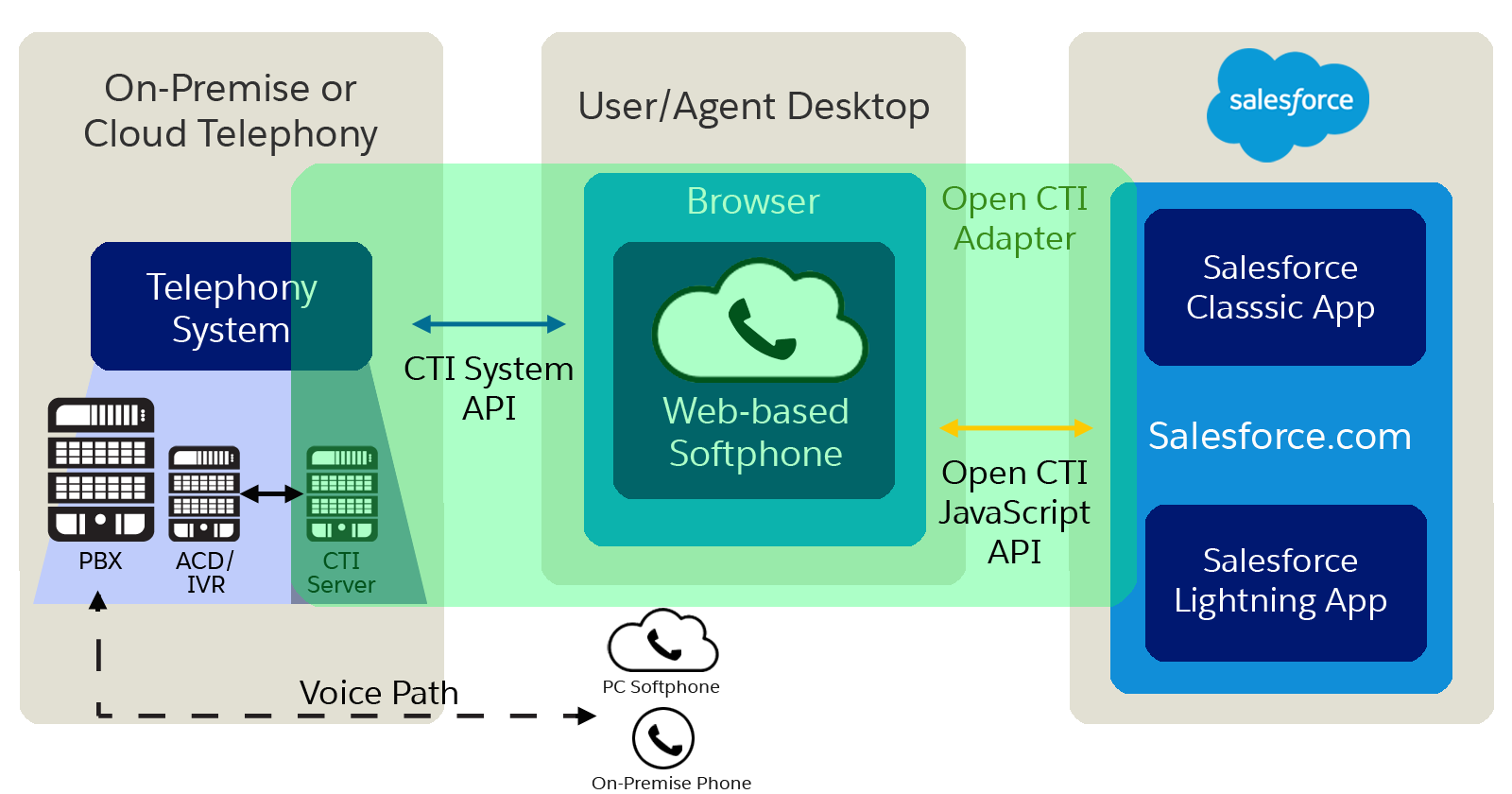
To display CTI functionality in Salesforce, Open CTI uses browsers as clients. With Open CTI, you can make calls from a softphone directly in Salesforce without installing CTI adapters on your machines. After you develop an Open CTI implementation, you can integrate it with Salesforce using Salesforce Call Center.
The way you implement Open CTI depends on your org’s user interface. There are separate Open CTI APIs for Salesforce Classic and Lightning Experience. You can’t swap the two Open CTI APIs in custom JavaScript code because they behave and function differently. Make sure that you think about where you want to implement your CTI system before you begin developing.

With Open CTI, you can:
- Build CTI systems that integrate with Salesforce without the use of CTI adapters.
- Create customizable softphones (call-control tools) that function as fully integrated parts of Salesforce and the Salesforce console.
- Provide users with CTI systems that are browser and platform agnostic, for example, CTI for Microsoft® Internet Explorer®, Mozilla® Firefox®, Apple® Safari®, or Google Chrome™ on Mac, Linux, or Windows machines.
To implement Open CTI, it helps if you have a basic familiarity with: CTI, JavaScript, Visualforce, web services, software development, the Salesforce console, and the Salesforce Call Center.
Keep in mind that Open CTI is only available for use with JavaScript pages. The examples in this guide are in JavaScript. You can use Open CTI in JavaScript to embed API calls and processes.
- Why Your UI Matters—Open CTI for Salesforce Classic vs. Lightning Experience
The way you implement Open CTI depends on your org’s user interface. There are separate Open CTI APIs for Salesforce Classic and Lightning Experience. - Method Parity Between Open CTI for Salesforce Classic and Lightning Experience
The methods provided in the two APIs aren’t always the same. Some Salesforce Classic methods aren’t available in Lightning Experience and some have been renamed. - Open CTI and Other Voice Solutions
Open CTI integrates third-party CTI systems with Salesforce. But do you wonder what came before? Or what the difference is between Open CTI and Sales Dialer? - Customize Open CTI Functionality
Your organization may have complex business processes that are unsupported by Open CTI functionality. Not to worry. When this is the case, the Lightning platform offers advanced administrators and developers several ways to implement custom functionality. - Open CTI Support Policy
Open CTI is in maintenance mode and is scheduled for retirement in February 2028. No new features or enhancements are being added to Open CTI. Effective immediately, Open CTI is deprecated and unavailable for newly created Agentforce Service orgs. To ensure long-term compatibility and access to the latest innovations, we recommend transitioning your development efforts to Salesforce Voice.