


 j
jRelease Notes
Requirements
Accessibility
Data Collection
Authentication
Notifications
Prepare Your App for Submission
Data Protection and Security
Additional Resources
PDF Version
The Service Chat SDK provides an authentication mechanism that allows your users to access user-specific information in Service Cloud. To authenticate, create an SCSAuthenticationSettings object and pass it to the SDK.
The legacy chat product is scheduled for retirement on February 14, 2026, and is in maintenance mode until then. During this phase, you can continue to use chat, but we no longer recommend that you implement new chat channels. To avoid service interruptions to your customers, migrate to Messaging for In-App and Web before that date. Messaging offers many of the chat features that you love plus asynchronous conversations that can be picked back up at any time. Learn about chat retirement in Help.
Important
Authentication with the Service Chat SDK uses an SCSAuthenticationSettings object. Create this object with a client ID and a dictionary containing authentication settings. This authentication settings dictionary must contain a URL for your org (SCSOAuth2JSONKeyInstanceUrl) and an access token (SCSOAuth2JSONKeyAccessToken). If your OAuth2 flow supports refresh tokens, include a refresh token (SCSOAuth2JSONKeyRefreshToken) to the authentication settings.
In Swift:
1// Specify auth info
2let myClientId: String = "CLIENT_ID_VALUE"
3let authDictionary: [SCSOAuth2JSONKey: String] =
4  [ .instanceUrl : "https://MYDOMAINNAME.my.salesforce.com",
5    .accessToken : "ACCESS_TOKEN_VALUE" ]
6
7// Create auth settings object
8let authSettings = SCSAuthenticationSettings(oauth2: authDictionary,
9                                             clientId: myClientId)
In Objective-C:
1// Specify auth info
2NSString *myClientId = @"CLIENT_ID_VALUE";
3NSDictionary<SCSOAuth2JSONKey, NSString*> *authDictionary =
4  @{ SCSOAuth2JSONKeyInstanceUrl : @"https://URL_FOR_YOUR_ORG.com",
5     SCSOAuth2JSONKeyAccessToken : @"ACCESS_TOKEN_VALUE" };
6
7// Create auth settings object
8SCSAuthenticationSettings *authSettings =
9  [[SCSAuthenticationSettings alloc] initWithOAuth2Dictionary: authDictionary
10                                                     clientId: myClientId];
If you’re using the Salesforce Mobile SDK, we provide a helper method that allows you to construct an SCSAuthenticationSettings object directly from the Mobile SDK user account. You can use this sample code after you’ve successfully logged in a user.
In Swift:
1// Get user account info from the Salesforce Mobile SDK
2let identity: SFUserAccountIdentity =
3  SFUserAccountIdentity(userId: myUserId, orgId: myOrgId)
4let account: SFUserAccount =
5  SFUserAccountManager.sharedInstance().userAccount(forUserIdentity: identity)!
6
7// Create auth settings object from SFUserAccount
8let authSettings = SCSAuthenticationSettings(mobileSDK: account)
In Objective-C:
1// Get user account info from the Salesforce Mobile SDK
2SFUserAccountIdentity *identity =
3  [SFUserAccountIdentityClass identityWithUserId:myUserId orgId:myOrgId];
4SFUserAccount *account =
5  [[SFUserAccountManagerClass sharedInstance] userAccountForUserIdentity:identity];
6
7// Create auth settings object from SFUserAccount
8SCSAuthenticationSettings *authSettings =
9  [[SCSAuthenticationSettings alloc] initWithMobileSDKAccount:account];
For developers who plan to use the Salesforce Mobile SDK for authentication, the Mobile SDK Developer’s Guide contains authentication instructions. If you’re using a Salesforce Experience Cloud site, be sure to configure the login endpoint as described in the Salesforce Mobile SDK documentation (Configure the Login Endpoint). This documentation describes how to use the SFDCOAuthLoginHost property in your info.plist file to create a custom login URI.
Note
If you plan to use remote push notification to alert the user when an event occurs in your org, call registerForPushNotifications on the SCSAuthenticationSettings object. To learn more, see Notifications with the Service Chat SDK for iOS.
However you create an SCSAuthenticationSettings object, pass it to the Service Chat SDK during the authentication flow.
You can either authenticate on-demand when the SDK calls serviceCloud(shouldAuthenticateServiceType:completion:) in your SCServiceCloudDelegate implementation, or you can authenticate explicitly (that is, before the app attempts to show the relevant UI) using the setAuthenticationSettings(settings:forServiceType:completion:) method in the ServiceCloud shared instance.
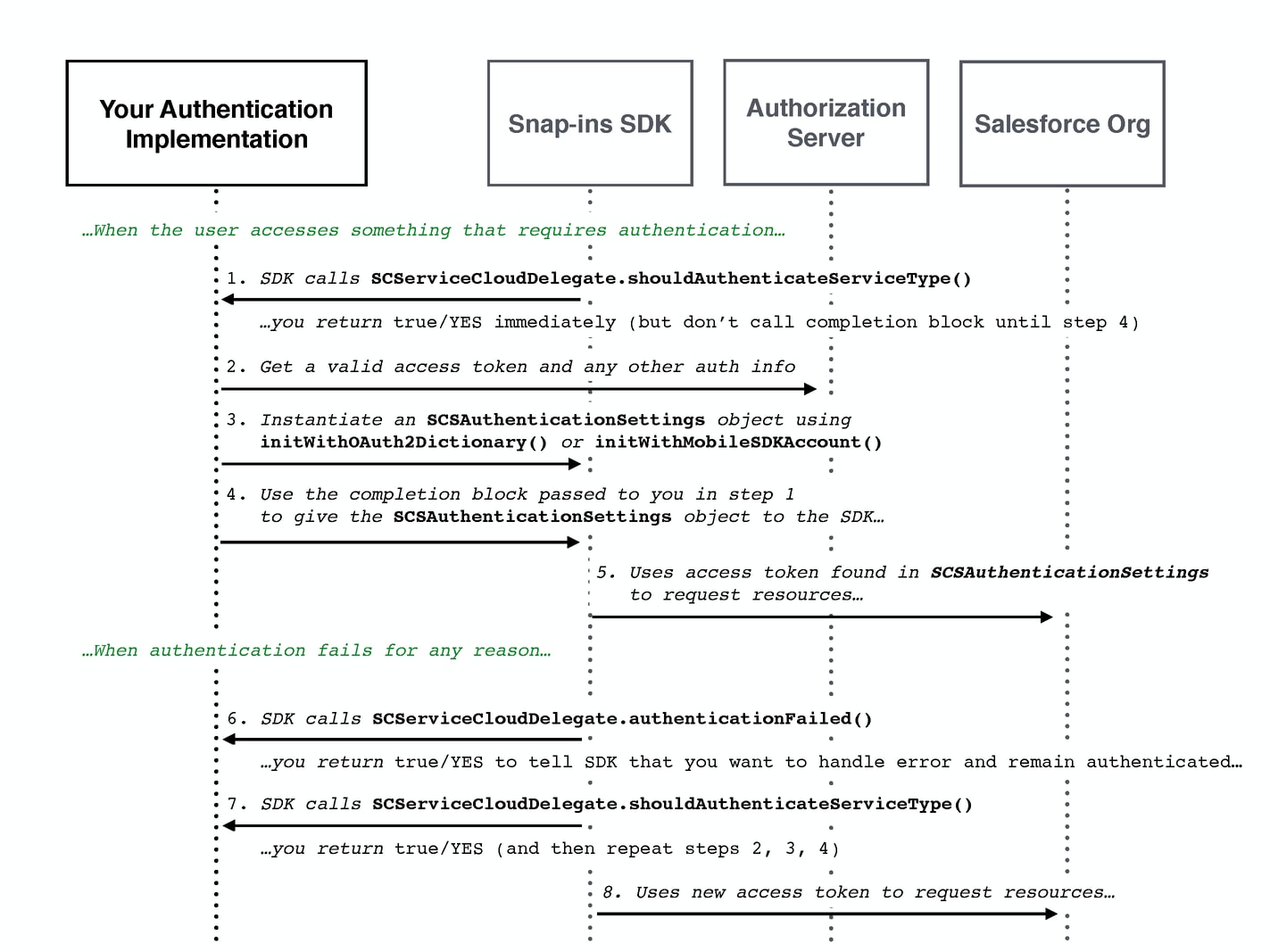
With on-demand authentication, you perform the authentication asynchronously, after the SDK calls your serviceCloud(shouldAuthenticateServiceType:completion:) delegate method. Once authenticated, pass the SCSAuthenticationSettings object to the completion block that you’re given in the serviceCloud(shouldAuthenticateServiceType:completion:) method.
The following sequence diagram illustrates the basic authentication flow for on-demand authentication.
Alternatively, you can explicitly authenticate before any UI appears that requires authentication. Call the setAuthenticationSettings(settings:forServiceType:completion:) method in the ServiceCloud shared instance using the SCSAuthenticationSettings object.
The following sequence diagram illustrates the authentication flow for explicit authentication.
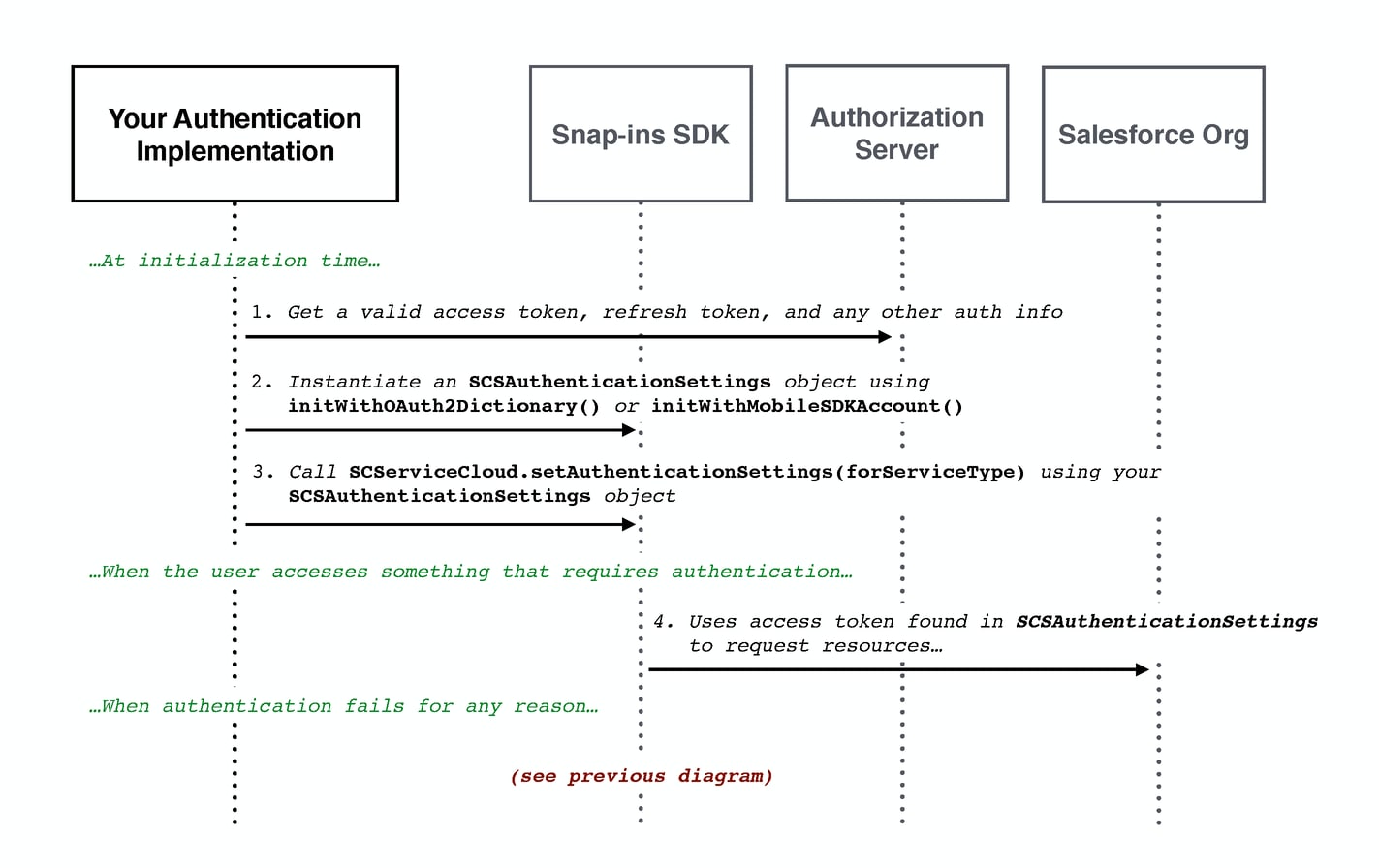
To programmatically log out a user, call setAuthenticationSettings(settings:forServiceType:completion:) using nil for the SCSAuthenticationSettings argument.
Implement serviceCloud(authenticationFailed:forServiceType:) in your SCServiceCloudDelegate object to handle error conditions. The SDK calls this method if the access token expires, and for any other scenario that results in an authentication failure. If you return true or YES, the SDK assumes that you want to proceed, and it subsequently calls serviceCloud(shouldAuthenticateServiceType:completion:) to give you a chance to send updated authentication information. If you return false or NO, the SDK goes back to the guest user state.
The error argument in this method contains information about the error. The code property on this object contains the error code. The following errors are the most common error codes you can encounter:
| Error Code | Description |
|---|---|
SCServiceUserSessionExpiredOrInvalidError (401) | Occurs when the session has expired or the ID is invalid. Use the refresh token to acquire another access token and then update the account property, as shown in the next step. |
SCServiceUserRequestRefusedError (403) | Occurs when the user does not have sufficient access for the request. Verify that the logged in user has sufficient credentials. |
SCServiceUserResourceNotFoundError (404) | Occurs when the requested resource was not found. Check the URI and other parameters for errors. |
See Status Codes and Error Responses for a full set of possible error codes.
The following sample code illustrates how to implement an SCServiceCloudDelegate object to handle authentication.
1class MyAuthHandler: NSObject, SCServiceCloudDelegate {
2
3  override init() {
4    super.init()
5
6    // Subscribe to ServiceCloud events
7    ServiceCloud.shared().delegate = self
8  }
9
10  /**
11   Implementation of a `ServiceCloudDelegate` method that allows you to
12   authenticate for a given service.
13   */
14  func serviceCloud(_ serviceCloud: ServiceCloud,
15                    shouldAuthenticateServiceType service: SCServiceType,
16                    completion: @escaping (SCSAuthenticationSettings?) -> Void) -> Bool {
17
18    // Rather than scrutinize the service to see if we want to authenticate,
19    // let's just assume that we always want to authenticate...
20
21    // TO DO: Authenticate asynchronously
22    let urlRequest = URLRequest.init(url: URL(string: "https://example.com/auth")!)
23    URLSession.shared.dataTask(with: urlRequest) { (data, response, error) in
24
25      // TO DO: Populate the `SCSAuthenticationSettings` object from the result.
26      var authSettings: SCSAuthenticationSettings?
27
28      // Call the completion block with the authentication settings (asynchronously)
29      completion(authSettings)
30
31    }.resume()
32
33    // Tell the SDK that we do plan to authenticate
34    return true
35  }
36
37  /**
38   Implementation of a `ServiceCloudDelegate` method to handle authentication
39   failure events.
40   */
41  func serviceCloud(_ serviceCloud: ServiceCloud,
42                    authenticationFailed error: Error,
43                    forServiceType service: SCServiceType) -> Bool {
44
45    // For this example, let's not bother handling the error,
46    // and just fall back to the guest user state...
47    // TO DO: In your code, you should inspect this error.
48    // If you want to handle the error, you could
49    // return `true` and then you'd be called back in the
50    // `shouldAuthenticateServiceType` method above.
51
52    return false
53  }
54}