
Appearance
Exercise 2: Get to Know Skills
In this exercise, you'll find the standard skills you'll use during your week as a sales rep.
A skill packages a common sales task, such as preparing for a call or reviewing a pipeline, as instructions your AI assistant follows. It defines which Salesforce data to gather and what the result should look like. Without a skill, you'd have to explain each step yourself. With a skill, you type its name, for example /call-prep, or describe what you need and let your AI assistant pick the right skill. The standard skills come with the Sales Cloud plugin.
Step 1: Find the Standard Skills
Option 1: Using Claude
In Claude, click New chat. Click + in the chat box, select Connectors, and turn on Salesforce.
In the chat box, type
/.A list of the available skills appears, including the standard skills of the Sales Cloud plugin.
Continue typing
deal.The list now shows only skills related to deals, such as
deal-reviewanddeal-advance-gap.Clear the chat box without sending a message.
Option 2: Using the AIforce Playground
In the AIforce Playground, open the Servers tab.

This tab lists all connected MCP servers. You can add servers here, and refresh or test their connections. If your AI assistant can't access Salesforce, start troubleshooting here.
Open the Plugins tab.

This tab shows the Sales Cloud plugin and its connector details.
If the Enable plugin switch of the Sales Cloud plugin is off, turn it on. The switch should now be on.
Scroll down to Skills.
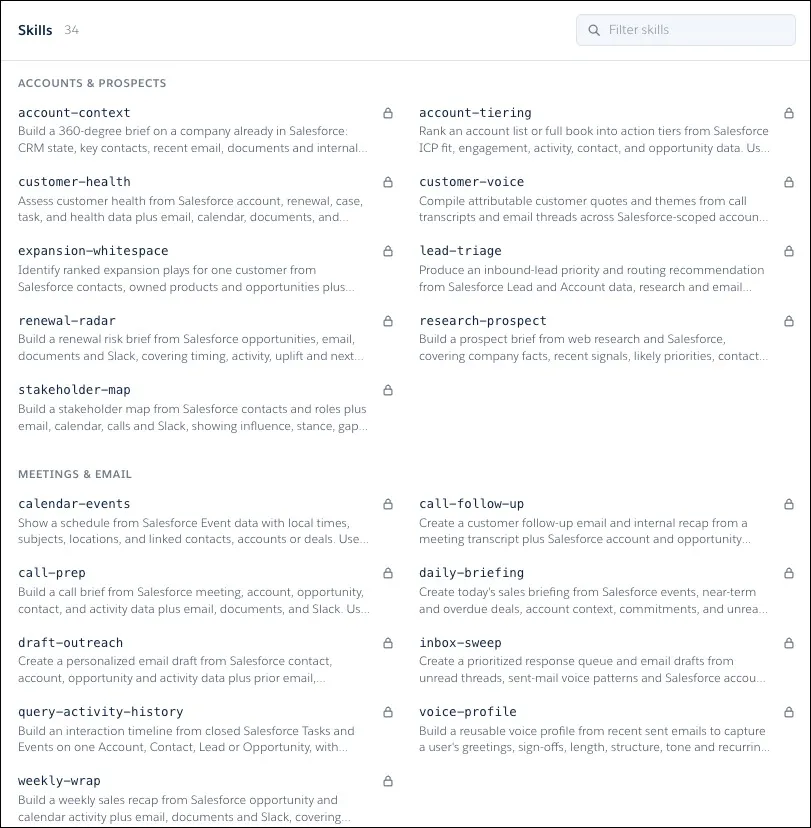
These are the standard skills of the Sales Cloud plugin, about 40 in all, grouped into several categories.
In the Filter skills box, enter
deal.The list now shows the skills whose name or description mentions deals, such as
deal-reviewanddeal-advance-gap.Open the Chat tab.

TIP
You can also pick a skill with the skills icon button next to Tools · Auto below the chat box. It opens Skills for this chat. A skill you pick there stays selected for your next prompts.
Summary
- You found the standard skills of the Sales Cloud plugin in your AI assistant.
- You filtered the skills to find the ones for a specific topic.
Next, you'll put the skills to work and check in on one of your accounts.