Code Extension scripts for batch data transform allow you to use custom Python logic to transform your data lake objects (DLOs) and data model objects (DMOs) in an isolated compute environment in Data 360. In this blog, we’ll cover advanced batch transform script examples.
Batch data transforms
Data 360’s native batch data transform feature allows for data preparation over DLOs and DMOs, including through operations like joins, filters, and aggregates. You can use the Transform Builder UI to create batch transforms on the platform. The Batch Data Transforms in Data 360 Trailhead module is a great starting point.
Code Extension
Code Extension is a Data 360 feature that runs custom PySpark logic against DLOs and DMOs inside an isolated Spark compute environment. It powers multiple pipelines, including search-index chunking and batch transform logic, the use case that this post covers.
If you are not familiar with the basics of Code Extension, you can check out the following resources before going deeper into this blog:
- Blog: Extend Data 360 with the Power of Code.
- YouTube: Extend Data 360 with Code Extension.
- Trailhead: Code Extension in Data 360 Module.
Under the hood: the development workflow for Code Extension batch data transform scripts
With Code Extensions, you author a PySpark script that drives the same batch transform pipeline as the one used by native batch transforms. A batch transform Code Extension script runs under strict isolation, using the datacustomcode SDK‘s Client() for reading and writing to DLOs or DMOs.
Here’s a high-level overview of what happens on your (the developer’s) machine and what happens in Data 360:
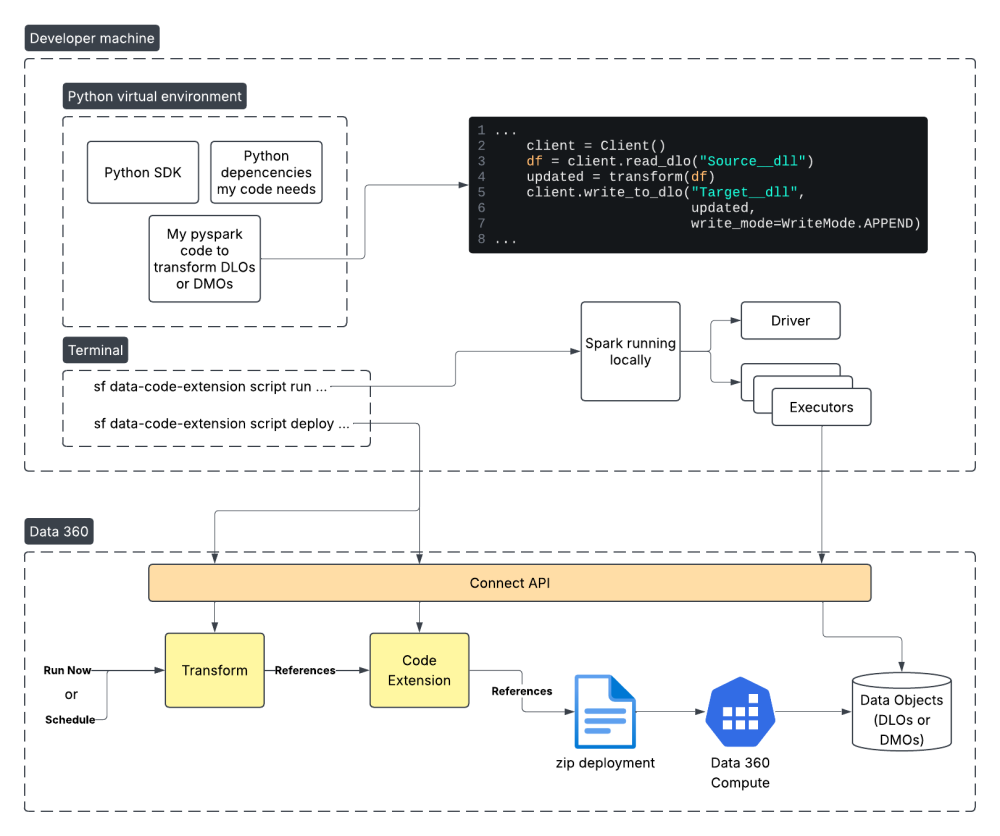
On the developer machine, a Python virtual environment is used for local execution involving the SDK, your custom PySpark script, and its dependencies. To run the extension locally, you use the following Salesforce Command Line Interface (SF CLI) for Code Extension command: sf data-code-extension script run. The command executes a Spark job on your computer, which reads DLOs or DMOs using the Connect API (by default, the first 1000 rows), and writes only to console output. This is where you’ll iterate until the logic works as intended.
The next step is to deploy to your org. To do so, use the SF CLI command: sf data-code-extension script deploy. The command zips up the project using Docker and uploads it via the Connect API into a Data 360 Transform and Code Extension pair.
When running the transform (now or on a schedule), Data 360 manages the Spark job, which executes your PySpark script to read from and write to DLOs or DMOs.
Local run (script run) |
Deployed run (script deploy + transform) |
|
|---|---|---|
| Runs on | Your machine, in a Python virtual environment | Data 360 compute |
| Reads default limit | By default, limit to 1000. See docs for how to override. | No default limit |
| Writes to | Console output only | Target DLO or DMO |
| Spark managed by | The SF CLI on your computer | Data 360 |
We recently published Run Complex Data Transformations in Data 360 with Code Extension, which gives you more information about the basics. Below, we build on that introduction and walk through three more examples: rolling up an account hierarchy, exploding a JSON event stream, and scoring leads with a bundled scikit-learn model.
Example 1: Iterative rollup of an account hierarchy
The use case: Roll up each account’s total-tree Annual Recurring Revenue (ARR), including its own plus every descendant’s, at any depth, into Account_Rollup__dll.
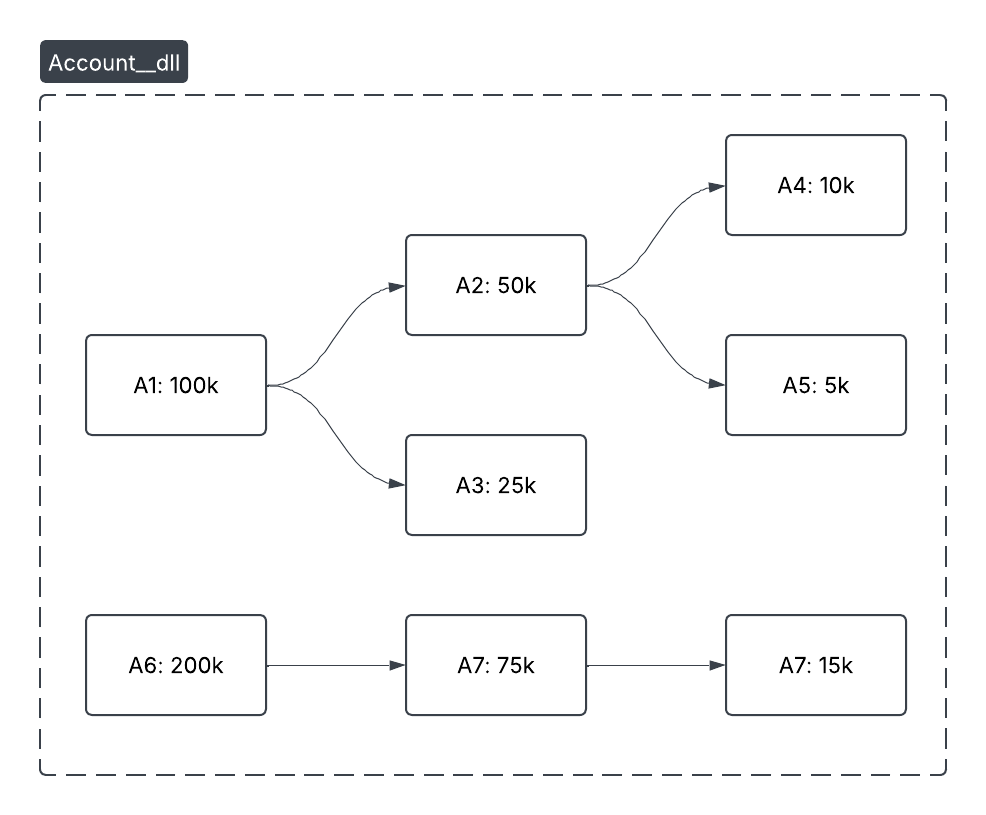
The solution: With the Account__dll records having various descendant depths, we can use a loop and keep joining the frontier one hop deeper until nothing new comes back.
1from pyspark.sql.functions import col, sum as _sum, coalesce, lit
2
3from datacustomcode.client import Client
4from datacustomcode.io.writer.base import WriteMode
5
6
7def main():
8    client = Client()
9
10    accounts = (
11        client.read_dlo("Account__dll")
12        .select("id__c", "parent_id__c", "arr__c")
13        .persist()
14    )
15
16    descendants = accounts.select(
17        col("id__c").alias("root_id"),
18        col("id__c").alias("descendant_id"),
19    ).persist()
20
21    frontier = descendants
22    while True:
23        next_hop = (
24            frontier.alias("f")
25            .join(
26                accounts.alias("a"),
27                col("a.parent_id__c") == col("f.descendant_id"),
28                "inner",
29            )
30            .select(
31                col("f.root_id").alias("root_id"),
32                col("a.id__c").alias("descendant_id"),
33            )
34        )
35        if next_hop.isEmpty():
36            break
37        descendants = descendants.union(next_hop).persist()
38        frontier = next_hop
39
40    totals = (
41        descendants.alias("d")
42        .join(
43            accounts.alias("a"),
44            col("d.descendant_id") == col("a.id__c"),
45            "left",
46        )
47        .select(col("d.root_id"), col("a.arr__c"))
48        .groupBy("root_id")
49        .agg(coalesce(_sum("arr__c"), lit(0)).alias("tree_arr__c"))
50        .withColumnRenamed("root_id", "id__c")
51    )
52
53    client.write_to_dlo("Account_Rollup__dll", totals, WriteMode.OVERWRITE)
54
55
56if __name__ == "__main__":
57    main()
The convergence check, stop, accumulate loop is plain Python driving DataFrames. NOTE: This convergence check assumes an acyclic hierarchy. If parent_id__c can form a cycle, add a max-depth counter to break the loop so a bad record can’t hang the Spark job indefinitely.
The results written to Account_Rollup__dll are as expected for this sample dataset:
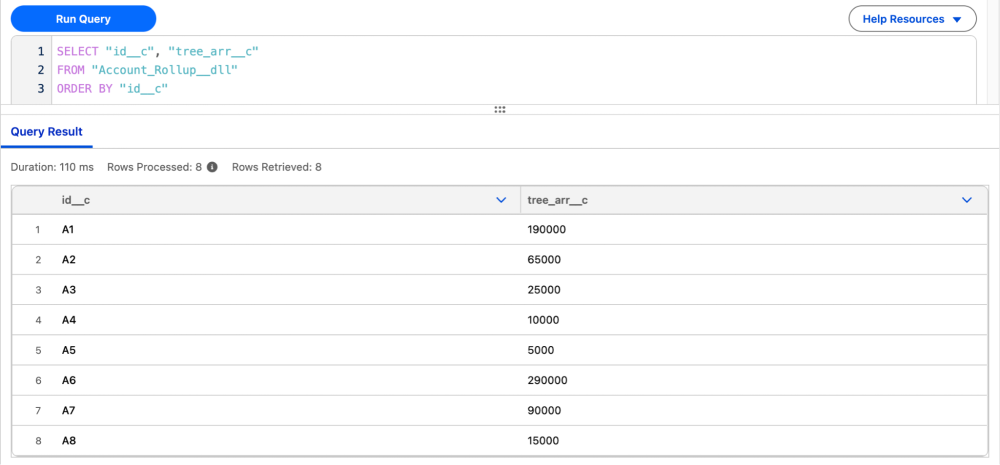
You can find this entire example, including the sample data used, in the SDK’s docs/examples/script/account_rollup directory.
Example 2: Flatten a batched event stream from a JSON-array column
The use case: Analytics SDKs commonly deliver events batched by session. One row per session is stored in a raw landing DLO, with each session’s events packed into a single JSON-array column. Downstream analysis use cases, such as funnel analysis, cohort segmentation, or identity-graph inputs, need one row per event.
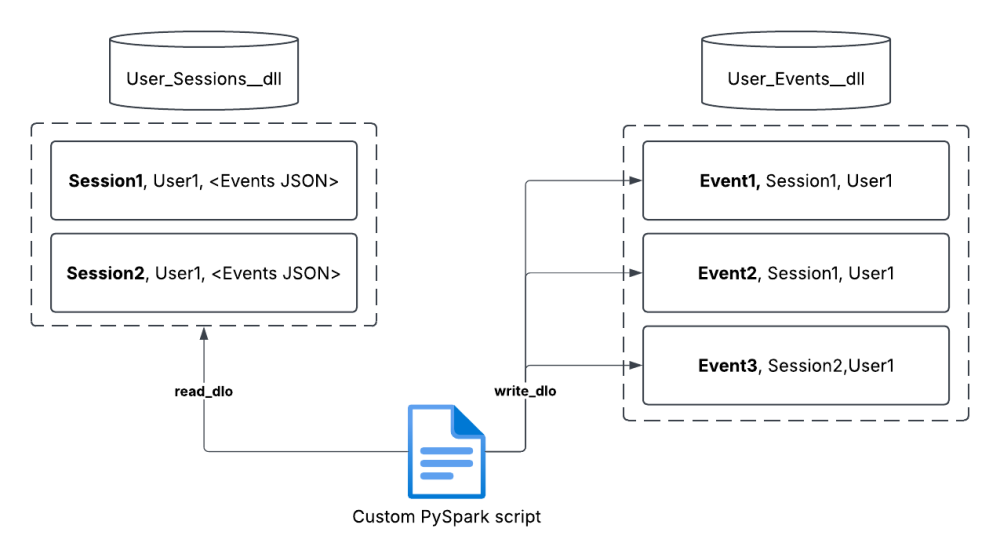
The solution: The parse-and-explode logic is worth pulling out of the entrypoint into a reusable helper. With Code Extensions, this can be done by putting files or modules in the payload/py-files/ directory, which needs to have this exact name.
1# payload/py-files/events.py
2from pyspark.sql.functions import col, explode_outer, from_json, to_timestamp
3from pyspark.sql.types import (
4    ArrayType, StringType, StructField, StructType,
5)
6
7
8EVENT_SCHEMA = StructType([
9    StructField("event_id", StringType(), True),
10    StructField("event_type", StringType(), True),
11    StructField("ts", StringType(), True),
12    StructField("path", StringType(), True),
13    StructField("value", StringType(), True),
14])
15EVENT_ARRAY_SCHEMA = ArrayType(EVENT_SCHEMA, True)
16
17# One row per event, carrying its parent session + user.
18def parse_events(df, session_col, user_col, events_col):
19    field = next(f for f in df.schema.fields if f.name == events_col)
20    events = (
21        col(events_col)
22        if isinstance(field.dataType, ArrayType)
23        else from_json(col(events_col).cast("string"), EVENT_ARRAY_SCHEMA)
24    )
25    return df.select(
26        col(session_col),
27        col(user_col),
28        explode_outer(events).alias("evt"),
29    ).select(
30        col("evt.event_id").alias("event_id__c"),
31        col(session_col),
32        col(user_col),
33        col("evt.event_type").alias("event_type__c"),
34        to_timestamp(col("evt.ts")).alias("event_ts__c"),
35        col("evt.path").alias("path__c"),
36        col("evt.value").alias("value__c"),
37    )
The entrypoint is now thinner: read, explode, filter, write.
1# payload/entrypoint.py
2from pyspark.sql.functions import col
3
4from datacustomcode.client import Client
5from datacustomcode.io.writer.base import WriteMode
6from events import parse_events
7
8
9def main():
10    client = Client()
11
12    sessions = client.read_dlo("User_Sessions__dll").select(
13        "session_id__c", "user_id__c", "events__c"
14    )
15    exploded = parse_events(sessions, "session_id__c", "user_id__c", "events__c")
16
17    output = exploded.filter(col("event_id__c").isNotNull())
18
19    client.write_to_dlo("User_Events__dll", output, WriteMode.OVERWRITE)
20
21
22if __name__ == "__main__":
23    main()
The results written to User_Events__dll are as expected for the sample dataset:
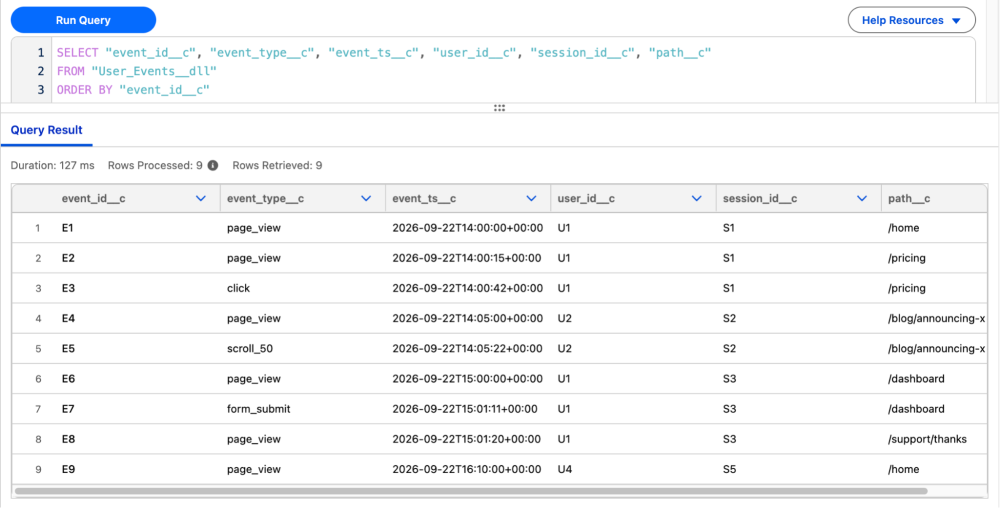
You can find this entire example, including the sample data used, in the SDK’s docs/examples/script/json_explode directory.
Example 3: Score leads with a bundled scikit-learn model
The use case: The data scientist on your team trained a small scikit-learn classifier over categorical lead features (for example, industry, employee band, region, and source) and handed you the serialized artifact. You want a score on every lead as part of the nightly pipeline.
The solution: Similar to the py-files directory from the last example, you can ship other file types in the files directory. You can also ship external dependencies in Code Extensions by using the requirements.txt file, which in this example brings in scikit-learn, joblib, and pandas. Bundle the model as payload/files/lead_scorer.zip (a zip around lead_scorer.joblib — the joblib carries the sklearn pipeline plus feature schema and value domain). The training script is a plain scikit-learn Pipeline fit, run locally before deploying the Code Extension for any model adjustments.
The PySpark entrypoint can joblib.load the model, enumerate every combination of its categorical inputs, score that small grid with predict_proba, and left-join the grid against the leads DLO.
1import itertools
2import tempfile
3import zipfile
4from pathlib import Path
5
6import joblib
7import pandas as pd
8from pyspark.sql import Row
9from pyspark.sql.functions import coalesce, col, lit
10
11from datacustomcode.client import Client
12from datacustomcode.io.writer.base import WriteMode
13
14
15UNKNOWN = "__unknown__"
16MODEL_ARCHIVE = "lead_scorer.zip"
17MODEL_MEMBER = "lead_scorer.joblib"
18
19OUTPUT_COLUMNS = [
20    "id__c", "first_name__c", "last_name__c", "industry__c",
21    "employee_band__c", "region__c", "source__c", "score__c",
22]
23
24
25def load_bundled_model(client):
26    archive_path = client.find_file_path(MODEL_ARCHIVE)
27    extract_dir = Path(tempfile.mkdtemp(prefix="lead_scorer_"))
28    with zipfile.ZipFile(archive_path) as zf:
29        zf.extract(MODEL_MEMBER, path=extract_dir)
30    return joblib.load(extract_dir / MODEL_MEMBER)
31
32
33def build_score_grid(spark, bundle):
34    pipeline = bundle["pipeline"]
35    feature_cols = bundle["feature_cols"]
36    domain = bundle["feature_domain"]
37
38    combos = list(itertools.product(*(domain[c] for c in feature_cols)))
39    grid_pd = pd.DataFrame(combos, columns=feature_cols)
40    grid_pd["score__c"] = pipeline.predict_proba(grid_pd)[:, 1]
41
42    rows = [
43        Row(**{c: r[c] for c in feature_cols}, score__c=float(r["score__c"]))
44        for r in grid_pd.to_dict(orient="records")
45    ]
46    return spark.createDataFrame(rows), feature_cols
47
48
49def main():
50    client = Client()
51
52    leads = client.read_dlo("Lead__dll")
53    spark = leads.sparkSession
54
55    bundle = load_bundled_model(client)
56    grid, feature_cols = build_score_grid(spark, bundle)
57
58    normalized = leads
59    for c in feature_cols:
60        normalized = normalized.withColumn(c, coalesce(col(c), lit(UNKNOWN)))
61
62    scored = (
63        normalized.alias("l")
64        .join(grid.alias("g"), feature_cols, "left")
65        .withColumn("score__c", coalesce(col("score__c"), lit(0.0)))
66    )
67
68    client.write_to_dlo(
69        "Lead_Scored__dll", scored.select(*OUTPUT_COLUMNS), WriteMode.OVERWRITE
70    )
71
72
73if __name__ == "__main__":
74    main()
The grid is small, just a few thousand rows, so Spark’s planner auto-broadcasts it and every lead gets its score from a plain equi-join. This approach works well when features are naturally categorical or already banded (industry, region, tier, or segment). Same pattern for churn, propensity, and product-affinity: any model whose inputs are categorical or bucketable. coalesce to __unknown__ keeps the join total as new industries or sources appear.
The results written to Lead_Scored__dll are as expected for the sample dataset:
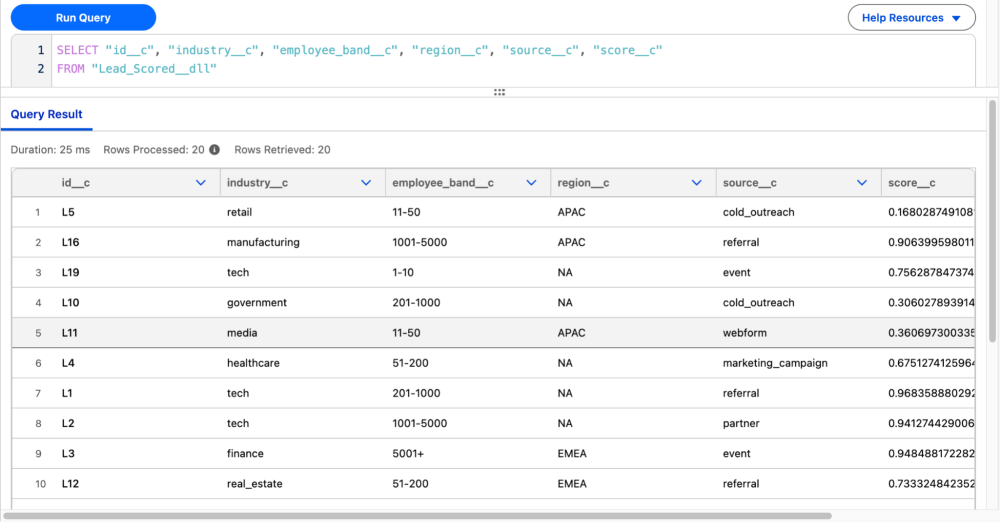
Because Lead_Scored__dll is a first-class Data 360 object, once mapped into a DMO, an Agentforce agent like Coworker can query it directly: “Who are my top 10 hottest leads this week?”
You can find this entire example, including the sample data used, in the SDK’s docs/examples/script/lead_scoring directory.
Limits and other considerations
Code Extension jobs run under managed Spark with fixed memory, timeout, and dependency-size limits documented in the Considerations When Writing Code Extensions guide. Because local runs sample only the first 1000 rows (by default) via the Connect API, data-scale problems, such as partition skew on a deep account tree or an out-of-memory issue on a large explode, only surface on the deployed run, so test at full scale after deploy. The documented limitations will evolve over time based on the roadmap, which you can influence by reaching out to your account executive and discussing feature requests.
Conclusion
Code Extension is the right tool for the job when Python is the right language: imperative control flow, an existing library you want to reuse, a serialized model, a helper module worth unit-testing on its own. Code Extension for batch data transform is GA. What use cases does this unblock for you and your team?
More Resources
- Python SDK: forcedotcom/datacloud-customcode-python-sdk · PyPI
- Salesforce CLI plugin: salesforcecli/plugin-data-code-extension
- Developer guide: Data 360 Code Extension
- Help: Batch Data Transforms Overview
About the author
Mark DeLaVergne is a Principal Software Engineer at Salesforce working on Code Extension in Data 360. With 19 years in software engineering and architecture, he currently leads Code Extension and partners on wider Data 360 design. You can find him on LinkedIn.