Create a manifest to define the metadata you want to retrieve. You can copy and edit the default manifest that was created in your project at manifest/package.xml.
Understand Agent and Legacy Agent Metadata
Draft (uncommitted) agents and agent versions are represented by AiAuthoringBundle, notBot or BotVersion. You can edit a draft agent.
Committed agents and agent versions are represented by AiAuthoringBundle, plus Bot and BotVersion. You can’t edit a committed agent. Instead, create and edit a new version.
Legacy agents don’t have a commit stage, and are represented by Bot and BotVersion (not AiAuthoringBundle). You can edit and overwrite an active legacy agent.
Agent Type
Metadata Representation
Editable
Draft Agent
AiAuthoringBundle
Yes
Committed Agent
AiAuthoringBundle, Bot, BotVersion
No
Legacy Agent
Bot and BotVersion
Inactive versions are editable, active versions are not
Replace the version number (for example, <version>65.0</version>) with your required metadata version. Your project’s sample package.xml manifest contains the most recent version number.
Add any other metadata types that your agent needs, such as Data 360 dependencies.
Defines metadata for all agents, including legacy agents. Includes metadata for all flows, prompt templates, and Apex classes in the org.
Replace the * wildcard with the API names of the ApexClass, Flows, and GenAiPromptTemplates that your agents use. Using wildcards for these types can pull excessive data, leading to very long deployments or timeouts.
Defines a single version of an agent, plus the flows, prompt templates, and Apex class types that the agent version uses.
Before deploying a single agent version into an org (using BotVersion), you must have deployed the full agent to the org. Deploying the agent before deploying a specific version ensures that all required metadata and artifacts are created in the target org.
To define a single agent version, make these changes to your manifest.
Instead of Bot, which is the top-level representation of an agent, use BotVersion, which represents the configuration for a specific agent version. Include the agent version’s name and version number. For example:
(Optional) - Update Your Manifest for Different Bot/AiAuthoringBundle Versions
Use these steps to specify the correct versions for your agent’s metadata.
(Optional) - Update Your Manifest for Different Bot/AiAuthoringBundle Versions
Use these steps to specify the correct versions for your agent’s metadata.
What are mismatched Bot/AiAuthoringBundle versions?
When you save an agent version, Agentforce creates AiAuthoringBundle metadata. When you commit an agent version, Agentforce creates Bot/BotVersion metadata. If you save more versions than you commit, the version of your AiAuthoringBundle won’t match the version of your Bot/BotVersion.
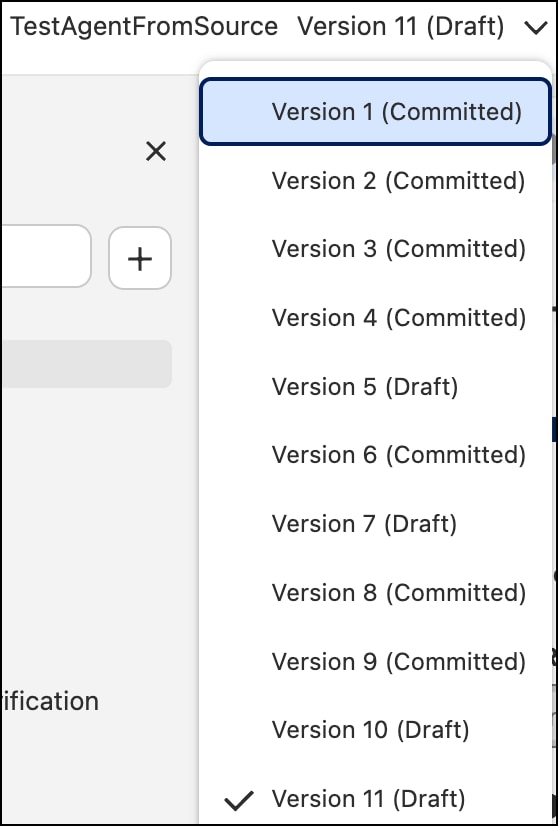
For example, this agent has 11 versions of an agent and 7 committed versions. Therefore, the agent’s metadata contains 11 versions of AiAuthoringBundle and 7 versions of Bot and BotVersion. You’ll need to specify the correct version numbers to match the correct AiAuthoringBundle to the correct Bot and BotVersion.
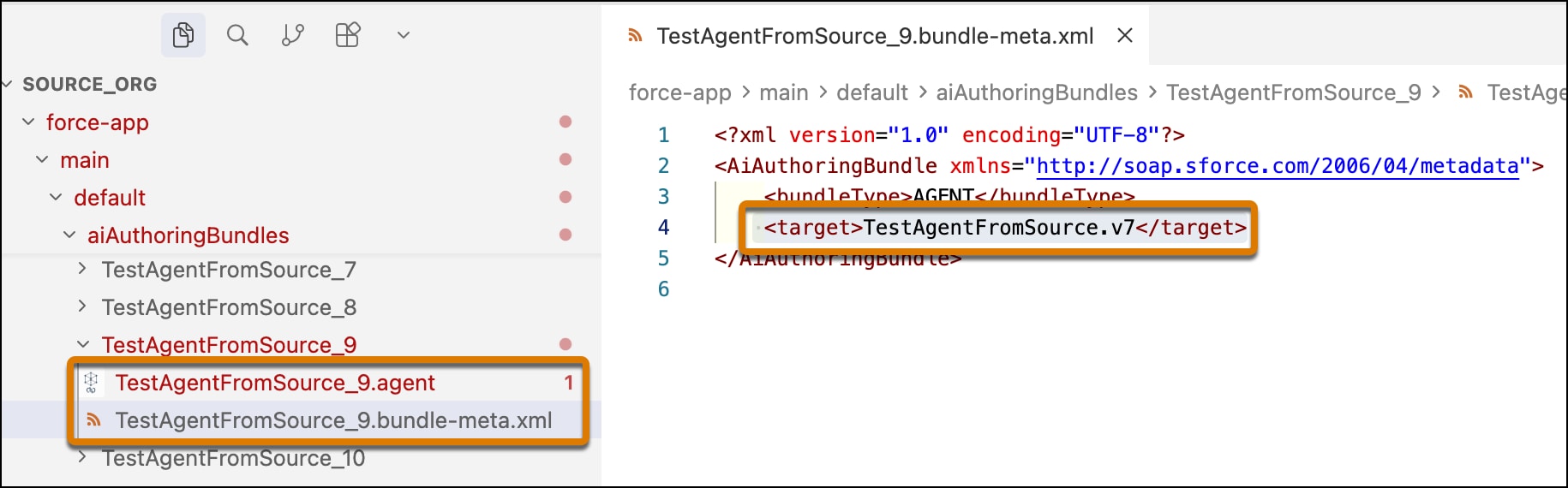
To find the matching Bot version, open the AiAuthoringBundle folder for your desired version. In the agent version’s bundle-meta.xml file, the target metadata shows the version to use for the GenAiPlannerBundle and BotVersion.
For example, version 9 of the agent “TestAgentFromSource” uses version 7 of GenAiPlannerBundle and BotVersion.


 j
j