Agent Script Example: Enforce Subagent Sequencing With Variables
To ensure that your agent follows your required workflows through multi-turn conversations, use a step variable to define the current subagent. The agent router selects the subagent based on the step, or state, variable’s value. Within a subagent, the LLM evaluates the customer’s answer and sets the step variable’s next value accordingly.
When to Use This Pattern
Use this pattern when your agent must:
Transition through required subagents in a defined order, where the order can depend on a customer’s previous answers.
Handle long multi-turn conversations. For example, to evaluate whether each customer response is complete and valid, returning to the same subagent to ask clarifying questions when needed.
Move to the next subagent only when the current subagent’s task is complete.
Example - Interview Agent
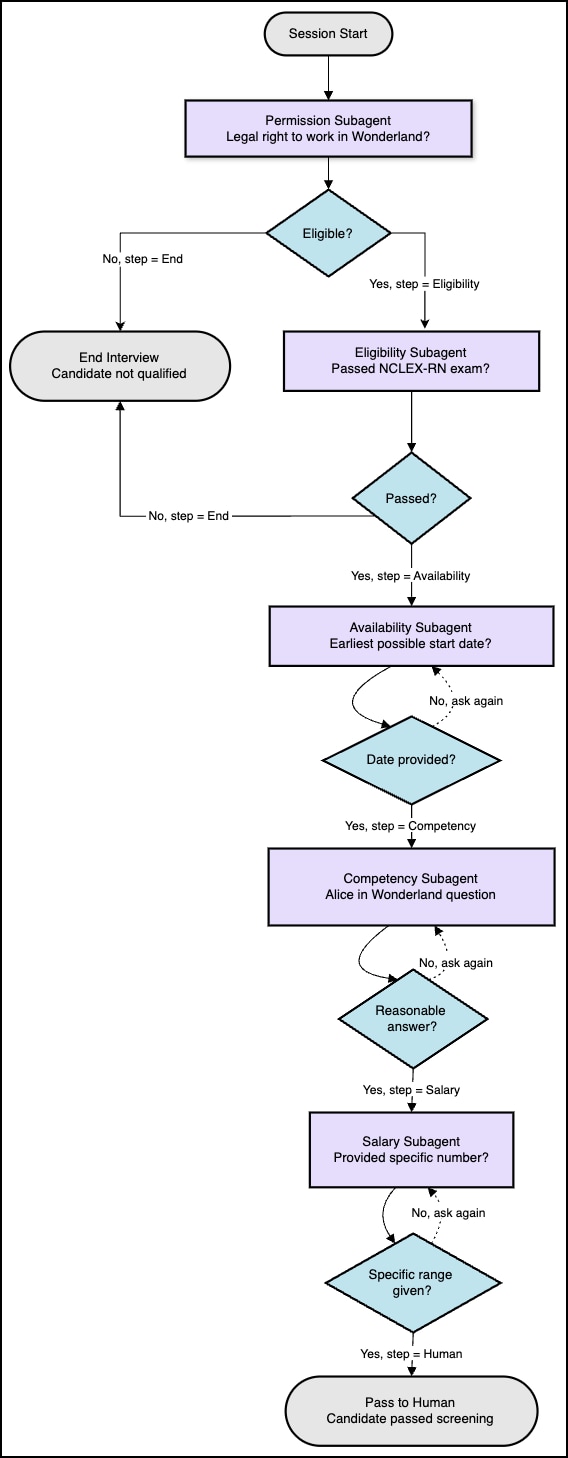
The InterviewAgent.agent sample screens job applicants by asking required questions in a specific order. Subsequent questions can depend on the applicant’s response to the current question. Some responses, such as not holding required credentials, result in interview termination.
Each subagent handles one question and decides when the application has provided a sufficient answer. The subagent then sets the currentInterviewStep variable appropriately. The agent’s start_agent router uses the currentInterviewStep variable to select the subagent.
In Agent Script, in the upper right, click the down arrow next to New Agent and select New from Script.
Paste the Interview Agent Script code into your new agent.
Click your agent to open it, then select Preview.
Enter a statement like I'd like to apply for the position and test your agent.
This agent provides an example of using step variables. It is not a production-ready agent.
Important
How Routing Works
The start_agent subagent acts as a router. It checks the value of the currentInterviewStep variable and transitions to the corresponding subagent. For example, if the value of currentInterviewStep is Permission, this transition runs:
Transition to Permission Topic
1start_agent agent_router:2 label: "Agent Router"3 description: "Welcome the user and determine the appropriate subagent based on user input"4 reasoning:5 instructions: ->6 if @variables.currentInterviewStep == "Permission":7 transition to @subagent.permission
This example uses these values for currentInterviewStep:
Permission: Confirm candidate has the legal right to work in Wonderland.
Eligibility: Ask if the candidate has passed their NCLEX-RN exam.
Availability: Identify the candidate’s earliest possible start date.
Competency: Ask a question about Alice in Wonderland to ensure the candidate has read the book.
Salary: Ask about expected salary and compensation preferences.
Human: Candidate has passed the screen and questions are passed to a human for follow-up.
End: Candidate doesn’t meet qualifications; end the interview.
How the Step Variable is Updated
In each subagent, the agent can call @utils.setVariables to update currentInterviewStep based on its evaluation of the candidate’s response. For example, in the Eligibility subagent, the agent can decide not to change the step variable’s value if the customer hasn’t fully answered the question. Once the customer has provided a valid answer, the agent can set the step variable to one of these values:
Availability - the candidate has passed the NCLEX-RN exam.
End - the candidate hasn’t passed the NCLEX-RN exam.
1subagent eligibility:2 label: "Eligibility"3 description: "Ask if the candidate has passed their NCLEX-RN exam."45 reasoning:6 instructions: ->7 | Ask the candidate whether they have passed the NCLEX-RN exam.8 Request a simple yes or no response and the year passed if available.9 If they have not passed, acknowledge and explain that passing is required for the role.10 If the candidate has passed, call {!@actions.setCurrentInterviewStep}with currentInterviewStep set to "Availability".11 If the candidate is NOT eligible, call {!@actions.setCurrentInterviewStep}with currentInterviewStep set to "End".1213 actions:14 setCurrentInterviewStep: @utils.setVariables15 description: "Set the CurrentInterviewStep variable"16 with currentInterviewStep = ...


 j
j