You can apply letters or symbols before or after the numeric value, such as for currency, perform decimal rounding, and add grouping and decimal separators.
XMD doesn’t update formatting for user input or context-driven fields. Formatting can only be applied to a static or preset value.
Formatting a Measure
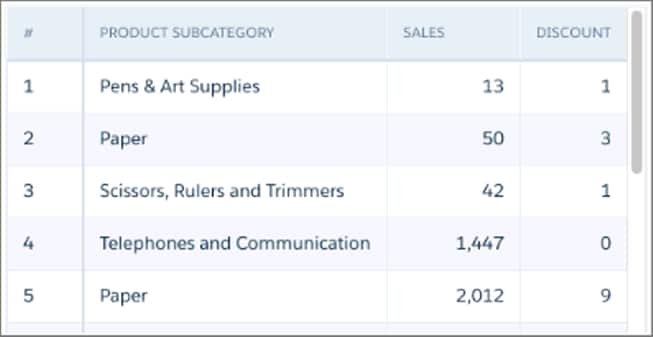
In this example lens, the values in the Sales column don’t include decimals or currency symbols.
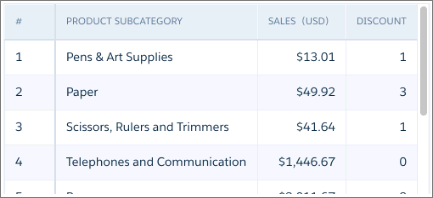
To relabel the Sales field and format its values, modify the XMD as indicated in the bold text.
1 "measures" : [ 2 { 3 "field": "Sales", 4 "format": { 5 "customFormat": "[\"$#,###,###.##\",1]" 6 }, 7 "label": "Sales (USD)", 8 "showInExplorer": true 9 } 10 ], The field now has the label “Sales (USD)” and its values include a currency symbol and two decimal places.
Formatting a Derived Measure
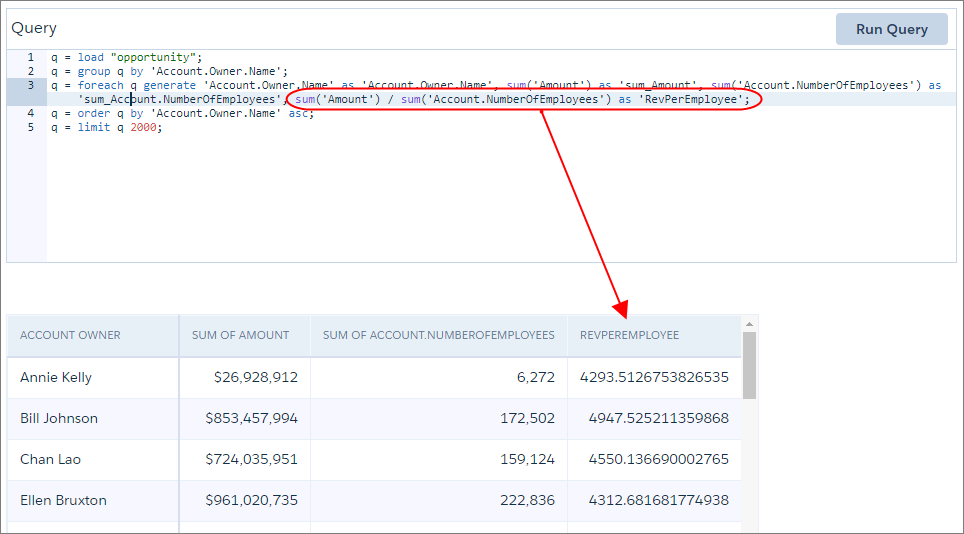
The following SAQL query contains a derived measure that calculates the average revenue per employee. As shown, the values in this derived field aren’t formatted.
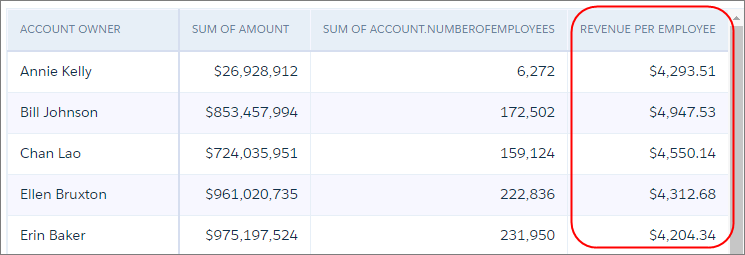
To relabel the RevPerEmployee field and format its values, modify the XMD as indicated in the bold text.
1 "derivedMeasures": [ 2 { 3 "field": "RevPerEmployee", 4 "format": { 5 "customFormat": "[\"$#,###.##\",1]" 6 }, 7 "label": "Revenue Per Employee", 8 "showInExplorer": true 9 } 10 ], The field now has the label “Revenue Per Employee” and its values include a currency symbol and a grouping separator.
More Formatting Examples
Check out these examples that illustrate how to use symbols to format measures and derived measures.
For information about using symbols in the customFormat field, see Measures and Derived Measures in XMD .
Goal XMD Display 500000 as $500,000 (prefix with ”$“) See Example 1 below Display 500000 as $500,000 (prefix with ”$”, include grouping separator) See Example 2 below Display 500000 as $500,000.00 (prefix with ”$”, include grouping separator, apply 2 decimal places) See Example 3 below Display 500000 as –$500,000.00USD (prefix with ”–$”, include grouping separator, apply 2 decimal places, suffix with “USD”) See Example 4 below Display Canadian currency code as a suffix (include grouping separator, apply 2 decimal places, suffix with “CAD”) See Example 5 below Display -1,234.56 as –$1,234.56 (use a semi-colon delimiter for negatives, pos;neg) See Example 6 below Display -1,234.56 as ($1,234.56) (Optional. Use a semi-colon delimiter, parenthesis for negatives, pos;(neg)) See Example 7 below
Example 1: Display 500000 as $500,000 (prefix with "$")
1 "measures": [ 2 { 3 "description" : "Amount", 4 "field" : "Amount", 5 "format" : { 6 "customFormat": "[\"$###0\",1]" 7 }, 8 "label" : "Amount", 9 "showInExplorer" : true 10 } 11 ], Example 2: Display 500000 as $500,000 (prefix with "$", include grouping separator)
1 "derivedMeasures": [ 2 { 3 "description" : "Amount", 4 "field" : "Amount", 5 "format" : { 6 "customFormat": "[\"$###,#00\",1]" 7 }, 8 "label" : "Amount", 9 "showInExplorer" : true 10 } 11 ], Example 3: Display 500000 as $500,000.00 (prefix with "$", include grouping separator, apply 2 decimal places)
1 "measures": [ 2 { 3 "description" : "Amount", 4 "field" : "Amount", 5 "format" : { 6 "customFormat": "[\"$###,#00.00\",1]" 7 }, 8 "label" : "Amount", 9 "showInExplorer" : true 10 } 11 ], Example 4: Display 500000 as -$500,000.00USD (prefix with "-$", include grouping separator, apply 2 decimal places, suffix with "USD")
1 "measures": [ 2 { 3 "description" : "Negative dollar amount", 4 "field" : "Amount", 5 "format" : { 6 "customFormat": "[\"-$###,#00.00USD\",1]" 7 }, 8 "label" : "Amount", 9 "showInExplorer" : true 10 } 11 ], Example 5: Display Canadian currency code as a suffix (include grouping separator, apply 2 decimal places, suffix with "CAD")
1 "measures": [ 2 { 3 "description" : "Amount", 4 "field" : "Amount", 5 "format" : { 6 "customFormat": "[\"#,##0.00CAD\",1]" 7 }, 8 "label" : "Amount", 9 "showInExplorer" : true 10 } 11 ], Example 6: Display -1,234.56 as -$1,234.56
(Use a semi-colon delimiter for negatives, pos;neg)
1 "measures": [ 2 { 3 "description" : "Amount", 4 "field" : "Amount", 5 "format" : { 6 "customFormat": "[\"$#,###.##;-$#,###.##\",1]" 7 }, 8 "label" : "Amount", 9 "showInExplorer" : true 10 } 11 ], Example 7: Display -1,234.56 as ($1,234.56)
(Optional. Use a semi-colon delimiter, parenthesis for negatives, pos;(neg))
1 "measures": [ 2 { 3 "description" : "Amount", 4 "field" : "Amount", 5 "format" : { 6 "customFormat": "[\"$#,###.##;($#,###.##)\",1]" 7 }, 8 "label" : "Amount", 9 "showInExplorer" : true 10 } 11 ], Example 8: Display -1,234.56 as $1,234.56-
(Optional. Use a semi-colon delimiter, ’-’ after the second delimiter, pos;neg;zero)
1 "measures": [ 2 { 3 "description" : "Amount", 4 "field" : "Amount", 5 "format" : { 6 "customFormat": "[\"$#,###.##;$#,###.##;-\",1]" 7 }, 8 "label" : "Amount", 9 "showInExplorer" : true 10 } 11 ],


 j
j