Open CTI を使用したサンプル HTML ページ
Open CTI の実装はそれぞれ外観が異なります。この例では、HTML ページを使用して CTI 機能を Salesforce ユーザインターフェースに追加する方法を示します。
この例では、Salesforce 組織にコールセンター定義ファイルをすでにインポートしたことを前提としています。
- HTML ページを作成します。
- 次のサンプルコードを切り取って HTML ページに貼り付けます。 このコードは、Open CTI の各種関数を示しています。
- Salesforce Classic のサンプルコード
-
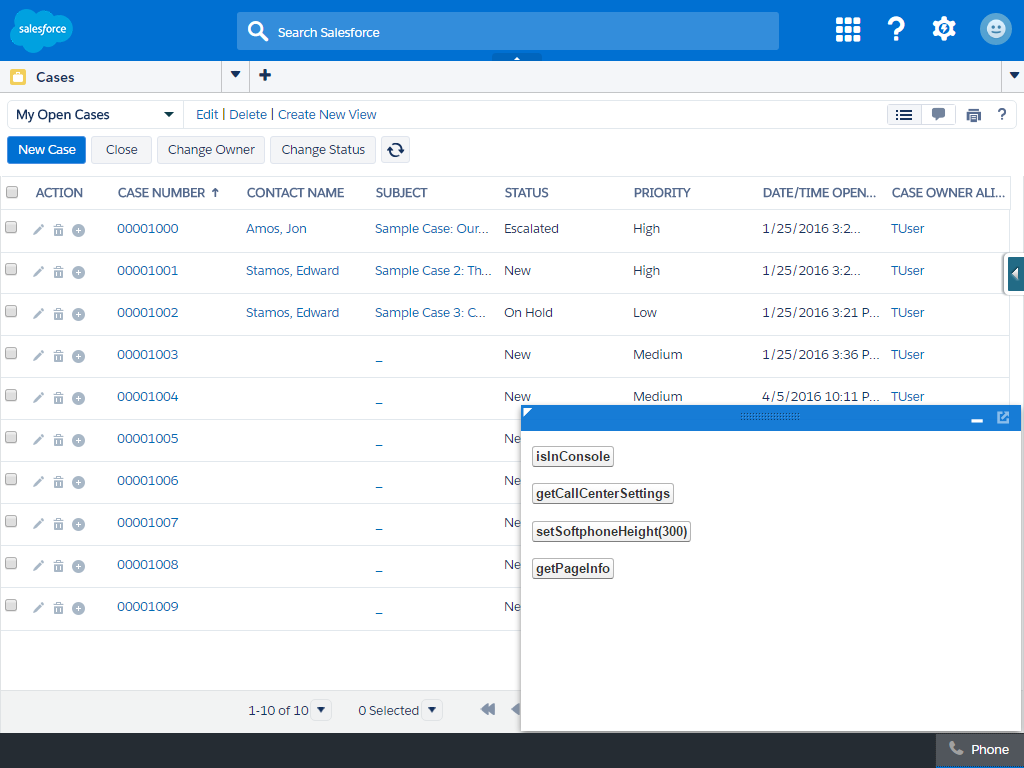
1<html> 2<head> 3 <!-- Imports Open CTI JavaScript library. Point to a valid Salesforce domain. --> 4 <script src="https://domain:port/support/api/41.0/interaction.js"></script> 5 <script type="text/javascript"> 6 // Callback of API method: isInConsole 7 var isInConsoleCallback = function (response) { 8 // Returns true if method is executed in Salesforce console, false otherwise. 9 if (response.result) { 10 alert('Softphone is in Salesforce console.'); 11 } 12 else { 13 alert('Softphone is not in Salesforce console.'); 14 } 15 }; 16 // Invokes API method: isInConsole 17 function isInConsole() { 18 sforce.interaction.isInConsole(isInConsoleCallback); 19 } 20 // Callback of API method: getCallCenterSettings 21 var getCallCenterSettingsCallback = function (response) { 22 // Result returns call center settings as a JSON string. 23 if (response.result) { 24 alert(response.result); 25 } 26 else { 27 alert('Error retrieving call center settings ' + response.error); 28 } 29 }; 30 // Invokes API method: getCallCenterSettings 31 function getCallCenterSettings() { 32 sforce.interaction.cti.getCallCenterSettings(getCallCenterSettingsCallback); 33 } 34 // Callback of API method: setSoftphoneHeight 35 var setSoftphoneHeightCallback = function (response) { 36 // Returns true if SoftPhone height was set successfully, false otherwise. 37 if (response.result) { 38 alert('Setting softphone height to 300px was successful.'); 39 } 40 else { 41 alert('Setting softphone height failed.'); 42 } 43 }; 44 // Invokes setSoftphoneHeight API method. 45 function setSoftphoneHeight() { 46 sforce.interaction.cti.setSoftphoneHeight(300, setSoftphoneHeightCallback); 47 } 48 // Callback of API method: getPageInfo 49 var getPageInfoCallback = function (response) { 50 if (response.result) { 51 alert(response.result); 52 } 53 else { 54 alert('Error occured while trying to get page info: ' + response.error); 55 } 56 } 57 // Invokes API method getPageInfo 58 function getPageInfo() { 59 sforce.interaction.getPageInfo(getPageInfoCallback); 60 } 61 </script> 62</head> 63<body> 64 <button onclick="isInConsole();">isInConsole</button><br/> 65 <button onclick="getCallCenterSettings();">getCallCenterSettings</button><br/> 66 <button onclick="setSoftphoneHeight();">setSoftphoneHeight(300)</button><br/> 67 <button onclick="getPageInfo();">getPageInfo</button> 68</body> 69</html> - Lightning Experience のサンプルコード
-
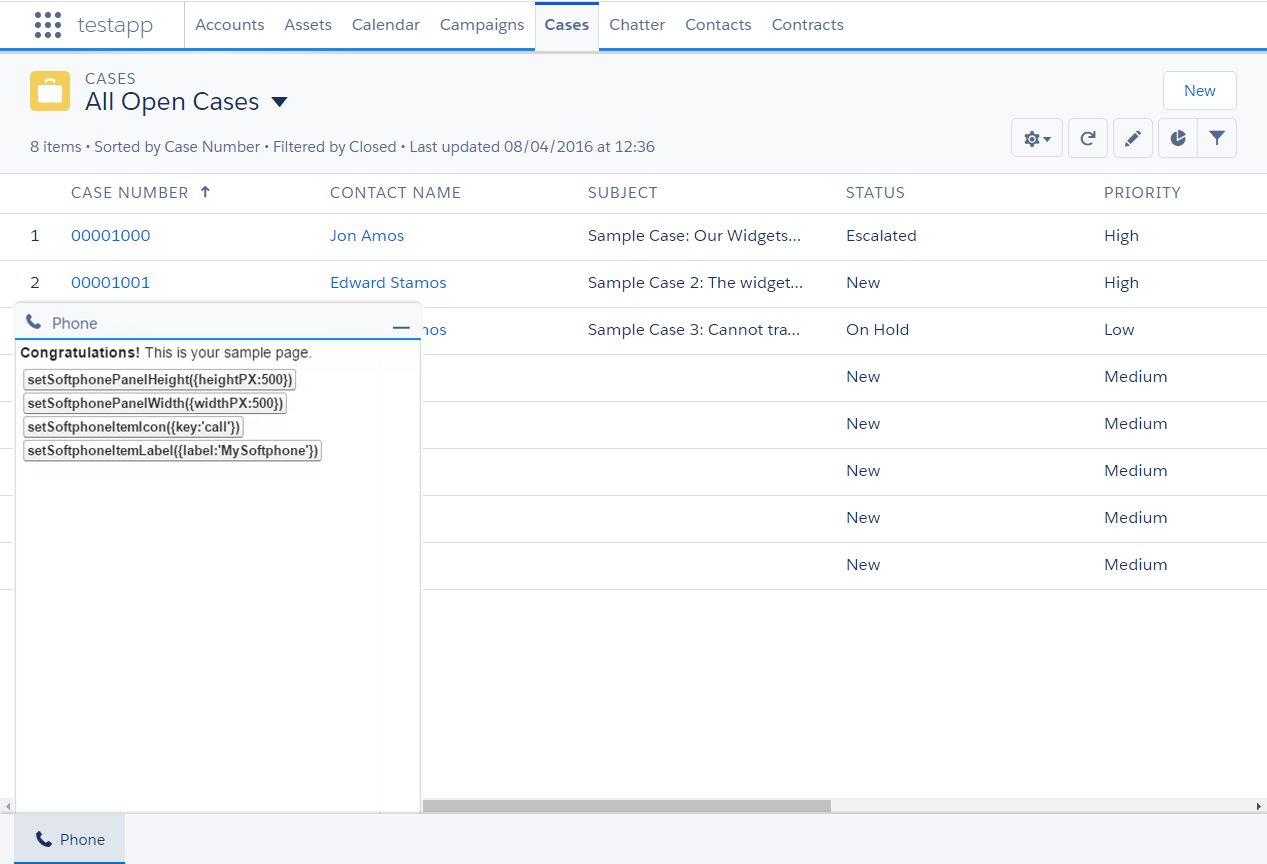
1<apex:page > 2 <!-- Begin Default Content --> 3 <h1>Congratulations!</h1> 4 This is your sample page. 5 <!-- End Default Content --> 6<html> 7<head> 8 <!-- Imports Open CTI JavaScript library. Point to a valid Salesforce domain. 9--> 10 <script src="https://domain:port/support/api/41.0/opencti_min.js"></script> 11 <script type="text/javascript"> 12 // Callback of API method: setSoftphonePanelHeight 13 var setSoftphonePanelHeightCallback = function(response) { 14 // Returns true if setSoftphonePanelHeight method is executed successfully, false otherwise 15 if (response.result) { 16 alert('setSoftphonePanelHeight is successfully executed.'); 17 } 18 else { 19 alert('setSoftphonePanelHeight failed.); 20 } 21 }; 22 // Invokes API method: setSoftphonePanelHeight 23 function setSoftphonePanelHeight() { 24 sforce.opencti.setSoftphonePanelHeight({ 25 heightPX: 500, 26 callback: setSoftphonePanelHeightCallback 27 }); 28 } 29 // Callback of API method: setSoftphonePanelWidth 30 var setSoftphonePanelWidthCallback = function(response) { 31 // Returns true if setSoftphonePanelWidth method is executed successfully, false otherwise 32 if (response.result) { 33 alert('setSoftphonePanelWidth is successfully executed.'); 34 } 35 else { 36 alert('setSoftphonePanelWidth failed.'); 37 } 38 }; 39 // Invokes API method: setSoftphonePanelWidth 40 function setSoftphonePanelWidth() { 41 sforce.opencti.setSoftphonePanelWidth({ 42 widthPX: 500, 43 callback: setSoftphonePanelHeightCallback 44 }); 45 } 46 // Callback of API method: setSoftphoneItemIcon 47 var setSoftphoneItemIconCallback = function(response) { 48 // Returns true if setSoftphoneItemIcon method is executed successfully, false otherwise 49 if (response.result) { 50 alert('setSoftphoneItemIcon is successfully executed.'); 51 } 52 else { 53 alert('setSoftphoneItemIcon failed.'); 54 } 55 }; 56 // Invokes API method: setSoftphoneItemIcon 57 function setSoftphoneItemIcon() { 58 sforce.opencti.setSoftphoneItemIcon({ 59 key: 'call', 60 callback: setSoftphoneItemIconCallback 61 }); 62 } 63 // Callback of API method: setSoftphoneItemLabel 64 var setSoftphoneItemLabelCallback = function(response) { 65 // Returns true if setSoftphoneItemLabel method is executed successfully, false otherwise 66 if (response.result) { 67 alert('setSoftphoneItemLabel is successfully executed.'); 68 } 69 else { 70 alert('setSoftphoneItemLabel failed.'); 71 } 72 }; 73 // Invokes API method: setSoftphoneItemLabel 74 function setSoftphoneItemLabel() { 75 sforce.opencti.setSoftphoneItemLabel({ 76 Label: 'MySoftphone', 77 callback: setSoftphoneItemLabelCallback 78 }); 79 } 80 </script> 81</head> 82<body> 83 <button onclick="setSoftphonePanelHeight();">setSoftphonePanelHeight({heightPX:500})</button><br/> 84 <button onclick="setSoftphonePanelWidth();">setSoftphonePanelWidth({widthPX:500})</button><br/> 85 <button onclick="setSoftphoneItemIcon();">setSoftphoneItemIcon({key:'call'})</button><br/> 86 <button onclick="setSoftphoneItemLabel();">setSoftphoneItemLabel({label:'MySoftphone'})</button> 87</body> 88</html> 89</apex:page>
HTML ページを作成した後、コールセンター定義ファイルに URL を追加します。ソフトフォンは、Salesforce Classic では左側、Salesforce コンソールまたは Lightning Experience ではフッターに表示されます。
Salesforce Classic でのサンプル HTML ページの出力

Salesforce Classic コンソールアプリケーションでのサンプル HTML ページの出力
Lightning Experience アプリケーションでのサンプル HTML ページの出力