


Service Cloud チャット開発者ガイド
 j
j開発 API のコードサンプル
チャットウィンドウ
- startChat
- showWhenOnline
- showWhenOffline
- addCustomDetail
- setName
- map
- setChatWindowWidth
- setChatWindowHeight
- doKnowledgeSearch
1<apex:page showHeader="false">
2<style> body { margin: 25px 0 0 25px; } </style>
3
4<h1>Welcome to Support</h1>
5<br />
6Thank you for your interest.
7<br /><br />
8
9<!-- START Button code, Replace this section with your Chat button code snippet -->
10<a id="liveagent_button_online_573B0000000033Y" href="javascript://Chat" style="display: none;" onclick="liveagent.startChat('573B0000000033Y')">Chat Now</a>
11<div id="liveagent_button_offline_573B0000000033Y" style="display: none;">Chat is currently unavailable</div>
12<script type="text/javascript">
13    if (!window._laq) { window._laq = []; }
14    window._laq.push(function(){
15        liveagent.showWhenOnline('573B0000000033Y', document.getElementById('liveagent_button_online_573B0000000033Y'));
16        liveagent.showWhenOffline('573B0000000033Y', document.getElementById('liveagent_button_offline_573B0000000033Y'));
17});</script>
18
19<!-- END Button code -->
20
21<!-- Chat Deployment Code, replace with your org's values -->
22<script type='text/javascript' src='https://c.la.gus.salesforce.com/content/g/js/36.0/deployment.js'></script>
23
24<!-- Deployment Code API examples -->
25<script type='text/javascript'>
26/* Adds a custom detail called Contact Email and sets it value to jane@doe.com */
27liveagent.addCustomDetail('Contact E-mail', 'jane@doe.com');
28
29/* Creates a custom detail called First Name and sets the value to Jane */
30liveagent.addCustomDetail('First Name', 'Jane');
31
32/* Creates a custom detail called Last Name and sets the value to Doe */
33liveagent.addCustomDetail('Last Name', 'Doe');
34
35/* Creates a custom detail called Phone Number and sets the value to 415-555-1212 */
36liveagent.addCustomDetail('Phone Number', '415-555-1212');
37
38/* An auto-query that searches Contacts whose Email field exactly matches 'jane@doe.com'. If no result is found, it will create a Contact record with the email, first name, last name, and phone number fields set to the custom detail values. */
39liveagent.findOrCreate('Contact').map('Email','Contact E-mail',true,true,true).map('FirstName','First Name',false,false,true).map('LastName','Last Name',false,false,true).map('Phone','Phone Number',false,false,true);
40
41/* The contact that's found or created will be saved or associated to the chat transcript. The contact will be opened for the agent in the Console and the case is linked to the contact record */
42liveagent.findOrCreate('Contact').saveToTranscript('ContactId').showOnCreate().linkToEntity('Case','ContactId');
43
44/* Creates a custom detail called Case Subject and sets the value to 'Refund policy for products' and will perform a knowledge search when the chat is accepted for the agent */
45liveagent.addCustomDetail('Case Subject','Refund policy for products').doKnowledgeSearch();
46
47/* Creates a custom detail called Case Status and sets the value to 'New' */
48liveagent.addCustomDetail('Case Status','New');
49
50/* This does a non-exact search on cases by the value of the 'Case Subject' custom detail If no results are found, it will create a case and set the case's subject and status.
51The case that's found or created will be associated to the chat and the case will open in the Console for the agent when the chat is accepted */
52liveagent.findOrCreate('Case').map('Subject','Case Subject',true,false,true).map('Status','Case Status',false,false,true).saveToTranscript('CaseId').showOnCreate();
53
54/* Saves the custom detail to a custom field on LiveChatTranscript at the end of a chat.  Assumes a custom field called Company__c was added to the Live Chat Transcript object */
55liveagent.addCustomDetail('Company', 'Acme').saveToTranscript('Company__c');
56
57/* For internal or technical details that don't concern the agent, set showToAgent to false to hide them from the display. */
58liveagent.addCustomDetail('VisitorHash', 'c6f440178d478e4326a1', false);
59
60/* Sets the display name of the visitor in the agent console when engaged in a chat */
61liveagent.setName('Jane Doe');
62
63/* Sets the width of the chat window to 500px */
64liveagent.setChatWindowWidth(500);
65
66/* Sets the height of the chat window to 500px */
67liveagent.setChatWindowHeight(500);
68
69<!-- Chat Deployment Code to initialize, replace with your org's values -->
70liveagent.init('https://d.la.gus.salesforce.com/chat', '572B000000003KL', '00DB00000000Rr8');
71</script>
72</apex:page>
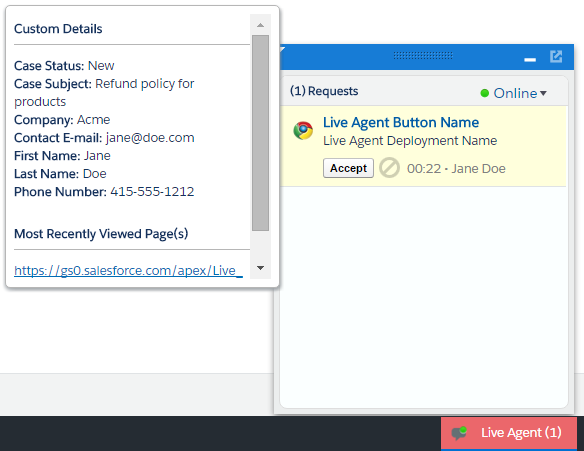
setName (1) に基づいて、コンソールに顧客の名前 (この例では Jane Doe) が表示されます。addCustomDetail.doKnowledgeSearch をコールすると、ナレッジウィジェット (2) に検索が自動的に表示されます。
省略可能な Cookie
同意管理を使用して、省略可能な Cookie を選択したり、オプトアウトしたりする機能をユーザーに提供できます。ユーザーがオプトインを選択した場合、省略可能な Cookie を追跡するために、liveagent.init() の 4 番目のパラメーターに true を渡すことができます。ユーザーがオプトインを選択しない場合で、オプトアウトを選択するときには false を渡します。4 番目のパラメーターを省略した場合は、true を渡した場合と同じになります。
1/* Enable optional cookies*/
2liveagent.init('https://d.la.gus.salesforce.com/chat', '572B000000003KL', '00DB00000000Rr8', true);
3liveagent.init('https://d.la.gus.salesforce.com/chat', '572B000000003KL', '00DB00000000Rr8');
4
5/* Disable optional cookies */
6liveagent.init('https://d.la.gus.salesforce.com/chat', '572B000000003KL', '00DB00000000Rr8', false);ユーザーがオプトアウトした場合は、liveagent.disableOptionalCookies() を呼び出すこともできます。これにより、省略可能な Cookie の追跡が削除および停止されます。これは、値が true の liveagent.init() よりも優先順位が高いことを除けば、liveagent.init() に false を渡すことと同じ処理になります。たとえば、先に liveagent.disableOptionalCookies() を呼び出し、次に liveagent.init() に true を渡した場合、省略可能な Cookie は無効のままです。liveagent.init() とは異なり、liveagent.disableOptionalCookies() は、ページが読み込まれた後にいつでもコールできます。
1/* Disable optional cookies.*/
2liveagent.disableOptionalCookies()
ユーザーがオプトアウトした後に、省略可能な Cookie に再度オプトインした場合、次のページの読み込みで liveagent.init() に true を渡します。
1<apex:page showHeader="false">
2<style> body { margin: 25px 0 0 25px; } </style>
3
4...
5
6<!-- Chat Deployment Code to initialize, replace with your org's values -->
7/* To enable tracking optional cookies, pass `true` to the fourth parameter. To disable
8them, pass `false` to the fourth parameter or call liveagent.disableOptionalCookies().*/
9liveagent.init('https://d.la.gus.salesforce.com/chat', '572B000000003KL', '00DB00000000Rr8',true);
10</script>
11</apex:page>