


 j
jAnnouncements
Why Use SCAPI
Base URL and Request Formation
Quick Start
CORS
SCAPI Specifications
B2C Commerce Release Notes
Ask the Community
CORS allows a web service to establish exceptions to the same-site policy that browsers normally enforce. Without CORS, browser access to resources on other servers is possible, but the browser prevents the response from being accessed and processed by the script.
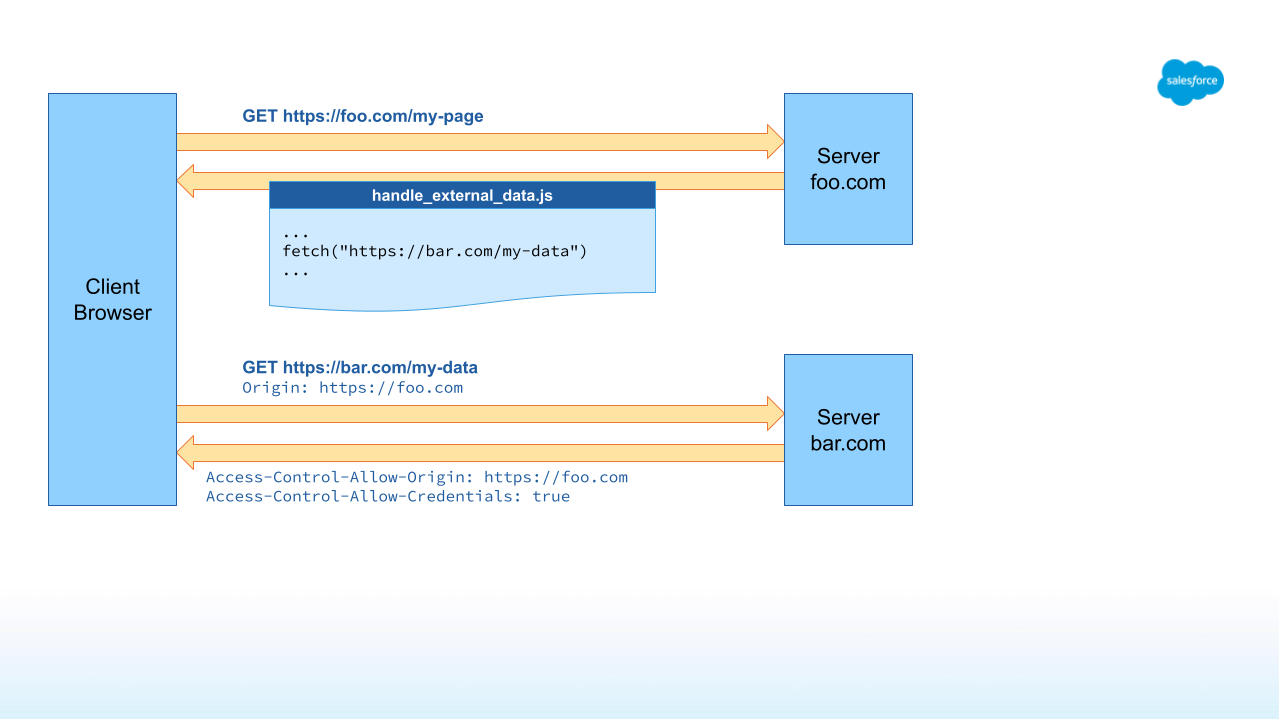
When a browser requests a resource from a site whose domain is different from the site where the script is executed, an Origin header is added to the request. A server supporting CORS returns the response header Access-Control-Allow-Origin, which contains a list of origins that are allowed to use the endpoint. If the current origin is not part of the list, the browser prevents the content from being accessed.
The following image shows the request flow for a server named bar.com that supports CORS:
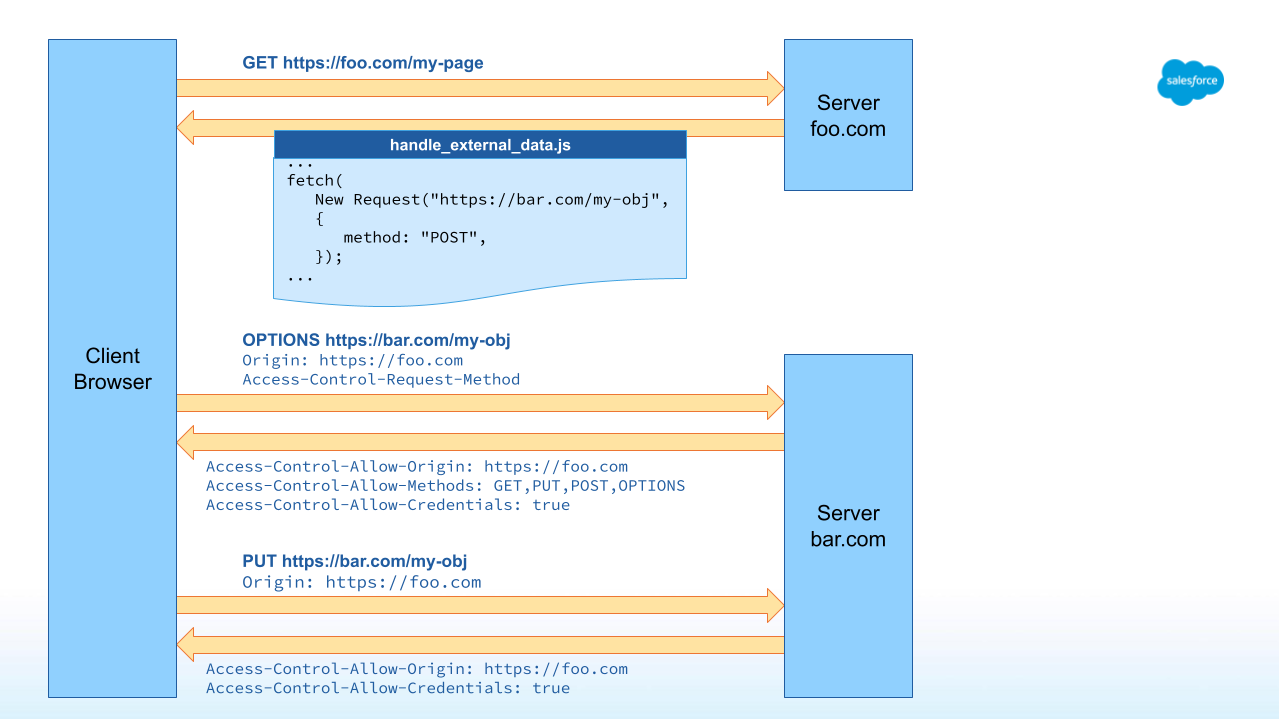
Browsers automatically make preflight requests before a modifying request is executed. Each preflight request is made as an OPTIONS request with the Origin header and the Access-Control-Request-Method header.
The resulting CORS response contains the Access-Control-Allow-Methods header, which lists the methods that the client is allowed to execute from the origin. It also contains the Access-Control-Max-Age header, which tells the browser how long (in seconds) it can cache the preflight result and reuse it for subsequent requests without repeating the preflight.
The modifying request itself is then only executed if the preflight request is successful, as shown in the following example request flow:
As of B2C Commerce 24.8, SCAPI adheres to the CORS standard and security best practices, and supports CORS requests for all Data and Shopper API endpoints.
Preflight (OPTIONS) requests are also supported.
If no configuration is provided, CORS is not active. To configure CORS in SCAPI, use the CORS API.
The configured list of aliases is automatically enriched with all known default names and site aliases. You do not need to explicitly configure them for CORS.
For security reasons, wildcards (*) are not supported, and the returned Access-Control-Allow-Origin header does not contain the full list of allowed origins. It only contains the single origin that was submitted with the current request’s Origin header.
Note
The configuration of allowed CORS origins is unique to each environment and is not replicated between environments. The configuration of allowed origins is done per client ID and site, which means:
The CORS API requires an AM OAuth token with the scope sfcc.cors-preferences.rw. When you send a new CORS configuration with a PUT request, the response mirrors the stored configuration, for example:
1{
2  "corsClientPreferences": [
3    {
4      "clientId": "12345678-90ab-cdef-fedc-ba0987654321",
5      "origins": [
6        "http://foo.com",
7        "https://foo.bar.com",
8        "myapp://example.com"
9      ]
10    }
11  ]
12}
Allowed URLs can contain any scheme and are not limited to HTTP and HTTPS. Each origin must adhere to the http-style format of <scheme>://(<subdomain>.)<domain>(.<tld>) and must not contain port or path information.
The port is not part of the configuration. If the origin domain is part of the allowlist, all ports are accepted by SCAPI CORS.
To enable CORS for a client without specifying custom origins, configure the client and site with an empty origin list. Known domain names and aliases still apply.
1{
2  "corsClientPreferences": [
3    {
4      "clientId": "12345678-90ab-cdef-fedc-ba0987654321",
5      "origins": []
6    }
7  ]
8}A CORS request, for example: a GET, PUT, POST, DELETE, or HEAD request, yields the same result as a typical request:
If a request contains a valid Origin header, the response contains the following headers:
1Access-Control-Allow-Origin
2Access-Control-Allow-Headers (only if Access-Control-Request-Headers was included in the request)
3Access-Control-Allow-Credentials (always true)
If a request contains an invalid Origin header, these response headers are simply missing, with no other changes.
Note: This behavior is different from OCAPI CORS where a manipulating request with an invalid origin results in a 401 status code and the message Unauthorized Origin.
For preflight requests with a valid endpoint, the server returns a 200 Success status with the following headers:
1Access-Control-Allow-Origin
2Access-Control-Allow-Methods
3Access-Control-Max-Age
4Access-Control-Allow-Headers (only if Access-Control-Request-Headers was included in the request)
5Access-Control-Allow-Credentials (always true)
6```http
7
8The `Access-Control-Max-Age` header is set to `600` seconds (10 minutes). Browsers cap this value to their own maximum (for example, 7200 seconds in Chromium-based browsers and 86400 seconds in Firefox).
9
10If the endpoint is invalid, the call will return a `404 Not Found` status.
11
12### Example Responses
13
14```sfdocs-code {"lang":"markdown", "title": "CORS request with a valid origin:" }
15REQUEST:
16GET `https``:``//{shortCode}.api.commercecloud.salesforce.com/product/shopper-products/v1/organizations/{organizationId}/products/{productId}`
17Origin: https://foo.com
18
19RESPONSE: 200
20{
21    "id": "{productId}",
22    ...
23}
24Access-Control-Allow-Credentials: true
25Access-Control-Allow-Origin: https://foo.com1REQUEST:
2GET `https://{shortCode}.api.commercecloud.salesforce.com/product/shopper-products/v1/organizations/{organizationId}/products/{productId}`
3Origin: https://foobar.com
4
5RESPONSE: 200
6{
7 "id": "{productId}",
8 ...
9}
10(no CORS headers)
11```http
12
13```sfdocs-code {"lang":"markdown", "title": "OPTIONS request (preflight) with a valid origin:" }
14REQUEST:
15OPTIONS `https``:``//{shortCode}.api.commercecloud.salesforce.com/product/shopper-products/v1/organizations/{organizationId}/products/{id}`
16Origin: https://foo.com
17Access-Control-Request-Method: GET
18
19RESPONSE: 200
20(no Body)
21Access-Control-Allow-Credentials: true
22Access-Control-Allow-Methods: GET, OPTIONS
23Access-Control-Allow-Origin: https://foo.com
24Access-Control-Max-Age: 600
25```http
26
27```sfdocs-code {"lang":"markdown", "title": "OPTIONS request (preflight) with an invalid origin:" }
28REQUEST:
29OPTIONS `https://{shortCode}.api.commercecloud.salesforce.com/product/shopper-products/v1/organizations/{organizationId}/products/{id}`
30Origin: https://foo.com
31Access-Control-Request-Method: GET
32
33RESPONSE: 200
34(no Body)
35(no CORS headers)Custom APIs are not currently supported.
j