Before you configure the MobilePush SDK Flutter plugin for iOS apps, make sure that the plugin is installed and configured for your app. See Marketing Cloud Flutter Plugin.
Enable Push Notifications
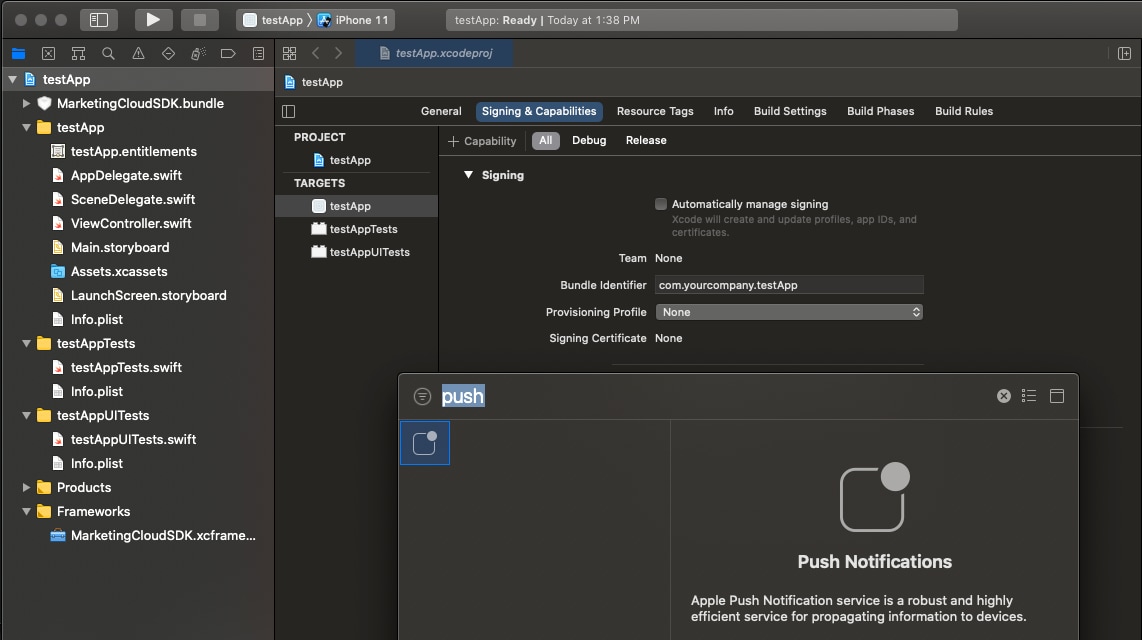
Enable push notifications in your target’s Capabilities settings in Xcode.
Update the AppDelegate
Navigate to the YOUR_APP/ios directory and open Runner.xcworkspace.
To configure the SDK and enable push, update AppDelegate.
Swift
1//AppDelegate.swift234import UIKit5import Flutter6import SFMCSDK7import MarketingCloudSDK89 func setupMobilePush(){10 // Make sure to dispatch this to the main thread, as UNUserNotificationCenter will present UI.11 DispatchQueue.main.async{12 // Set the UNUserNotificationCenterDelegate to a class adhering to thie protocol.13 // In this exmple, the AppDelegate class adheres to the protocol (see below)14 // and handles Notification Center delegate methods from iOS.15 UNUserNotificationCenter.current().delegate = self1617 // Request authorization from the user for push notification alerts.18 UNUserNotificationCenter.current().requestAuthorization(options: [.alert, .sound, .badge], completionHandler: {(_ granted: Bool, _ error: Error?) ->Void in19 if error == nil{20 if granted == true{21 // Your application may want to do something specific if the user has granted authorization22 // for the notification types specified; it would be done here.23}24}25})2627 // Your application should register for remote notifications each time your application28 // launches to make sure that the push token for silent push is updated, if necessary.2930 // Registering in this manner doesn't mean that a user sees a notification. It only means31 // that the application receives a unique push token from iOS.32 UIApplication.shared.registerForRemoteNotifications()33}34}3536@UIApplicationMain37@objc class AppDelegate: FlutterAppDelegate {383940 // The appID, accessToken and appEndpoint are required values for MobilePush SDK Module configuration and are obtained from your app.41 // See https://salesforce-marketingcloud.github.io/MarketingCloudSDK-iOS/get-started/get-started-setupapps.html for more information.42 let appID = "<your appID>"43 let accessToken = "<your accessToken>"44 let appEndpointURL = "<your appEndpoint>"45 let mid = "<your account MID>"46 // Define features your app uses.47 let analytics = true484950 override func application(51 _ application: UIApplication,52 didFinishLaunchingWithOptions launchOptions: [UIApplication.LaunchOptionsKey: Any]?53) ->Bool{54 GeneratedPluginRegistrant.register(with: self)555657 // Required: tell the MarketingCloudSDK about the notification. The SDK collects analytics58 // and processes the notification on behalf of your application.59 SFMCSdk.requestPushSdk{ mp in60 mp.setNotificationResponse(response)61}626364 // rest of the didFinishLaunchingWithOptions method...65 return super.application(application, didFinishLaunchingWithOptions: launchOptions)66}6768 completionHandler(.alert)69}7071}
Objective-C
1//AppDelegate.h23#import <Flutter/Flutter.h>4#import <UIKit/UIKit.h>5#import <UserNotifications/UserNotifications.h>6#import <SFMCSDK/SFMCSDK.h>7//Other imports...89@interface AppDelegate : FlutterAppDelegate<UNUserNotificationCenterDelegate>1011@end1213//AppDelegate.m1415#import "AppDelegate.h"16#import "GeneratedPluginRegistrant.h"17#import <MarketingCloudSDK/MarketingCloudSDK.h>18//Other imports...1920@implementation AppDelegate2122- (BOOL)application:(UIApplication *)application23 didFinishLaunchingWithOptions:(NSDictionary *)launchOptions {2425 //Flutter setup26 [GeneratedPluginRegistrant registerWithRegistry:self];27 // Override point for customization after application launch.2829 // Use the Push Config Builder to configure the Mobile Push Module. This gives you the maximum flexibility in SDK configuration.30 // The builder lets you configure the module parameters at runtime.31 PushConfigBuilder *pushConfigBuilder = [[PushConfigBuilder alloc] initWithAppId:@"{MC_APP_ID}"];32 [pushConfigBuilder setAccessToken:@"{MC_ACCESS_TOKEN}"];33 [pushConfigBuilder setMarketingCloudServerUrl:[NSURL URLWithString:@"{MC_APP_SERVER_URL}"]];34 [pushConfigBuilder setMid:@"MC_MID"];35 [pushConfigBuilder setAnalyticsEnabled:YES];363738 // Once you've created the mobile push configuration, intialize the SDK.39 [SFMCSdk initializeSdk:[[[SFMCSdkConfigBuilder new] setPushWithConfig:[pushConfigBuilder build] onCompletion:^(SFMCSdkOperationResult result) {40 if (result == SFMCSdkOperationResultSuccess) {41 // module is fully configured and ready for use42 [self pushSetup];43 } else {44 NSLog(@"SFMC sdk configuration failed.");45 }46 }] build]];4748 // rest of the didFinishLaunchingWithOptions method...49 return [super application:application didFinishLaunchingWithOptions:launchOptions];50}5152- (void)pushSetup {53 // Make sure to dispatch this to the main thread, as UNUserNotificationCenter will present UI.54 dispatch_async(dispatch_get_main_queue(), ^{55 // Set the UNUserNotificationCenterDelegate to a class adhering to thie protocol.56 // In this exmple, the AppDelegate class adheres to the protocol (see below)57 // and handles Notification Center delegate methods from iOS.58 [UNUserNotificationCenter currentNotificationCenter].delegate = self;5960 // Your application should register for remote notifications each time your application61 // launches to make sure that the push token for silent push is updated, if necessary.6263 // Registering in this manner doesn't mean that a user sees a notification. It only means64 // that the application will receive a unique push token from iOS.65 [[UIApplication sharedApplication] registerForRemoteNotifications];6667 // Request authorization from the user for push notification alerts.68 [[UNUserNotificationCenter currentNotificationCenter]69 requestAuthorizationWithOptions:UNAuthorizationOptionAlert |70 UNAuthorizationOptionSound |71 UNAuthorizationOptionBadge72 completionHandler:^(BOOL granted, NSError *_Nullable error) {73 if (error == nil) {74 if (granted == YES) {75 // Your application may want to do something specific if the user has granted authorization76 // for the notification types specified; it would be done here.77 NSLog(@"User granted permission");78 }79 }80 }];81 });82}8384- (void)application:(UIApplication *)application didRegisterForRemoteNotificationsWithDeviceToken:(NSData *)deviceToken {85 [SFMCSdk requestPushSdk:^(id<PushInterface> _Nonnull mp) {86 [mp setDeviceToken:deviceToken];87 }];88}8990- (void)application:(UIApplication *)application didFailToRegisterForRemoteNotificationsWithError:(NSError *)error {91 os_log_debug(OS_LOG_DEFAULT, "didFailToRegisterForRemoteNotificationsWithError = %@", error);92}9394// The method will be called on the delegate when the user responded to the notification by opening95// the application, dismissing the notification or choosing a UNNotificationAction. The delegate96// must be set before the application returns from applicationDidFinishLaunching:.97- (void)userNotificationCenter:(UNUserNotificationCenter *)center didReceiveNotificationResponse:(UNNotificationResponse *)response withCompletionHandler:(void (^)(void))completionHandler {98 // tell the MarketingCloudSDK about the notification99 [SFMCSdk requestPushSdk:^(id<PushInterface> _Nonnull mp) {100 [mp setNotificationResponse:response];101 }];102 if (completionHandler != nil) {103 completionHandler();104 }105}106107// The method will be called on the delegate only if the application is in the foreground. If the method is not implemented or the handler is not called in a timely manner then the notification will not be presented. The application can choose to have the notification presented as a sound, badge, alert and/or in the notification list. This decision should be based on whether the information in the notification is otherwise visible to the user.108- (void)userNotificationCenter:(UNUserNotificationCenter *)center willPresentNotification:(UNNotification *)notification withCompletionHandler:(void (^)(UNNotificationPresentationOptions options))completionHandler {109 completionHandler(UNAuthorizationOptionSound | UNAuthorizationOptionAlert | UNAuthorizationOptionBadge);110}111112/** This delegate method offers an opportunity for applications with the "remote-notification" background mode to fetch appropriate new data in response to an incoming remote notification. You should call the fetchCompletionHandler as soon as you’re finished performing that operation, so the system can accurately estimate its power and data cost.113This method will be invoked even if the application was launched or resumed because of the remote notification. The respective delegate methods will be invoked first. Note that this behavior is in contrast to application:didReceiveRemoteNotification:, which is not called in those cases, and which will not be invoked if this method is implemented. **/114- (void)application:(UIApplication *)application didReceiveRemoteNotification:(NSDictionary *)userInfo fetchCompletionHandler:(void (^)(UIBackgroundFetchResult))completionHandler {115 [SFMCSdk requestPushSdk:^(id<PushInterface> _Nonnull mp) {116 [mp setNotificationUserInfo:userInfo];117 }];118 completionHandler(UIBackgroundFetchResultNewData);119}120121@end
URL Handling
The SDK doesn’t automatically present URLs from these sources.
CloudPages URLs from push notifications
OpenDirect URLs from push notifications
Action URLs from in-app messages
To handle URLs from push notifications, follow these steps.
To set the URLHandlingDelegate, update the AppDelegate as shown in this example.
Swift
1func setupMobilePush(){2 // Set the URLHandlingDelegate to a class adhering to the protocol.3 // In this example, the AppDelegate class adheres to the protocol (see below)4 // and handles URLs passed back from the SDK.5 // For more information, see https://salesforce-marketingcloud.github.io/MarketingCloudSDK-iOS/sdk-implementation/implementation-urlhandling.html6 SFMCSdk.requestPushSdk{ mp in7 mp.setURLHandlingDelegate(self)8}910 //rest of setupMobilePush...11}
Objective-C
1// AppDelegate.h23#import <Flutter/Flutter.h>4#import <UIKit/UIKit.h>5#import <UserNotifications/UserNotifications.h>6#import <SFMCSDK/SFMCSDK.h>78//...910// Implement the SFMCSdkURLHandlingDelegate delegate11@interface AppDelegate : FlutterAppDelegate<UNUserNotificationCenterDelegate, SFMCSdkURLHandlingDelegate>1213@end141516// AppDelegate.m1718- (void)pushSetup {19 // AppDelegate adheres to the SFMCSdkURLHandlingDelegate protocol20 // and handles URLs passed back from the SDK in `sfmc_handleURL`.21 // For more information, see https://salesforce-marketingcloud.github.io/MarketingCloudSDK-iOS/sdk-implementation/implementation-urlhandling.html22 [SFMCSdk requestPushSdk:^(id<PushInterface> _Nonnull mp) {23 [mp setURLHandlingDelegate:self];24 }];2526 //rest of pushSetup...27}
Implement the URLHandlingDelegate
Implement the URLHandlingDelegate in AppDelegate, as shown in this example.
Swift
1// AppDelegate.swift23//rest of AppDelegate.swift...45// MobilePush SDK: REQUIRED IMPLEMENTATION6extension AppDelegate: URLHandlingDelegate {7 /**8 This method, if implemented, can be called when a Alert+CloudPage, Alert+OpenDirect, Alert+Inbox or Inbox message is processed by the SDK.9 Implementing this method allows the application to handle the URL from Marketing Cloud Engagement data.1011 Prior to the MobilePush SDK version 6.0.0, the SDK would automatically handle these URLs and present them using a SFSafariViewController.1213 Given security risks inherent in URLs and web pages (Open Redirect vulnerabilities, especially), the responsibility of processing the URL shall be held by the application implementing the MobilePush SDK. This reduces risk to the application by affording full control over processing, presentation and security to the application code itself.1415 @param url value NSURL sent with the Location, CloudPage, OpenDirect or Inbox message16 @param type value NSInteger enumeration of the source type of this URL17 */18 func sfmc_handleURL(_ url: URL, type: String){19 // Very simply, send the URL returned from the MobilePush SDK to UIApplication to handle correctly.20 UIApplication.shared.open(url,21 options: [:],22 completionHandler: {23(success)in24 print("Open \(url): \(success)")25})26}27}
Objective-C
1// AppDelegate.m23//rest of AppDelegate.m...45/**6 This method, if implemented, can be called when a Alert+CloudPage, Alert+OpenDirect, Alert+Inbox or Inbox message is processed by the SDK.7 Implementing this method allows the application to handle the URL from Marketing Cloud Engagement data.89 Prior to the MobilePush SDK version 6.0.0, the SDK would automatically handle these URLs and present them using a SFSafariViewController.1011 Given security risks inherent in URLs and web pages (Open Redirect vulnerabilities, especially), the responsibility of processing the URL shall be held by the application implementing the MobilePush SDK. This reduces risk to the application by affording full control over processing, presentation and security to the application code itself.1213 @param url value NSURL sent with the Location, CloudPage, OpenDirect or Inbox message14 @param type value NSInteger enumeration of the source type of this URL15 */16- (void)sfmc_handleURL:(NSURL * _Nonnull)url type:(NSString * _Nonnull)type {17 if ([[UIApplication sharedApplication] canOpenURL:url]) {18 [[UIApplication sharedApplication] openURL:url options:@{} completionHandler:^(BOOL success) {19 if (success) {20 NSLog(@"url %@ opened successfully", url);21 } else {22 NSLog(@"url %@ could not be opened", url);23 }24 }];25 }26}2728//rest of AppDelegate.m...
Also review the additional documentation on URL Handling
Enable Rich Notifications (Optional)
Rich notifications include images, videos, titles, subtitles, and mutable content. Mutable content can include personalization in the title, subtitle, or body of your message.


 j
j