Create the Apex Action

Your widget displays data from an object in your org, such as a HotelInfo custom object. While there are multiple ways to get the data, a standard approach is to create an Apex class that contains a SOQL query for the HotelInfo object. The Apex class returns the results in the shape of one of your custom Lightning types schema. You then use this Apex class to create an Apex Action (also known as an Invocable Action), which later sections show how to turn into an MCP tool.

  1. In your local DX project, create the Apex class that queries your org and returns output shaped to the schema of one of your custom Lightning types. Remember, for channels that support MCP, you must create two custom Lightning types: one for the MCP result wrapper role and one for the MCP payload role.

    Make sure your Apex code meets the requirements for an Apex action. For example, the Apex class must be global and the method that returns results must be annotated with @InvocableMethod. See these links for full details:

  2. Deploy your Apex class to your org. For example, to use a Salesforce CLI command to deploy to the org with alias my-org, run this command:

    1sf project deploy start --metadata ApexClass:HotelSearchResult --target-org my-org
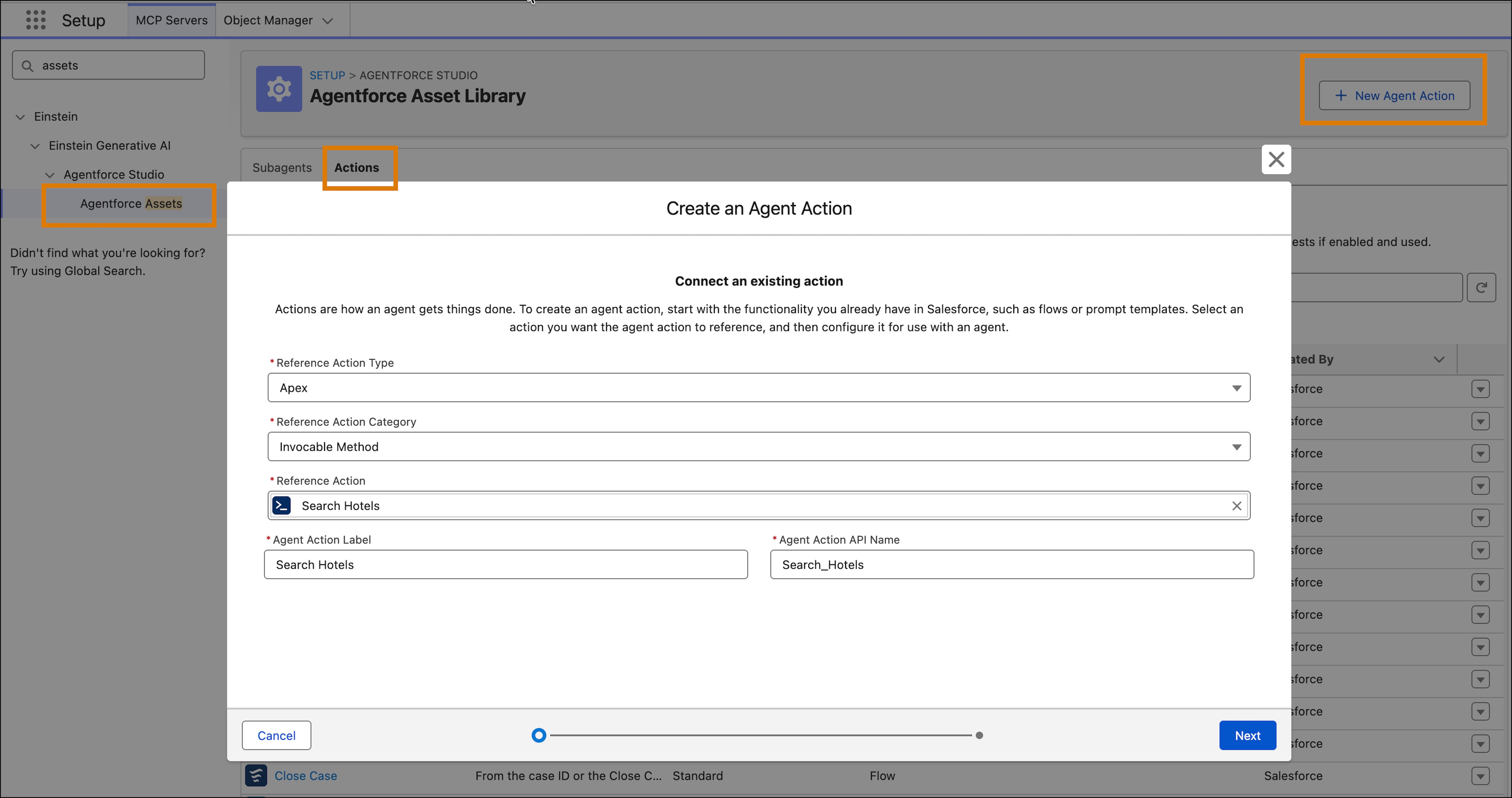
  3. In your org, go to Setup, enter Assets in the Quick find box, select Agentforce Assets and then the Actions tab.

  4. Click the + New Agent Action button to create an Apex-based action using your Apex class. Use these values in the dialog box:

    • Reference Action Type: Apex
    • Reference Action Category: Invocable Method
    • Reference Action: Select your Apex class.

    Click Next. Most of the information is automatically filled in.

    Create an agent action in Setup using the Apex class.

  5. Click Finish to add the asset.

After you click Finish, your Apex Action is added to the asset library and it’s ready to become an MCP tool. See Create a Custom MCP Server.

See Also 

Beta Feature

Headless Experience Layer is a pilot or beta service that is subject to the Beta Services Terms at Ageements - Salesforce.com or a written Unified Pilot Agreement if executed by Customer, and applicable terms in the Product Terms Directory. Use of this pilot or beta service is at the Customer's sole discretion.