


Elements in Frames
Let’s write a UI test for a playground-app element inside an iframe.
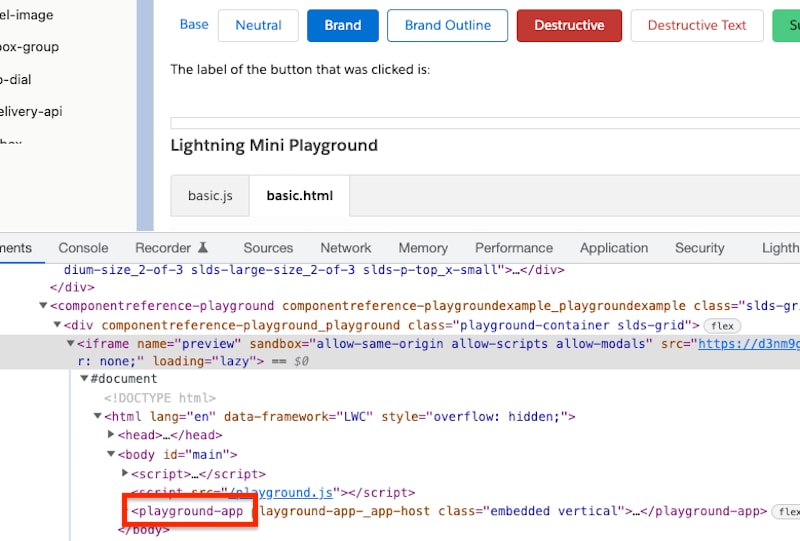
Add a frame element
First, we need to create a root Home page object and add a frame element:
1{
2  "root": true,
3  "selector": {
4    "css": "componentreference-playground"
5  },
6  "shadow": {
7    "elements": [
8      {
9        "name": "previewFrame",
10        "public": true,
11        "type": "frame",
12        "selector": {
13          "css": "[name='preview']"
14        }
15      }
16    ]
17  }
18}
Enter the frame from a test
Use enterFrame() in this JavaScript test to enter the frame.
1const home = await utam.load(Home);
2const frame = await home.getPreviewFrame();
3await utam.enterFrame(frame);
Load the page object inside the frame
The Playground page object for our playground-app, which is in the iframe, should be marked as root.
1{
2  "root": true,
3  "selector": {
4    "css": "playground-app"
5  },
6  "methods": [
7    {
8      "name": "play",
9      "compose": []
10    }
11  ]
12}
Now, when the JavaScript test enters the frame, we can load the Playground page object from the UTAM loader:
1// shortcut to enter frame and load:
2// utam.enterFrameAndLoad(frame, Playground);
3const playground = await utam.load(Playground);
4await playground.play();
Exit frame
When the test is done interacting with the Playground page object inside the frame, call exitFrame:
1await utam.exitFrame();If the frame is nested, a test can use utam.exitParentFrame() to pass the control to the parent frame of the current frame.
Note
 j
j