The Winter ’27 release has deployed across most instances, with the final rollout set for October 9, 2026. Please review the maintenance schedule to verify the exact deployment window for your organization.
This post covers the key updates for developers. We start with AIforce and the Headless Toolkit, including Salesforce Multi-Framework, MCP, Salesforce CLI, and API updates. Then we cover Lightning Web Components (LWC), Apex, Agentforce, Data 360, and platform developer tools.
AIforce and Headless Toolkit
AIforce brings the full power of Salesforce to any interface. You build the capability once, and it shows up directly inside your users’ agents, apps, and workflows.
Under the hood, this runs on a headless architecture. Every major Salesforce capability is available as an API, a Model Context Protocol (MCP) tool, or a CLI command. Any authenticated caller can use it, whether that’s an app, a human, or an AI agent. The Headless Toolkit is the biggest developer theme of the Winter ’27 release. It brings AI Skills, the Headless Experience Layer (HXL), Multi-Framework apps, MCP tools, and CLI and API enhancements. Let’s dive into the main developer features.
Salesforce Development plugin for Claude Code
The Salesforce Development plugin teaches Claude Code how to build Salesforce apps and agents. It detects your Salesforce DX project and gives Claude Code Salesforce-specific skills and org context through pre-configured Salesforce-hosted MCP servers. Install the plugin from the Claude Plugin Marketplace, or run this command in Claude Code.
1/plugin install salesforce-development@claude-plugins-officialUsing Codex, Cursor, or another coding agent? The plugin’s skills come from the open-source Salesforce skills library, which works with any agent that supports AI Skills. Install it with one command.
1npx skills add forcedotcom/sf-skillsExplore what’s inside the plugin
The core plugin ships skills that cover the everyday Salesforce development lifecycle. They generate Apex, custom objects and fields, permission sets, Flows, reports, and Lightning pages. They also write and run Apex tests, analyze debug logs, run SOQL queries, configure sharing, scan code with Code Analyzer, and validate and deploy metadata.
The plugin also connects Claude Code to MCP servers for Salesforce API and metadata guidance. A bundled Apex and SOQL language server gives the agent the same code intelligence your IDE uses.
Go beyond the core plugin with specialized plugins
New in Winter ’27, the plugin knows when a task needs more than its core skills. Describe your task, and it recommends a specialized plugin from the Salesforce catalog. The catalog includes specialized plugins such as:
dx-org-lifecycle:dx-devops:Run DevOps Center pipelines and work items, and configure their automated tests.agentforce-adlc:Author, test, and deploy Agentforce agents.experience-lwcandexperience-react:Build Lightning web components and React apps.integration:Set up Named Credentials, callouts, OAuth apps, and Change Data Capture.
To search the catalog yourself, add the plugins keyword and a description of your task.
1/salesforce-development:discover plugins <description of your task>
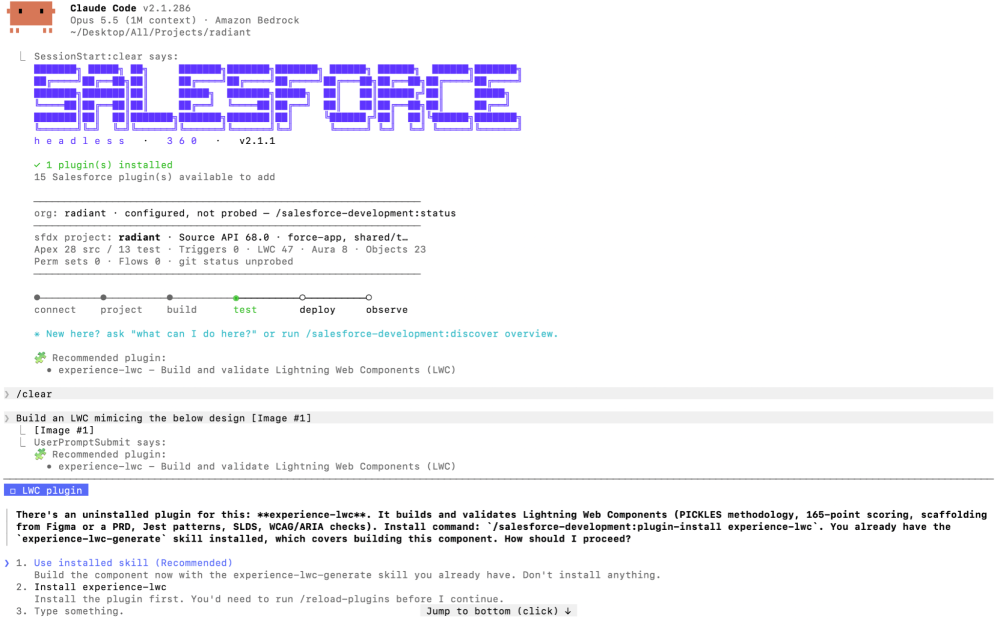
Prefer fewer suggestions? Run /salesforce-development:plugin-recommendations to set how readily the plugin recommends plugins, from off to high.
Salesforce Multi-Framework
Salesforce Multi-Framework lets you build web apps with frontend frameworks you already know, like Angular or React, and run them on the Salesforce Platform. Your app gets Salesforce data, security, and governance without a separate hosting stack. Winter ’27 adds Angular alongsideReact, a richer Data SDK, a way to embed your app in Lightning pages using microfrontends, and 2GP packaging.
Additionally, we’ve updated the Multi-Framework Recipes sample repository with new Angular and microfrontend code samples to help you get started.
Build Multi-Framework apps with Angular
Angular joins React as a supported framework. Bring your existing Angular skills, libraries, and apps to the platform. Scaffold an app from the angularinternalapp template for employee-facing apps, or the angularexternalapp template for customer and partner apps or angularbasic for a barebones template. Angularinternalapp and angularexternalapp templates come pre-wired with platform integration.
1sf template generate project --name account-pulse --template angularinternalappYour app is a UIBundle metadata type. You build it with the standard Angular CLI and deploy it with the same Salesforce DX commands you use for the rest of your project.
Reuse data logic with Data SDK extensions
The Data SDK works with any framework and enforces object-level security, field-level security, and sharing rules on every request. In Winter ’27, you can package your own data logic as an extension. Write the extension once with defineDataExtension, and call it through a typed sdk.ext.<name> namespace in every bundle that needs it.
Here’s an extension that returns the top accounts by annual revenue, using the GraphQL API in User Interface API (UI API).
1import { defineDataExtension, gql } from '@salesforce/platform-sdk';
2interface TopAccountsQuery {
3    uiapi: {
4        query: {
5            Account: {
6                edges: {
7                    node: {
8                        Id: string;
9                        Name: { value: string | null } | null;
10                        AnnualRevenue: { value: number | null } | null;
11                    };
12                }[];
13            };
14        };
15    };
16}
17
18const TOP_ACCOUNTS = gql`
19    query TopAccounts($first: Int) {
20        uiapi {
21            query {
22                Account(first: $first, orderBy: { AnnualRevenue: { order: DESC, nulls: LAST } }) {
23                    edges {
24                        node {
25                            Id
26                            Name @optional { value }
27                            AnnualRevenue @optional { value }
28                        }
29                    }
30                }
31            }
32        }
33    }
34`;
35export const pulseExtension = defineDataExtension({
36    name: 'pulse',
37    setup: (sdk) => ({
38        async topAccounts(first = 5) {
39            if (!sdk.graphql) {
40                throw new Error('GraphQL is not available on this surface');
41            }
42            const result = await sdk.graphql.query<TopAccountsQuery, { first: number }>({
43                query: TOP_ACCOUNTS,
44                variables: { first }
45            });
46            return (result.data?.uiapi.query.Account.edges ?? []).map(({ node }) => ({
47                id: node.Id,
48                name: node.Name?.value,
49                annualRevenue: node.AnnualRevenue?.value
50            }));
51        }
52    })
53});
Attach the extension when you create the SDK, then call it like any other SDK method.
1import { createDataSDK } from '@salesforce/platform-sdk';
2import { pulseExtension } from './pulse-extension';
3
4const sdk = await createDataSDK({ extensions: [pulseExtension] });
5const accounts = await sdk.ext.pulse.topAccounts(5);
The Data SDK also picks up these additions:
- Labels extension: Retrieve custom labels by namespace and locale.
- Minimum API version: Set a minimum Salesforce API version on an extension so that it attaches only where its data exists.
- Per-request headers: Pass a
headersoption on an individual GraphQL query or mutation. Headers are part of the cache key, so requests with different headers don’t share cached responses.
Localize your app and talk to the host page
Use the new @salesforce/platform-sdk/i18n module to match dates, numbers, and currency to each user’s Salesforce locale. Call getCurrentApp() to read the running app’s namespace, name, and qualified name.
1import { createDataSDK, getCurrentApp, getViewSDK } from '@salesforce/platform-sdk';
2import { createI18nFormatters, fetchI18nContext } from '@salesforce/platform-sdk/i18n';
3
4const sdk = await createDataSDK();
5
6// Format currency with the running user's locale and currency
7const ctx = await fetchI18nContext(sdk);
8const fmt = createI18nFormatters(ctx);
9const total = fmt.formatCurrency(5080000, { maximumFractionDigits: 0 });
10
11// Read the running app's identity, for example c__w27AccountPulse
12const app = await getCurrentApp();
13console.log(app.identity?.qualifiedName);
Embed your app in Lightning pages as a microfrontend (Beta)
You don’t have to rebuild your app in LWC to show it on a Lightning page. Write a thin Lightning web component that renders the lightning-ui-embedding base component and points it at your deployed app’s URL. Salesforce hosts your app in a secure, sandboxed iframe and gives it a two-way channel to the surrounding page.
That channel is what makes a microfrontend feel native. The host component can pass data down to your app, and your app can send events back up. In our example below, an industry filter in the LWC filters the Angular app’s account list, and clicking an account in the Angular app shows that record in native Salesforce components.
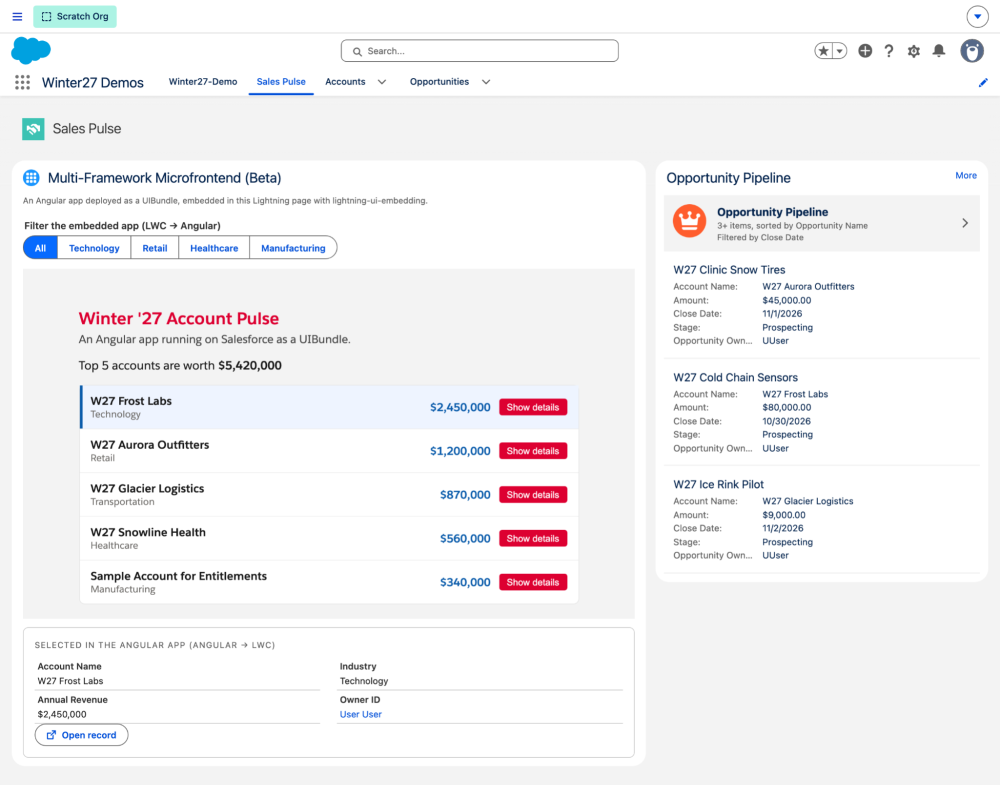
Pass data from the host LWC to your app
Set the props attribute on lightning-ui-embedding. When a value changes, Salesforce pushes the new props to your app.
1<template>
2    <lightning-radio-group
3        label="Filter the embedded app"
4        type="button"
5        options={industryOptions}
6        value={industry}
7        onchange={handleIndustryChange}>
8    </lightning-radio-group>
9    <lightning-ui-embedding
10        lwc:ref="embedding"
11        src={appUrl}
12        props={embedProps}
13        width="100%"
14        height="560">
15    </lightning-ui-embedding>
16</template>
In your app, read the props with getUiState() from the view SDK, and subscribe to get every change.
1const view = await getViewSDK();
2const ui = view?.getUiState?.<PulseUiState>();
3if (ui) {
4    this.industry.set(ui.state.props.industry ?? '');
5    ui.subscribe((next) => this.industry.set(next.props.industry ?? ''));
6}
Send events from your app to the host LWC
Dispatch a CustomEvent through the view SDK. Salesforce forwards it to the host page.
1select(account: PulseAccount): void {
2    this.view?.dispatchEvent?.(
3        new CustomEvent('pulse.accountselected', {
4            detail: { recordId: account.id, name: account.name }
5        })
6    );
7}
The event arrives on the lightning-ui-embedding element with the same type and detail. Embedding event names contain a dot, so you can’t bind them in the template. Add the listener once in renderedCallback instead.
1import { LightningElement, api } from 'lwc';
2export default class MicrofrontendHost extends LightningElement {
3    @api appUrl; // deployed app URL on the salesforce.app domain
4    industry = '';
5    selected;
6    listening = false;
7
8    get embedProps() {
9        return { industry: this.industry };
10    }
11    renderedCallback() {
12        const embedding = this.refs.embedding;
13        if (embedding && !this.listening) {
14            this.listening = true;
15            embedding.addEventListener('pulse.accountselected', (event) => {
16                this.selected = event.detail; // { recordId, name }
17            });
18        }
19    }
20    handleIndustryChange(event) {
21        this.industry = event.detail.value;
22    }
23}
The host then renders selected.recordId with lightning-record-view-form, so the details panel is plain Salesforce UI. Here’s the same page after a user picks Retail in the LWC filter and selects an account in the Angular app.
Embedding supports internal, employee-facing apps built with React or Angular and served from the salesforce.app domain. You can add the host component to Lightning pages and Experience Cloud site pages.
Package, manage, and monitor your apps
- Package with 2GP: Distribute Multi-Framework apps with second-generation packaging (2GP). Use unlocked packages for apps you want to keep editable, or managed packages to distribute locked, namespaced internal apps through AppExchange.
- Manage apps in App Manager: From Setup, open App Manager and select New App | New Multi-Framework App. Choose Builder Central to build from a natural language description, or Agentforce Vibes to work directly with code.
- Analyze performance in Scale Center (Beta): From Setup, open Multi-Framework Insights (Beta) and click Generate Insight Report. The dashboard shows key metrics for up to ten apps with the most page views over the last seven days.
Headless Experience Layer (Beta)
The Headless Experience Layer (HXL) lets you define a rich UI once, as a widget, and render it natively in Agentforce, Claude, and Slackbot. To show how it works, I built a snow report widget for an Agentforce agent. Four pieces of metadata connect the agent’s Apex action to the UI, and each piece refers to the next by name.
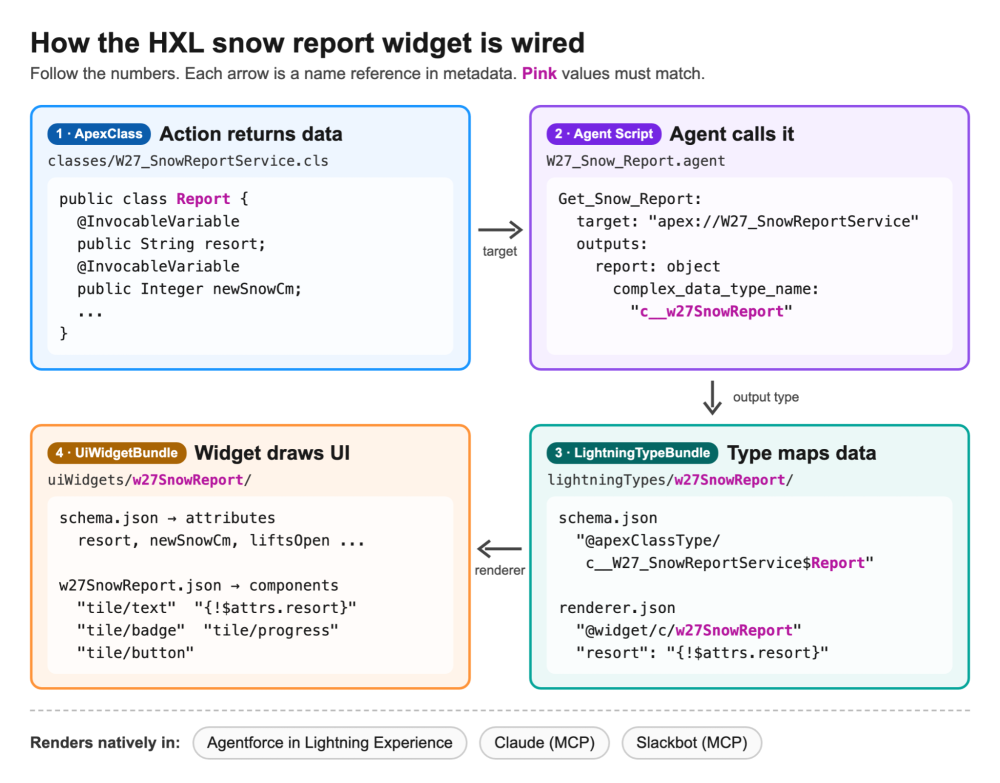
First, the agent’s action calls the Apex invocable method and types its output with a custom Lightning type, c__w27SnowReport.
1Get_Snow_Report:
2   description: "Returns today's snow report for a resort"
3   inputs:
4      resort: string
5         is_required: True
6   outputs:
7      report: object
8         complex_data_type_name: "c__w27SnowReport"
9         is_displayable: True
10   target: "apex://W27_SnowReportService"
The Lightning type is a LightningTypeBundle with two files. Its schema.json binds the type to the Report Apex class that the action returns.
1{
2  "title": "Snow Report",
3  "lightning:type": "@apexClassType/c__W27_SnowReportService$Report"
4}
Its renderer.json points to the w27SnowReport widget and maps each field of the Apex class to a widget attribute.
1{
2  "renderer": {
3    "componentOverrides": {
4      "$": {
5        "definition": "@widget/c/w27SnowReport",
6        "attributes": {
7          "resort": "{!$attrs.resort}",
8          "conditions": "{!$attrs.conditions}",
9          "newSnowCm": "{!$attrs.newSnowCm}",
10          "baseDepthCm": "{!$attrs.baseDepthCm}",
11          "liftsOpen": "{!$attrs.liftsOpen}",
12          "liftsTotal": "{!$attrs.liftsTotal}"
13        }
14      }
15    }
16  }
17}
The w27SnowReport widget itself is a UiWidgetBundle. Its composition file lays out HXL components and binds them to those attributes. Here’s an excerpt: the header, the lifts progress bar, and a button that sends a follow-up message to the agent.
1{ "definition": "tile/text", "attributes": { "text": "{!$attrs.resort}", "variant": "h2" } },
2{ "definition": "tile/badge", "attributes": { "label": "{!$attrs.conditions}", "variant": "success" } },
3{ "definition": "tile/progress",
4  "attributes": { "label": "Lifts open", "value": "{!$attrs.liftsOpen}", "max": "{!$attrs.liftsTotal}", "size": "md" } },
5{ "definition": "tile/button",
6  "attributes": {
7    "label": "Show lift hours",
8    "actions": { "click": [
9      { "definition": "action/sendMessage", "attributes": { "content": "What are the lift hours today?" } }
10    ] }
11  } }
Here’s the result in the Agentforce Builder preview. The action returns structured data, and the agent shows it as an interactive card instead of plain text.
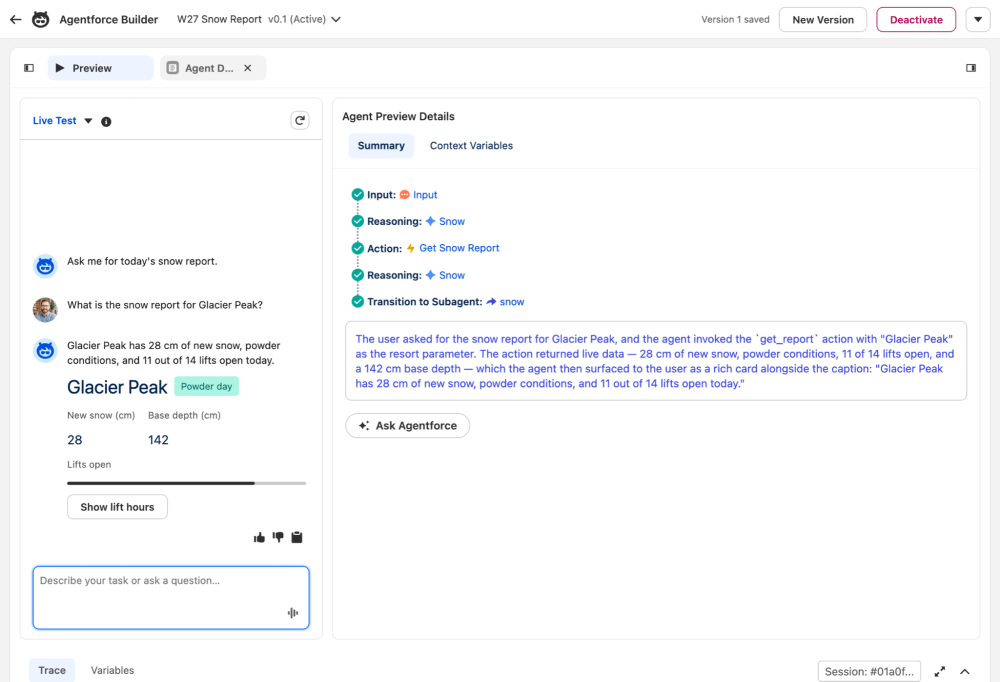
To try it, turn on Headless Experience Layer Settings in Setup, and deploy the widget and the Lightning type with sf project deploy start. To use the same widget in Claude or Slackbot, add the action as a tool on a custom MCP server. You can also explore components in the HXL Playground.
Salesforce MCP updates
Model Context Protocol (MCP) now works in both directions on Salesforce, through Salesforce Hosted MCP Servers and Agentforce. Your Agentforce agents can call MCP tools, and external AI clients can call your agents as MCP tools. Here’s what’s new.
Expose your Agentforce agents as MCP tools
Make an Agentforce agent available to any MCP client, such as Claude, ChatGPT, or Cursor, by adding it as a tool on a custom MCP server. The external client sends a request, and your agent handles it with its own instructions, actions, and knowledge sources. Every call runs as the authenticated user, so sharing rules, field-level security, and Einstein Trust Layer policies still apply.
To expose an agent:
- In Setup, go to Integration > Salesforce MCP Servers and open your custom server.
- Add a tool, and select Agentforce Agent as the backing type.
- Choose the agent, then give the tool a name and a description.
- Publish the server.
The agent’s required inputs become the tool’s parameter schema. Only agents built with the new Agent Script Builder can be exposed, so upgrade legacy agents first.
Tip: External models choose tools based only on the name and description. Make each tool task-specific. For example, one sales agent can back a “Schedule Customer Meeting” tool and a “Forecast Deal” tool instead of a single generic “Sales Agent” tool. Update the description whenever the agent’s instructions change.
Add MCP server tools to your Agentforce agents
Going the other way, you can now add AgentExchange MCP server tools to an agent directly in Agentforce Builder. The Actions modal lists MCP server tools next to standard agent actions. Use the MCP Server Tools filter to find them quickly.
Two related updates make the right server easier to find and manage:
- Agentforce Registry: Each MCP server on AgentExchange has its own card that shows its tools and the solutions it belongs to. From Setup, open Agentforce Registry, select Registered MCP Servers, and click New+ to open AgentExchange and browse server cards.
- API Catalog: Activate Salesforce hosted MCP servers for Agentforce and supported external MCP clients, and register external MCP servers, including MuleSoft.
Automate Marketing Cloud Engagement with 40 new MCP tools
The Marketing Cloud Engagement MCP server adds 40 tools, so your AI agent can handle more day-to-day operations in natural language. New tools create and run Automation Studio activities, manage campaigns and Content Builder folders, upsert bulk data, query data extensions, erase contacts, and retrieve email tracking events.
Salesforce CLI updates
Salesforce CLI ships every week, so a lot has landed since Summer ’26. Here are five updates worth acting on now.
Move off the temporary secrets workaround
Commands such as org display and org list --json no longer print access tokens, SFDX auth URLs, or passwords. The SF_TEMP_SHOW_SECRETS=true workaround that restores the old output goes away on October 28, 2026. When a script needs a secret, ask for it explicitly.
1sf org auth show-access-token --target-org my-org
2sf org auth show-sfdx-auth-url --target-org my-org
3sf org auth show-user-password --target-org my-org
Check your CI jobs now. A script that reads accessToken from org display --json gets [REDACTED] instead of a token, and the failure shows up later as a 401 error.
Scaffold async Apex with built-in best practices
New Batchable and Queueable values for the --template flag generate async Apex that follows platform best practices.
1sf template generate apex class --name ProcessAccounts --template Batchable
2sf template generate apex class --name SendEmail --template Queueable
The Batchable template uses a typed scope, an inline SOQL query, and Database.RaisesPlatformEvents. The Queueable template attaches a Finalizer, so your post-job logic runs even after an unhandled exception.
1public with sharing class SendEmail implements Queueable, Finalizer {
2
3    public void execute(QueueableContext context) {
4        System.attachFinalizer(this);
5        // TODO: implement job logic here
6    }
7
8    public void execute(FinalizerContext context) {
9        if (context.getResult() == ParentJobResult.UNHANDLED_EXCEPTION) {
10           // handle failure
11        }
12    }
13}
Control Apex debug logs from the command line
Set the debug log level when you run anonymous Apex. Use --debug-level for a predefined level, or --category-level for per-category control.
1sf apex run --file test.apex --debug-level DETAIL
2sf apex run --file test.apex --category-level Apex_code=FINEST --category-level Db=FINE
New apex trace commands to create, list, and delete trace flags are coming next in the release candidate.
Set up scratch orgs for realistic testing
Assign a role to a new scratch org user with roleDeveloperName in the user definition file.
1{
2  "Username": "w27.presenter@winter27demos.example",
3  "LastName": "Presenter",
4  "Email": "w27.presenter@winter27demos.example",
5  "profileName": "Standard User",
6  "roleDeveloperName": "W27_Demo_Presenter"
7}
To let Apex tests send email to unverified domains, enable enableSubstituteFromAddress in your scratch org definition file.
1{
2  "settings": {
3    "emailAuthorizationSettings": {
4      "enableSubstituteFromAddress": true
5    }
6  }
7}
Skip the source-tracking scan on large projects
When your org is already in sync with your project, such as an org pre-seeded with your metadata, set SF_SOURCE_TRACKING_ASSUME_SYNCED to skip the local scan before deploys and retrieves. On very large projects, this can save some time.
1export SF_SOURCE_TRACKING_ASSUME_SYNCED=true
2sf project deploy start --target-org my-org
Tip: Use it with extra care. If the org isn’t really in sync, it drifts further out of sync.
Also new: the api request rest and api request graphql commands are generally available, and Salesforce CLI now requires Node.js 22 or later. See the Salesforce CLI release notes for every command and flag.
Salesforce Platform API updates
Winter ’27 ships API version 68.0. Two changes need action from integration owners now, and two make everyday API work easier.
Assign Use Any API Auth before December 1, 2026
Beginning December 1, 2026, every user who authenticates with SOAP API login() needs the Use Any API Auth user permission. This applies to all orgs. Users without it get an error. Test the change in advance with the release update in Setup.
This is a step toward the bigger change. SOAP login() in API versions 31.0 through 64.0 retires in Summer ’27. Move those integrations to OAuth with external client apps.
Plan for the retirement of API versions 31.0 through 40.0
SOAP API, REST API, and Bulk API versions 31.0 through 40.0 are being retired. For REST, this covers every URI under /services/data/vXX.X/.
- Summer ’27 (deprecation): These versions stop getting security updates and bug fixes.
- Summer ’28 (retirement): Calls to these versions fail.
Search your integrations, scripts, and middleware for hard-coded versions in this range, and move them to a current version.
Use latest instead of a numbered REST API version
Replace the version segment in a REST API URI with latest. Salesforce routes the request to the most recent version that your org supports. To see which version latest resolves to, call the List Available REST API Versions resource.
1sf api request rest "/services/data/latest/sobjects/Account" --target-org my-orgIn our Winter ’27 org, latest resolved to v68.0. Use it for scripts and internal tools. Keep a pinned version for production integrations that depend on a specific contract.
Monitor composite API requests with EventLogFile
Query the EventLogFile object for the new CompositeApi and CompositeApiSubrequest event types. You get details for each composite and composite graph request, and for each subrequest. That helps when a composite call succeeds overall but one subrequest fails.
1SELECT EventType, LogDate, LogFileLength
2FROM EventLogFile
3WHERE EventType IN ('CompositeApi', 'CompositeApiSubrequest')
4ORDER BY LogDate DESC
LWC updates
Winter ’27 brings two Lightning Web Components (LWC) features to general availability and fills a few gaps for state managers and console apps. Upgrade your components to LWC API version 68.0 to pick up the latest behavior. According to the release notes, version 68.0 has no version-specific changes, so it’s an easy upgrade.
Write logic in templates with complex template expressions (GA)
You no longer need a getter just to join strings, count items, or pick a CSS class. Write a subset of JavaScript directly in the template with template expressions. Template expressions require API version 66.0 or later.
1<template>
2    <p>{`Hello, ${firstName} ${lastName}!`}</p>
3    <p>{isLoggedIn ? 'Welcome back!' : 'Please log in'}</p>
4    <p>Theme: {user?.profile?.settings?.theme ?? 'default'}</p>
5    <p>In-stock: {items.filter(item => item.qty > 0).length} of {items.length}</p>
6    <ul>
7        <template for:each={items} for:item="item">
8            <li key={item.name} class="{item.qty > 0 ? 'slds-text-color_success' : 'slds-text-color_error'}">
9                {item.name} ({item.qty})
10            </li>
11        </template>
12    </ul>
13</template>
Keep these rules in mind:
- Quote attribute expressions: The compiler requires double quotes around an expression in an attribute value, as in
class="{...}". - Keep expressions simple: You can’t use
this,new, or function declarations in an expression. - Iterate over expressions:
for:eachaccepts a quoted expression that returns an array, such asfor:each="{items.filter(item => item.qty > 0)}". Each item still needs a uniquekey.
Use third-party web components with lwc:external (GA)
Use an existing third-party web component library in LWC without rewriting it or wrapping it in an iframe. Load the library, then add lwc:external to the custom element so it renders as a native web component.
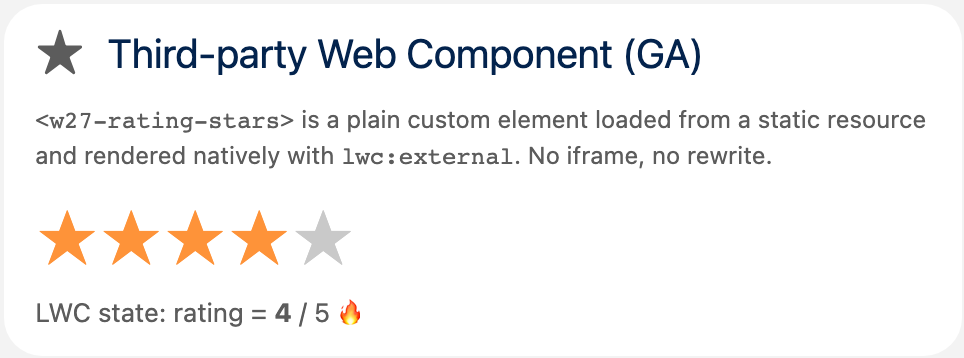
Our example uses w27-rating-stars, a plain, framework-free custom element packaged as an IIFE and uploaded as a static resource named w27RatingStars. It knows nothing about LWC. It reads value and max attributes and fires a standard rate event. In your LWC, load the static resource and render the element with lwc:external.
1<template>
2    <template lwc:if={libraryLoaded}>
3        <w27-rating-stars lwc:external value={rating} max="5" lwc:spread={starProps} onrate={handleRate}>
4        </w27-rating-stars>
5    </template>
6</template>1import { LightningElement } from 'lwc';
2import { loadScript } from 'lightning/platformResourceLoader';
3import RATING_STARS from '@salesforce/resourceUrl/w27RatingStars';
4
5export default class ExternalComponent extends LightningElement {
6 rating = 4;
7 starProps = { 'data-qa': 'product-rating' };
8 libraryLoaded = false;
9
10 async connectedCallback() {
11 await loadScript(this, RATING_STARS);
12 this.libraryLoaded = true;
13 }
14
15 handleRate(event) {
16 this.rating = event.detail.value;
17 }
18}Note: Third-party web components require Lightning Web Security. Load libraries as IIFE or UMD bundles, because loadScript doesn’t support ES modules. On an lwc:external element, LWC passes values as attributes by default and sets properties only when the custom element defines them.
Here’s the w27-rating-stars component rendered inside a Lightning web component.
Refresh state manager data with refresh()
Some state managers serve data without a single record ID, such as related list records. You can now call refresh() on these managers to pull fresh data after an update. You don’t need to reload the page or create a new manager. Ensure the current status is loaded before calling it. The status remains loaded during execution, and the returned promise resolves once data populates with the latest results.
1import { LightningElement, api } from 'lwc';
2import relatedListRecords from 'lightning/stateManagerRelatedListRecords';
3
4export default class OpportunityList extends LightningElement {
5    @api recordId;
6    related = relatedListRecords({
7        parentRecordId: undefined,
8        relatedListId: 'Opportunities',
9        fields: ['Opportunity.Name']
10    });
11
12    connectedCallback() {
13        this.related.value.setParentRecordId(this.recordId); // load the Account's Opportunities
14    }
15
16    async handleRefresh() {
17        const sm = this.related.value;
18        if (sm.status === 'loaded') {
19            await sm.refresh(); // rejects if the status isn't loaded
20        }
21    }
22}
Note: status, data, and refresh() live on related.value, not on related.
Apex updates
Winter ’27 gives Apex more room to work and better ways to test and inspect your code. Here are the highlights, with examples.
Handle larger payloads with higher heap limits
The Apex heap limit increases from 6 MB to 10 MB for synchronous transactions and from 12 MB to 25 MB for asynchronous transactions. The new limits are turned on automatically. Deploying from a Winter ’27 sandbox to a Summer ’26 production org? In the sandbox, open Apex Settings in Setup and select Enforce the Summer ’26 Apex heap limit until production upgrades.
Test real callouts with Apex integration tests (Developer Preview)
Unit tests can’t make real callouts, so a mock can hide a broken named credential or payload. Integration tests let you call the real service from a scratch org. They aren’t available in production orgs or sandboxes, and they don’t count toward code coverage. Turn on the ApexIntegrationTests feature in your scratch org definition file, then annotate the class and its test methods with @IntegrationTest.
1@IntegrationTest
2public with sharing class W27_ExternalServiceIntegrationTest {
3    @BeforeClass
4    static void setup() {
5        insert as user new Account(Name = 'W27 PaymentTestAccount');
6    }
7    @IntegrationTest
8    static void testExternalServiceCallout() {
9        Account a = [SELECT Id FROM Account WHERE Name = 'W27 PaymentTestAccount' WITH USER_MODE LIMIT 1];
10        HttpRequest req = new HttpRequest();
11        req.setEndpoint('callout:W27_Echo/get?status=verified&account=' + a.Id);
12        req.setMethod('GET');
13        HttpResponse res = new Http().send(req);
14        Assert.areEqual(200, res.getStatusCode());
15        Assert.isTrue(res.getBody().contains('verified'));
16    }
17    @TearDown
18    static void tearDown() {
19        delete [SELECT Id FROM Account WHERE Name = 'W27 PaymentTestAccount'];
20    }
21}
Integration tests don’t roll back data, so clean up in @TearDown. It runs after each test method, so with several methods, delete only per-method data there. Only one integration test class can run per org at a time, and runs are asynchronous only. Run them with sf apex run test, without --synchronous. If you register Test.setMock(), the mock still wins.
Compare two fields in SOQL with FORMULA() (Beta)
Compare fields directly in a WHERE clause with FORMULA() instead of creating a formula field just for a query. FORMULA() requires API version 68.0 and isn’t available in production orgs.
1List<Opportunity> openBalances = Database.query(
2    'SELECT Name, Amount_To_Pay__c, Amount_Paid__c FROM Opportunity ' +
3    'WHERE FORMULA(\'Amount_To_Pay__c - Amount_Paid__c\') > 0 ' +
4    'WITH USER_MODE ORDER BY Name'
5);
Prevent field name collisions in managed package queries
If a subscriber creates a field with the same API name as a field in your managed package, dynamic SOQL in your package can resolve the wrong field. Build a Database.QueryOptions object with withExplicitNamespace(true), and bind it with a SET OPTIONS clause. For details, see Prevent Field Name Collisions in Managed SOQL Queries.
1Database.QueryOptions options = Database.QueryOptions.builder()
2    .withExplicitNamespace(true)
3    .build();
4List<SObject> rows = Database.queryWithBinds(
5    'SELECT Id, Name FROM Opportunity WHERE Name LIKE :prefix LIMIT 5 SET OPTIONS :options',
6    new Map<String, Object>{ 'prefix' => 'W27%', 'options' => options },
7    AccessLevel.USER_MODE
8);
Note: Put SET OPTIONS after the other clauses, including WHERE, ORDER BY, LIMIT, and OFFSET. Only FOR UPDATE can follow it.
Look up Apex types with the Apex Symbol API (Beta)
The Apex Symbol API is a Tooling API resource that returns the same type information the Apex compiler uses, for built-in, custom, packaged, and dynamic types. Use it to power code completion or to ground a coding agent before it writes Apex. Set category to builtin, database, or dynamic, and narrow the results with namespace and name. The API handles one request per org at a time.
1sf api request rest "/services/data/v68.0/tooling/symbols?category=builtin&namespace=Database&name=QueryOptionsBuilder" --target-org my-orgPage through Data 360 objects with Apex cursors (Beta)
Apex cursors now work with Data 360 Data Model Objects (DMOs). Fetch any slice of a large result set, forward or backward, without Batch Apex. In one of my orgs with Data 360, the same pattern pages through more than 1.4 million rows successfully.
1Database.Cursor cursor = Database.getCursor(
2    'SELECT device_id__c, event_ts__c, power_draw_w__c FROM Radiant_Reading__dlm ORDER BY event_ts__c DESC'
3);
4Integer total = cursor.getNumRecords();
5List<SObject> lastPage = cursor.fetch(Math.max(total - 50, 0), 50); // jump straight to the end
DMO queries can consume Data Services credits from your Data 360 subscription. Track usage with Limits.getDataCloudCursors() and Limits.getDataCloudCursorRows(). Cursors expire 24 hours after you create them.
More Apex updates
- Test Discovery API: Filter results with the
testLevelparameter, such asRunLocalTests. In API version 68.0,testLevelreplacesshowAllMethods. - Recompile only invalid Apex: In Setup, use Compile only invalid classes or Compile only invalid triggers instead of recompiling the whole org. To get the errors programmatically, call the Tooling API apexCompileResults resource.
- Old API version warnings: The compiler now warns about classes and triggers saved at API versions 9.0 through 19.0, which will be retired. Move them to API version 20.0 or later.
- Elastic limits for Batch Apex (Beta): Elastic limits now cover Batch jobs, in addition to Queueable jobs and future methods. Jobs keep running above the rolling 24-hour async limit, and you can test this in non-production orgs.
Agentforce monthly updates
Agentforce ships updates every month, and the August and September updates arrive with Winter ’27. This round gives Agent Script a lot of new language features. It also makes multi-agent solutions generally available and simplifies how you move agents between orgs.
Write more expressive agents with new Agent Script language features
Agent Script now handles more logic without an extra action or a prompt workaround.
- New expression functions:
lower(),upper(),to_json(),from_json(), andjson_path(obj, path, default).
else ifchains: Branch on more than two conditions. Nestedifstatements andelifstill aren’t supported.- New system variables:
@system_variables.current_connectionand@system_variables.current_modalitytell your agent where and how it’s talking to the user. - Deterministic escalation: A top-level
escalatestatement hands the conversation to a human when a condition is met. The example below uses each of these features.
1before_reasoning:
2   set @variables.tier = upper(@variables.tier_input)
3   set @variables.first_sku = json_path(from_json(@variables.order_json), "$.items[0].sku", "none")
4   if @variables.score >= 90:
5      set @variables.band = "high"
6   else if @variables.score >= 70:
7      set @variables.band = "medium"
8   else:
9      set @variables.band = "low"
10reasoning:
11   instructions: ->
12      | Recent tags: {!@variables.recent_tags[0:2]}. You're on {!@system_variables.current_modality}.
13after_reasoning:
14   if @variables.needs_human:
15      escalate
Format action output per connection
Tell your agent exactly how to format an action’s output on each connection. Add a when @connection.<name> block to the action, and pick a response format with render. The new built-in json format sends the action’s structured output directly to the client. Add show_and_return: True to send the response and end the turn.
1connection messaging:
2   label: "Messaging"
3subagent menu:
4   reasoning:
5      actions:
6         get_menu: @actions.Get_Menu_For_Restaurant
7            with restaurant=...
8            when @connection.messaging
9               render: @response_formats.json
10                  show_and_return: True
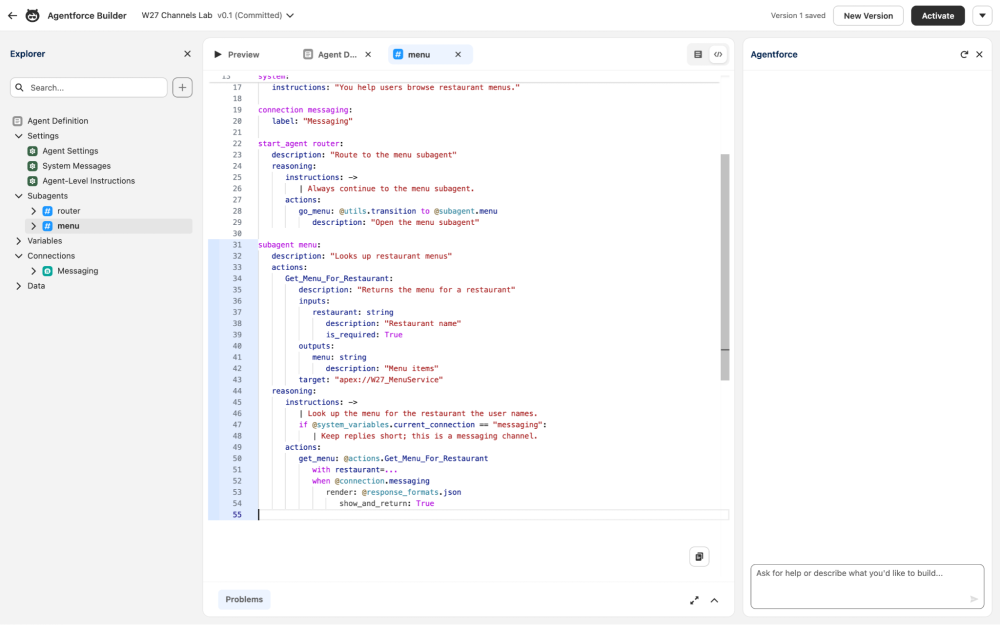
The compiler checks that each format belongs to its connection. After we published the agent, the rule appeared as a messaging render rule that returns JSON and ends the turn. To shape replies with natural language instead, add connection instructions to the Messaging, Service Email, or Marketing Email connection.
Accept file uploads in agent conversations
Service and Employee agents can now accept screenshots, receipts, and PDFs on Enhanced Chat v1, Enhanced Chat v2, and Lightning Experience. Your agent can read the file, attach it to a record, or use it as context. This feature is rolling out starting the week of September 21, 2026.
Turn it on in the agent’s config block. The mode can be auto (the default), managed, disabled, or error. In managed mode, uploaded files land in @system_variables.uploaded_files, so your script decides what to do with them.
1config:
2   developer_name: "W27_Channels_Lab"
3   file_upload:
4      mode: "managed"
5   runtime:
6      streaming: True
The new runtime block shown here also lets you set runtime behavior, such as streaming and citations, per agent.
Delegate to specialist agents with Multi-Agent Orchestration (GA)
Multi-Agent Orchestration is generally available. Connect an orchestrator agent to specialized agents in your org, and let each agent do what it does best. Declare the specialist as a connected_subagent, then hand off to it like any other subagent.
1start_agent concierge:
2   reasoning:
3      instructions: ->
4         | Answer resort questions yourself. Hand off menu questions to the menu specialist.
5      actions:
6         ask_menu_specialist: @utils.transition to @connected_subagent.Menu_Specialist
7            description: "Hand off restaurant menu and food questions"
8
9connected_subagent Menu_Specialist:
10   target: "agent://W27_Menu_Specialist"
11   description: "Answers questions about restaurant menus"
12   delegate_escalation: True
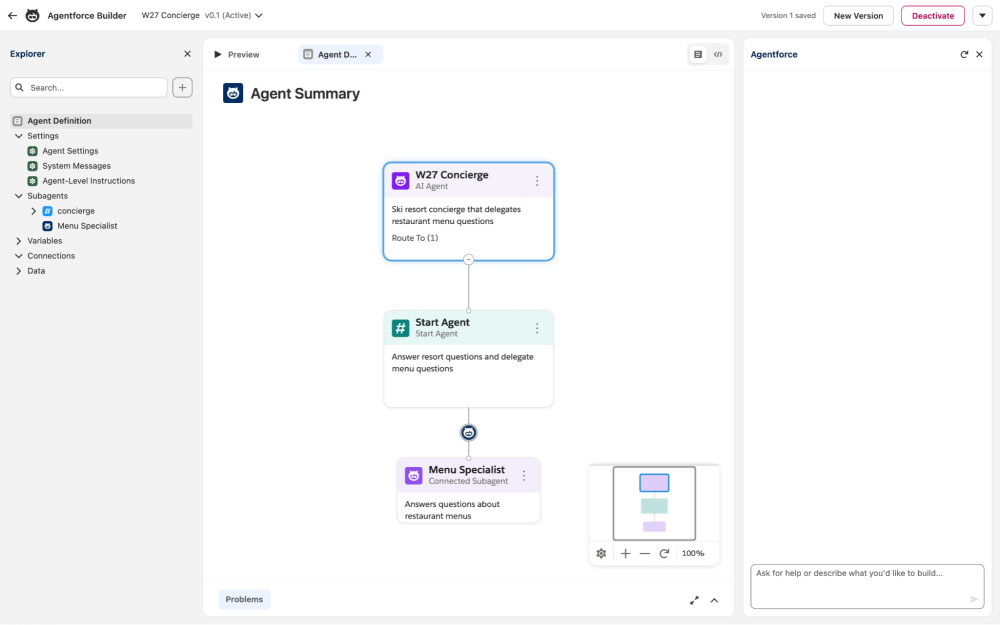
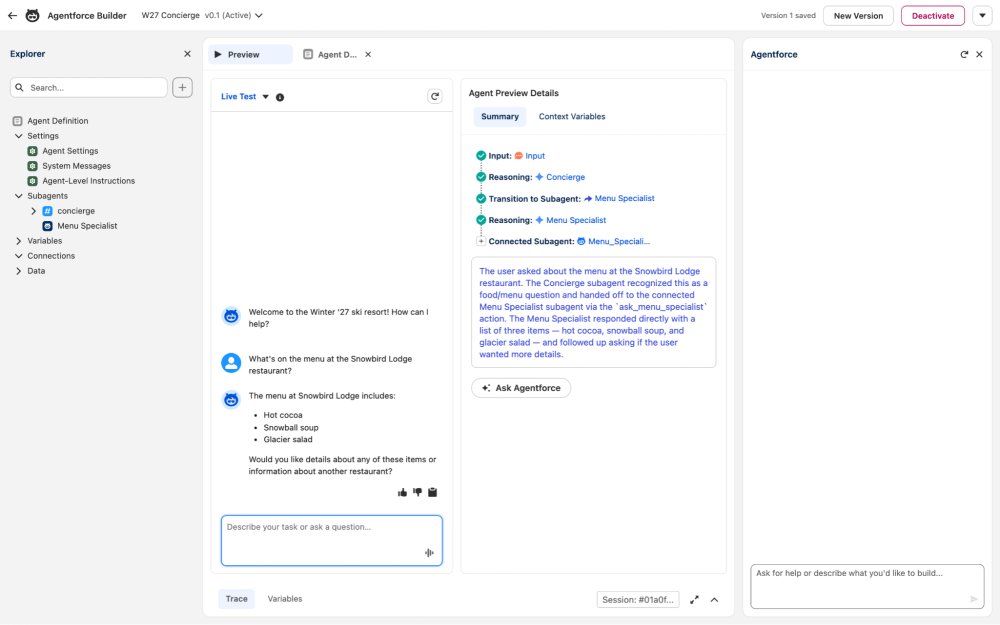
In our test example, a menu question moved from the concierge to the specialist, which called its Apex action and answered. A question about ski lift hours stayed with the concierge.
Deploy agents between orgs with simplified metadata types
Starting in API version 68.0, an agent is described by two metadata types: AiAgentDefinition and AiAgentDefinitionVersion. You no longer list every planner, plugin, Apex class, flow, and prompt template by hand. Retrieve a version with its dependencies in one command.
1sf project retrieve start --metadata "AiAgentDefinitionVersion:W27_Channels_Lab#1" --root-type-with-dependencies AiAgentDefinitionVersionIn our org, this returned the agent definition, the version, its Agent Script authoring bundle, and the Apex class behind its action. Both orgs must be on API version 68.0. Until production upgrades, keep using the previous metadata types to deploy from a Winter ’27 sandbox.
Also new: Compare and merge agent versions in Agentforce Builder, and the Agentforce platform is now turned on by default. Gemini 2.5 Pro, Flash, and Flash-Lite requests are rerouted to newer Gemini models on October 20, 2026, so test your prompts now.
To see the latest Agent Script grammar, linter, and compiler, explore the open-source Agent Script repository.
Data 360 monthly updates
Data 360 ships updates as often as monthly, and changes included in Winter ’27 are generally listed under October 2026 in the release notes. Here are two key updates for developers.
Measure RAG retriever quality with advanced retriever metrics
Retrievers find the content that grounds retrieval-augmented generation (RAG). To measure one, test it in the Retriever Playground in Advanced Mode with a question and a reference answer. Data 360 now returns a context precision score. Context precision measures how well the retriever ranks relevant chunks above irrelevant ones. A higher score means the relevant chunks are at the top. The metrics panel also shows the retrieval response time and the retrieved chunks.
To track retriever quality from code, query the AI Retriever Quality Metric DMO (ssot__AiRetrieverQualityMetric__dlm). Each row holds the context precision, answer relevancy, and faithfulness scores for a retriever request, along with the user utterance and the IDs of the retrieved context. This query averages the scores for each retriever over the last seven days.
1List<AggregateResult> scores = [
2    SELECT ssot__RetrieverApiName__c retriever,
3           AVG(ssot__ContextPrecisionScoreNumber__c) contextPrecision,
4           AVG(ssot__AnswerRelevancyScoreNumber__c) answerRelevancy,
5           AVG(ssot__FaithfulnessRelevancyScoreNumber__c) faithfulness,
6           COUNT(Id) samples
7    FROM ssot__AiRetrieverQualityMetric__dlm
8    WHERE ssot__MetricCreatedTimestamp__c = LAST_N_DAYS:7
9    GROUP BY ssot__RetrieverApiName__c
10];
Compare these averages before and after you change chunking, the search index, or the model, so you know which change moved the score. Testing retrievers consumes credits. For details, see Billing Considerations for Testing Retrievers.
Transform zero-copy data with Python code extensions
Code extension runs your custom Python batch transforms in Data 360. Winter ’27 extends them to zero-copy data: a data lake object (DLO) backed by a zero-copy connector, or a data model object (DMO) mapped from that DLO. The connector reads the data in place on the external platform, so you skip the ingestion step and the cost of storing a copy. Your script needs no special configuration. It runs the same way on federated data as on ingested data.
Write the script with the Code Extension plugin for Salesforce CLI (Beta). The SDK hands you a PySpark DataFrame. This script reads a DMO, averages signal strength for each device, and writes the result to another DMO.
1from pyspark.sql.functions import avg, count, round
2
3from datacustomcode.client import Client
4from datacustomcode.io.writer.base import WriteMode
5
6
7def main():
8    client = Client()
9
10    readings = client.read_dmo("Radiant_Reading__dlm")
11
12    signal_by_device = readings.groupBy("device_id__c").agg(
13        round(avg("signal_dbm__c"), 1).alias("avg_signal_dbm__c"),
14        count("*").alias("reading_count__c"),
15    )
16
17    client.write_to_dmo(
18        "Radiant_Device_Signal__dlm", signal_by_device, write_mode=WriteMode.OVERWRITE
19    )
20
21
22if __name__ == "__main__":
23    main()
Create the package, run scan to fill in the read and write permissions in config.json, and then run the script locally against your org.
1sf plugins install @salesforce/plugin-data-code-extension
2sf data-code-extension script init --package-dir ./radiant-script
3sf data-code-extension script scan --entrypoint ./radiant-script/payload/entrypoint.py
4sf data-code-extension script run --entrypoint ./radiant-script/payload/entrypoint.py --target-org my-org
A local run reads a sample of rows through the Query API and prints the output DataFrame instead of writing it, so you can test against real data safely. When the output looks right, zip and deploy the package with sf data-code-extension script deploy, and then run it from a batch data transform.
Platform development tool updates
Winter ’27 brings a new in-browser IDE, Apex performance scans from your coding agent, and region-aware routing for Agentforce Vibes.Here’s what’s new.
Write and run code in the browser with Web Console (GA)
Web Console is a browser-based IDE built on VS Code for Web and built into Salesforce, so there’s nothing to install. Open it from the Setup menu by selecting Web Console, or click Edit on an Apex class or trigger in Setup.
In Web Console, you can:
- Edit code: Edit and save Apex, and view and edit Lightning web components with Org Browser.
- Run Apex and SOQL: Run anonymous Apex scripts, and build queries with SOQL Builder and see their query plans.
- Test and debug: Run Apex tests from the Testing panel, create a trace flag, and get debug logs.
- Work with metadata: Browse, retrieve, and deploy your org’s metadata.
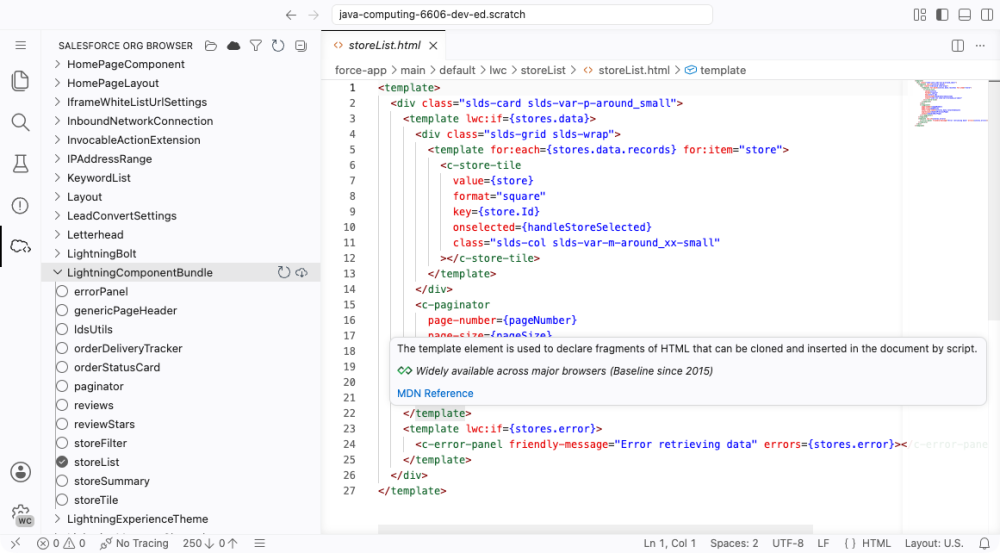
Apex is read-only in production orgs, so make your edits in a sandbox or other non-production org. Running queries requires the Use Any API Client user permission. See supported editions for availability.
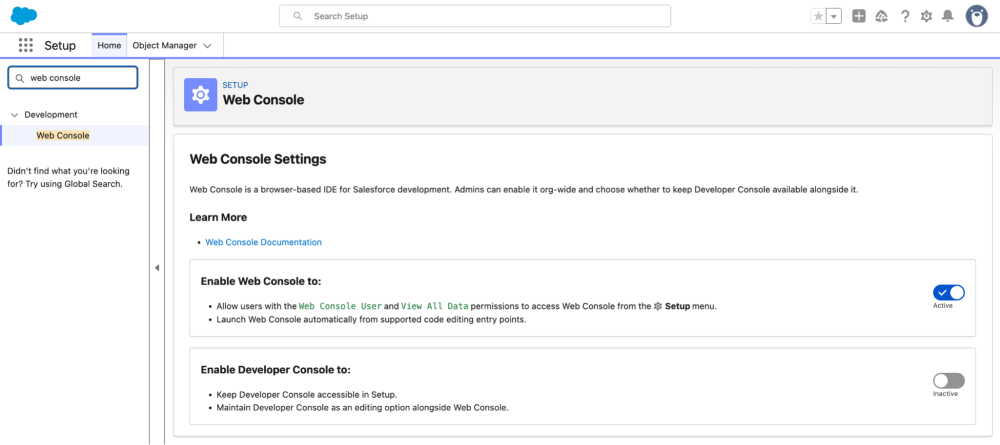
In Winter ’27, Developer Console doesn’t appear in the Setup menu by default. To bring it back, from Setup, enter Development in the Quick Find box, select Web Console, and set Enable Developer Console to Active. If you switch back, share your reasons in the Web Console feedback repository.
Scan Apex for performance antipatterns with ApexGuru
Ask your coding agent to check Apex for performance issues with the scan_apex_class_for_antipatterns tool from ApexGuru in the Salesforce DX MCP Server. The tool works in Agentforce Vibes, Claude Code, Cursor, and other MCP clients. Turn it on with the scale-products toolset.
1{
2  "servers": {
3    "Salesforce DX": {
4      "command": "npx",
5      "args": ["-y", "@salesforce/mcp", "--orgs", "DEFAULT_TARGET_ORG", "--toolsets", "scale-products"]
6    }
7  }
8}
ApexGuru also finds exact and near-duplicate Apex code, ranked by how many characters you can remove. From Setup, open Scale Center, go to Scale Insights, and click ApexGuru Insights to review the Code Duplicates recommendations. ApexGuru runs in production and Full Copy sandbox orgs, and it’s included at no extra cost for Unlimited Edition, Signature Success Plan, and Scale Test customers.
Keep Agentforce Vibes requests in your org’s region
Route Agentforce Vibes AI requests to the model endpoint closest to your Salesforce org, instead of to the United States by default. When geo-aware routing is on, the model picker shows only the models available in your org’s region. To turn it on, from Setup, enter Agentforce Vibes Extension in the Quick Find box, and turn on Enable Geo-Aware Routing for this Org. Data 360 must be turned on first.
Scratch orgs don’t inherit this setting, so add it to your scratch org definition file.
1{
2  "settings": {
3    "agentforceForDevelopersSettings": {
4      "agentforceForDevelopersGeoAwareOptIn": true
5    }
6  }
7}
By default, a request falls back to the United States when no model is available in your region. To return an error instead, in Einstein Setup, turn on Enable In-Region Model Request Only. This setting doesn’t yet apply to Anthropic and Gemini models.
Conclusion
Winter ’27 is the release that makes Salesforce truly headless. Every major capability, including data, automation, grounding, and agents, is now reachable from a CLI, an API, your IDE, or an autonomous AI agent, with security enforced by default. With the Headless Experience Layer, the UI you build once rendered in Lightning Experience, ChatGPT, Claude, and Slackbot.
The best way to get ready is to spin up a sandbox, scratch org or a Developer edition org and try these features before they reach production. Have questions, or want to share what you’re building? Join the conversation in the Salesforce Developers Trailblazer Community, or connect with us on the Salesforce Developers channels.
More Winter ’27 learning resources
- Read the official release notes
- Join the Salesforce Developers Trailblazer Community group to connect with the global developer community
- Join the Release Readiness Trailblazers Community group to get early access to release information and discuss changes with other developers
About the author
Mohith Shrivastava is a Principal Developer Advocate at Salesforce with 15 years of experience building enterprise-scale products on the Salesforce Platform. Mohith is currently among the lead contributors on Salesforce Stack Exchange, a developer forum where Salesforce Developers can ask questions and share knowledge. You can follow him on LinkedIn.