


Salesforce Voice with Partner Telephony Developer Guide
 j
jUse the Demo Connector
Start the Demo Connector
- Clone the git repo, and install the NPM
dependencies.
1$ git clone git@github.com:salesforce-misc/byo-demo-connector.git 2$ cd byo-demo-connector 3$ npm install - Add a private key generated from Generate a Self-Signed Certificate with OpenSSL.
1{byo-demo-connector} 2 |__src 3 |__server 4 |__private.key - Launch the tool.
1$ npm start
By default, the web server runs in SSL on port 8080. The adapterUrl in your contact center points to this web server (for example, https://www.myTelephonyDemo.com:8080).
The previous command also starts the Salesforce Voice REST APIs connector on default port 3030. It’s used for creating voice calls, transcription, and recording.
1$ npm run client
2$ npm run server
Verify That the Connector Is Loaded
- The byo-demo-connector app uses a self-signed
certificate, so get your web browser to accept a self-signed certificate.
- Open the byo-demo-connector app URL (for example, https://serverURL:8080/remote.html) in a separate tab.
- Click through any warnings for untrusted certificates.
- Log in to Salesforce as one of the users in the contact center.
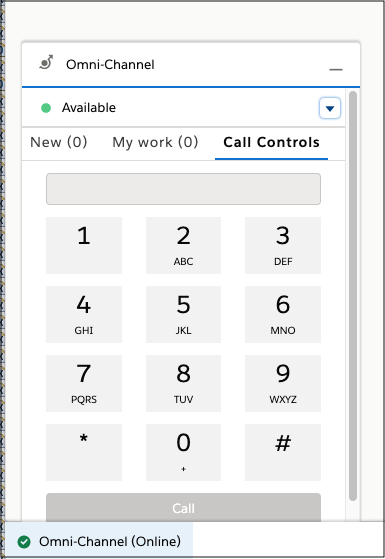
- Log in to the Omni-Channel utility and change the rep status to Available.
 Open the Browser Debugger and make sure that you see messages from the
connector. The messages start with [sdk] or [connector].
Open the Browser Debugger and make sure that you see messages from the
connector. The messages start with [sdk] or [connector].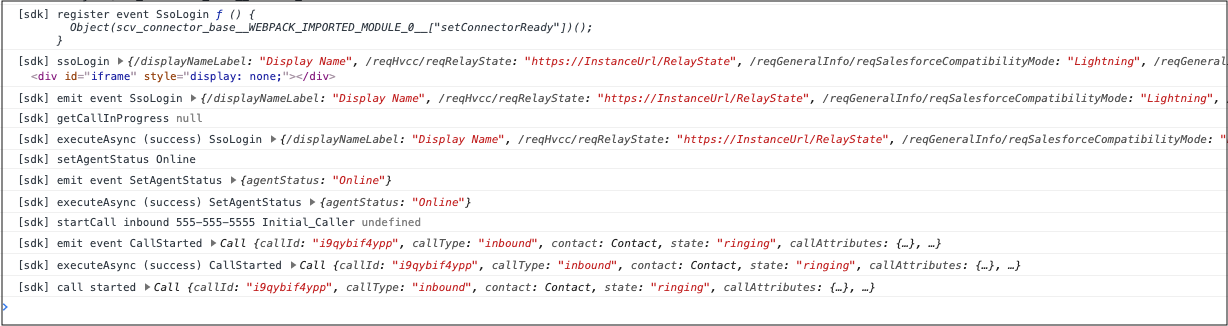
Demo Connector Storage
In version Summer ’26 and later, the demo connector uses a server-side storage architecture instead of browser localStorage.
Architecture components:
- RemoteStorage Class: Abstraction layer for storage operations
- REST API endpoints: GET/POST /api/users/{username}/{storageKey}
- Context-Based Storage: Data scoped per username
- Asynchronous operations: All storage methods return promises
Storage keys:
- activeCalls: Active phone calls
- agentConfig: Rep phone configuration such as softphone and desk phone selection
- capabilities: Rep capabilities such as mute, record, merge
- contactTypes: Available contact types for add participant
- callInfo: Current call information
Use these curl commands to debug and locally test the demo connector. The commands query the in-memory storage for development purposes. Don't use these API patterns in your production connector implementation.
Query storage with a REST API, where {username} is in the format john.doe@example.com:
1# Get active calls for a user
2curl http://localhost:8080/api/users/{username}/activeCalls
3
4# Get rep configuration
5curl http://localhost:8080/api/users/{username}/agentConfig
6
7# Get capabilities
8curl http://localhost:8080/api/users/{username}/capabilities
Store data with a REST API:
1# Set agent configuration
2curl -X POST http://localhost:8080/api/users/{username}/agentConfig \
3  -H "Content-Type: application/json" \
4  -d '{"phones":["SOFT_PHONE","DESK_PHONE"],"selectedPhone":{"type":"SOFT_PHONE"}}'
To migrate to version Summer ’26 and later, update how you’re handling storage. If you've customized the demo connector code for your own custom connector implementation, check your integration and make these updates.
- All storage operations are async (use await).
- Methods like getActiveCallsObj() and handleSocketMessage() are async.
- Replace localStorage calls with remoteStorage.getItem() and remoteStorage.setItem().
Debug the Demo Connector
In version Summer ’26 and later, use a REST API to debug the demo connector.
Query storage state with REST API :
1# Check active calls
2curl http://localhost:8080/api/users/{username}/activeCalls
3
4# Check rep configuration
5curl http://localhost:8080/api/users/{username}/agentConfig
6
7# Check capabilities
8curl http://localhost:8080/api/users/{username}/capabilities
9
10# Check call info
11curl http://localhost:8080/api/users/{username}/callInfo
Example response:
1{
2  "username": "john.doe@example.com",
3  "storageKey": "agentConfig",
4  "value": {
5    "phones": ["SOFT_PHONE", "DESK_PHONE"],
6    "selectedPhone": {
7      "type": "SOFT_PHONE"
8    }
9  }
10}