


 j
jAnnouncements
Why Use SCAPI
Base URL and Request Formation
Quick Start
Migrate from Salesforce B2C Commerce Connectors to MuleSoft HTTP Connector
SCAPI Specifications
B2C Commerce Release Notes
Ask the Community
The Salesforce B2C Commerce Data Connector and Salesforce B2C Commerce Shop Connector are deprecated and replaced with the MuleSoft HTTP Connector.
If you have existing Mule apps that currently use the Salesforce B2C Commerce Connectors, use the following steps as a blueprint to migrate to the MuleSoft HTTP Connector.
The Salesforce B2C Commerce Data Connector has two main elements. Both need to be migrated to the MuleSoft HTTP Connector request operation:
You must migrate the am-oauth2-configuration to the mule-oauth-module extension of the HTTP Connector.
For details, see Configure OAuth2 Client Credentials Grant Type Authentication.
1<dependency>
2    <groupId>org.mule.connectors</groupId>
3    <artifactId>mule-http-connector</artifactId>
4    <version>1.10.3</version>
5    <classifier>mule-plugin</classifier>
6</dependency>1<dependency>
2 <groupId>org.mule.modules</groupId>
3 <artifactId>mule-oauth-module</artifactId>
4 <version>1.1.21</version>
5 <classifier>mule-plugin</classifier>
6</dependency>Create an HTTP Request configuration as a global configuration element. This is used in all flows.
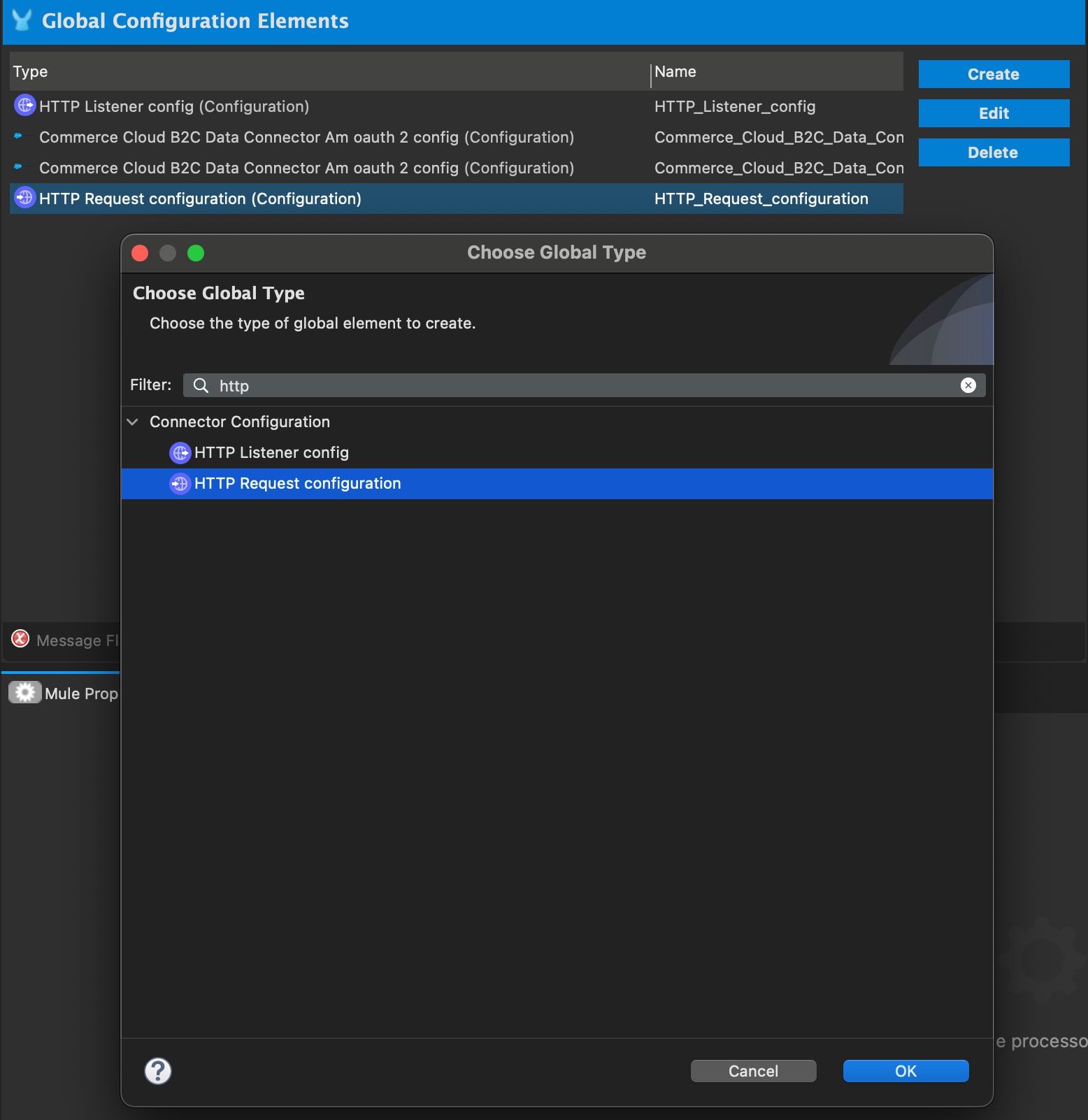
For Authentication, select Client credentials grant type.

Specify Protocol and Host properties.
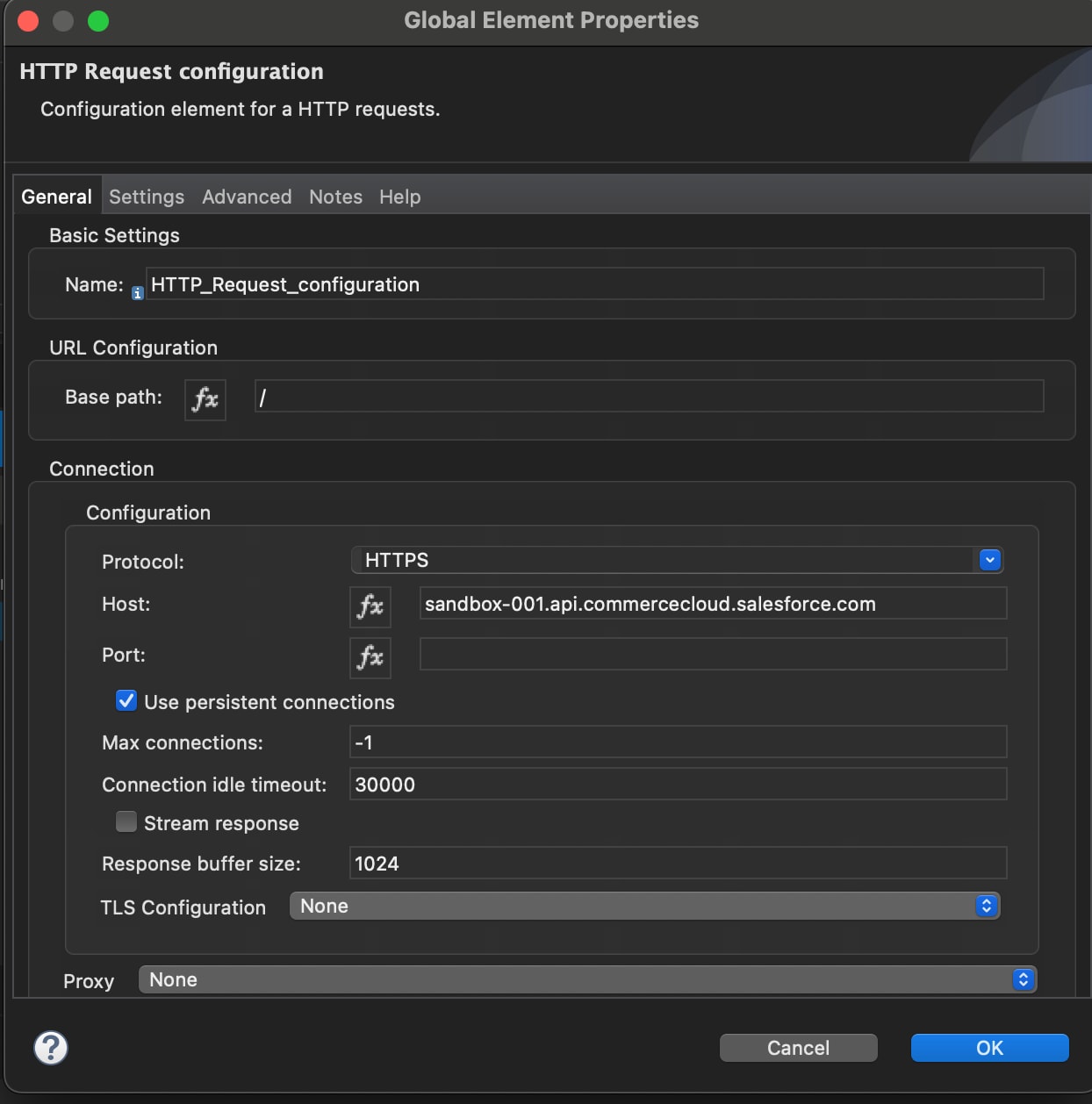
Configure the new http:request-config properties with the following values from your existing am-oauth2-config.
Make sure scopes contains the scope for your instance, for example: SALESFORCE_COMMERCE_API:bjms_dev.
Note
http:request-config property name | Value | Copy from am-oauth2-config |
|---|---|---|
| host | baseUri | Yes |
| protocol | HTTPS | No, static value |
| clientId | clientId | Yes |
| clientSecret | clientSecret | Yes |
| scopes | scopes | Yes |
| tokenUrl | tokenUrl | Yes |
The global HTTP Request Configuration with OAuth authentication is now fully configured.
Before migration:
1<commerce-cloud-dataapi:am-oauth2-config
2    name="Commerce_Cloud_B2C_Data_Connector_Am_oauth_2_config"
3    doc:name="Commerce Cloud B2C Data Connector Am oauth 2 config"
4    doc:id="11bc93bc-e1aa-4004-bae3-f8570173fdf2"
5>
6    <commerce-cloud-dataapi:am-oauth2-connection baseUri="<url>">
7        <commerce-cloud-dataapi:oauth-client-credentials
8            clientId="<clientID>"
9            clientSecret="<clientSecret>"
10            scopes="SALESFORCE_COMMERCE_API:bjms_dev sfcc.example sfcc.products.rw sfcc.products"
11            tokenUrl="<tokenURL>"
12       />
13    </commerce-cloud-dataapi:am-oauth2-connection>
14</commerce-cloud-dataapi:am-oauth2-config>
After migration:
1<http:request-config name="HTTP_Request_configuration" >
2    <http:request-connection host="<url>" protocol="HTTPS>
3    <http:authentication>
4        <oauth:client-credentials-grant-type
5        clientId="<clientID>"
6        clientSecret="<clientSecret>"
7        tokenUrl="<tokenURL>"
8        scopes="SALESFORCE_COMMERCE_API:bjms_dev sfcc.example sfcc.products.rw sfcc.products" />
9    </http:authentication>
10    </http:request-connection>
11</http:request-config>All commerce-cloud-dataapi operations have an organizationId, config-ref, version_ property, and various additional properties corresponding to the operation, for example, get-product has a productId:
1<flow name="DataConnectorMigrationFlow"
2    doc:id="adf832b2-733e-4e18-8fb9-c35570c81083"
3>
4    <http:listener
5        doc:name="Listener"
6        doc:id="b381c6c5-b5c8-4f12-bed7-f0e0df1d6076"
7        config-ref="HTTP_Listener_config"
8        path="/test" />
9    <commerce-cloud-dataapi:get-product-products-organizations-products-by-version-organization-id-product-id
10        doc:name="Get Product"
11        doc:id="6b1b33d9-86c8-458f-89fe-9b35272bd6fe"
12        config-ref="Commerce_Cloud_B2C_Data_Connector_Config"
13        version="v1"
14        organizationId="f_ecom_bjms_dev"
15        productId="apple-ipod-classic"
16    />
17</flow>
Migrate all flows in your application using the following steps:
1<flow name="HTTPConnectorFlow"
2    doc:id="23142ccf-73ed-4711-8ae0-322d8996d374"
3>
4    <http:listener
5      doc:name="Listener"
6      doc:id="ac5d6ce1-260e-4147-a0bb-8e1fa0d430ec"
7      config-ref="HTTP_Listener_config"
8      path="/test2"
9   />
10    <http:request
11      method="GET"
12      doc:name="Request"
13      doc:id="8825fb47-cb94-4b9d-a2e6-5afd927389c1"
14      config-ref="HTTP_Request_configuration"
15      path="/product/products/v1/organizations/f_ecom_bjms_dev/products/apple-ipod-classic"/>
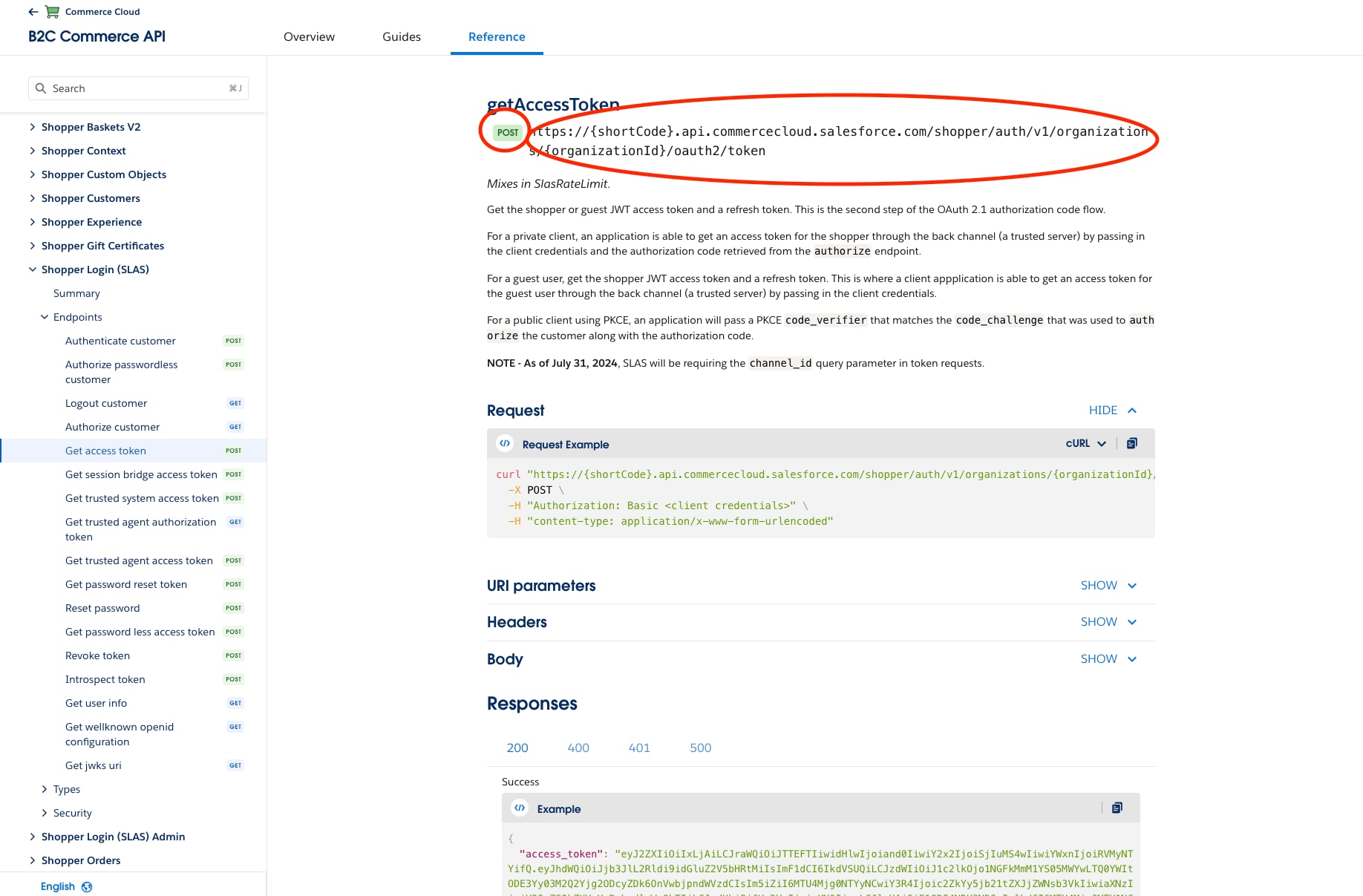
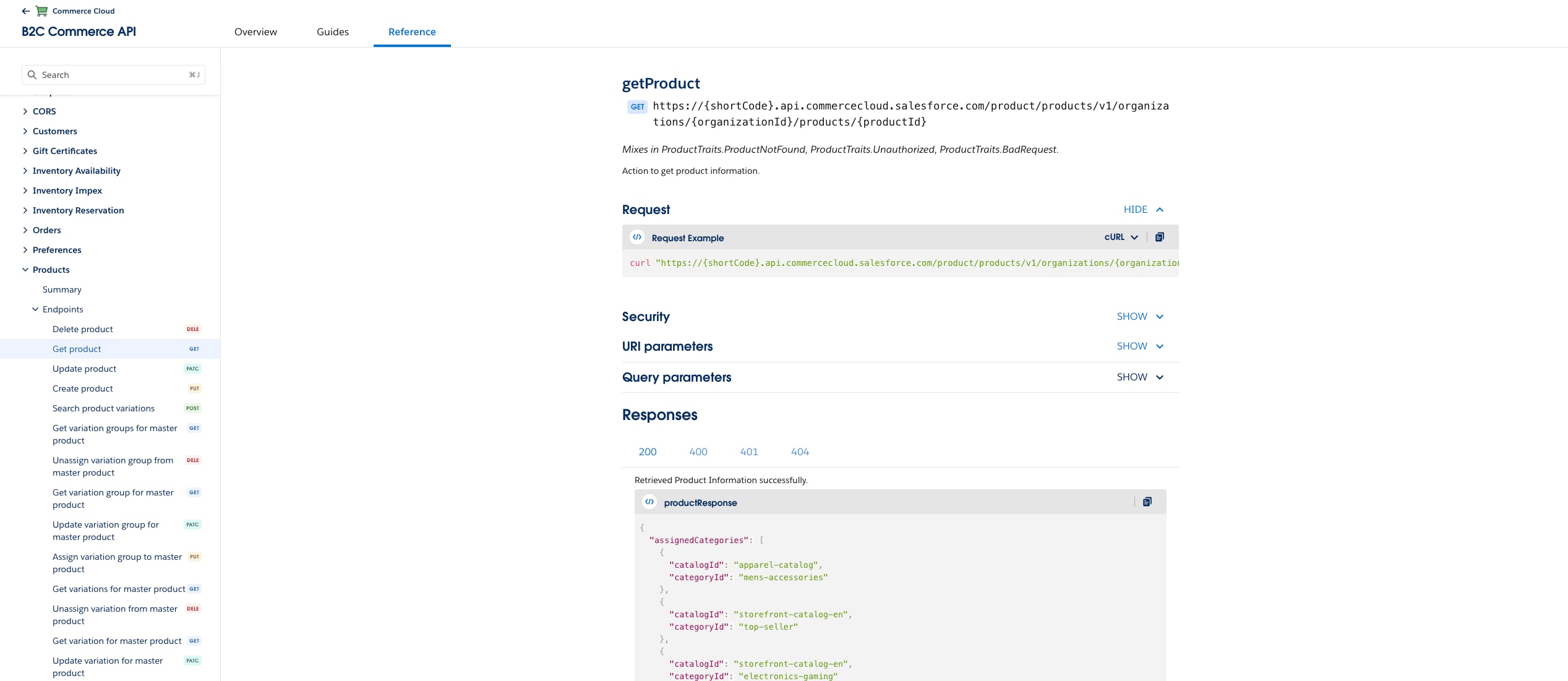
16</flow>commerce-cloud-dataapi operation. You can get API details for your operation from SCAPI Reference documentation, for example: getProduct.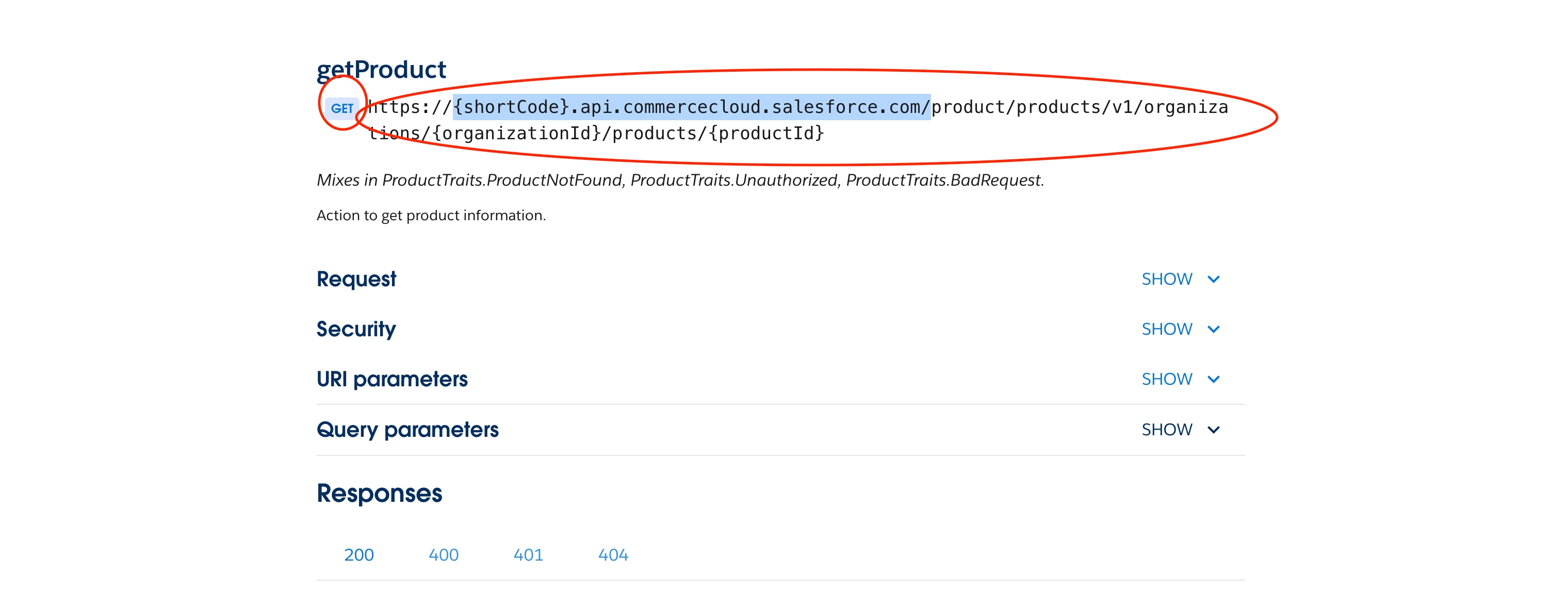
Copy the method and path with placeholders from the applicable documentation, for example: /product/products/v1/organizations/{organizationId}/products/{productId}.
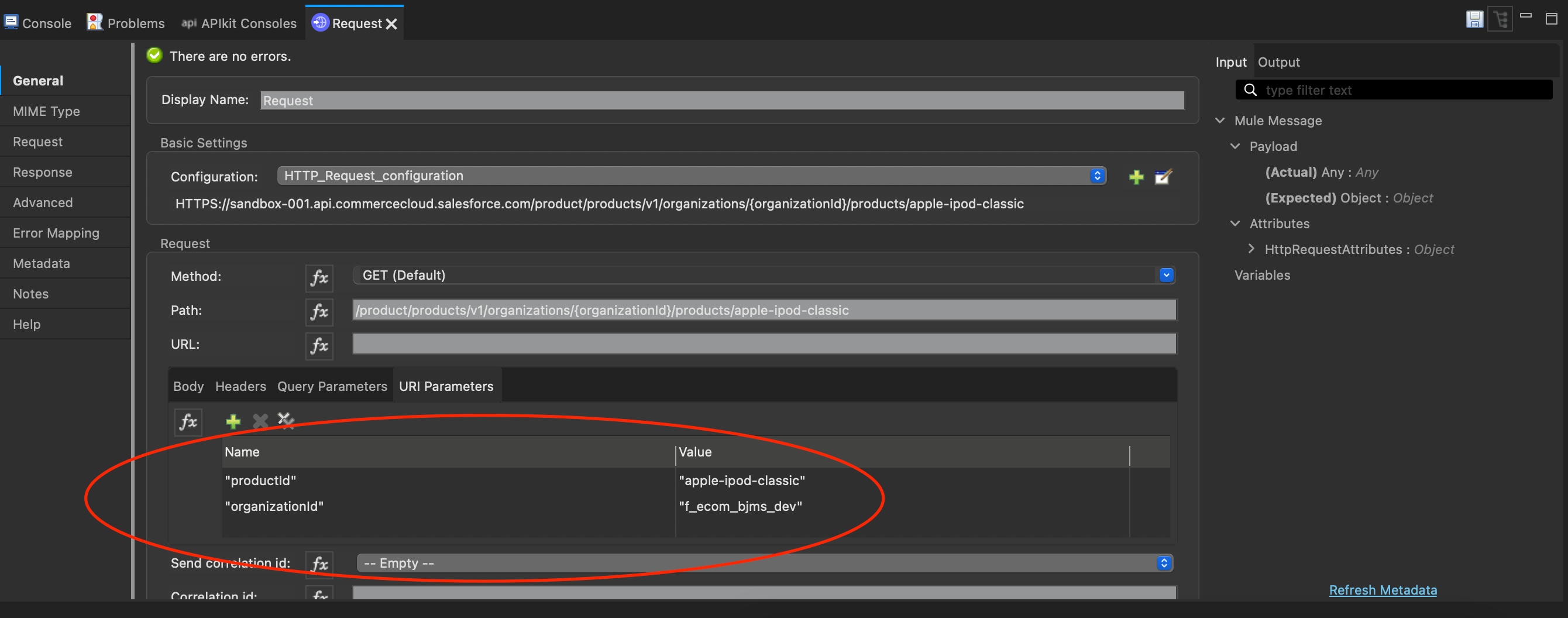
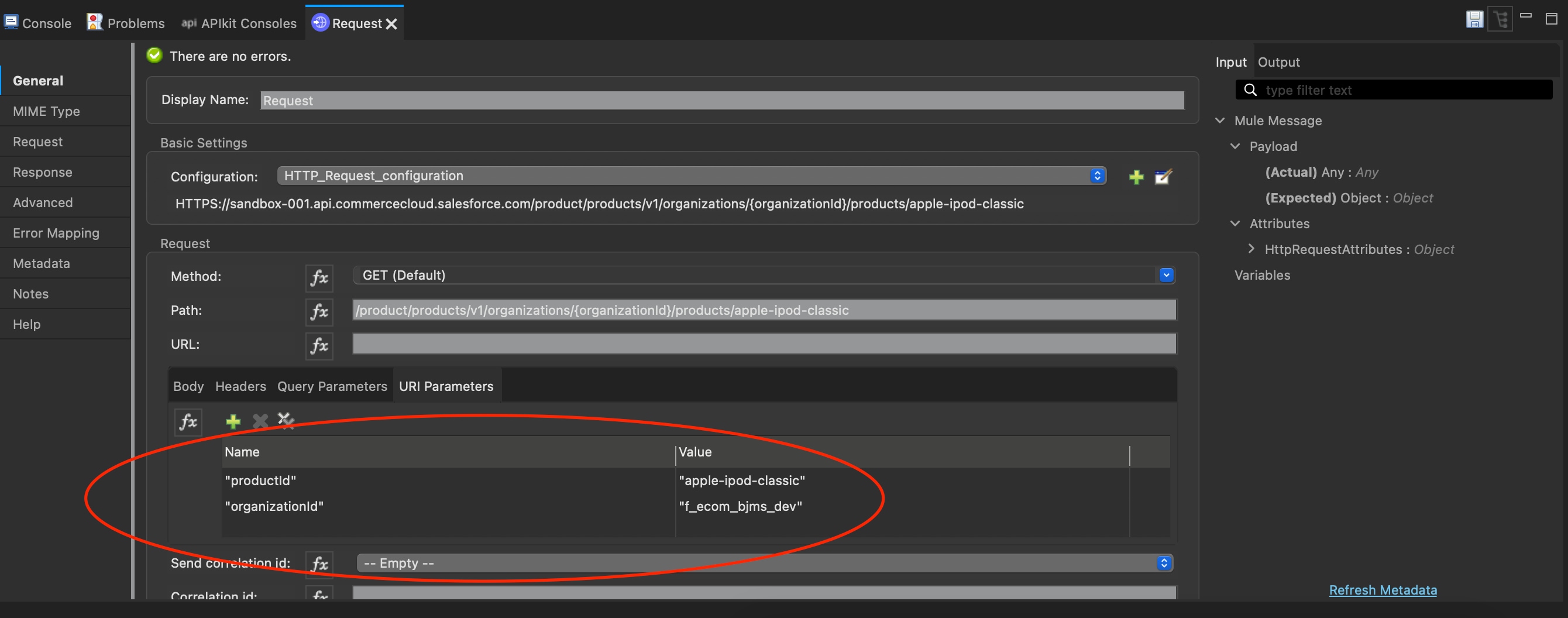
Add URI parameter, query parameter, body, and header to the HTTP Connector request operation.
http:request property name | Value | |
|---|---|---|
| config-ref | HTTP_Request_configuration | See: Migrate to global configuration using mule-oauth-module extension for the previously created http:request-config property name. |
| method | Copy operation from SCAPI documentation **** (GET) | SCAPI documentation |
| path | Copy path with placeholder from SCAPI documentation | SCAPI documentation |
| base URI parameter {organizationId} | commerce-cloud-dataapi : organizationId | Copy from commerce-cloud-dataapi operation property organizationId. |
| additional URI parameter | SCAPI documentation, if applicable | |
| Query parameter | SCAPI documentation, if applicable | |
| Body | SCAPI documentation, if applicable | |
| Header | SCAPI documentation, if applicable |
For details, see the following documentation:
| Commerce Data Connector | HTTP Connector |
|---|---|
|
|
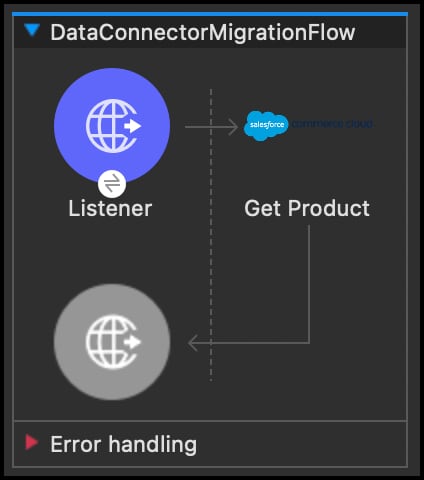 | 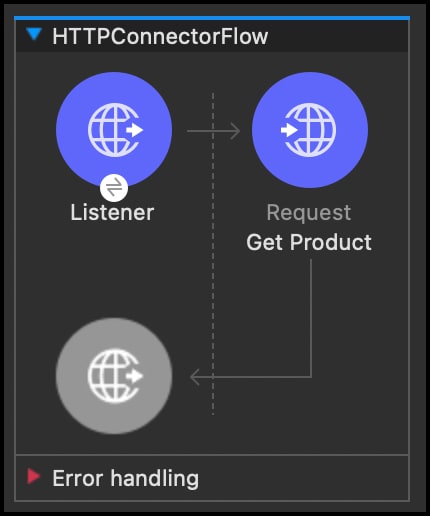 |
Before migration:
1<flow name="DataConnectorMigrationFlow"
2    doc:id="adf832b2-733e-4e18-8fb9-c35570c81083"
3>
4    <http:listener
5        doc:name="Listener"
6        doc:id="b381c6c5-b5c8-4f12-bed7-f0e0df1d6076"
7        config-ref="HTTP_Listener_config"
8        path="/test" />
9    <commerce-cloud-dataapi:get-product-products-organizations-products-by-version-organization-id-product-id
10        doc:name="Get Product"
11        doc:id="6b1b33d9-86c8-458f-89fe-9b35272bd6fe"
12        config-ref="Commerce_Cloud_B2C_Data_Connector_Config"
13        version="v1"
14        organizationId="f_ecom_bjms_dev"
15        productId="apple-ipod-classic"
16    />
17</flow>
After migration:
1<flow name="HTTPConnectorFlow"
2    doc:id="23142ccf-73ed-4711-8ae0-322d8996d374"
3>
4    <http:listener
5        doc:name="Listener"
6        doc:id="ac5d6ce1-260e-4147-a0bb-8e1fa0d430ec"
7        config-ref="HTTP_Listener_config"
8        path="/test" />
9
10    <http:request
11        method="GET"
12        doc:name="Request"
13        doc:id="8825fb47-cb94-4b9d-a2e6-5afd927389c1"
14        config-ref="HTTP_Request_configuration"
15        path="/product/products/v1/organizations/{organizationId}/products/{productId}"
16    >
17        <http:uri-params >
18            <![CDATA[#[output application/java
19            ---
20            {
21            "productId" : "apple-ipod-classic",
22            "organizationId" : "f_ecom_bjms_dev"
23            }]]]>
24       </http:uri-params>
25    </http:request>
26</flow>You must migrate all elements of the Salesforce B2C Commerce Shop Connector to the MuleSoft HTTP Connector request operation.
The Salesforce B2C Commerce Shop Connector uses a deprecated auth call, which is no longer supported. For details, see B2C Commerce API Release Notes and Authorization for Shopper APIs.
Note
You must migrate the shopper-token-config objects shopper-token-connection and customer-auth-config to the HTTP Connector.
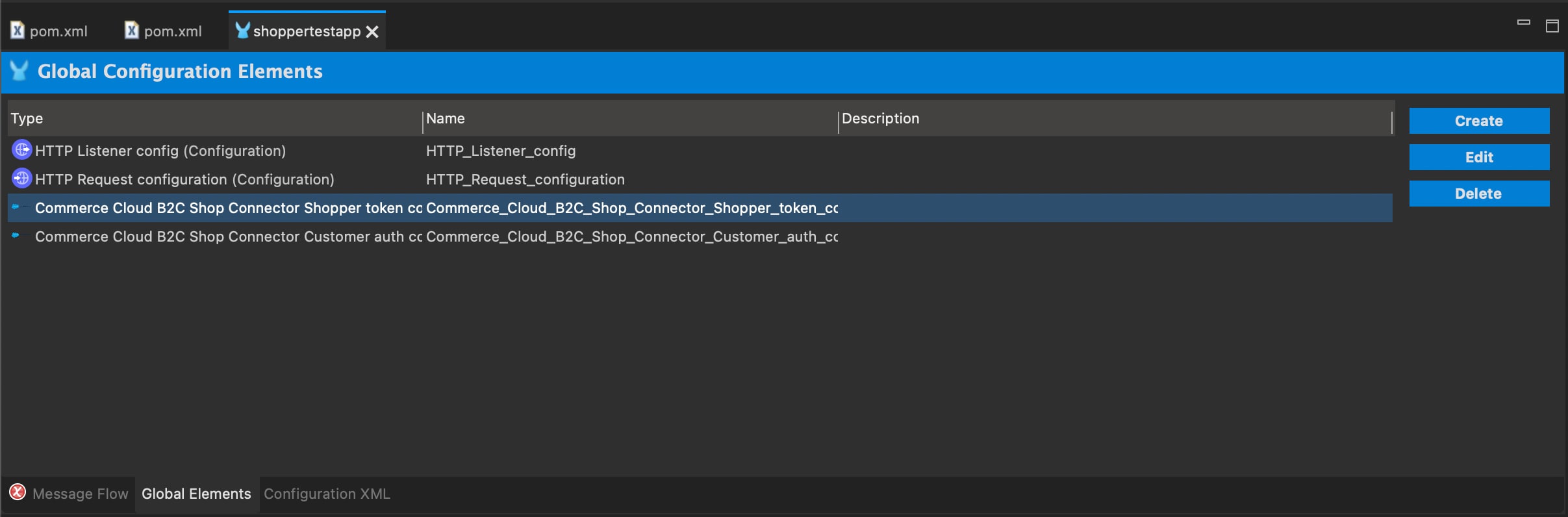
1<dependency>
2    <groupId>org.mule.connectors</groupId>
3    <artifactId>mule-http-connector</artifactId>
4    <version>1.10.3</version>
5    <classifier>mule-plugin</classifier>
6</dependency>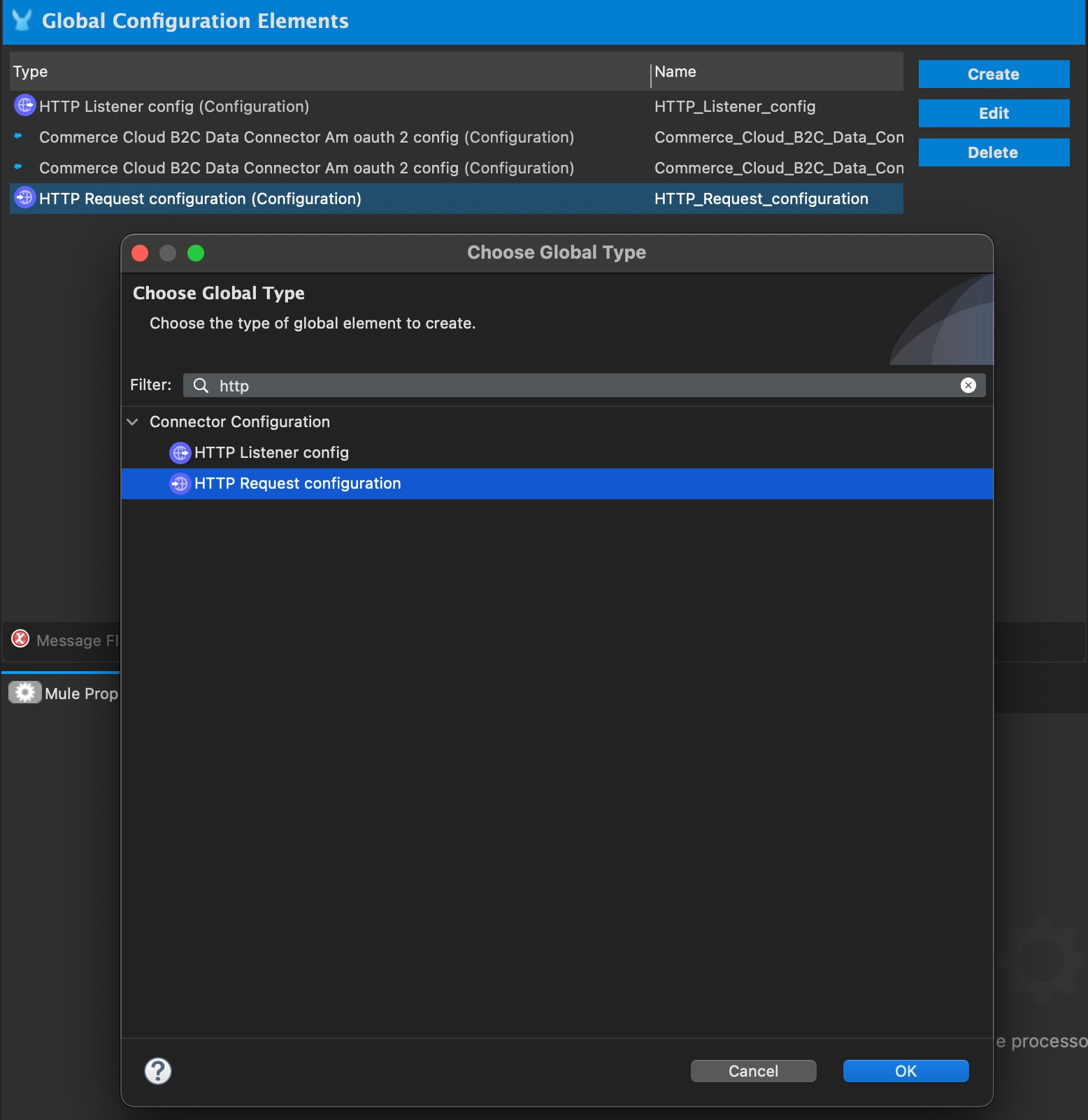
Although the mule-oauth-module allows client-credentials-grant-type, the configuration does not allow additional parameters that SCAPI requires. Therefore, an additional HTTP Connector Configuration for OAuth is used. For details, see: https://docs.mulesoft.com/http-connector/1.5/http-authentication#oauth2cc.
Note
http:request-config properties with the following values from your existing shopper-token-connection and customer-auth-config:http:request-config property name | Value | Copy from shopper-token-connection and customer-auth-config? |
|---|---|---|
| host | baseUri | Yes |
| protocol | HTTPS | No, static value |
| clientId | clientId | Yes |
| clientSecret | clientSecret | Yes |
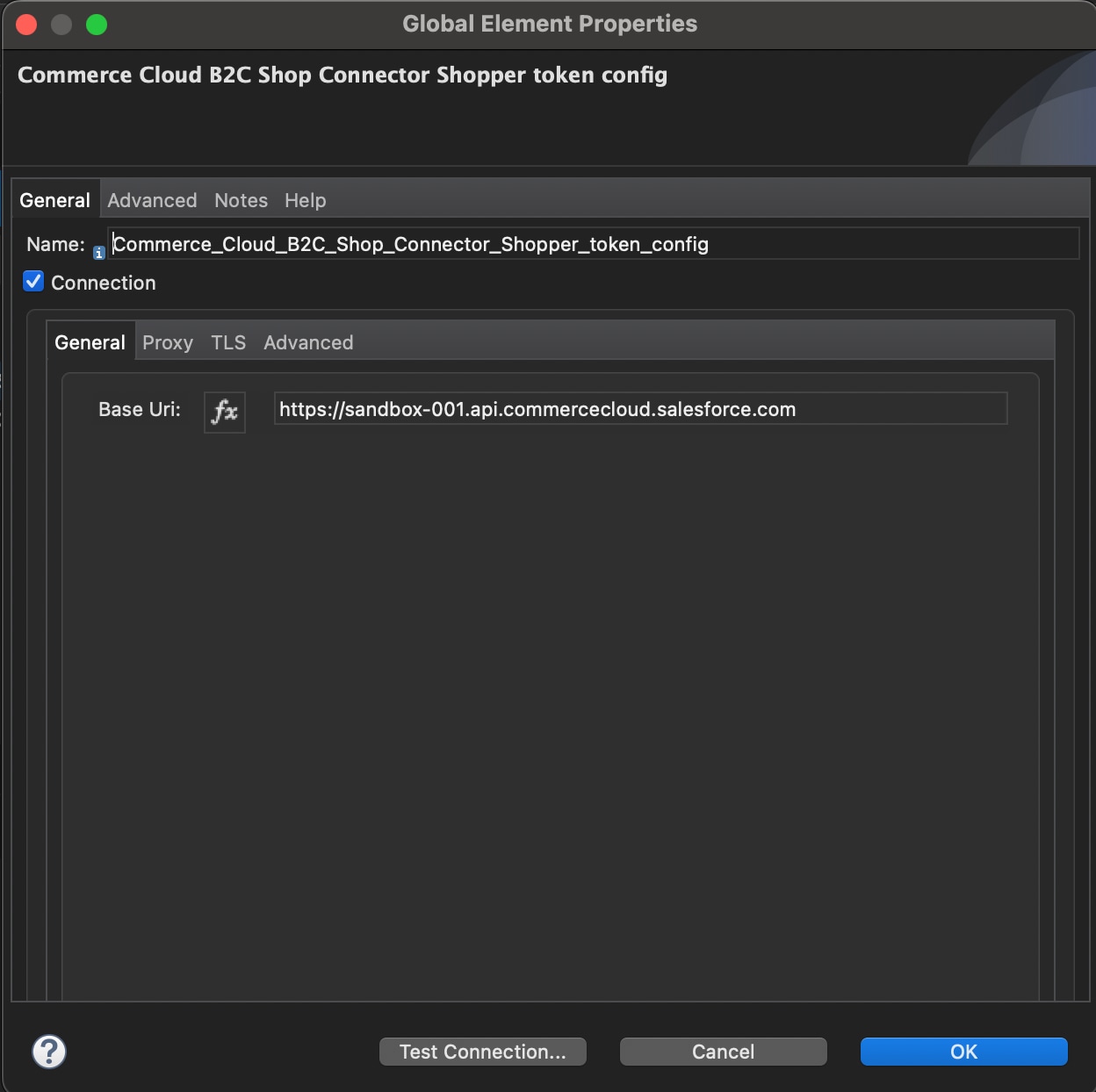
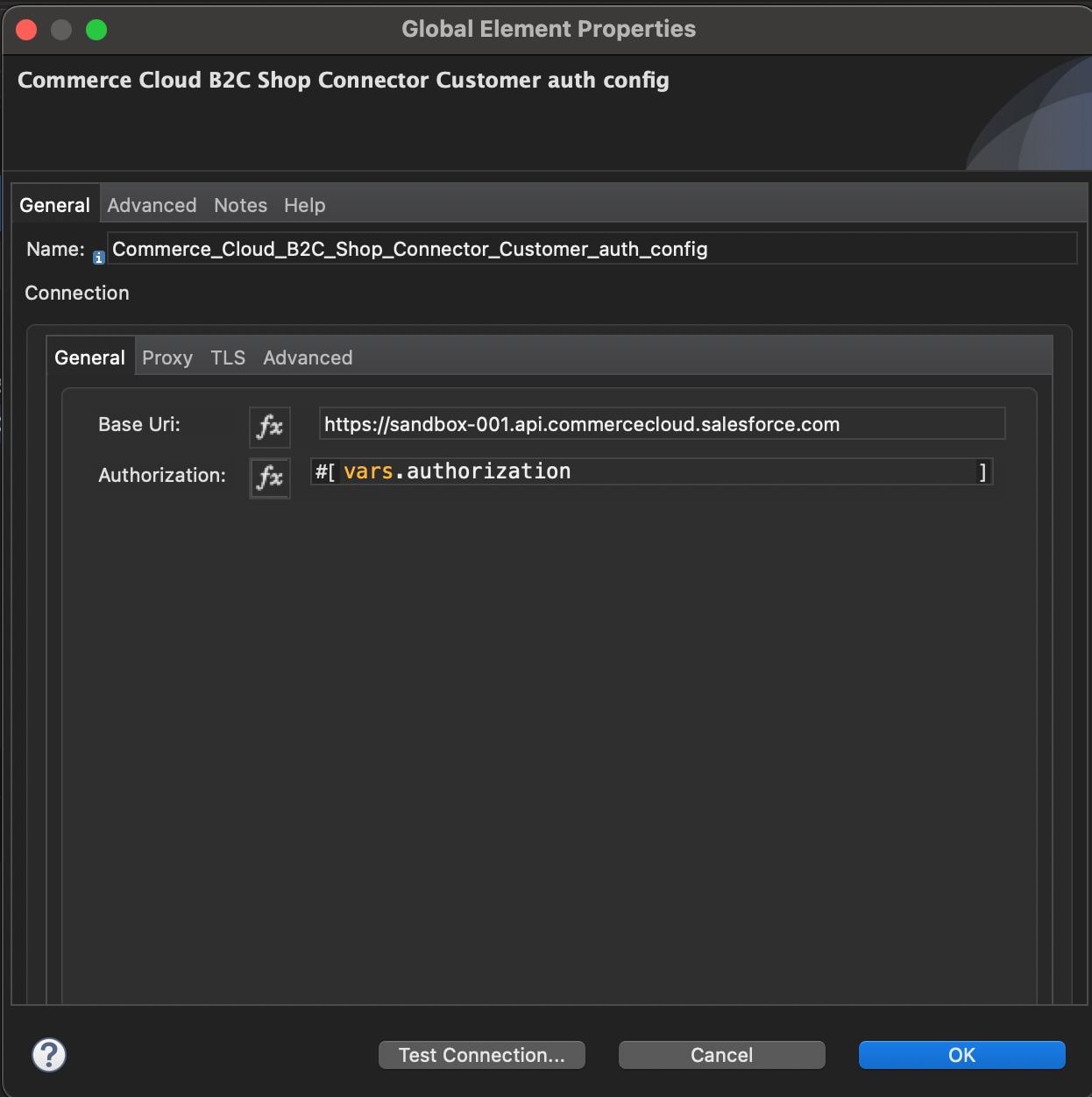
1<http:request-config
2        name="HTTP_Request_Auth_configuration"
3        doc:name="HTTP Request configuration"
4        doc:id="5be8a127-4b2f-42f3-b1bf-d29b5f0611ac" >
5        <http:request-connection
6            protocol="HTTPS"
7            host="sandbox-001.api.commercecloud.salesforce.com"
8        >
9            <http:authentication >
10                <http:basic-authentication
11                    # basic credentials from commerce-cloud-shopper-api:create-shopper-auth-organizations-oauth2-token-by-version-organization-id
12                    username="<your username>"
13                    password="<your password>" />
14            </http:authentication>
15        </http:request-connection>
16    </http:request-config>
17
18    <http:request-config
19        name="HTTP_Request_configuration"
20    >
21        <http:request-connection
22            host="sandbox-001.api.commercecloud.salesforce.com"
23            protocol="HTTPS">
24        </http:request-connection>
25 </http:request-config>All commerce-cloud-shopper-api operations have an organizationId, config-ref, siteId, version_ property and various additional properties corresponding to the operation, for example: get-product has a productId.
Migrate these in a manner similar using the previous steps, for example:
1<flow name="ShopConnectorMigrationFlow"
2 doc:id="4dc8dc1d-7cd3-4423-9240-1ce3b4e95a0f"
3>
4 <http:listener
5 doc:name="Listener"
6 doc:id="ff006824-2ac9-494b-9403-9786fd285734"
7 config-ref="HTTP_Listener_config"
8 path="/test"
9 />
10 # Get access token for guest customer
11 <commerce-cloud-shopper-api:create-shopper-auth-organizations-oauth2-token-by-version-organization-id
12 doc:name="Get Access Token"
13 doc:id="347fcaa3-639e-451a-ae7f-5f5c6ce49c35"
14 config-ref="Commerce_Cloud_B2C_Shop_Connector_Shopper_token_config"
15 version="v1"
16 organizationId="f_ecom_bjms_dev"
17 authorization="Basic <your basic credentials>"
18 >
19 <commerce-cloud-shopper-api:custom-query-params >
20 <![CDATA[#[output application/java
21 ---
22 {
23 "grant_type" : "client_credentials",
24 "channel_id" : "SiteGenesis"
25 }]]]>
26 </commerce-cloud-shopper-api:custom-query-params>
27 <commerce-cloud-shopper-api:custom-headers >
28 <![CDATA[#[output application/java
29 ---
30 {
31 "Content-Type" : "application/x-www-form-urlencoded"
32 }]]]>
33 </commerce-cloud-shopper-api:custom-headers>
34 </commerce-cloud-shopper-api:create-shopper-auth-organizations-oauth2-token-by-version-organization-id>
35 # set authorization access token to variable authorization
36 <set-variable
37 value='#["Bearer " ++ payload.access_token]'
38 doc:name="Set Authorization"
39 doc:id="2afa706f-0569-4c37-a748-cdd5a6abdf60"
40 variableName="authorization"
41 />
42 <commerce-cloud-shopper-api:get-product-shopper-products-organizations-products-by-version-organization-id-id
43 doc:name="Get Product"
44 doc:id="8cd547ef-1ffc-4719-961e-39a49109004a"
45 version="v1"
46 config-ref="Commerce_Cloud_B2C_Shop_Connector_Customer_auth_config"
47 organizationId="f_ecom_bjms_dev"
48 siteId="SiteGenesis"
49 id="apple-ipod-classic"
50 />
51</flow>For a registered shopper, there might be similar flow operation objects containing authorization and authentication, for example:
1<commerce-cloud-shopper-api:create-shopper-auth-organizations-oauth2-login-by-version-organization-id
2    doc:name="Authenticate Customer"
3    doc:id="432892fb-c84b-44a6-8407-2df7dad561e3"
4    config-ref="Commerce_Cloud_B2C_Shop_Connector_Shopper_token_config"
5    version="${shopper.version}"
6    organizationId="${shopper.orgId}"
7    authorization="#[attributes.headers.Authorization]">
8            <commerce-cloud-shopper-api:content >
9                <![CDATA[#[%dw 2.0
10                    output application/x-www-form-urlencoded
11                    ---
12                    {
13                    "grant_type":"authorization_code_pkce",
14                    "client_id":"3a15f34e-fecd-4fcc-8235-86b70978e629",
15                    "redirect_uri":"http://localhost:9010/callback",
16                    "code_challenge": attributes.queryParams.code_challenge,
17                    "channel_id": "SiteGenesis"
18                   }]]]>
19            </commerce-cloud-shopper-api:content>
20</commerce-cloud-shopper-api:create-shopper-auth-organizations-oauth2-login-by-version-organization-id>| Commerce Shop Connector | HTTP Connector |
|---|---|
|
|
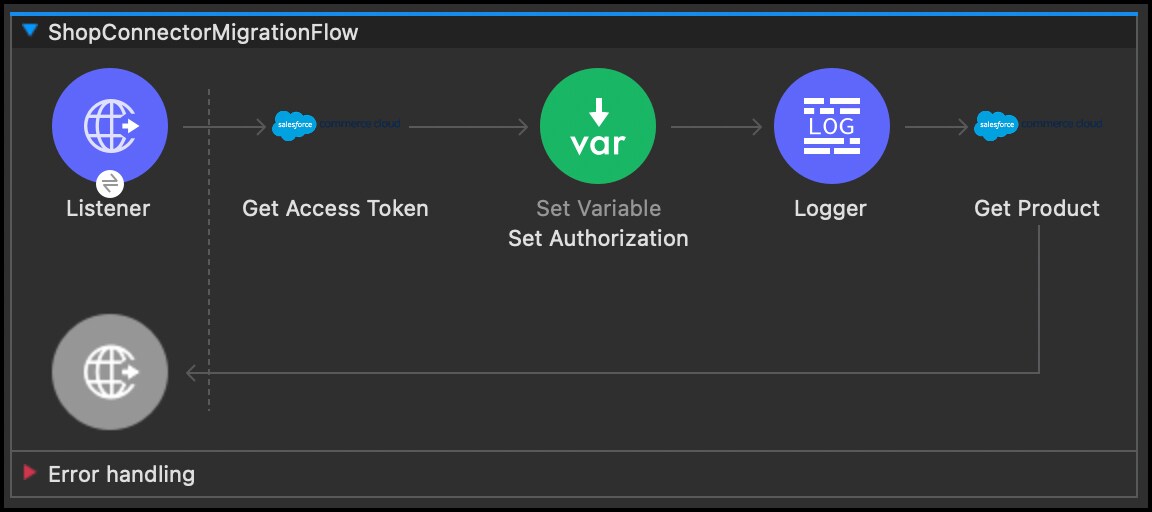 | 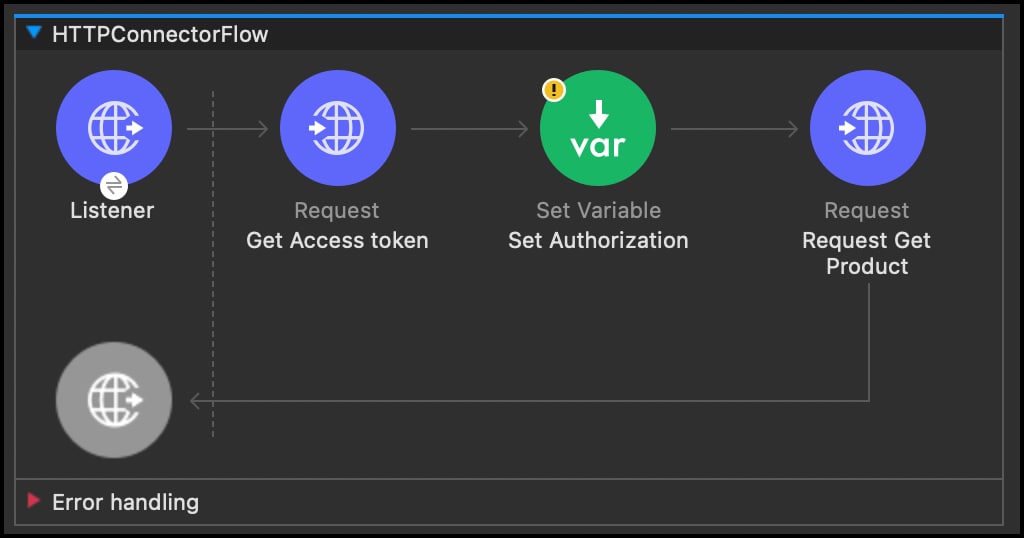 |
Migrate all flows in your application to a flow utilizing the HTTP Connector:
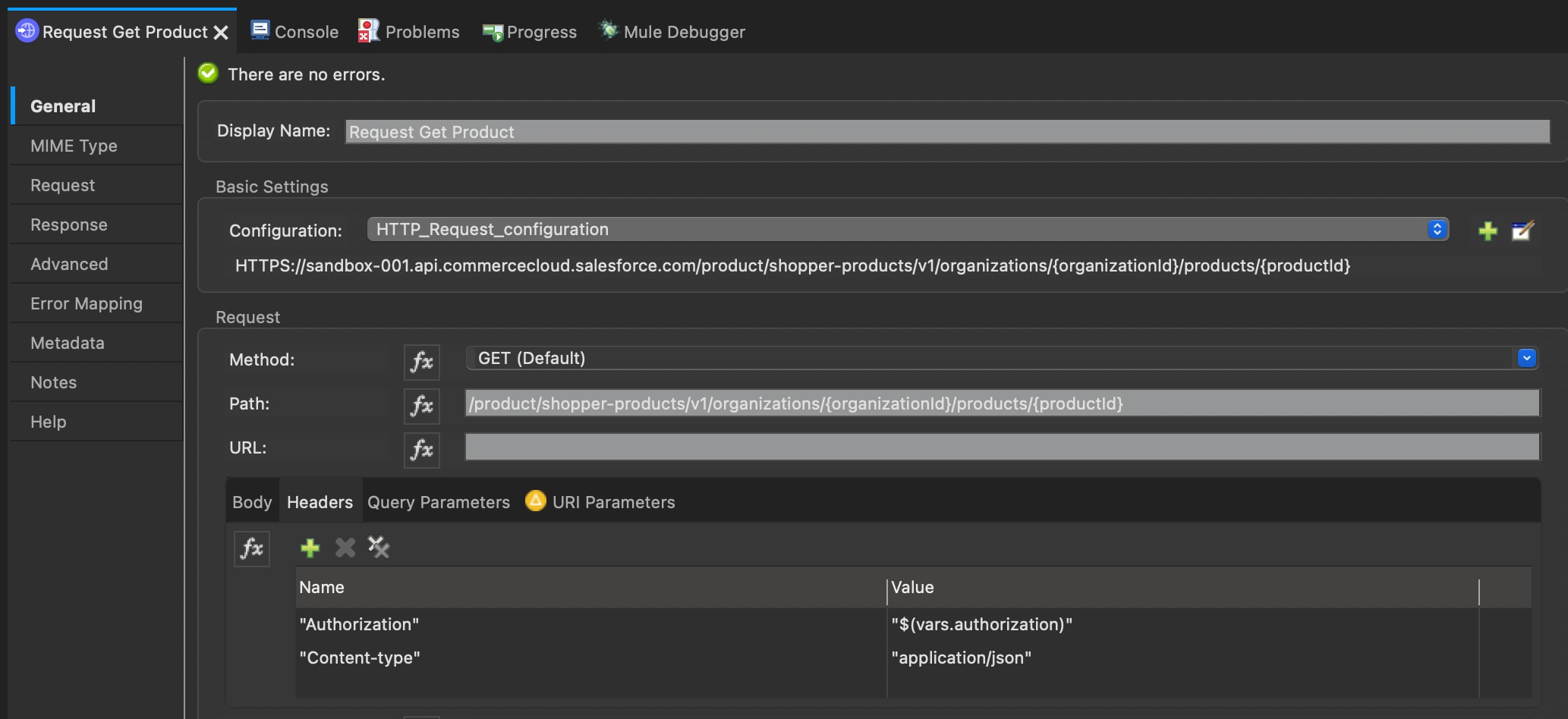
commerce-cloud-dataapi operation.http:request operation to the corresponding place in the flow.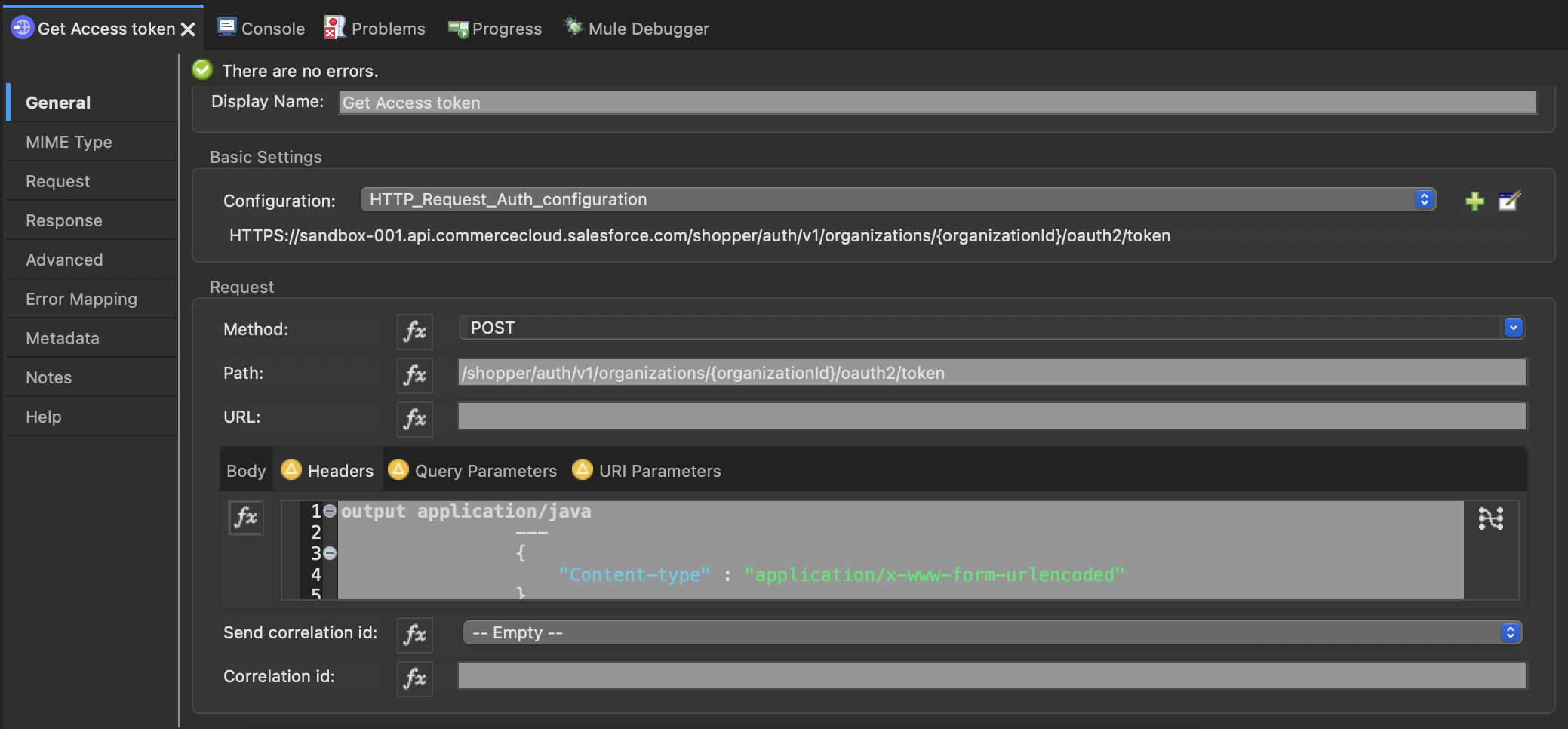
For Get Access token (HTTP Connector request operation)
http:request property name | Value | Notes |
|---|---|---|
| config-ref | HTTP_Request_Auth_configuration | See the previously created http:request-config property name, which contains the Basic credentials for Basic auth. |
| method | Copy operation from SCAPI documentation (GET) | SCAPI documentation |
| path | Copy path with placeholder from SCAPI documentation | SCAPI documentation |
| base URI parameter {organizationId} | commerce-cloud-shopapi : organizationId | Copy from commerce-cloud-shopapi operation property organizationId. |
| additional URI parameter | SCAPI documentation, if applicable | |
| Query parameter | commerce-cloud-shopper-api:custom-query-params "grant_type" : "client_credentials", "channel_id" : "SiteGenesis" | SCAPI documentation, if applicable |
| Body | SCAPI documentation, if applicable | |
| Header | commerce-cloud-shopper-api:custom-headers "Content-Type":"application/x-www-form-urlencoded" | SCAPI documentation, if applicable |
For Get Product (HTTP Connector request operation)
http:request property name | Value | Notes |
|---|---|---|
| config-ref | HTTP_Request_configuration | See the previously created http:request-config property name. |
| method | Copy operation from SCAPI documentation (GET) | SCAPI documentation |
| path | Copy path with placeholder from SCAPI documentation | SCAPI documentation |
| base URI parameter {organizationId} | commerce-cloud-shopapi : organizationId | Copy from commerce-cloud-shopapi operation property organizationId. |
| additional URI parameter | commerce-cloud-shopper-api:get-product-shopper-products-organizations-products-by-version-organization-id-id → id | SCAPI documentation, if applicable |
| Query parameter | commerce-cloud-shopper-api:get-product-shopper-products-organizations-products-by-version-organization-id-id → siteId | SCAPI documentation, if applicable |
| Body | SCAPI documentation, if applicable | |
| Header | SCAPI documentation, if applicable |
For additional details, see the following documentation:
Before migration:
1<flow name="ShopConnectorMigrationFlow"
2 doc:id="4dc8dc1d-7cd3-4423-9240-1ce3b4e95a0f"
3>
4 <http:listener
5 doc:name="Listener"
6 doc:id="ff006824-2ac9-494b-9403-9786fd285734"
7 config-ref="HTTP_Listener_config"
8 path="/test"
9 />
10 # Get jwt-token for guest customer
11 <commerce-cloud-shopper-api:create-shopper-auth-organizations-oauth2-token-by-version-organization-id
12 doc:name="Get Access Token"
13 doc:id="347fcaa3-639e-451a-ae7f-5f5c6ce49c35"
14 config-ref="Commerce_Cloud_B2C_Shop_Connector_Shopper_token_config"
15 version="v1"
16 organizationId="f_ecom_bjms_dev"
17 authorization="Basic <your basic credentials>"
18 >
19 <commerce-cloud-shopper-api:custom-query-params >
20 <![CDATA[#[output application/java
21 ---
22 {
23 "grant_type" : "client_credentials",
24 "channel_id" : "SiteGenesis"
25 }]]]>
26 </commerce-cloud-shopper-api:custom-query-params>
27 <commerce-cloud-shopper-api:custom-headers >
28 <![CDATA[#[output application/java
29 ---
30 {
31 "Content-Type" : "application/x-www-form-urlencoded"
32 }]]]>
33 </commerce-cloud-shopper-api:custom-headers>
34 </commerce-cloud-shopper-api:create-shopper-auth-organizations-oauth2-token-by-version-organization-id>
35
36 # set authorization access token to variable authorization
37 <set-variable
38 value='#["Bearer " ++ payload.access_token]'
39 doc:name="Set Authorization"
40 doc:id="2afa706f-0569-4c37-a748-cdd5a6abdf60"
41 variableName="authorization"
42 />
43 # commerce-cloud-shopper-api:shopper-connection
44 # configuration parameter > authorization
45 <commerce-cloud-shopper-api:get-product-shopper-products-organizations-products-by-version-organization-id-id
46 doc:name="Get Product"
47 doc:id="8cd547ef-1ffc-4719-961e-39a49109004a"
48 version="v1"
49 config-ref="Commerce_Cloud_B2C_Shop_Connector_Customer_auth_config"
50 organizationId="f_ecom_bjms_dev"
51 siteId="SiteGenesis"
52 id="apple-ipod-classic"
53 />
54</flow>After migration:
1<flow name="HTTPConnectorFlow"
2    doc:id="aba98309-f8c4-43fd-bf2e-7936738057c6"
3>
4    <http:listener
5        doc:name="Listener"
6        doc:id="df9c1b70-ee7e-4497-9504-a2db7dbfedf6"
7        config-ref="HTTP_Listener_config"
8        path="/test"
9   />
10   # get jwt-token for guest customer
11    <http:request
12        method="POST"
13        doc:name="Get Access token"
14        doc:id="49cc1ca2-4900-4c42-b704-7f0a98923229"
15        # http config with basic credentials
16        config-ref="HTTP_Request_Auth_configuration"
17        path="/shopper/auth/v1/organizations/{organizationId}/oauth2/token">
18        <http:headers >
19            <![CDATA[#[output application/java
20                ---
21                {
22                    "Content-type" : "application/x-www-form-urlencoded"
23                }
24            ]]]>
25        </http:headers>
26        <http:uri-params >
27            <![CDATA[#[output application/java
28                ---
29                {
30                    "organizationId" : "f_ecom_bjms_dev"
31                }
32            ]]]>
33        </http:uri-params>
34        <http:query-params >
35            <![CDATA[#[output application/java
36                ---
37                {
38                    "grant_type" : "client_credentials",
39                    "channel_id" : "SiteGenesis"
40                }
41            ]]]>
42        </http:query-params>
43    </http:request>
44   # set authorization access token to variable authorization
45    <set-variable
46        value='#["Bearer " ++ payload.access_token]'
47        doc:name="Set Authorization"
48        doc:id="ab79d83f-4726-4b52-b3eb-8fb23b936a16"
49        variableName="authorization"
50    />
51
52
53    <http:request
54        method="GET"
55        doc:name="Request Get Product"
56        doc:id="d6f30c66-0767-4d90-9553-3edd692667e6"
57        config-ref="HTTP_Request_configuration"
58        path="/product/shopper-products/v1/organizations/{organizationId}/products/{productId}" >
59        <http:headers >
60            <![CDATA[#[output application/java
61                ---
62                {
63                "Authorization" : "$(vars.authorization)",
64                "Content-type" : "application/json"
65                }]]]>
66       </http:headers>
67        <http:uri-params >
68            <![CDATA[#[output application/java
69                ---
70                {
71                "organizationId" : "f_ecom_bjms_dev",
72                "productId" : "apple-ipod-classic"
73                }]]]>
74       </http:uri-params>
75        <http:query-params >
76            <![CDATA[#[output application/java
77                ---
78                {
79                "siteId" : "SiteGenesis"
80                }]]]>
81            </http:query-params>
82    </http:request>
83</flow>