


 j
jOverview
Recent Changes
Add Support for Voice Resiliency
Disable Call Actions
Desk Phone Support
Enable Headset Support
Apex Reference
Service Cloud Connector API Reference
Troubleshooting
Previous Versions
If the telephony provider supports desk phones, reps can make outbound calls or answer inbound calls from their desk phone. Reps can also decline calls and initiate transfers from their desk phone. By default, the softphone is enabled for all reps. To use a deskphone, reps can enable the deskphone from the Omni-Channel utility.
This guide is for telephony providers who are creating a solution that integrates Salesforce Voice with their telephony system. If that’s not you, see the Salesforce Voice with Telephony Providers Implementation Guide or Salesforce Help. To update your solution to include Bring Your Own Channel for CCaaS Messaging capabilities along with Salesforce Voice, see the Bring Your Own Channel Developer Guide.
Important
The Service Cloud Connector API getAgentConfig() and setAgentConfig() methods must be implemented in the vendor connector. The getAgentConfig() method is invoked when the rep clicks the Agent Settings icon. It returns an AgentConfigResult object. For example:
1new AgentConfigResult({
2    phones: ["SOFT_PHONE", "DESK_PHONE"],
3    selectedPhone: new Phone("DESK_PHONE", “5554443333”)
4})
The setAgentConfig() method is implemented by the vendor and returns a SetAgentConfigResult object indicating whether the operation is successful. For example:
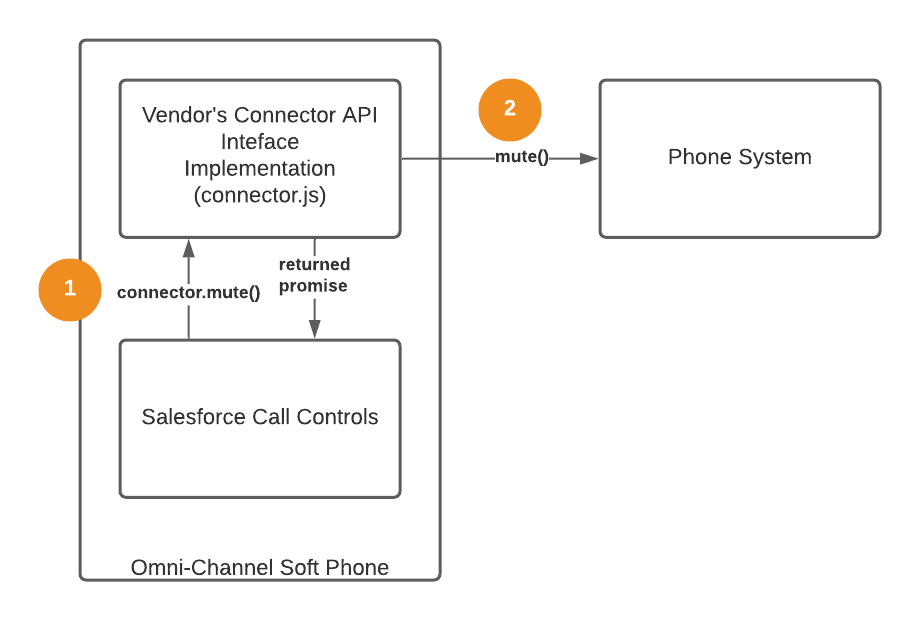
1new SetAgentConfigResult({ success: true })When using the Omni-Channel softphone, call control events and errors get published automatically by Salesforce. Each promise can be resolved or rejected from the vendor’s Connector API Interface implementation. However, when using a desk phone, events and errors must be published from the vendor’s code using publishEvent() and publishError().
For example, when clicking the mute button from a softphone, the mute() method is called on the vendor’s Connector API Interface implementation and a promise is sent back to Salesforce.
When using a hard phone, explicitly call publishEvent() when the mute occurs.
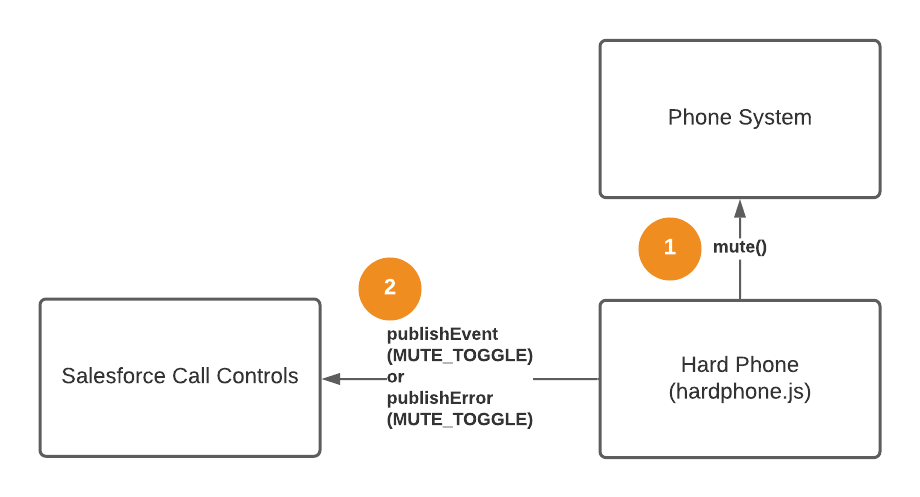
The publishEvent() method can be called from the Connector API Interface implementation with many potential event types. The publishError() method can be called for desk phone events for the same events. For example:
MUTE_TOGGLE — when the phone is muted or unmuted
HOLD_TOGGLE — when the phone is on hold or resumed
RECORDING_TOGGLE — when the recording is enabled or disabled
SWAP — when the hold state of two callers is switched
CONFERENCE — when two calls are being conferenced
ADD_PARTICIPANT — when adding a call participant
See the reference documentation for all the possible event types.
If accepting or declining a call from a hard phone (desk phone), add the attribute isSoftphoneCall: false to call.callInfo when calling the publishEvent() method. This attribute prevents circular event loops where the desk phone and Salesforce repeatedly trigger each other’s call events.
1publishEvent({
2  eventType: Constants.VOICE_EVENT_TYPE.CALL_CONNECTED,
3  payload: new CallResult({ call }) // "call" contain the PhoneCall object
4});
When initiating an outbound or transfer call from a desk phone, isSoftphoneCall must also be false.
When publishing call events such as CALL_STARTED using publishEvent(), the connector can disable call controls if you prefer that reps not use the Omni-Channel softphone call controls at a desk phone. By default, all controls are enabled, but you can pass any of these values in the callInfo parameter (from the PhoneCall object) to disable call controls.
We recommend that you disable accept and decline softphone call controls if a desk phone is enabled, to avoid unintended issues.
1callInfo: {
2  acceptEnabled: boolean,  // must be false for desk phone
3  declineEnabled: boolean, // must be false for desk phone
4  holdEnabled: boolean,
5  muteEnabled: boolean,
6  extensionEnabled: boolean,
7  swapEnabled: boolean,
8  conferenceEnabled: boolean,
9  extensionEnabled: boolean,
10  recordEnabled: boolean,
11  addCallerEnabled: boolean
12}While in most cases, reps start outbound calls by click-to-dial on a contact or the Omni-Channel dial pad, there’s also a way to start a call programmatically using the Service Cloud Connector API. Specifically, use the publishEvent() method with the CALL_STARTED event type and a CallResult payload.
This code sample is adapted from the Demo Connector in GitHub (byo-demo-connector).
1/**
2 * Start a call
3 * @param {Contact} contact
4 * @param {Object} callInfo (callInfo.isSoftphoneCall is false if dialing from a desk phone)
5 */
6function dial(contact, callInfo) {
7  const callAttributes = { participantType: Constants.PARTICIPANT_TYPE.INITIAL_CALLER };
8  const call = new Call(Constants.CALL_TYPE.OUTBOUND, contact, callAttributes, new CallInfo(callInfo));
9  if (!callInfo.isSoftphoneCall) {
10    publishEvent({ eventType: Constants.VOICE_EVENT_TYPE.CALL_STARTED, payload: new CallResult({ call })});
11  }
12}
13
14/**
15 * Example usage
16 */
17dial(new Contact({ phoneNumber: "5554445555"}), {
18  isSoftphoneCall: false,
19  callStateTimestamp: new Date(),
20  isOnHold: false,
21  isMuted: false,
22  isRecordingPaused: false,
23  muteEnabled: true,
24  swapEnabled: true,
25  conferenceEnabled: true,
26  extensionEnabled: true,
27  holdEnabled: true,
28  recordEnabled: true,
29  addCallerEnabled: true
30});
See Also
j