The Workplace Command Center uses a mix of standard Salesforce objects, custom objects, and Metadata types to represent workspace information, employee status and health assessments, consent and authorization information, and employee survey information.
Standard Salesforce Objects that Workplace Command Center uses as-is include:
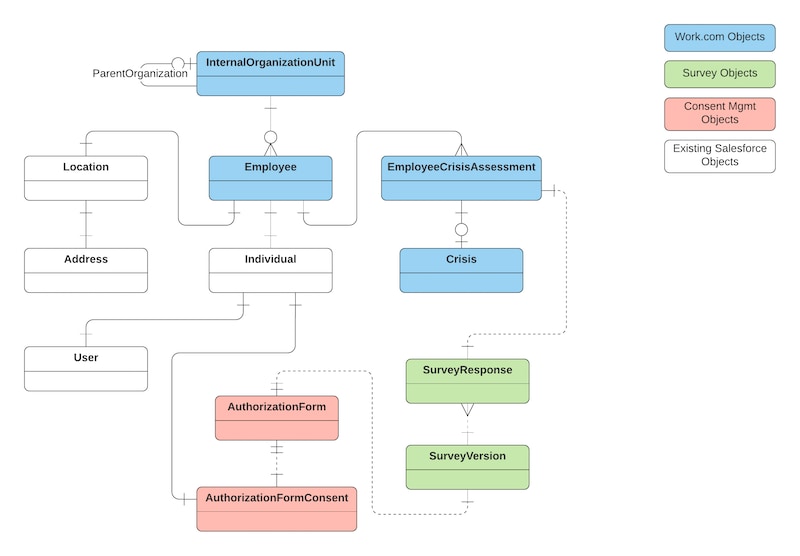
- AuthorizationForm, AuthorizationFormConsent, AuthorizationFormText: Used to capture employee’s consent for collecting and storing health information.
- Individual: Used to connect Employee data with privacy and consent information.
- Survey, SurveyResponse, SurveyVersion: Used for Work.com Wellness Check health questionnaires for employees.
Location is used by Work.com to represent a physical organization location, with extra custom fields added by Work.com.
Objects added specifically for Work.com are:
- Employee: Represents an employee within a company or organization.
- InternalOrganizationUnit: Represents an organization that an Employee belongs to.
- EmployeeCrisisAssessment: Represents a crisis assessment of an Employee.
- Crisis: Represents a major crisis event that affects an Employee in an InternalOrganizationUnit.
The relationships between objects used for Workplace Command Center are described in the following diagram:
-
Work with Employee Data
While Work.com uses Employee to track employee information, existing solutions may already have an alternate data model that tracks employees. To apply the full power of Work.com, solutions may need to correlate or synchronize their data with Employee data.
-
Link Employee with Other Objects
Connect the Employee object to other objects.
-
Synchronize Work.com Data Between Orgs
Users are encouraged to install and use Work.com in an org dedicated to Work.com. This may result in scenarios where data in an existing org has to be migrated or kept in synch with a new Work.com org.
-
Authenticate Between Work.com and Other Orgs
If Work.com has been installed in a new, dedicated org, but your solution must access the original org, you need a strategy for authenticating to the other org.
-
Understand Location Data
Work.com uses Location to associate Employees to physical and abstract locations. Existing solutions may already have an alternate data model that tracks employee locations. To apply the full power of Work.com, solutions may need to correlate or synchronize their data with Location data.
-
Command Center Data Triggers
Work.com installs and uses Command Center data triggers on Employee, Individual, User, and Location. Adding or modifying records for these objects can trigger changes in related objects. It’s also possible to disable the triggers for data loads.
-
Understand Logging
Work.com captures errors and exceptions that originate from Workplace Command Center and Wellness Check and adds them as log messages to the wkcc__CmdCtrLog__c custom object.
-
Standard Objects Used by Work.com
The Work.com data model includes several standard Salesforce objects.
-
Custom Objects and Fields Used by Work.com
The Work.com data model includes several custom objects and fields.
-
Custom Metadata Types Used by Work.com
The Work.com data model includes these custom metadata types.
See Also


 j
j