


メタデータ API 開発者ガイド
 j
jExperienceBundle
ファイルのサフィックスおよびディレクトリの場所
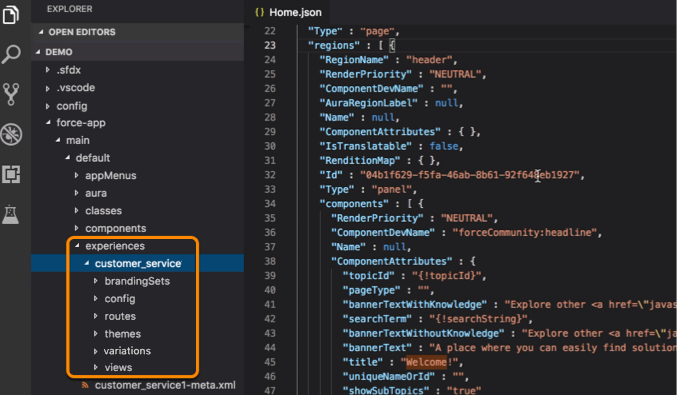
ExperienceBundle コンポーネントのサフィックスは .json で、取得時に experiences フォルダに保存されます。各コミュニティには、独自のフォルダがあります。これらのフォルダにはそれぞれ、サポートしているプロパティ用の別フォルダが含まれています。
ExperienceBundle には、experiences フォルダに 1 つ以上のコミュニティ定義を含めることができます。各コミュニティ定義には、brandingSets、config、routes、themes、variations、views のリソースフォルダがあり、それぞれのフォルダに JSON ファイルで関連する追加の設定情報が保存されています。次に、リソースフォルダを表示する、コミュニティ定義の例を示します。
バージョン
ExperienceBundle コンポーネントは、API バージョン 46.0 以降で使用できます。
特別なアクセスルール
Lightning コミュニティで ExperienceBundle メタデータ型を使用するには、[設定] から、[クイック検索] ボックスに「コミュニティ設定」と入力し、[コミュニティ設定] を選択します。[ExperienceBundle メタデータ API を有効化] を選択して、変更を保存します。
項目
| 項目名 | 項目の型 | 説明 |
|---|---|---|
| experienceResources | ExperienceResources[] | この ExperienceBundle のリソースのリスト。各リソースは、brandingSets、config、routes、themes、variations、views などのコミュニティのアイテムを表します。 |
| label | string | 必須。ExperienceBundle の名前を表します。 |
| type | SiteType (string 型の列挙) | 必須。サイトの種別を識別します。ChatterNetworkPicasso の値を使用する Lightning コミュニティのみがサポートされます。 |
ExperienceResources
バンドル内のコミュニティのリストを表します。
| 項目名 | 項目の型 | 説明 |
|---|---|---|
| experienceResource | ExperienceResource[] | この ExperienceBundle のリソースのリスト。各リソースは、brandingSets、config、routes、themes、views などのコミュニティのプロパティを表します。 |
ExperienceResource
ExperienceBundle に含まれる特定のコミュニティ情報を表します。
構造内には、種別ごとにフォルダがあります。各フォルダには、その種別とサイトに関する情報を提供する 1 つ以上のファイルが含まれています。それぞれが ExperienceBundle の特定のフォルダとファイルに対応しています。
| 項目名 | 項目の型 | 説明 |
|---|---|---|
| fileName | string | 必須。リソースファイルの名前。 |
| format | string | 必須。JSON のみが使用可能です。 |
| source | base64 | 各ファイルの JSON コンテンツ。 |
| type | string | 必須。リソースの種別。有効な値は、次のとおりです。
|
brandingSets フォルダ
このフォルダには、ブランドセットごとに brandingSets_name.json という名前の 1 つの JSON ファイルが含まれています。各ファイルは同一の構造で、同じプロパティを持ちます。
<brandingSets_name>.json
| プロパティ | 型 | 説明 |
|---|---|---|
| definitionName | string | 必須。テーマでブランドセットをグループ化するのに使用されるブランドセットの名前を表します。「テーマ:branding-テーマ」のように定義します。 たとえば、コミュニティのテーマが Stella の場合、definitionName は stella:branding-stella になります。 さらに、いくつかの標準テンプレートには一意の名前が付けられています。
|
| id | UUID | コンポーネントの GUID を表します。 |
| label | string | ブランドセットの名前を表します。 |
| type | string | コンポーネントの種類を表します。サポートされている値は、brandingSet のみです。 |
| values | map | 必須。コミュニティに適用可能なブランドの対応付けを表します。 |
1{
2  "values" : {
3    "HeaderBackgroundColor" : "#FFFFFF",
4    "TextTransformStyle" : "none",
5    "BorderColor" : "#D4D4D4",
6    "DetailTextColor" : "#5A5A5A",
7    "HeaderFonts" : "Ek Mukta",
8    "CardBackgroundColor" : "rgba(255, 255, 255, 0)",
9    "LoginBackgroundColor" : "#F4F4F4",
10    "_ActionColorTrans" : "rgba(25, 124, 190, 0.9)",
11    "LoginBackgroundImage" : "../../../../sfsites/picasso/core/external/salesforceIdentity/images/background.jpg?v=1",
12    "PageBackgroundColor" : "#F5F7FA",
13    "_HeaderTextColor" : "rgba(34,34,34,.8)",
14    "_NavigationMenuHoverColor" : "rgba(255,255,255,.2)",
15    "_HeaderInputBackgroundColor" : "rgba(255,255,255,.4)",
16    "TextColor" : "#222222",
17    "NavigationMenuTextColor" : "#222222",
18    "_HeaderPlaceholderTextColor" : "rgba(85,85,85,.8)",
19    "_OverlayTextColorShadow" : "#000000",
20    "ActionColor" : "#0099DE",
21    "CompanyLogo" : "",
22    "_LinkColorDarker" : "#135F90",
23    "_ActionColorDarker" : "#135F90",
24    "_HoverColor" : "rgba(25, 124, 190, 0.05)",
25    "ErrorFontColor" : "#ff9e9e",
26    "OverlayTextColor" : "#FFFFFF",
27    "PrimaryFont" : "Ek Mukta",
28    "LinkColor" : "#3558D6"
29    },
30  "definitionName" : "cpt:branding-cpt",
31  "label" : "Customer Account Portal",
32  "id" : "283407c3-5938-4a6b-b97f-621cda6968c8",
33  "type" : "brandingSet"
34 }
config フォルダ
- sitename.json
- languages.json
- page_name.json
sitename.json ファイルプロパティ
| プロパティ | 型 | 説明 |
|---|---|---|
| forgotPasswordRouteId | UUID | ユーザがパスワードを忘れた場合に使用するルートの ID を表します。 |
| isAvailableToGuests | boolean | 公開ユーザにサイトへのアクセス権があるか (true)、否か (false) を示します。デフォルト値は false です。 |
| isFilteredComponentsView | boolean | コンポーネントのリストが現在のページ種別に基づいて条件設定されているか (true)、否か (false) を示します。一部のコンポーネントは、ページの特定のパラメータを必要とし、そのパラメータを手動で設定しない限り機能しません。デフォルト値は false です。 |
| isProgressiveRenderingEnabled | boolean | ページコンポーネントの表示順序が優先されるか (true)、否か (false) を示します。デフォルト値は false です。 |
| loginAppPageId | UUID | ログインページの ID を表します。 |
| mainAppPageId | UUID | 必須。メインページの ID を表します。 |
| preferredDomain | string | コミュニティのページにインデックスを付けるために使用するドメインの名前を表します。検索エンジンの結果を改善します。 API バージョン 48.0 以降で利用できます。 |
| preferredDomainId | string | コミュニティのページにインデックスを付けるために使用するドメインを表します。検索エンジンの結果を改善します。 API バージョン 48.0 で削除されました。代わりに、preferredDomain を使用します。 |
| selfRegistrationRouteId | UUID | セルフ登録に使用するログインルートの ID を表します。 |
| type | string | コンポーネントの種類を表します。サポートされている値は、site のみです。 |
実装すると、sitename.json に trustedSitesForScript コンテナが 1 つ作成されます。
| プロパティ | 型 | 説明 |
|---|---|---|
| id | UUID | コンポーネントの GUID を表します。 |
| isActive | boolean | 許可リストに登録された項目が、有効 (true) であり優先する必要があるか、無効 (false) であり、許可リストに登録された取得元として処理する必要がないことを示します。デフォルトは false です。 |
| trustedSiteName | string | UI に表示する、許可リストに登録された取得元の名前。 |
| trustedSiteUrl | string | 許可リストに登録された取得元の完全修飾 URL。 |
| type | string | コンポーネントの種類を表します。サポートされている値は、trustedSitesForScripts のみです。 |
1{
2   "isAvailableToGuests" : false,
3   "isFilteredComponentsView" : false,
4   "mainAppPageId" : "df9907cb-6e68-4ca1-8bb2-51173ca5374e",
5   "loginAppPageId" : "58e9939a-84b2-498d-bbc5-7a89d89087fa",
6   "selfRegistrationRouteId" : "ad5c8bf1-297f-4ad3-b47c-0e35d85f10ef",
7   "forgotPasswordRouteId" : "e3139f6f-44d8-4eec-be9d-3609ce063039",
8   "isProgressiveRenderingEnabled" : false,
9   "preferredDomain" : "none",
10   "selfRegistrationRouteId" : "b8fe8ab1-f266-41e1-a63b-4791165f3c1d",
11   "trustedSitesForScript" : [ {
12     "id" : "92c489e2-0b7b-4a48-9c88-bef7e8fe6f1b",
13     "isActive" : true,
14     "trustedSiteName" : "test",
15     "trustedSiteUrl" : "https://123.com",
16     "type" : "trustedSitesForScripts"
17   }, {
18     "id" : "92c489e2-0b7b-4a48-9c88-bef7e8fe6f1c",
19     "isActive" : true,
20     "trustedSiteName" : "test1",
21     "trustedSiteUrl" : "https://1234.com",
22     "type" : "trustedSitesForScripts"
23  } ],
24    "type" : "site"
25}
languages.json ファイルプロパティ
| プロパティ | 型 | 説明 |
|---|---|---|
| defaultCode | string | 必須。使用する基本言語コードと国コードを表します。 |
| defaultLabel | string | 必須。言語の表示ラベルを定義します。 |
| id | UUID | コンポーネントの GUID を表します。 |
| type | string | コンポーネントの種類を表します。サポートされている値は、languageContainer のみです。 |
サポートされる言語ごとに、languages.json のコンテナとして 1 つのセクションがあります
| プロパティ | 型 | 説明 |
|---|---|---|
| countryCode | string | 選択した言語の国コード。この文字列は空のままにできます。このプロパティは、選択した言語がアラビア語 (アルジェリア) やアラビア語 (バーレーン) のように国ごとに変異形がある場合にのみ適用されます。この場合は、countryCode を使用してそれらを区別します。 例: { languageCode" : "ar", "CountryCode" : "DZ", "Label" : "Arabic (Algeria) (DZ)",}, { "Code" : "ar", "CountryCode" : "BH", "Label" : "Arabic (Bahrain) (BH)",} |
| fallbackLanguageId | UUID | 選択した言語に合った正しいコンテンツを追加するように注意してください。たとえば、コミュニティ訪問者が言語セレクタから日本語を選択したが、そのページに日本語のコンテンツがないとします。この場合、コンテンツが代替言語で表示されます。 |
| id | UUID | コンポーネントの GUID を表します。 |
| isActive | boolean | コミュニティ訪問者が、特定の言語を言語セレクタで使用できるか (true)、否か (false) を示します。デフォルト値は true です。 |
| label | string | 言語の表示ラベルを定義します。表示ラベルは、コミュニティに追加する言語セレクタコンポーネントとエクスペリエンスビルダーの言語セレクタに表示されます。 |
| languageCode | string | 選択した言語の国コードを表します。 |
| type | string | コンポーネントの種類を表します。サポートされている値は、language のみです。 |
1{
2    "defaultCode" : "en_US",
3    "defaultLabel" : "English (US)",
4    "id" : "04597c83-0b9d-4f16-9f4d-4ec28bd553b4",
5    "type" : "languageContainer",
6    "languages" : [ {
7        "languageCode" : "af",
8        "countryCode" : "",
9        "isActive" : true,
10        "label" : "Afrikaans",
11        "fallbackLanguageId" : "c6e7fe67-55e0-47b3-ad58-bf49539249f0",
12        "id" : "22036d6f-11ce-4f7b-b7f0-f2c409f817ea",
13        "type" : "language"
14        }
15     ]
16 }| プロパティ | 型 | 説明 |
|---|---|---|
| cmsSettings | map | CMS Connect ヘッダーおよびフッターの設定。有効な値は次のとおりです。
|
| currentThemeId | UUID | 必須。サイトの現在のテーマの UUID を表します。この項目は、mainAppPage.json と loginAppPage.json (該当する場合) で使用可能です。 |
| headMarkup | string | 必須。コミュニティのメインページの <head> タグにカスタムマークアップを追加することを許可します。 を使用した場合と同様です。Salesforce ヘルプのマークアップの説明を参照してください。 |
| id | UUID | 必須。コンポーネントの GUID を表します。 |
| isRelaxedCSPLevel | boolean | スクリプトを実行する機能とサードパーティホストへのスクリプトアクセスを制御します。デフォルトは false です。この項目は、mainAppPage.json と loginAppPage.json (該当する場合) で使用可能です。 |
| label | string | 必須。ページの名前を表します。 |
| templateName | string | 必須。テンプレートページの一意の開発者名を表します。有効な値は、次のとおりです。
|
| type | string | 必須。コンポーネントの種類を表します。サポートされている値は、appPage のみです。 |
1{
2    "headMarkup" : null,
3    "isRelaxedCSPLevel" : false,
4    "templateName" : "CPT Community Template",
5    "cmsSettings" : { },
6    "currentThemeId" : "ff52089c-6ad9-4dd9-b5b5-251d4a117ce3",
7    "label" : "main",
8    "id" : "df9907cb-6e68-4ca1-8bb2-51173ca5374e",
9    "type" : "appPage"
10}
routes フォルダ
routes フォルダには、ページごとに <page_name>.json という名前の 1 つの JSON ファイルが含まれています。
<page_name>.json
| プロパティ | 型 | 説明 |
|---|---|---|
| activeViewId | UUID | 必須。ルートのデフォルトビューを表します。定義された利用者がないか、ユーザが利用者に一致しない場合に使用されます。 API バージョン 48.0 以降で利用できます。 |
| appPageId | UUID | 必須。ルートの単一ページアプリケーション (SPA) ページを表します。これは、main.json または login.json のいずれかを参照します。 |
| id | UUID | 必須。コンポーネントの GUID を表します。コンポーネントから継承されます。 |
| label | string | 必須。ルートの名前を表します。コンポーネントから継承されます。 |
| objectApiName | string | 必須。カスタムオブジェクト API の名前。(標準オブジェクトでは使用できません)。 |
| pageAccess | string | 必須。ルートの状況が公開か非公開かを示します。デフォルト値の UseParent に設定した場合、サイトの状況によってルートの状況が決定します。常に非公開のルートはユーザインターフェースから編集できません。有効な値は、UseParent、Public、RequiresLogin です。 |
| routeType | string | 必須。ルートの種別を識別します。値は、同じ SPA ページを共有するすべてのルートの間で一意です。viewType の値が一致する必要があります。 |
| type | string | 必須。コンポーネントの種類を表します。サポートされている値は、route のみです。 |
| urlPrefix | string | 必須。ルートのベース URL を表します。 |
1{
2    "urlPrefix" : "",
3    "appPageId" : "b5fe94e2-071f-47b2-b76d-427a624cb407",
4    "routeType" : "home",
5    "pageAccess" : "UseParent",
6    "label" : "Home",
7    "id" : "c7263124-7bc4-4147-a39a-25fe7e305b98",
8    "type" : "route"
9}
themes フォルダ
themes フォルダには、テーマごとに theme_name.json という名前の 1 つの JSON ファイルが含まれています。
theme_name.json
| プロパティ | 型 | 説明 |
|---|---|---|
| activeBrandingSetId | UUID | 現在の使用中のブランドセットの ID。ブランディングセットの definitionName は、テーマの brandingSetReference と一致する必要があります。 |
| customCSS | string | Lightning コミュニティテンプレートから作成したページのカスタム CSS。 |
| developerName | string | 必須。テーマの一意の開発者名。ほとんどのテーマは自身の名前を直接派生させます。たとえば、Jepson はその developerName に jespon を使用します。 標準テンプレートには次の固有の値応答画面があります。
|
| id | UUID | 必須。コンポーネントの GUID を表します。 |
| label | string | テーマの名前を表します。 |
| layouts | map | 必須。ThemeLayoutType を UUID に対応付け、ThemeLayout の定義を含みます。Login と Inner テーマレイアウトが常に必須です。 |
| type | string | 必須。コンポーネントの種類を表します。サポートされている値は、theme のみです。 |
1{
2    "developerName" : "cpt",
3    "layouts" : {
4        "Login" : "12162c3e-06ac-43a9-adc7-db36ae5140b0",
5        "Inner" : "c09d58be-0622-4fc4-806a-ed34174929f9"
6    },
7    "customCSS" : "",
8    "activeBrandingSetId" : "283407c3-5938-4a6b-b97f-621cda6968c8",
9    "label" : "Customer Account Portal",
10    "id" : "ff52089c-6ad9-4dd9-b5b5-251d4a117ce3",
11    "type" : "theme",
12    "views" : [ {
13        "componentName" : "salesforceIdentity:loginBody2",
14        "label" : "Login",
15        "id" : "12162c3e-06ac-43a9-adc7-db36ae5140b0",
16        "type" : "view",
17        "regions" : [ {
18            "regionName" : "header",
19            "id" : "f8354922-11f2-495d-9d89-0a51943af2b0",
20            "type" : "region",
21            "components" : [ ]
22        } ]
23    } ]
24}variations フォルダ
ブランドセット、ページバリエーション、コンポーネントの表示、およびコンポーネント属性の 4 つの異なるバリエーションの種別がサポートされます。異なるバリエーションは、componentVariant コンテナによって示されます。
たとえば、ユーザが特定の利用者条件を満たしたときに、コミュニティにホームページのページバリエーションを表示できます。これを実現するには、利用者を作成した後、環境のバリエーション定義ファイルの componentVariant コンテナの targetId を使用してその利用者を環境のバリエーションの対象にします。
experienceVariation_name.json
| プロパティ | 型 | 説明 |
|---|---|---|
| componentVariants | list | 必須。この環境のバリエーションに属するコンポーネントのバリエーションのリスト。 |
| developerName | string | 必須。環境のバリエーションの一意の開発者名。この名前は Personalization API の対象の targetValue 項目で使用され、設定後は更新できません。 |
| id | UUID | 必須。コンポーネントの GUID を表します。 |
| type | string | 必須。コンポーネントの種別を表します。サポートされている値は、experienceVariation のみです。 |
実装すると、バリエーションを記述する experienceVariation_name.json ファイルにそれぞれコンテナが 1 つ作成されます。
| プロパティ | 型 | 説明 |
|---|---|---|
| id | UUID | 必須。コンポーネントの GUID を表します。 |
| propertyOverrides | map | 必須。指定されたテーマ、ルート、またはコンポーネントの targetId へのプロパティの上書きを定義します。 たとえば、targetId がテーマを指している場合、この環境のバリエーションで異なるブランドセットを使用するように、テーマの defaultBrandingSet プロパティを上書きできます。 上書きがサポートされているプロパティは次のとおりです。
|
| targetId | UUID | 必須。プロパティを上書きする項目の UUID。テーマ、ルートまたはコンポーネントの ID である必要があります。 |
| type | string | 必須。コンポーネントの種別を表します。サポートされている値は、experienceVariation のみです。 |
ブランドセットの環境のバリエーションの例
1{
2   "id": "64e93604-78fa-11e9-8f9e-2a86e4085a59",
3   "developerName": "BrandingVariation",
4   "type": "experienceVariation",
5   "componentVariants": [{
6      "id": "4bf0af78-8d73-11e9-bc42-526af7764f64",
7      "type": "componentVariant",
8      // Theme UUID
9      "targetId": "c810858e-78fa-11e9-8f9e-2a86e4085a59",
10      "propertyOverrides": {
11         // Brandingset UUID
12         "activeBrandingSetId": "be9f4760-78fa-11e9-8f9e-2a86e4085a59"
13      }
14   }]
15}
ページバリエーションの環境のバリエーションの例
1{
2   "id": "64e93604-78fa-11e9-8f9e-2a86e4085a59",
3   "developerName": "PageVariation",
4   "type": "experienceVariation",
5   "componentVariants": [{
6      "id": "4bf0af78-8d73-11e9-bc42-526af7764f64",
7      "type": "componentVariant",
8      // Route UUID
9      "targetId": "c810858e-78fa-11e9-8f9e-2a86e4085a59",
10      "propertyOverrides": {
11         // View UUID
12         "activeViewId": "be9f4760-78fa-11e9-8f9e-2a86e4085a59"
13      }
14   }]
15}
コンポーネントの表示の環境のバリエーションの例
1{
2   "id": "64e93604-78fa-11e9-8f9e-2a86e4085a59",
3   "developerName": "ComponentVisibilityVariation",
4   "type": "experienceVariation",
5   "componentVariants": [{
6      "id": "4bf0af78-8d73-11e9-bc42-526af7764f64",
7      "type": "componentVariant",
8      // Component UUID
9      "targetId": "c810858e-78fa-11e9-8f9e-2a86e4085a59",
10      "propertyOverrides": {
11         "isVisible": true
12      }
13   }]
14}1{
2 "id" : "6ce1260f-cb01-45a0-8947-f2d85602a3db"
3 "developerName": "Home_CMS_Collection_Component_Properties",
4 "type": "experienceVariation",
5 "componentVariants": [{
6 "id" : "3gh1260f-cb01-45a0-8947-f2d92037a4db"
7 "type": "componentVariant",
8 "targetId": "d77369e6-7230-43e7-9b59-6e91c47b3273",
9 "propertyOverrides": {
10 "componentAttributes": {
11 "config/dataProviderDefinition/attributes/dataProviderInfo/apiName":"SilverCollection"
12 }
13 },
14 }],
15}1{
2 "id" : "8cf943b8-525d-4c13-a719-6ebc7d61a81e",
3 "developerName" : "Default_Navigation_Menu_Component_Properties",
4 "type" : "experienceVariation",
5 "componentVariants" : [{
6 "id" : "5be1260f-cb01-45a0-8947-f2d85602a4db",
7 "type" : "componentVariant",
8 "targetId" : "fdf9eb51-ddc5-4e79-9ea8-5b94f5ca8db4",
9 "propertyOverrides" : {
10 "componentAttributes" : {
11 "NavigationMenuEditorRefresh" : "NavMenu1"
12 }
13 },
14 }],
15}views フォルダ
views フォルダには、いくつかの JSON ファイルがあり、それぞれがビューを定義しています。各 Lightning コミュニティは、単一ページアプリケーションで構成されています。それらは、単一の HTML ページを読み込む Web アプリケーションです。単一ページアプリケーションは、複数のビューで構成されており、それらのビューによりユーザが操作するたびにページが動的に更新されます。
view_name.json
| プロパティ | 型 | 説明 |
|---|---|---|
| appPageId | UUID | 必須。ビューの単一ページアプリケーション (SPA) のページ ID。これは、main.json または login.json のいずれかを参照します。 |
| componentName | string | 必須。レイアウトコンポーネントの FQN。コンポーネントは、forceCommunity:layout を実装する必要があり、テーマレイアウトの場合は forceCommunity:themeLayout を実装する必要があります。 |
| id | UUID | 必須。コンポーネントの GUID を表します。 |
| label | string | 必須。 に表示される名前。 |
| themeLayoutType | string | ビューのテーマレイアウト種別 (ビューに対してのみ公開)。 |
| type | string | 必須。コンポーネントの種別を表します。サポートされている値は、view のみです。 |
| viewType | string | 必須。ルートの routeType に一致します。 |
各 <view_name>.json には、コンテナとして 1 つ以上の領域が含まれています。
| プロパティ | 型 | 説明 |
|---|---|---|
| id | UUID | 必須。コンポーネントの GUID を表します。 |
| regionLabel | string | タブの領域表示ラベルを指定します。 |
| regionName | string | 必須。レイアウトコンポーネントのデザインファイルのデザイン属性と一致します。 |
| type | string | 必須。コンポーネントの種類を表します。サポートされている値は、region のみです。 |
各 <view_name>.json の region セクションには、コンテナとして 1 つ以上のコンポーネントが含まれています。
| プロパティ | 型 | 説明 |
|---|---|---|
| componentAttributes | HashMap | 必須。コンポーネントのデザイン属性値。 |
| componentName | string | 必須。コンポーネントの FQN。この項目で使用できるのは、Experience Builder のコンポーネントパネルで使用できるコンポーネントのみです。 |
| id | UUID | 必須。コンポーネントの GUID を表します。 |
| renderPriority | enums.priority | コンポーネントの順次表示の優先度の値を設定します。使用可能な値: HIGHEST、HIGH、NEUTRAL |
| renditionMap | HashMap | RenditionComponents の UUID への異なる変換キーの対応付け。 |
| type | string | 必須。コンポーネントの種類を表します。サポートされている値は、component のみです。 |
各 <view_name>.json には、コンポーネントごとに変換コンテナが 1 つ作成されます。
| プロパティ | 型 | 説明 |
|---|---|---|
| id | UUID | 必須。コンポーネントの GUID を表します。 |
| renditionValue | map | テキスト内の異なる言語など、コンポーネントの異なるバリエーションの対応付け。 |
| type | string | 必須。コンポーネントの種類を表します。サポートされている値は、renditionComponent のみです。 |
1{
2    "themeLayoutType" : "Inner",
3    "viewType" : "account-management",
4    "appPageId" : "df9907cb-6e68-4ca1-8bb2-51173ca5374e",
5    "componentName" : "siteforce:sldsOneColLayout",
6    "label" : "Account Management",
7    "id" : "9ca8fa47-8e87-4915-a6f7-c2d8d37f3076",
8    "type" : "view",
9    "regions" : [ {
10         "regionName" : "content",
11         "id" : "969ada98-7d72-4e45-8a10-7db51fae247c",
12         "type" : "region",
13         "components" : [ {
14            "componentName" : "forceCommunity:tabset",
15            "componentAttributes" : {
16                "tabsetConfig" : "{\"UUID\":\"4711850e-ffdc-4375-a45e-f716bcdbbb1c\",\"activeTab\":\"tab1\",
17                \"useOverflowMenu\":false,\"tabs\":[{\"UUID\":\"bc8fb51f-4783-43d4-9376-60c07677a367\",\"tabName\":\"Members\",
18                \"tabKey\":\"tab1\",\"locked\":false,\"allowGuestUser\":false,\"seedComponents\":[{\"fqn\":\"forceCommunity:relatedList\",
19                \"attributes\":{\"parentRecordId\":\"{!CurrentUser.accountId}\",\"relatedListName\":\"Users\",\"customTitle\":\"Members\",
20                \"showCustomTitle\":\"true\",\"showBreadCrumbs\":\"false\",\"showRowNumbers\":\"false\",\"showManualRefreshButton\":\"false\"}}]},
21                {\"UUID\":\"f2793a99-b757-4be4-846f-dc98a13a8139\",\"tabName\":\"Branding\",\"tabKey\":\"tab2\",\"locked\":false,
22                \"allowGuestUser\":false,\"seedComponents\":[{\"fqn\":\"forceCommunity:accountBrandRecord\",
23                \"attributes\":{\"recordId\":\"{!CurrentUser.accountId}\"}}]}]}",
24                "regions" : ""
25            },
26            "renderPriority" : "NEUTRAL",
27            "renditionMap" : { },
28            "id" : "4711850e-ffdc-4375-a45e-f716bcdbbb1c",
29            "type" : "component",
30            "renditions" : [ {
31               "renditionValue" : {
32                  "LumenInstanceAttributes" : {
33                  "richTextValue" : "<p>new text</p>"
34                  }
35               },
36              "id" : "9d8878df-f520-4010-861c-57b930a3daab",
37              "type" : "renditionComponent"
38            } ]
39        } ]
40    } ]
41}
宣言的なメタデータの定義のサンプル
次に、ExperienceBundle 宣言の例を示します。個々のフォルダやバンドルされたコードのファイルの例については、brandingSets、config、routes、themes、variations、および views を参照してください。
1<xsd:complexType name="ExperienceBundle">
2    <xsd:complexContent>
3        <xsd:extension base="tns:Metadata">
4            <xsd:sequence>
5                <xsd:element name="experienceResources" minOccurs="0" type="tns:ExperienceResources"/>
6                <xsd:element name="label" type="xsd:string"/>
7                <xsd:element name="type" type="tns:SiteType"/>
8            </xsd:sequence>
9        </xsd:extension>
10    </xsd:complexContent>
11</xsd:complexType>
12    <xsd:complexType name="ExperienceResources">
13        <xsd:sequence>
14            <xsd:element name="experienceResource" minOccurs="0" maxOccurs="unbounded" type="tns:ExperienceResource"/>
15        </xsd:sequence>
16    </xsd:complexType>
17<xsd:complexType name="ExperienceResource">
18    <xsd:sequence>
19        <xsd:element name="fileName" type="xsd:string"/>
20        <xsd:element name="format" type="xsd:string"/>
21        <xsd:element name="source" minOccurs="0" type="xsd:base64Binary"/>
22        <xsd:element name="type" type="xsd:string"/>
23    </xsd:sequence>
24</xsd:complexType>
使用方法
コンポーネントの UUID はリリース時にシステムにより自動的に生成されるため、コンポーネントを ExperienceBundle に追加する場合は id に任意の値を入力できます。
ExperienceBundle を使用して Lightning コミュニティをリリースする場合、SiteDotCom 型がマニフェストファイルに含まれていないことを確認します。
- package.xml マニフェストファイルの API バージョンを 48.0 に設定して、パッケージをリリースします。
- 次に、package.xml の API バージョンを 49.0 に設定します。
- パッケージを取得して、ExperienceBundle の最新の更新を取得します。
マニフェストファイル内のワイルドカードのサポート
このメタデータ型では、package.xml マニフェストファイル内のワイルドカード文字 * (アスタリスク) がサポートされます。マニフェストファイルの使用についての詳細は、「zip ファイルを使用したメタデータのリリースと取得」を参照してください。