B2C Commerce provides powerful tools to customize shopper experiences. Today SCAPI can be customized via Hooks, where developers use the B2C Commerce Script API to add filters or modify responses before they get sent back to the calling application. A composable storefront calls custom APIs via hooks. Storefront Next calls them either as a generated typed client built on the SCAPI client primitives, or directly with native fetch.
To further leverage existing development tools, B2C Commerce provides a framework enabling developers to write custom script code, such as controllers, and expose this functionality as a custom REST API under the SCAPI framework.
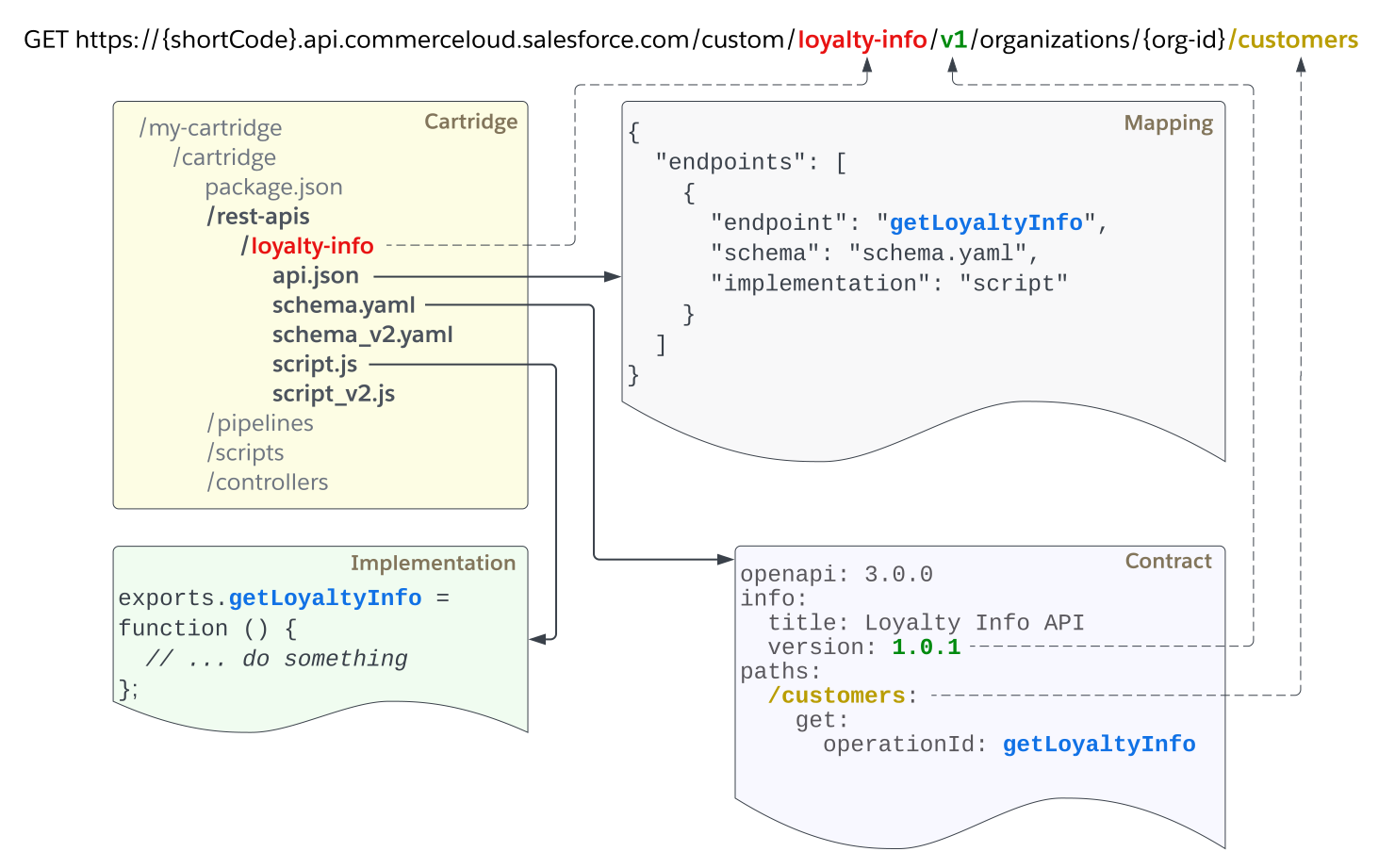
In this guide, we will look at an example called Loyalty Info API that can be used to retrieve the loyalty status for a given customer. This graphic shows the required components and their relationship:
The components will be further explained in the next sections. Note the following details from the diagram:
A dashed line shows where this URL segment is defined.
The blue parameter is the endpoint identifier. It is used to bind the endpoint to the implementation and appears in all three components.
Cartridge
Custom APIs are defined within custom code cartridges. In the cartridge directory, a new folder rest-apis must be created which is the root folder for all APIs in that cartridge.
In the rest-apis folder, subdirectories represent the actual APIs. The names of these directories represent the API names as they are addressed by the URL. Each directory contains the files for the three components representing this API.
Example: The structure for the example API called loyalty-info is expected to look like this:
API directory names can only contain alphanumeric lowercase characters and hyphens.
Important
Due to the registration process, it is recommended to start implementing Custom API endpoints in a new code version.
Tip
Contract
The API contract must be provided by an OAS 3.0 schema file in YAML format. For more information about OAS 3.0, refer to the OAS 3.0 specification.
In this schema file, the API version and the endpoints are defined. The API version is located in the info.version field and is transformed into a URL version by using the major version segment and prepending it with v (for example, 1.0.1 → v1).
The endpoints are defined as part of the paths object and can implement multiple operations (that is, HTTP methods). Each operation is required to have a property called operationId, which must be unique within the schema file. It is used for mapping the endpoint to the implementation. The path of the endpoint becomes the endpointPath in the URL structure.
To secure the endpoint, define a valid security scheme as a shared component and apply it at the endpoint or global level. See Authentication for more details.
Example: The schema for a /customers?c_customer_id={id} endpoint in version v1 is expected to look like this:
schema.yaml:
1openapi: 3.0.02info:3 version: 1.0.14 title: Loyalty Information API5components:6 securitySchemes:7 ShopperToken:8 type: oauth29 flows:10 authorizationCode:11 authorizationUrl: https://my-shortcode.api.commercecloud.salesforce.com/shopper/auth/v1/organizations/my-org-id/oauth2/authorize12 tokenUrl: https://my-shortcode.api.commercecloud.salesforce.com/shopper/auth/v1/organizations/my-org-id/oauth2/token13 scopes:14 c_loyaltyInfo_r: Read loyalty information of a customer15 clientCredentials:16 tokenUrl: https://my-shortcode.api.commercecloud.salesforce.com/shopper/auth/v1/organizations/my-org-id/oauth2/token17 scopes:18 c_loyaltyInfo_r: Read loyalty information of a customer19paths:20 /customers:21 get:22 summary: Get loyalty information for customer23 operationId: getLoyaltyInfo24 parameters:25 - in: query26 name: c_customer_id27 required: true28 schema:29 type: string30 - in: query31 name: siteId32 required: true33 schema:34 type: string35 minLength: 136 - in: query37 name: locale38 required: false39 schema:40 type: string41 minLength: 142 responses:43 "200":44 description: Shows loyalty information for the customer45 content:46 application/json:47 schema:48 type: object49 properties:50 tier:51 type: string52 points:53 type: integer54 "404":55 description: Shows that the customer is not found56 content:57 application/json:58 examples:59 not_found:60 value:61{62 "type": "https://api.commercecloud.salesforce.com/documentation/error/v1/custom-errors/customer-not-found",63}64security:65 - ShopperToken: ["c_loyaltyInfo_r"]
Implementation
The API implementation is provided by a script file using the B2C Commerce Script API. The function name must match the value of the endpoint’s operationId in the contract.
Example: A valid implementation for /customers?c_customer_id={id} based on the definition in the contract could look like this:
script.js:
1var RESTResponseMgr = require("dw/system/RESTResponseMgr");23exports.getLoyaltyInfo = function(){45 var customerId = request6 .getHttpParameterMap()7 .get("c_customer_id")8 .getStringValue();910 /*11 ... some lookup of loyalty data based on customer id ...12 */1314 if(customerId === "customer1"){1516 var info = {17 tier: "silver",18 points: 1427519};2021 RESTResponseMgr22 .createSuccess(info)23 .render();2425}else{2627 RESTResponseMgr28 .createError(404, "customer-not-found", "Customer Unknown", "You provided an unknown customer ID.")29 .render();3031}3233};3435exports.getLoyaltyInfo.public = true;
Always return responses in JSON format. Errors should additionally adhere to the SCAPI error format as described in RFC 9457, with at least the type field being present. Response bodies are subject to validation in the future and may be declined if they don’t meet these requirements.
Important
Make sure that the implementation contains high quality, well-tested code with sufficient error handling. In order to protect the platform, Custom APIs use a Circuit Breaker mechanism that will block API requests when the implementation throws too many errors. See Circuit Breaker for more information.
Important
To learn how to create JSON responses in your scripts with ease, have a look at the documentation of the Script API class RESTResponseMgr.
Tip
Mapping
The api.json file provides the API mapping. It contains a list of endpoints, and for each entry the endpoint name, its schema file, and the name of the implementing script is defined.
Example: A valid mapping for /customers?c_customer_id={id} based on the definitions in the contract and implementation is expected to look like this:
Relative paths are not supported. The schema and implementation must be located at the same level as the corresponding api.json.
Important
Provide the implementation name without the file extension.
Important
Registration of Endpoints
When the Custom API endpoints have been correctly defined as previously described, they must be registered in order to be accessible.
The registration is triggered by activating the code version containing the new API definitions. Whenever changes to an API are required, it is recommended to work in a new code version and to switch the version when ready.
Versioning
Custom API versions are represented in two different formats, the API version and the URL version.
The API version is defined in the contract as part of the info.version field and applies to all endpoints defined in this file. The value must be numeric but can have multiple segments separated by a dot.
In the URL, the version is transformed by using the major version segment and prepending it with v . For example, this list shows valid API versions and their corresponding URL versions:
1 → v1
1.0 → v1
2.0 → v2
2.1.1 → v2
It is recommended to introduce breaking changes in a new major version. See the SCAPI Change Policy for details.
System Query Parameters
The following system query parameters exist and can be used when defined in the contract:
siteId - The site of the current request
locale - The locale of the current request
Make sure you understand the meaning of these parameters and when to use them. For example, the system uses the siteId to identify the site context, so using this parameter only makes sense for a Shopper API request. For an Admin API request that requires a site, for example: an API that returns objects filtered by site, use a custom query parameter like c_siteId. Note that the site is a query parameter instead of a path parameter, which is different from other ways of customization, such as using controllers and hooks.
The parameter locale is used to set the locale of the request, and behaves the same way as the Script API method dw.system.Request#setLocale.
If a siteId is not provided, the request is treated as a SCAPI Admin API request and the Business Manager site is used. If a locale is not provided in a request, the site’s default locale is used.
The parameter siteId is also used to register a Custom API. This means that if you don’t add the cartridge containing a Custom API to a site cartridge path, any request to it with that siteId results in a 404 response. For Admin APIs, the cartridge must be added to the cartridge path of the Business Manager site.
Note
Don’t use a shopper token for an Admin API request. In these scenarios, use an AmOAuth2 token.
Example 1: Define the system query parameter using the name for siteId and type string. If the parameter isn’t a valid string, the request is declined.
Define system query parameters with the correct schema field as shown previously. Setting required to false means that the value is not required. When required is true, the request is refused if the parameter is missing or empty.
Important
Shopper and Admin API Endpoints
Like the non-custom B2C Commerce APIs (SCAPI), each endpoint is either a Shopper or an Admin API endpoint. For general information on how to differentiate those API groups, see SCAPI Groups.
For Custom APIs, there are three main differences between Shopper and Admin endpoints:
Shopper endpoints have stricter limits for request body size and API quotas. See Limitations for specific values.
Shopper endpoints require the siteId query parameter, while Admin endpoints must omit this parameter. Requests without a siteId are treated as Admin API requests.
Shopper endpoints require the ShopperToken security scheme, while Admin endpoints require the AmOAuth2 security scheme, and each endpoint can have only one security scheme. See Authentication for details on how to use these.
Supported HTTP Methods
Supported methods for Custom APIs include:
GET
POST
PUT
PATCH
DELETE
HEAD
OPTIONS
The following example extends the Loyalty Information API with a POST method with which an admin can update the loyalty information:
schema.yaml:
1openapi: 3.0.02info:3 version: 1.0.14 title: Loyalty Information API5components:6 securitySchemes:7 AmOAuth2:8 type: oauth29 flows:10 authorizationCode:11 authorizationUrl: https://account.demandware.com/dwsso/oauth2/authorize12 tokenUrl: https://account.demandware.com/dwsso/oauth2/access_token13 scopes:14 c_loyaltyInfo_rw: Read or Update loyalty information of a customer15 clientCredentials:16 tokenUrl: https://account.demandware.com/dwsso/oauth2/access_token17 scopes:18 c_loyaltyInfo_rw: Read or Update loyalty information of a customer19paths:20 /customers/{customerId}:21 post:22 summary: Update loyalty information for customer23 operationId: updateLoyaltyInfo24 parameters:25 - in: path26 name: customerId27 required: true28 schema:29 type: string30 requestBody:31 content:32 'application/json':33 schema:34 type: object35 required:36 - points37 properties:38 points:39 type: number40 minimum: 141 maximum: 9999942 responses:43 "200":44 description: Shows loyalty information for the customer45 content:46 application/json:47 schema:48 type: object49 properties:50 tier:51 type: string52 points:53 type: integer54 "404":55 description: Shows that the customer is not found56 content:57 application/json:58 examples:59 not_found:60 value:61{62 "type": "https://api.commercecloud.salesforce.com/documentation/error/v1/custom-errors/customer-not-found",63}64security:65 - AmOAuth2: ["c_loyaltyInfo_rw"]
Here is a sample implementation for this endpoint:
script.js:
1var RESTResponseMgr = require("dw/system/RESTResponseMgr");23exports.updateLoyaltyInfo = function(){45 var customerId = request6 .getSCAPIPathParameters()7 .get('customerId');89 var requestBody = request10 .httpParameterMap11 .requestBodyAsString;12 var requestJSON = JSON.parse(requestBody);1314 /*15 ... Update loyalty points based on customer id and request body ...16 */171819 if(customerId === "customer1"){2021 var updatedInfo = {22 tier: "silver",23 points: requestJSON.points24};2526 RESTResponseMgr27 .createSuccess(updatedInfo)28 .render();2930}else{3132 RESTResponseMgr33 .createError(404, "customer-not-found", "Customer Unknown", "You provided an unknown customer ID.")34 .render();3536}3738};3940exports.updateLoyaltyInfo.public = true;
To learn more about new convenience methods for SCAPI path parsing, refer to the Request class in Script API.
Tip
The attribute additionalProperties is NOT allowed when defining the request body schema. To take advantage of request body validation and build robust APIs, define the request body schema in detail. If the request body schema of an endpoint contains additionalProperties, the endpoint is not registered.
Note
Validation
All request parameters must be defined in the contract as requests with unknown parameters are declined. Custom query parameters must be prefixed with c_. System query parameters must be added to the contract if used.
Example: Defining a mandatory query parameter with the name c_status and the type integer. If the parameter is not present or is not a valid integer, the request is declined.
Our community is maintaining a Custom API collection within the Sample Hooks Collection, providing the functionality earlier offered with hooks as new Custom APIs. Here are a few APIs available with this collection:
URL Resolution
URL List API
Guest Order Look Up
Customer Groups API
Mini Product
Send Mail API
Geo IP API
For more information, check out the Custom APIs Collection on the Salesforce Commerce Cloud GitHub repository.
Limitations
The following limitations are in place:
General:
Transactions can’t be committed in the case of GET requests.
The schema attribute additionalProperties is not allowed.
Shopper and Admin APIs must adhere to the applicable API quotas. For quota details, see API Quotas documentation.
Shopper APIs:
Default request runtime of 60 seconds, configurable up to 120 seconds via the Timeouts API.
A 10-second runtime is recommended for Shopper endpoints. Set the runtime via the Timeouts API.
Note
Maximum request body size of 5 MiB (5,242,880 bytes).
STOREFRONT activity type. Storefront quota limits are applied.
SCAPI Admin APIs:
Default request runtime of 60 seconds, configurable up to 120 seconds via the Timeouts API.
Maximum request body size of 20 MB (20,000,000 bytes).
BUSINESS_MANAGER activity type. Default quota limits are applied.


 j
j