These use cases show how SLAS authorizes access to a Shopper API for private clients under different login scenarios.
Remember that any shopping app that is able to securely store a client secret is a private client. Full stack web apps and all shopping apps with a backend-for-frontend (BFF) must be provisioned as private clients.
Each use case demonstrates a different login scenario: guest user (no login), federated login, and B2C login.
Although all three use cases feature the Open Commerce API (OCAPI)’s /baskets endpoint, remember that a SLAS access token can be used with any Shopper API endpoint.
Each step in the authentication flow is numbered and described in detail for all three use cases. The numbered steps are also illustrated with a diagram to help you visualize the process.
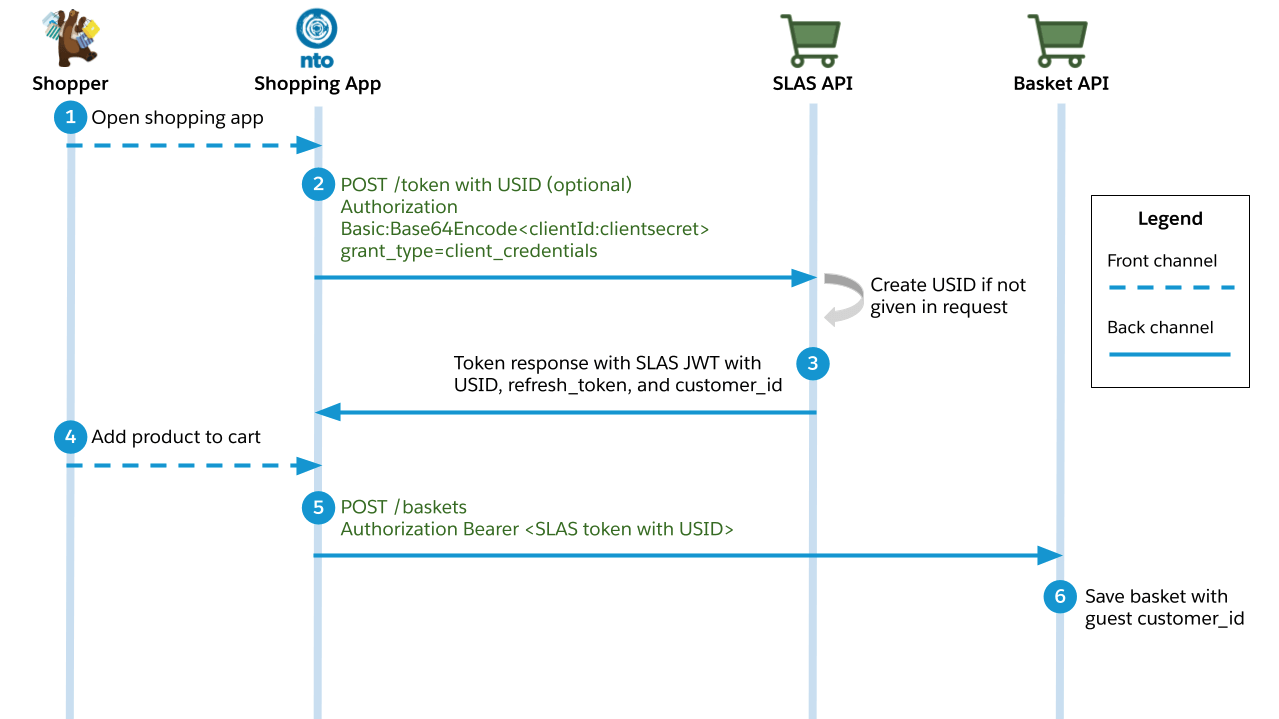
This use case describes what happens when the shopper adds a product to their basket without logging in first. It follows the client credentials grant flow as defined by the OAuth 2.1 standard.
A shopper opens a B2C Commerce shopping app and starts interacting with it.
The shopping app requests an access token using the /token endpoint of the SLAS API.
The request must include an authorization header that contains a Base64 encoded version of the following string: <clientID>:<clientSecret>. (Don’t forget to replace <clientID> and <clientSecret> with actual values before encoding the string.)
Example header value: Authorization: Basic czZCaGRSa3F0MzpnWDFmQmF0M2JW.
The client ID and client secret must be provisioned for the app by a SLAS Organization Administrator. See the SLAS Admin API for more information.
Recommended query parameter (will be required in the future): channel_id.
Optional query parameter: usid. If you already have a Unique Shopper Identifier (USID) for the guest user, you can pass it in. Otherwise, a USID is generated for you by SLAS.
Best practice: reuse the USID for a shopper from the previous guest login so that you can tie that user to all the previous login attempts and enable personalization.
The endpoint responds with an access token in the form of a JSON Web Token (JWT), a customer_id string, a USID, and a refresh token.
The guest shopper adds a product to their basket.
The shopping app makes a request to the /baskets endpoint of OCAPI and provides a SLAS access token in the header.
The Baskets API saves a shopping basket with a customer_id string that is associated with the guest user.
Registered User (Federated Login)
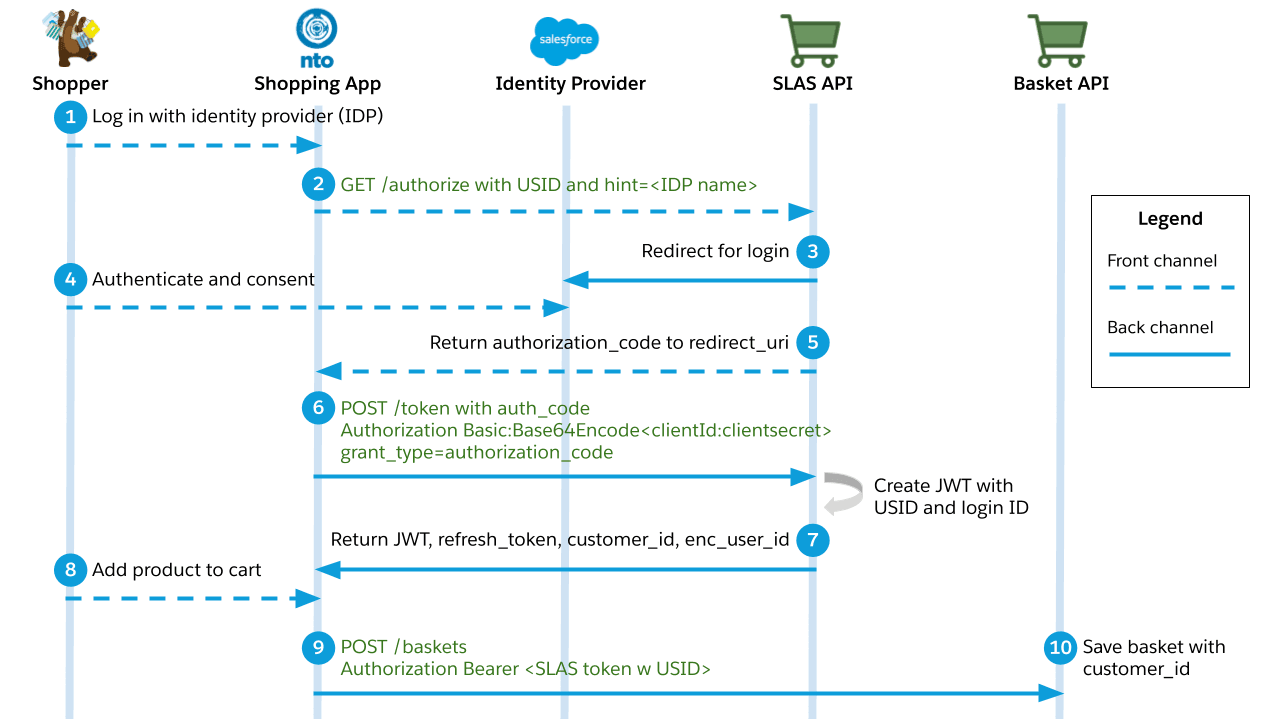
This use case describes what happens when a shopper logs in using a third-party identity provider before adding a product to their basket. It follows the authorization code grant flow as defined by the OAuth 2.1 standard.
A shopper logs in to a B2C Commerce shopping app and chooses a third-party identity provider (IDP) to perform the authentication.
The shopping app makes a request to the /authorize endpoint of the SLAS API.
Required query parameters: hint, response_type=code, client_id, and redirect_uri.
The hint parameter specifies the name of the identity provider.
The redirect_uri parameter specifies what app route to redirect to when the login is complete.
The SLAS API redirects to the identity provider’s login page.
The shopper enters their credentials and consents.
If login is successful, the SLAS API responds with an authorization code and redirects to the shopping app.
The shopping app requests an access token using the /token endpoint of the SLAS API.
The request must include an authorization header that contains a Base64 encoded version of the following string: <clientID>:<clientSecret>. (Don’t forget to replace <clientID> and <clientSecret> with actual values before encoding the string.)
Example header value: Authorization: Basic czZCaGRSa3F0MzpnWDFmQmF0M2JW.
The client ID and client secret must be provisioned for the app by a SLAS Organization Administrator. See the SLAS Admin API for more information.
The endpoint responds with an access token in the form of a JSON Web Token (JWT), a customer_id string, a USID, and a refresh token.
The shopper adds a product to their basket.
The shopping app makes a request to the /baskets endpoint of OCAPI and provides a SLAS access token in the header.
The Baskets API saves a shopping basket with a customer_id string that is associated with the registered user.
Registered User (B2C Commerce Login)
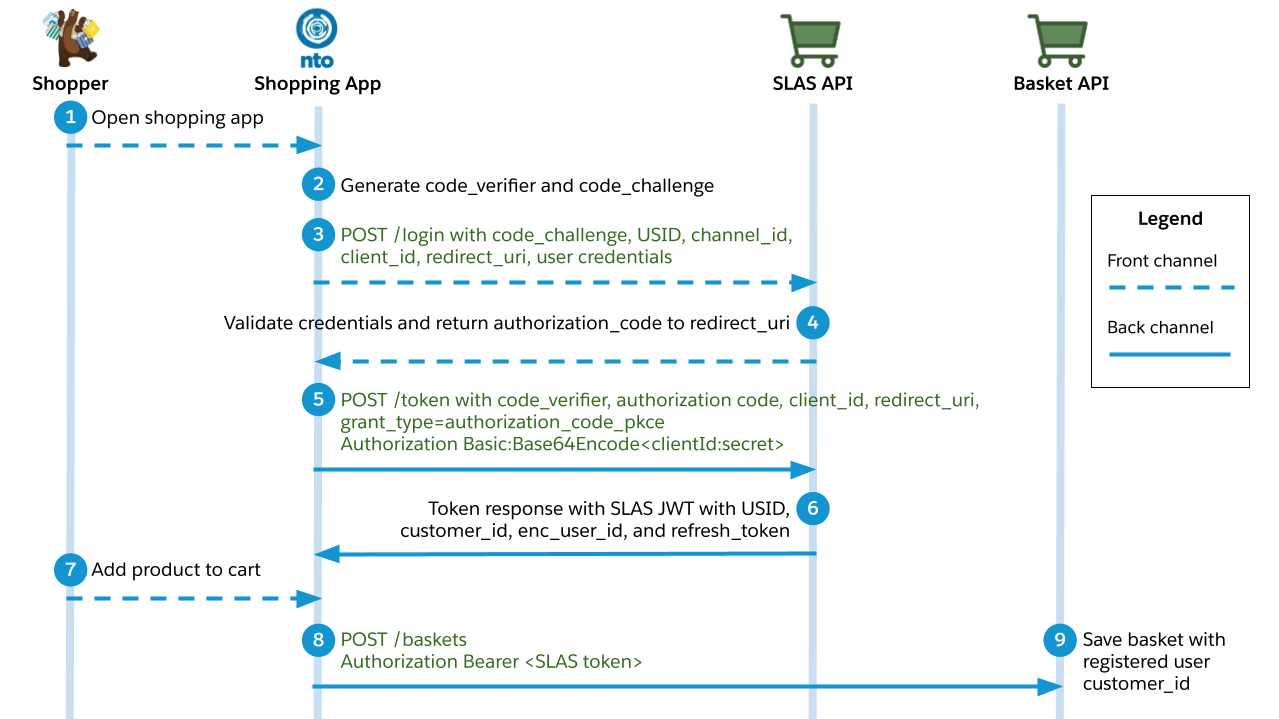
This use case describes what happens when a shopper logs in with credentials that are managed by a B2C Commerce instance before adding a product to their basket. It follows the authorization code grant flow as defined by the OAuth 2.1 standard. It also uses a proof key for code exchange (PKCE), as defined by RFC 7636.
A shopper logs in to a B2C Commerce shopping app and chooses to authenticate directly through the shopping app.
The shopping app generates two strings: code_verifier and code_challenge.
The code_verifier string is a random string.
The code_challenge is an encoded version of the code_verifier string using an SHA-256 hash.
The shopping app makes a request to the /login endpoint of the SLAS API.
The request must include an authorization header that contains a Base64 encoded version of the following string: <shopperUserID>:<shopperPassword>. (Don’t forget to replace <shopperUserID> and <shopperPassword> with actual values before encoding the string.)
Example header value: Authorization: Basic czZCaGRSa3F0MzpnWDFmQmF0M2JW.
Required query parameters: code_challenge, usid, channel_id, client_id, and redirect_uri.
The SLAS API validates the user credentials, redirects to the redirect URI, and returns an authorization code.
The shopping app makes a request to the /token endpoint of the SLAS API.
The request must include an authorization header that contains a Base64 encoded version of the following string: <clientID>:<clientSecret>. (Don’t forget to replace <clientID> and <clientSecret> with actual values before encoding the string.)
Example header value: Authorization: Basic czZCaGRSa3F0MzpnWDFmQmF0M2JW.
The client ID and client secret must be provisioned for the app by a SLAS Organization Administrator. See the SLAS Admin API for more information.
Required query parameters: grant_type=authorization_code_pkce, code_verifier, code, client_id, and redirect_uri.
The endpoint responds with an access token in the form of a JSON Web Token (JWT), a customer_id string, a USID, and a refresh token.
The response also includes an enc_user_id string that can be used to call Einstein APIs.
The shopper adds a product to their basket.
The shopping app makes a request to the /baskets endpoint of OCAPI and provides a SLAS access token in the header.
The Baskets API saves a shopping basket with a customer_id string that is associated with the registered user.


 j
j