Access tokens whose scope includes the Shopper Context API are powerful: they can activate specific promotions and be used to see how a storefront would appear in the future. Don’t share them with untrusted clients like web browsers or client apps.
It is highly recommended to use Shopper Context calls with a private client and to only make setting Shopper Context calls through a secure backend channel. Users of Shopper Context should avoid making direct calls through a browser or similar clients where the data can be viewed to prevent potential misuse.
As part of this, when creating a new public client in SLAS for a tenant, if adding Shopper Context scope is attempted, a warning message is displayed to make sure that the user is aware of the pitfalls of doing so.
Warning
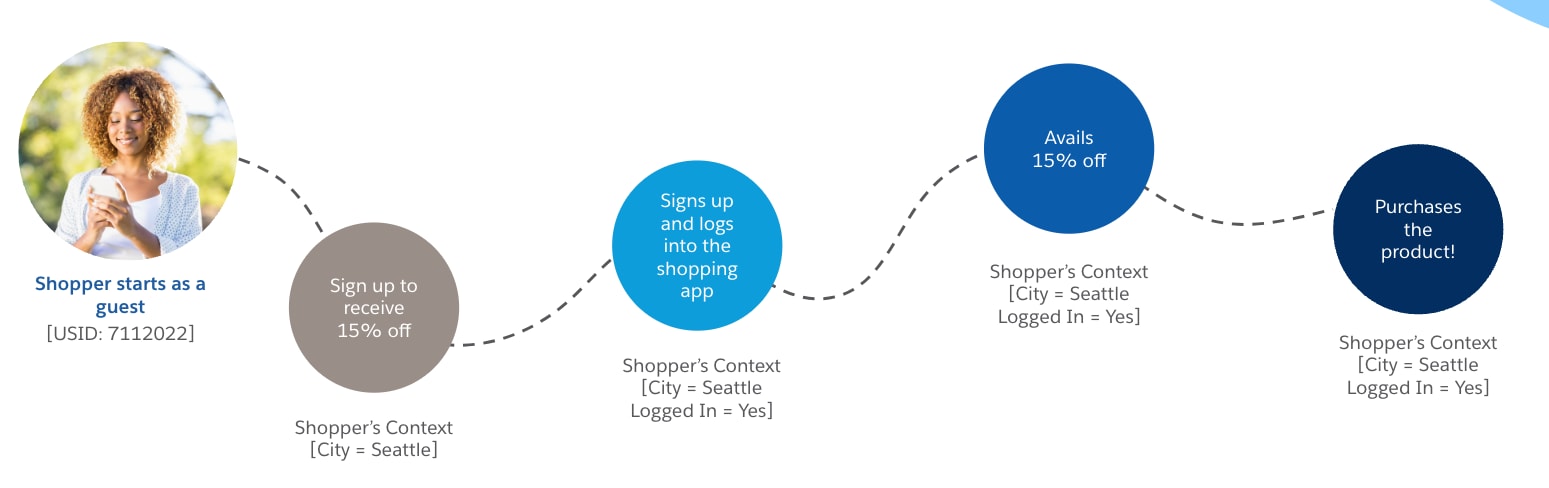
Let’s look at a shopper’s personalized journey while browsing for jackets in the Northern Trail Outfitters shopping app:
She visits the shopping app and starts as a guest shopper
She’s from Seattle and notices that signing up to receive email promotions gets 15% off her purchase.
After signing up, she logs in to the shopping app. The two contexts reveal that:
She’s browsing from the city of Seattle.
She’s logged in to the shopping app.
She takes advantage of the 15% off and makes a purchase!
Shopper Context Lite
To personalize the first Shopper API request without first creating shopper context and waiting for the response, use Shopper Context Lite. It applies a lightweight subset of context (clientIp, sourceCode, and up to two customQualifiers) through the sfdc_shopper_context request header, so a storefront can skip a separate context-setup call on the critical path.
Use Shopper Context Lite for context that’s available when a shopper arrives. For all other context, such as customer groups, coupon codes, assignment qualifiers, effective dates, and geolocation, use the Shopper Context API described on this page.
Set and Retrieve Shopper Context
To set and retrieve shopper context with the Shopper Context API:
Enable Shopper Context in Business Manager:
Log in to Business Manager.
Go to Merchant Tools | site | Site Preferences | Hybrid Auth Settings.
Call the PUT Shopper Context API (in the scope of USID returned with the SLAS access token). Provide the shopper’s USID and context you would like to set, using createShopperContext or updateShopperContext endpoints:
After the shopper context is set, make a call to retrieve shopper context information, for example: GET products.
Constraints
After the shopper is logged out, the shopper’s context is deleted.
For PRD instances, context is stored for one day for guest shoppers and seven days for registered shoppers. For other instances, a context is stored for one day for both guest and registered shoppers. As a best practice, extend the context periodically by creating a new one.
The number of contexts that can be stored per instance is limited. By default, the PRD instances can store five million contexts. Other instances can store five thousand. If the limit is reached, subsequent requests to create a context return an HTTP 400 response. For quota limits best practices, see Update Shopper Context.
B2C Instance Type
Guest Shopper TTL
Registered Shopper TTL
Context Quota limit
PRD
1 day
7 days
5,000,000
Non-PRD
1 day
1 day
5,000
The Shopper Context API doesn’t support custom fields and objects.
Shopper Context is only compatible with OCAPI that use a ShopperToken (or SLAS). OCAPI can work with other authentication schemes, but Shopper Context is only supported with the ShopperToken authentication scheme.


 j
j