Trusted Agent on Behalf (TAOB) authorization allows an agent to perform actions on behalf of a registered or guest shopper.
By default, shopper tracking preferences are disabled for all TAOB flows, which means that dnt is set to true. This differs from other SLAS token requests, in which dnt is set to false.
Note
Configure Trusted Agent Authorization
Configure Business Manager permissions:
In Business Manager, configure the following functional permissions for one or more agents in your organization: Login_On_Behalf and Create_Order_On_Behalf.
Create a dedicated public client ID to use in the OAuth auth_code PKCE flow. For details, see Public SLAS Client Use Cases.
Add the sfcc.ta_ext_on_behalf_of scope to your SLAS client.
Set a redirect URI.
Perform the steps for registered and guest shoppers in the following sections, as applicable.
To initialize an Agentforce session, obtain a SLAS shopper access token that includes the sfcc.shopper-agents.rw scope, and then call the Shopper Agents API with the sessionInitKey received at session start.
Specify TAOB Parameters for Guest Shoppers
Make sure you use the public client ID created when configuring SLAS.
Note
Set login_id to guest.
Set idp_origin to slas. This is standard for SLAS Guest requests. If any other idp_origin value is used, SLAS returns a bad request.
If the trusted agent needs access to the existing basket of a guest shopper (viewing or updating), you must pass the same USID that was included in the shopper token.
You must pass the state parameter in the TAOB guest Token request to get the TAOB access_token to transfer the state from the authorization call to the token call. The state parameter value is returned with the authorization code in the response url from the TAOB guest authorization call, for example:
.../taob/callback?code=HETXpvg5LKBNIHjDTWkRrf2MLVU&state=taob.gst.7bc7fb7f-e646-44fd-bc73-dfd5c3c9019b
Example: TAOB Authorization Request for a Guest Shopper
Make sure you use the public client ID created when configuring SLAS.
Note
Set login_id to the shopper’s credentials.
Set idp_origin to ecom.
Consider the following scenario where trusted agent authorization is used to help a registered shopper:
Lauren is a call center agent who helps shoppers with their orders.
Tim is a shopper who contacts the call center. He wants to update the quantity of shirts in his order but is having difficulty doing it himself.
Using the SLAS TAOB flow, Lauren gains access to Tim’s account, which gives her access to the items added to the cart.
Lauren successfully updates the quantity of shirts in Tim’s order.
Tim is pleased with the Lauren’s help and completes his order.
This flow is specifically for Account Manager when it serves as the IDP for agents. For agents using a different IDP, consider using the SLAS Trusted System On-behalf (TSOB) call flow to provide the SLAS shopper JSON Web Token (JWT) in your custom agent solution.
Note
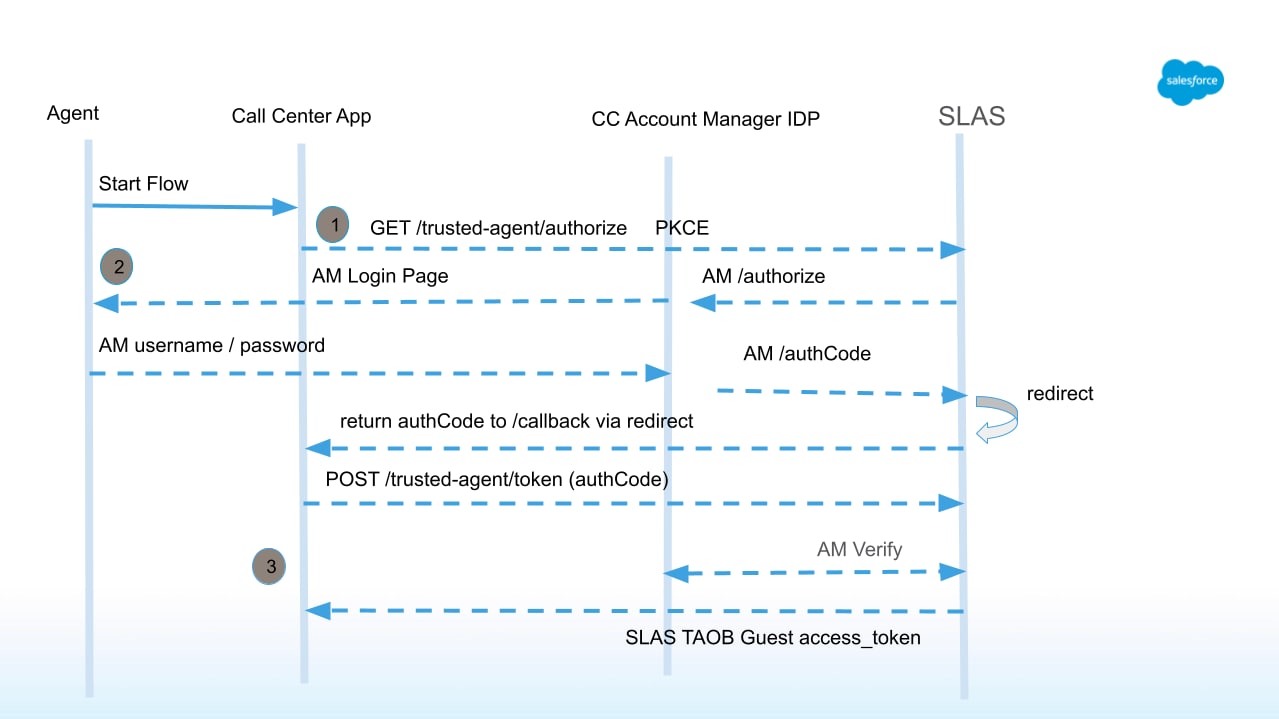
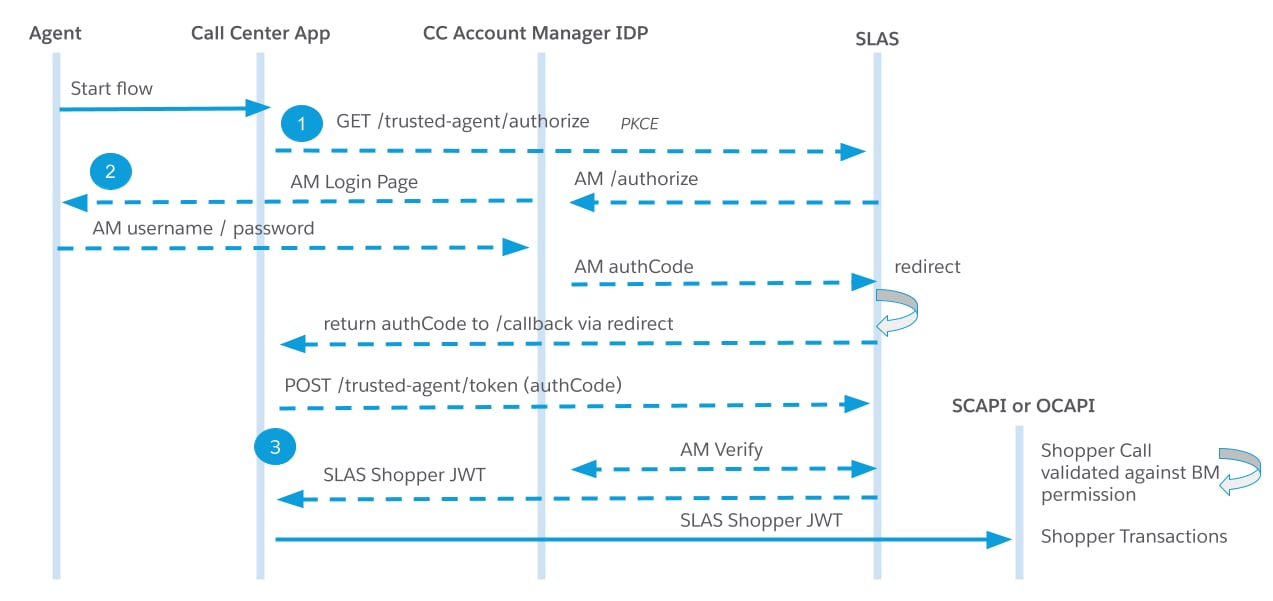
The following diagram shows the typical API requests and responses used in the trusted agent authorization flow for a registered shopper:
Example: TAOB Authorization Request for a Registered Shopper
The following commands demonstrate how to authorize a trusted agent using a public client.
When running the sample code provided, don’t forget to replace the placeholder values with actual values.
The request redirects you to Account Manager for authentication. After a successful login, you are redirected to the address provided in the redirect_uri parameter of the previous request. When redirecting, the authorization code is included in the code query parameter.
Now request a trusted agent token using getTrustedAgentAccessToken. In the authorization header, use the value from the code query parameter that was returned when the agent authenticated with Account Manager:


 j
j