


此文已使用 Salesforce 機器翻譯系統翻譯。更多詳細資料請參見此處。
請參閱使用追蹤同意橫幅保護隱私。
通過 Progressive Web App (PWA) 工具包 網站上的跟蹤同意橫幅來維護購物者的信任。通過橫幅,您的購物者可以加入宣告或退出 PWA Kit 中包含的預設活動跟蹤。
本指南介紹了跟蹤同意橫幅的默認實施和自定義選項。
混合網店不支援本指南中描述的功能。
Note
先決條件
若要配置和使用跟蹤同意橫幅,請使用 Retail React App 版本 6.0 或更高版本構建網站。
默認跟蹤同意實施
橫幅用戶介面
跟蹤同意橫幅在 template-retail-react-app/app/components/_app/index.jsx 中可用,因此您可以在網站的任何頁面上顯示它。橫幅在 中定義 template-retail-react-app/app/hooks/use-dnt-notification.js。
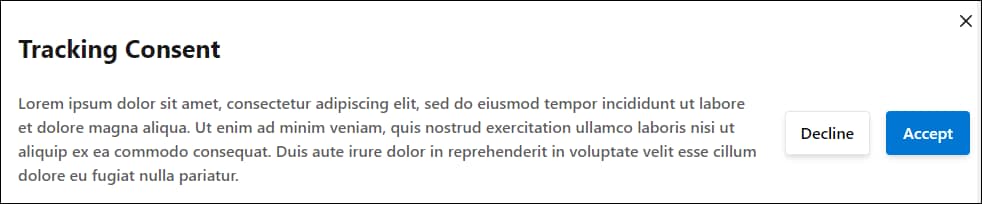
默認情況下,橫幅與此示例類似。
不跟蹤值
這是定義 DNT 狀態設定為的兩個值:
effectiveDnt:設置為您設定的預設 DNT 狀態,如果未設定預設 DNT 狀態,則設置為false此。如果購物者同意跟蹤或true購物者退出退出跟蹤,則此值將設置為false。selectedDnt:在購物者與同意橫幅交互之前未定義。如果購物者同意跟蹤或true購物者退出退出跟蹤,則此值將設置為false。
橫幅和 DNT 工作流程
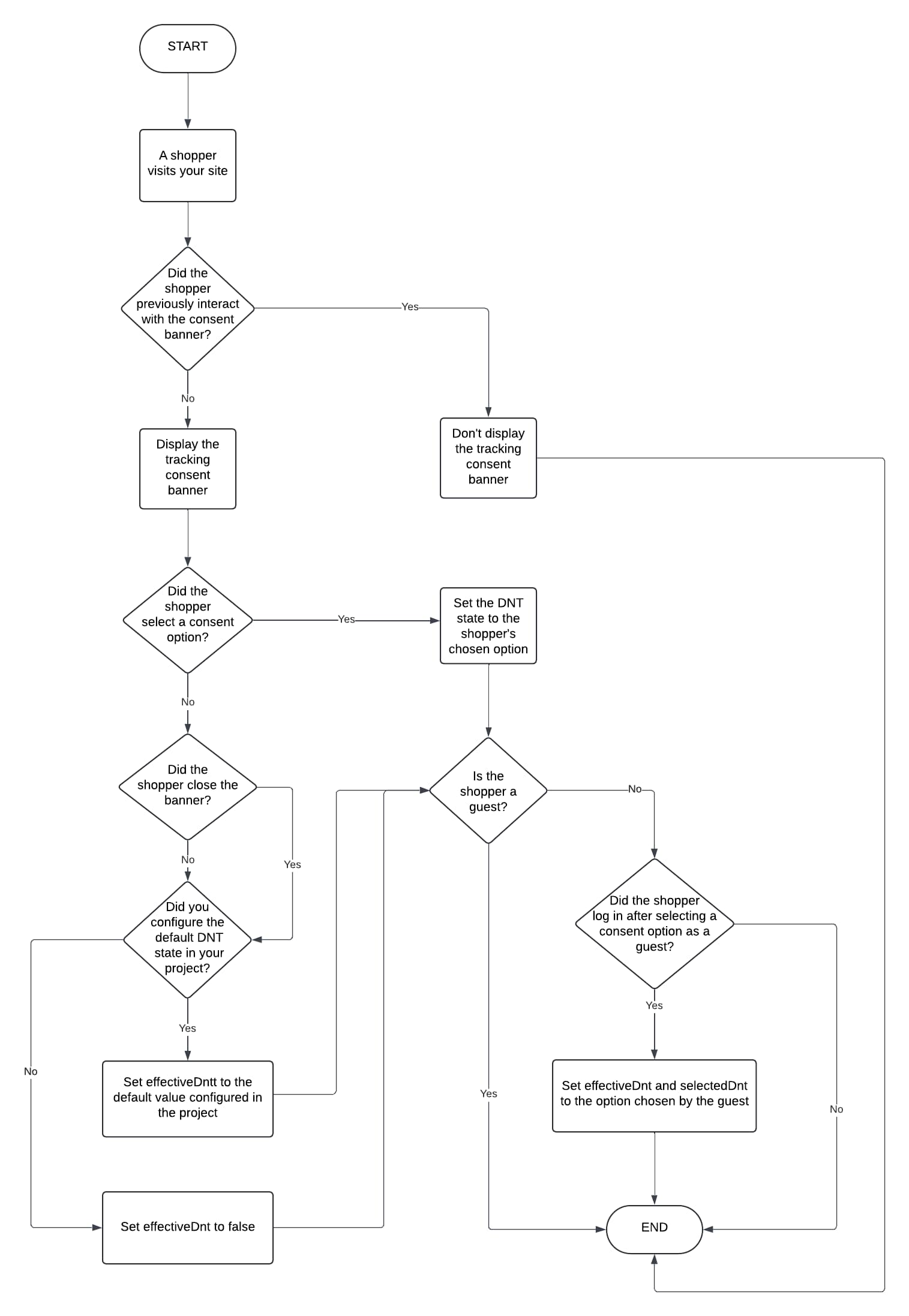
如果購物者關閉橫幅或未在橫幅中做出選擇,則預設 DNT 狀態設置為 false (跟蹤活動)。若要更改該行為,請參閱 配置預設 DNT 狀態。當購物者執行以下任一作后,下次訪問您的網站時,橫幅會重新出現:
- 關閉瀏覽器
- 刷新網站數據
- 清除他們的cookie
此圖總結了跟蹤同意橫幅的行為,以及購物者訪問您的網站時如何設置 DNT 狀態。
除非另有說明,否則圖中的所有步驟都適用於訪客購物者和已知購物者。
配置預設 DNT 狀態
或者,您可以指定預設的 DNT 狀態,當購物者關閉跟蹤同意橫幅或未在橫幅中進行選擇時,該狀態將適用。為此,請在專案中設置此檔中的 defaultDNT 屬性: {overridesDir}/app/components/_app-config/index.jsx。
defaultDnt={true}:表示未跟蹤購物者活動。defaultDnt={false}:表示正在跟蹤購物者活動。
在本例中, defaultDnt 設定為 false。
1// More code here...
2
3   <CommerceApiProvider
4            shortCode={commerceApiConfig.parameters.shortCode}
5            clientId={commerceApiConfig.parameters.clientId}
6            organizationId={commerceApiConfig.parameters.organizationId}
7            siteId={locals.site?.id}
8            locale={locals.locale?.id}
9            currency={locals.locale?.preferredCurrency}
10            redirectURI={`${appOrigin}/callback`}
11            proxy={`${appOrigin}${commerceApiConfig.proxyPath}`}
12            headers={headers}
13            // Add your chosen default DNT state.
14            defaultDnt={false}
15            // Uncomment 'enablePWAKitPrivateClient' to use SLAS private client login flows.
16            // Make sure to also enable useSLASPrivateClient in ssr.js when enabling this setting.
17            // enablePWAKitPrivateClient={true}
18            logger={createLogger({packageName: 'commerce-sdk-react'})}
19        >
20            <MultiSiteProvider site={locals.site} locale={locals.locale} buildUrl={locals.buildUrl}>
21                <ChakraProvider theme={theme}>{children}</ChakraProvider>
22            </MultiSiteProvider>
23            <ReactQueryDevtools />
24   </CommerceApiProvider>
25
26   // More code here...
自定義跟蹤同意橫幅
或者,您可以通過更改部分內容(例如外觀或文本)來自定義跟蹤同意橫幅。為此,您有這兩個選擇。
- 使用管理 購物者跟蹤首選項中所述的 API 和鉤子。
或
-
通過完成這些步驟,覆蓋基本範本中的橫幅檔。
- 如果尚未執行此作,請在 PWA Kit 專案中建立一個名為
hooks.{overridesDir}/app - 創建一個在資料夾中
hooks調用use-dnt-notification.js的檔。 - 將此代碼複製並貼上到
use-dnt-notification.js中。在此示例中,我們用於selectedDnt呈現由元件控制的DntNotification自定義橫幅。此外,我們還使用該updateDnt函數將購物者的跟蹤首選項作為布爾值應用。請參閱 「不跟蹤值」。
- 如果尚未執行此作,請在 PWA Kit 專案中建立一個名為
1import React, {useEffect} from 'react'
2import PropTypes from 'prop-types'
3import {FormattedMessage, useIntl} from 'react-intl'
4import {
5    Button,
6    Modal,
7    ModalContent,
8    ModalBody,
9    ModalCloseButton,
10    useDisclosure,
11    Heading,
12    Stack,
13    Text,
14    Flex
15} from '@salesforce/retail-react-app/app/components/shared/ui'
16import {useDNT} from '@salesforce/commerce-sdk-react'
17import {useLocation} from 'react-router-dom'
18
19export const DntNotification = ({isOpen, onOpen, onClose}) => {
20    const {selectedDnt, updateDNT} = useDNT()
21    const {formatMessage} = useIntl()
22    const location = useLocation()
23
24    useEffect(() => {
25        if (selectedDnt === undefined) {
26            onOpen()
27        } else {
28            onClose()
29        }
30    }, [location, selectedDnt])
31
32    const onCloseNotification = () => {
33        updateDNT(null)
34        onClose()
35    }
36
37    return (
38        <Modal
39            size="sm"
40            data-testid="sf-dnt-notification"
41            blockScrollOnMount={false}
42            closeOnOverlayClick={false}
43            trapFocus={false}
44            isOpen={isOpen}
45            onOpen={onOpen}
46            onClose={onCloseNotification}
47        >
48            <ModalContent
49                position="fixed"
50                bottom="4"
51                right="4"
52                maxW="400px"
53                pointerEvents="all"
54                containerProps={{
55                    pointerEvents: 'none'
56                }}
57                border="2px solid"
58            >
59                <ModalCloseButton
60                    aria-label={formatMessage({
61                        id: 'dnt_notification.button.assistive_msg.close',
62                        defaultMessage: 'Close consent tracking form'
63                    })}
64                />
65                <ModalBody pb={8} bg="white" marginTop={4}>
66                    <Heading as="h3" fontSize={25} width="100%" marginBottom={5}>
67                        <FormattedMessage
68                            defaultMessage="Your Privacy Matters to Us"
69                            id="dnt_notification.title"
70                        />
71                    </Heading>
72                    <Flex direction="column">
73                        <Text>
74                            <FormattedMessage
75                                defaultMessage="We collect data to improve your experience, deliver personalized content or ads, and better understand how our site is used. By selecting 'Accept,' you agree to our use of tracking technologies. "
76                                id="dnt_notification.description"
77                            />
78                        </Text>
79                        <Stack direction="column" spacing={4} mt={4} align="flex-end">
80                        <>
81                            <Button
82                                onClick={() => {
83                                    updateDNT(true)
84                                    onClose()
85                                }}
86                                width="100%"
87                            >
88                                <FormattedMessage defaultMessage="Decline" id="dnt_notification.button.decline" />
89                            </Button>
90                            <Button
91                                onClick={() => {
92                                    updateDNT(false)
93                                    onClose()
94                                }}
95                                width="100%"
96                            >
97                                <FormattedMessage defaultMessage="Accept" id="dnt_notification.button.accept" />
98                            </Button>
99                        </>
100                        </Stack>
101                    </Flex>
102                </ModalBody>
103            </ModalContent>
104        </Modal>
105    )
106}
107
108DntNotification.propTypes = {
109    isOpen: PropTypes.bool.isRequired,
110    onOpen: PropTypes.func.isRequired,
111    onClose: PropTypes.func.isRequired
112}
113
114/**
115 *
116 * @returns {Object} - Object props to be passed into the DntNotification component
117 */
118export const useDntNotification = () => {
119    const {isOpen, onOpen, onClose} = useDisclosure()
120
121    return {
122        isOpen,
123        onOpen,
124        onClose
125    }
126}- 如果重寫
app/components/_app/index.jsxPWA Kit 專案中的檔,請利用useDntNotification挂鉤顯示自定義的跟蹤同意橫幅。
1import {
2    DntNotification,
3    useDntNotification
4} from '{overridesDir}/app/hooks/use-dnt-notification'
5
6const App = (props) => {
7   ...
8   const dntNotification = useDntNotification()
9   ...
10
11   return (
12        ...
13        // Put the consent tracking banner in your chosen location in your code by adding the dntNotification component.
14        <DntNotification {...dntNotification} />
15        ...
16   )
17}
根據 DNT 狀態抑制跟蹤
(可選)可以在 PWA Kit 專案中添加代碼,以根據購物者的跟蹤首選項或預設 DNT 狀態觸發或阻止作。
用於 effectiveDnt 觸發或阻止 API 調用等作。例如,用於訪問Google Analytics的API調用。請參閱 「不跟蹤值」。
在此示例中,我們用於 effectiveDnt 觸發分析 API 調用,目的是根據購物者與網站的交互收集數據。這些數據可以提供有關購物者行為、網站流量或銷售業績等因素的見解。
1import {
2    useDNT
3} from '@salesforce/commerce-sdk-react'
4function reportClickTracking() {
5  const {effectiveDnt} = useDNT()
6  if (effectiveDnt) {
7    return
8  }
9  return fetch('https://tracking.example.com/collect')
10}
考量事項
-
如果購物者退出宣告追蹤(DNT 狀態設定為
true)或未設定 DNT 狀態: -
PWA Kit 將覆蓋您在 Business Manager 的 隱私首選項 下設置的任何預設跟蹤配置。PWA Kit 網站應用以下任一配置:
- PWA Kit 本指南中描述的預設或自定義跟蹤配置。
- Shopper Login and API Access Service(SLAS): 如果您使用 SLAS 自定義了跟蹤同意橫幅,則您的網站將應用 管理購物者跟蹤首選項中描述的跟蹤配置。
跟蹤許可疑難解答
本部分針對您在使用跟蹤同意橫幅時可能遇到的常見錯誤提供建議的解決方案。
橫幅未顯示或行為意外
原因: CSS 或 JavaScript 問題可能會妨礙功能,或導致橫幅在某些設備或瀏覽器上無法正確顯示或根本無法顯示。
建議的解決方案: 在多個瀏覽器和設備中測試橫幅,以確保功能一致。請特別注意具有更嚴格 Cookie 政策的瀏覽器(例如,Safari 的智慧跟蹤預防)。測試不同的螢幕尺寸和解析度,以確保橫幅廣告具有回應性和使用者友好性。確認橫幅不會干擾任何網站功能或購物者互動。
也請參閱
- 管理購物者跟蹤首選項
- Salesforce 説明:
 j
j