


 j
jConfigure Marketing Cloud Engagement
Runtime Toggles
Add Beacon Support
Enable Background Location Updates
Segment Location Messages
Event Tracking
Handle URLs
Data Protection and Privacy
Changelog
The Salesforce Engagement SDK for iOS uses location capabilities of your customer’s device to trigger location-based notifications. The SDK caches geofence messages and displays them on devices when users cross a geofence boundary. Enable location features, configure beacon support, and segment location messages to deliver targeted, location-aware experiences for your app users.
To successfully use this functionality, your Marketing Cloud Engagement admin must enable your account with access to MobilePush and Location Services.
Starting with iOS 14, users have the option to use approximate instead of precise location. Geofences and beacons aren’t triggered for users who provide approximate location permission. See Apple Developer Documentation: Accuracy Authorization.
Location messaging and beacon support in iOS versions 14 and later require precise location authorization. The SDK sends only precise location updates to Marketing Cloud Engagement, and ignores approximate location data.
When you enable location services in the SDK configuration, you can use location messaging by calling a single method. You can enable location in your SDK configuration using the setLocationEnabled method of the MarketingCloudSdkConfigBuilder class.
Apple requires that you add these keys to your Info.plist file to enable location services.
NSLocationAlwaysUsageDescriptionNSLocationAlwaysAndWhenInUseUsageDescriptionNSLocationWhenInUseUsageDescriptionFor more information, see Choosing the Location Services Authorization to Request on Apple’s Developer Documentation site.
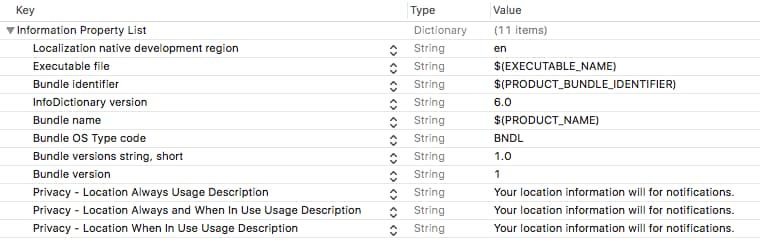
The SDK requires Always permissions for full geofence and beacon functionality. An application doesn’t receive location messages if an app user selects When-in-use authorization.
Important
When your application is ready to enable location features, including geofence and beacon messaging, call the SDK’s startWatchingLocation method to start watching location.
1MarketingCloudSdk.requestSdk { mc in
2    mc?.startWatchingLocation()
3}1SFMCSdk.requestPushSdk { mp in
2 mp.startWatchingLocation()
3}1MarketingCloudSDK.sharedInstance().sfmc_startWatchingLocation()The MarketingCloudSDK+Location.h header file details additional methods to get information about location and control the frameworks behavior.
The SDK suppresses geofence messages with no content. If you include AMPscript or a merge field in your message that returns an empty string, your app doesn’t display that message to the user.
Important
Enable beacon support to range for beacons in the background and access the device’s last known location. Configure your app’s Info.plist to ensure beacon functionality works when your app is in the background or suspended.
Enable background location updates to allow the app to periodically download new regions and messages. This feature is useful for users who spend extended time within a single 5-kilometer radius, ensuring they receive updated geofence and beacon messages.
Segment location messages to deliver messages to a subset of your audience based on custom criteria. Implement the location delegate to evaluate whether to show a message based on user attributes, app state, or message custom keys.
j