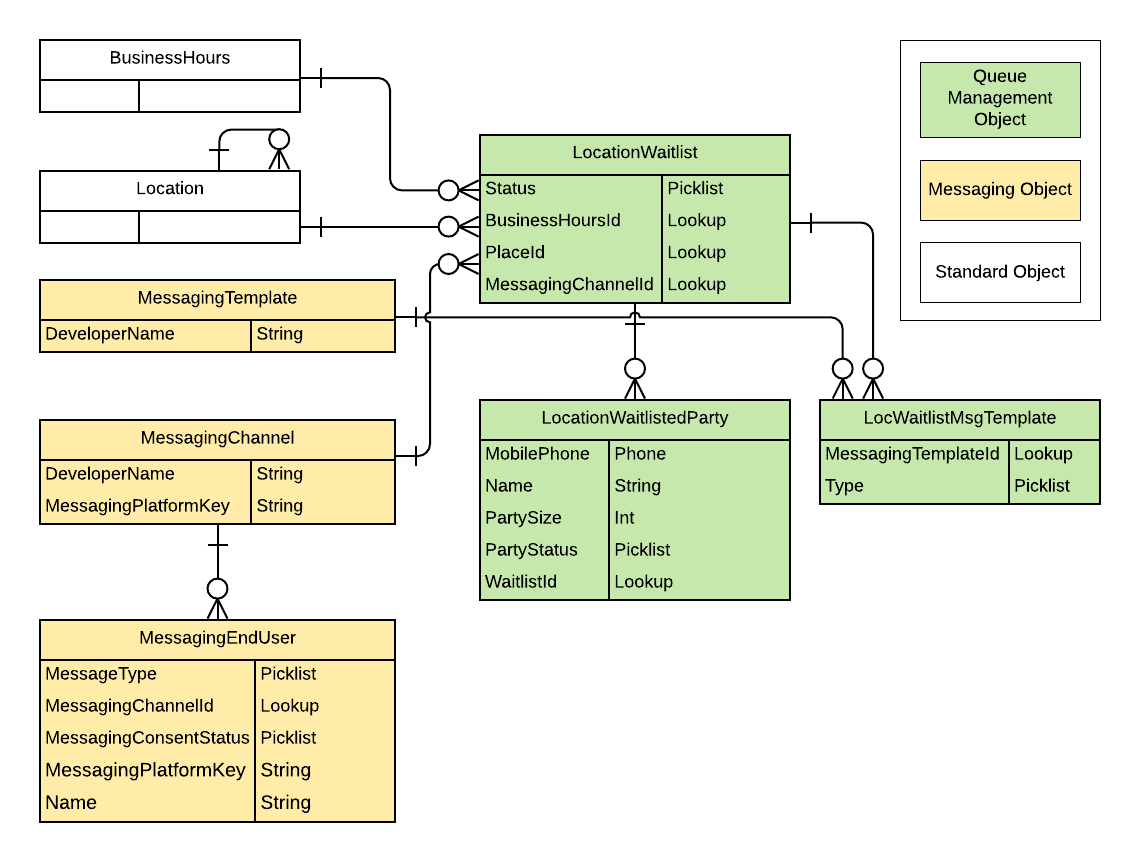
Queue Management uses a combination of Salesforce objects.
The following diagram highlights the key objects involved in the queue management process.
Queue Management Objects
LocationWaitlist: Represents a queue created for a specific location. Multiple queues can be created for a single location. For example, you can have a queue for each sales agent or a standard queue and a queue for vulnerable groups. The specific party of people in a queue is represented by LocationWaitlistedParty.
LocWaitlistMsgTemplate: Represents a junction object connecting LocationWaitlist to MessagingTemplate.
Other Objects
BusinessHours: Specifies the business hours of your support organization.
Location: Represents a physical organization location, with extra custom fields added by Work.com.
MessagingChannel: Represents a communication channel that an end user can use to send a message to an agent. A communication channel can be an SMS number, a Facebook page, or another supported messaging channel. For Queue Management, we exclusively use the SMS text messaging channel.
MessagingEndUser: Represents a single address—such as a phone number or Facebook page—communicating with a single Messaging channel.
MessagingTemplate: Represents a Messaging template used to send pre-formatted messages. For queue management, the admin should create at least one template before implementing this visitor experience.


 j
j