


 j
Get Started
Considerations
Authentication
Create Custom Scorers
Custom Scorer Invocable Actions
Use Test Results to Improve Your Agent
Export Agentforce Session Tracing Data
Calls to the Testing API Connect API resources need an access token. To get one, create an external client app in your org, copy its consumer key and secret, and request a token.
Do this setup once per org. The same app and token work for Agentforce Testing API (turn-level and conversational tests) and for the legacy Testing API.
To call Testing API endpoints in Connect API, you need an org with Agentforce enabled and at least one active agent. You also need to create an external client app and a token.
The user that runs the tests needs these permissions. For the client credentials flow, that’s the user you specify in the Run As field when you create the app.
AITestingUser)AIWorkbenchUser), which AI Testing User requiresTo grant them, create a permission set that includes both user permissions and assign it to the user. To create and assign a permission set, see Create a Permission Set and Assign Permission Sets to a Single User in Salesforce Help.
To securely use Connect API endpoints for Testing API, you must create an External Client App (ECA) or a Connected App.
Create an external client app with OAuth and JWT enabled. Use these instructions to get set up: Create a Local External Client App
When creating the app, include these settings.
Use these OAuth Scopes:
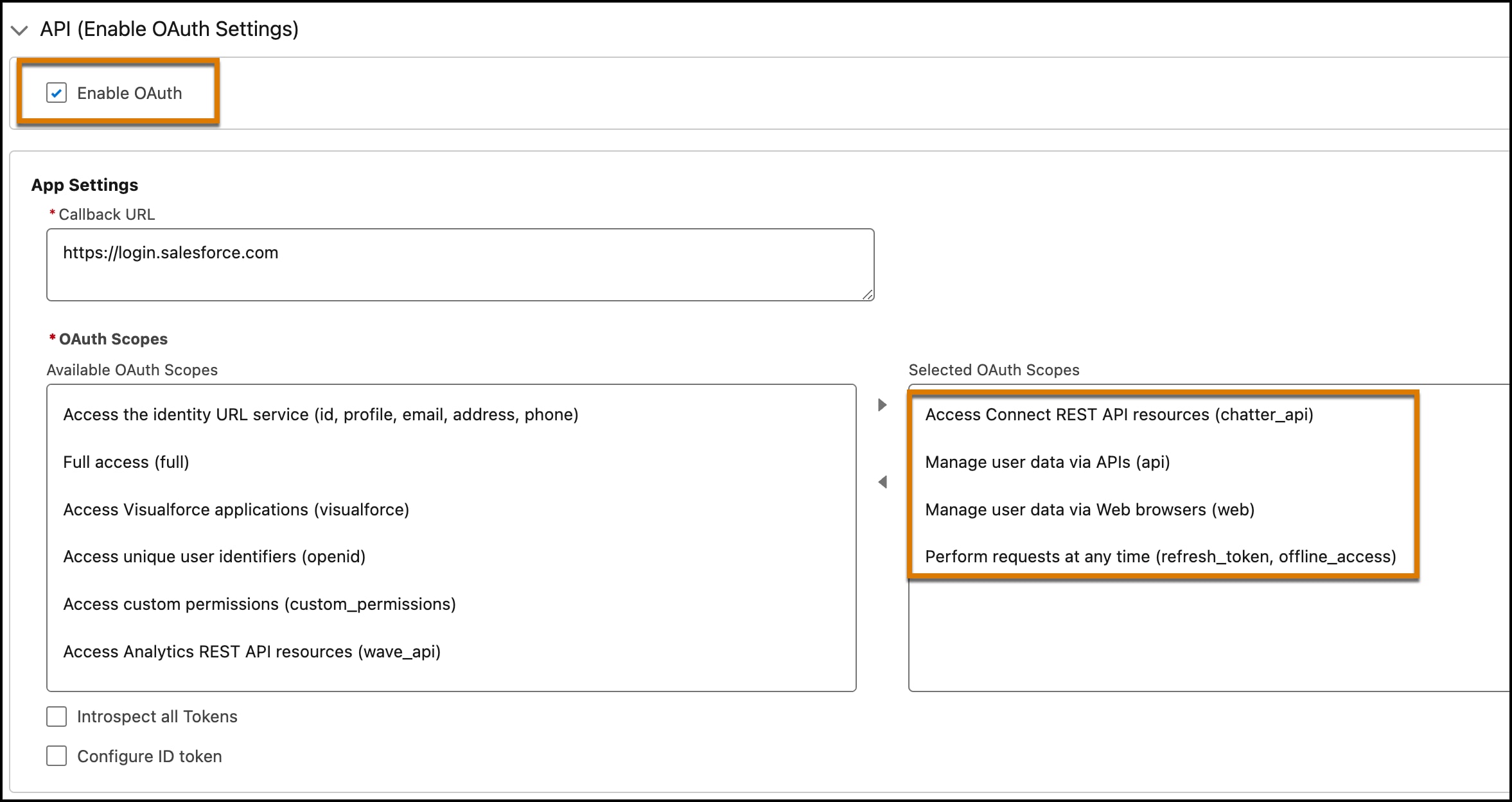
In OAuth Settings, select these additional settings:
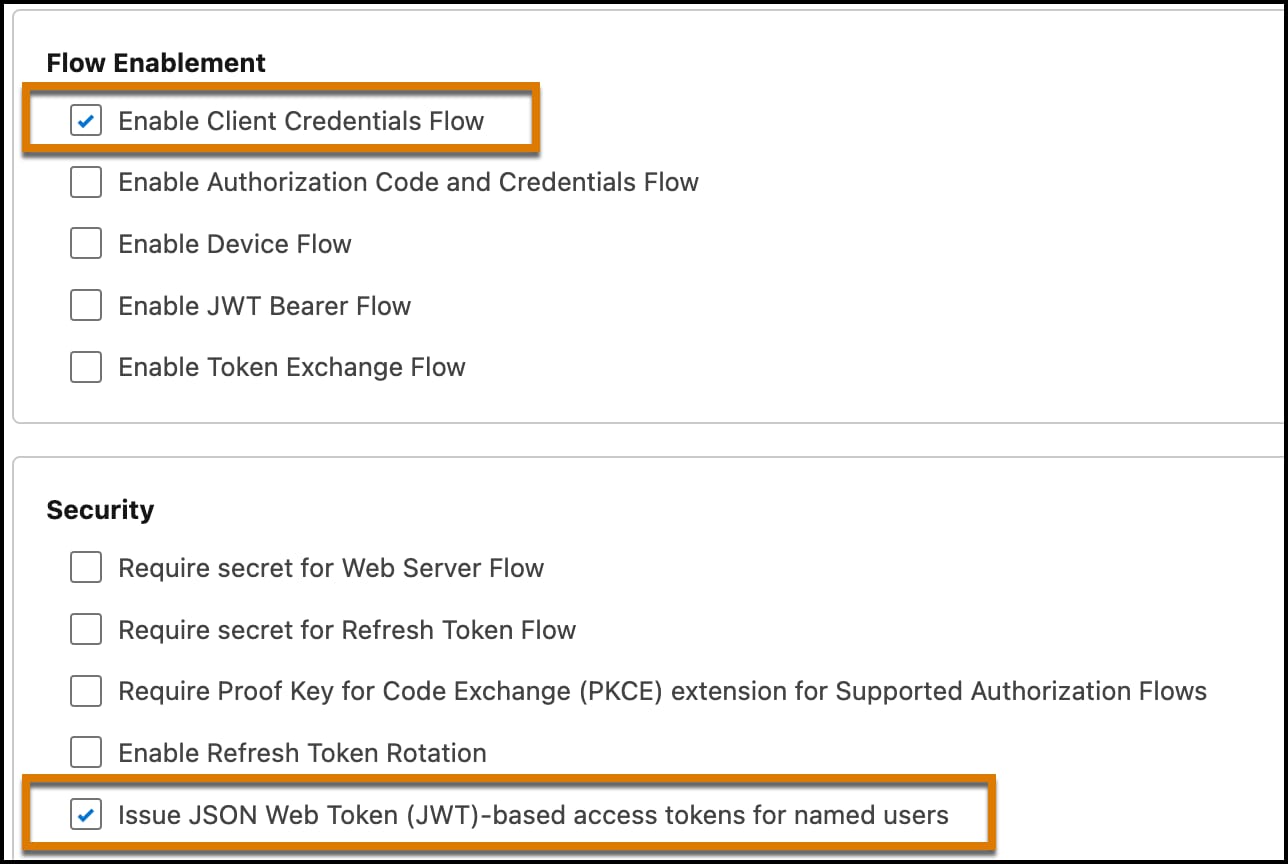
After creating the app, ensure that the API caller has the correct client credentials and that the client can issue JWT-based access tokens.
Enable Client Credentials Flow appears in two places: in the app’s OAuth Settings (step 2) and on its Policies tab (step 3). Select it in both. If you select it in only one, the token request fails with client credentials flow not enabled.
Important
To create a token, you need the consumer key and the consumer secret from your ECA.
From Setup, find and select External Client Apps.
Select your app and click the Settings tab.
Expand the OAuth Settings section.
Click the Consumer Key and Consumer Secret button, and copy your secrets. You need these values to mint this token.
Store your consumer secret in a secure location.
Important
From Setup, in the Quick Find box, enter My Domain, and then select My Domain.
Copy the value shown in the Current My Domain URL field.
Request a JWT from Salesforce using a POST request, specifying the values for your consumer key, consumer secret, and domain name.
All calls to Testing API require a token. Create a token by using the consumer key, the consumer secret, and your domain name.
1curl -X POST https://{MY_DOMAIN_URL}/services/oauth2/token
2-d 'grant_type=client_credentials'
3-d 'client_id={CONSUMER_KEY}'
4-d 'client_secret={CONSUMER_SECRET}'MY_DOMAIN_URL: Get the domain from Setup by searching for My Domain. Copy the value shown in the Current My Domain URL field.CONSUMER_KEY, CONSUMER_SECRET: Get the consumer key and secret by following the instructions in Obtain Credentials.The previous cURL request returns a JSON payload similar to this response.
1{
2  "access_token": "eyJ0bmsiOiJ...(shortened)",
3  "signature": "Zzf2V4jNqOtyYIeotqXNRfKRMmLsFvRwQda+fdgpmH8=",
4  "token_format": "jwt",
5  "scope": "chatter_api api",
6  "instance_url": "https://instance_name.my.salesforce.com",
7  "id": "https://login.test1.pc-rnd.salesforce.com/id/00DSG00000KcODt2AN/005SG00000GiUcHYAV",
8  "token_type": "Bearer",
9  "issued_at": "1737590384852"
10}
Copy the access token specified in the access_token property. This token is required when you make requests to the API. Send it as a bearer token in the Authorization header.
j