


Knowledge Object Model
The Knowledge object model is slightly different from other feature areas because it exposes a set of abstract Salesforce objects that aren’t directly used when you create articles. These abstract objects then contain concrete derivations that you do use when creating articles.
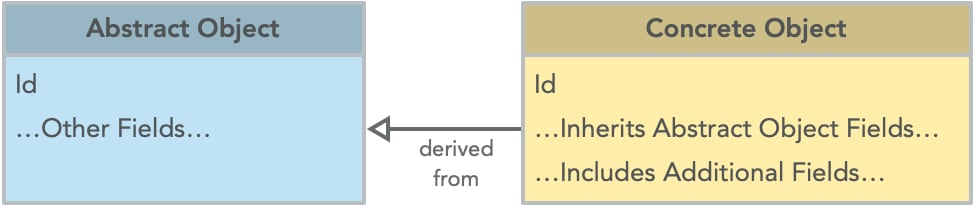
This architecture gives more flexibility to search behavior in support of Lightning Knowledge and Salesforce Classic.
Core Knowledge Objects
The core abstract Knowledge objects are for a Knowledge article (KnowledgeArticle), and a set of versions of that article (KnowledgeArticleVersion). These versions can include different translations and historical versions of an article.
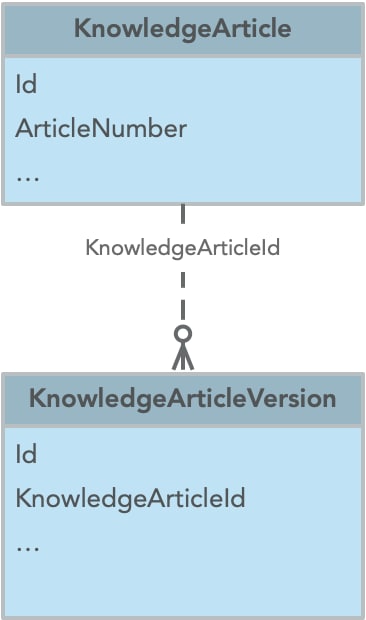
- KnowledgeArticle—The abstract Knowledge article object. This object contains metadata about a knowledge article irrespective of the article’s version, translation, or status.
- KnowledgeArticleVersion—The abstract Knowledge article version object. Whenever you create a draft of an article, it gets a new version number and a unique ID. Each translation of an article also has a version and ID. Each version is a KnowledgeArticleVersion record with the KnowledgeArticle record as the parent.
When you create knowledge articles, you create records with concrete Salesforce objects. These objects inherit from their abstract counterparts. By default, these concrete objects are named “Knowledge__ka” for knowledge articles and “Knowledge__kav” for knowledge article versions in Lightning Knowledge.
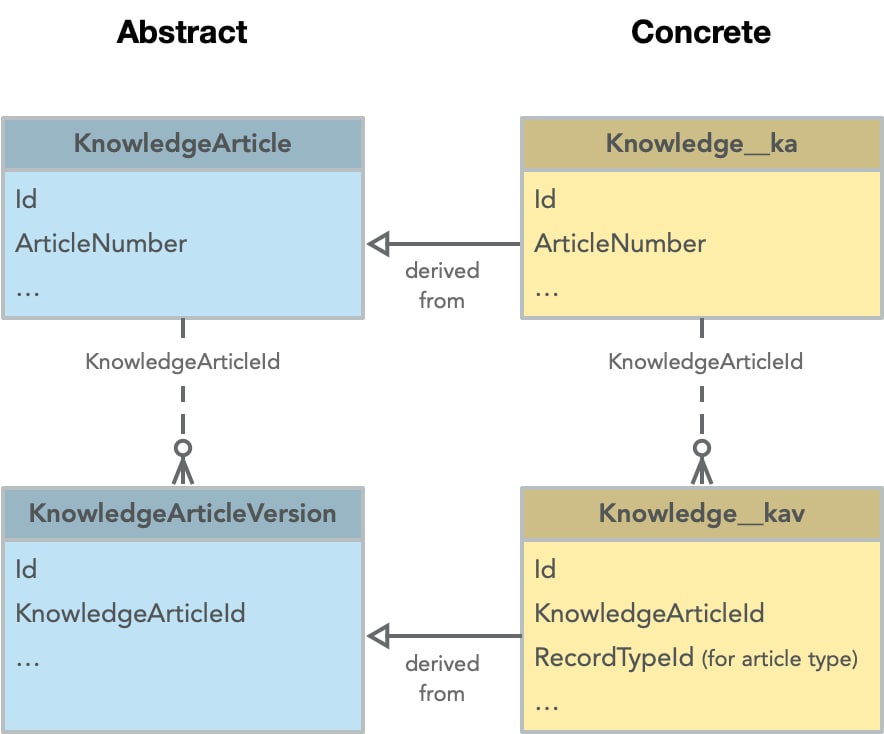
This diagram shows the default names in Lightning Knowledge for the concrete implementations, but you can change these names. The names always have the suffixes “__ka” for knowledge articles and “__kav” for knowledge article versions. You can change the “Knowledge” prefix by changing the Object Name for the Knowledge__kav object in the Object Manager.
The concrete implementation contains any of your custom fields for a knowledge article. The Knowledge__kav object also contains a “RecordTypeId” field, which is a record type used to describe the article structure, such as FAQ or Tutorial. Each record type can contain its own layouts. For example, an FAQ record type can use a special layout that displays custom fields such as “Question__c” and “Answer__c”.
In Salesforce Classic, the article structure is determined by the article type. Each knowledge article type has a different concrete implementation, for example FAQ__kav, Tutorial__kav. In Lightning Knowledge, one concrete object is used, for example, Knowledge__kav, and instead the record type is used to associate an article with a unique article structure.
Complete Knowledge Object Diagram
To see the relationship of Knowledge articles to other objects, let’s highlight some of the other important object relationships. In this diagram, the default value “Knowledge” is the article type name to illustrate the object mode. If you change this value in Setup, the prefix for each object with “__” in the name is changed accordingly.
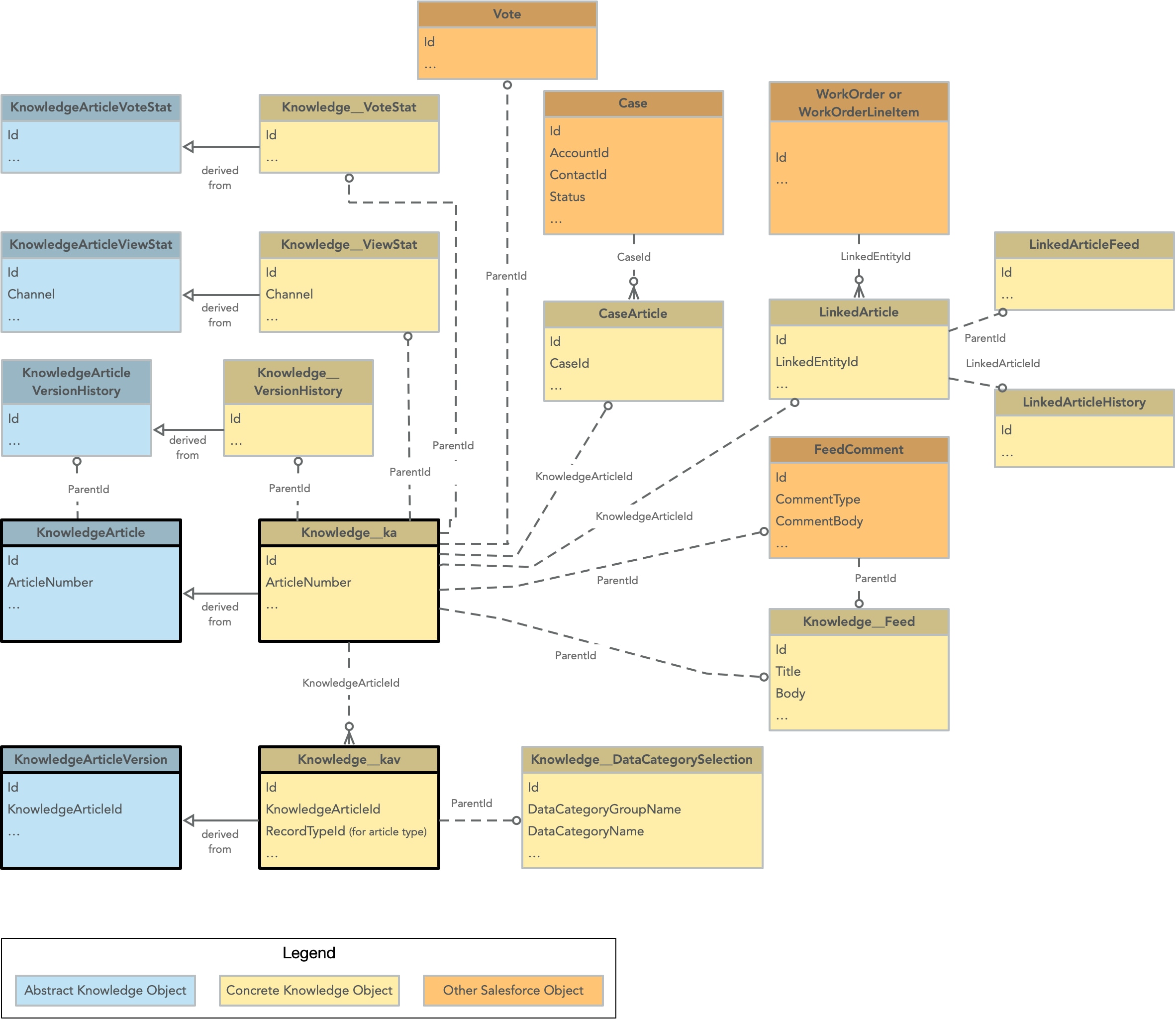
These objects appear in this Knowledge object model. Each object links to its reference documentation for more information.
- Case—A case, which is a customer issue or problem. Every article can be associated with a case using the CaseArticle object.
- CaseArticle—The association between a Case and a KnowledgeArticle.
- FeedComment—A comment added to a feed for a knowledge article.
- Knowledge__DataCategorySelection—A data category that classifies an article.
- Knowledge__Feed—The feed for a knowledge article.
- Knowledge__ka—The concrete object of a KnowledgeArticle.
- Knowledge__kav—The concrete object of a KnowledgeArticleVersion.
- Knowledge__VersionHistory—The concrete object of a KnowledgeArticleVersionHistory.
- Knowledge__ViewStat—The concrete object of a KnowledgeArticleViewStat.
- Knowledge__VoteStat—The concrete object of a KnowledgeArticleVoteStat.
- KnowledgeArticle—The abstract Knowledge article object. This object contains metadata about a knowledge article irrespective of the article’s version, translation, or status.
- KnowledgeArticleVersion—The abstract Knowledge article version object. Whenever you create a draft of an article, it gets a new version number and a unique ID. Each translation of an article also has a version and ID. Each version is a KnowledgeArticleVersion record with the KnowledgeArticle record as the parent.
- KnowledgeArticleVersionHistory—Enables read-only access to the full history of an article.
- KnowledgeArticleViewStat—Provides statistics on the number of views for the specified article.
- KnowledgeArticleVoteStat—Provides the weighted rating for the specified article.
- LinkedArticle—A knowledge article that is attached to a work order, work order line item, or work type.
- LinkedArticleFeed—The comment feed on a linked article.
- LinkedArticleHistory—The history of changes made to tracked fields on a linked article.
- WorkOrder—Field service work to be performed for a customer.
- WorkOrderLineItem—A subtask on a work order in field service.
- Vote—A vote that a user has made on a knowledge article.
- Using Vote is allowed for Knowledge Article objects but not for Knowledge Article Version objects.
- Only one vote record can exist per knowledge article per user.Voting isn’t allowed by Site Guest Users.
- Vote allows multiple types of values for the “Type” field, but only “Up” and “Down” are allowed for Knowledge Articles.
 j
j