The Storefront Next Migration Tool is an AI-assisted command-line accelerator for migrating Salesforce B2C Commerce storefronts from SiteGenesis, Storefront Reference Architecture (SFRA), or Composable Storefront, which is based on Progressive Web App Kit (PWA Kit), to Storefront Next. Developers use the tool to analyze an existing storefront, create a reviewable migration plan, generate a Storefront Next scaffold, and verify generated work against the live source site. The tool reduces repeated migration work. Developers still complete engineering review, testing, and user acceptance testing (UAT).
The Storefront Next Migration Tool is available as a developer preview release. Storefront Next Migration Tool isn’t generally available unless or until Salesforce announces its general availability in documentation or in press releases or public statements. All commands, parameters, and other features are subject to change or deprecation at any time, with or without notice. Don’t implement functionality in production with these commands or tools. Evaluate the tool in a non-production environment. The tool uses a customer-supplied third-party large language model (LLM) account. Review the LLM provider’s data-handling terms before submitting source code, configuration, or storefront data.
Important
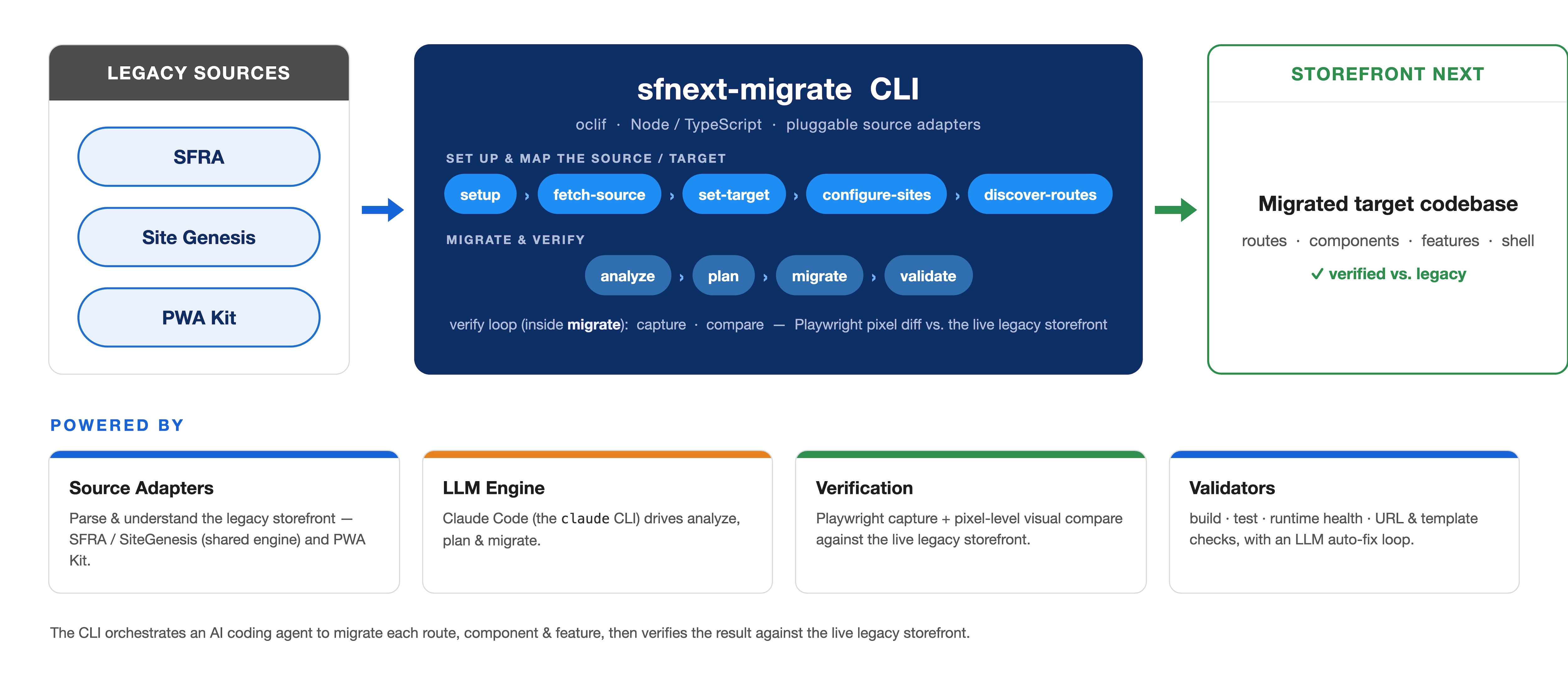
The migration diagram shows the path from a legacy SiteGenesis, SFRA, or PWA Kit storefront to a Storefront Next scaffold. The path connects to the source storefront, analyzes pages, generates a migration plan per route for your review, verifies the code and visual layout, and validates the output.
When to Use the Storefront Next Migration Tool
Use the Storefront Next Migration Tool when a SiteGenesis, SFRA, or PWA Kit storefront has standard routes that the tool can recognize. Manual migration requires teams to rebuild routes, components, styles, localized copy, interactivity, and data access patterns, and to compare the migrated storefront with the source. The Storefront Next Migration Tool changes that work from a blank-page rebuild to a review-and-finish workflow. The tool produces a structurally correct, compiling, lint-clean Storefront Next scaffold and compares migrated regions with the live legacy storefront.
Use the Storefront Next Migration Tool to:
Accelerate migration of standard storefront routes and features.
Inventory source routes, components, copy, interactions, and layouts.
Create a route-by-route plan that developers review before generation.
Detect visual differences between the generated Storefront Next page and the live legacy page.
Identify custom work early, before it becomes a late-stage migration issue.
The Storefront Next Migration Tool is strongest on well-structured standard pages built with known SFRA or PWA Kit patterns. Examples include home pages, product listing pages (PLPs), product detail pages (PDPs), registration pages, and account pages.
Prepare a Storefront Next Migration
Before you migrate a SiteGenesis, SFRA, or PWA Kit storefront, set up the Storefront Next Migration Tool. The tool package is @salesforce/sfnext-migrate. Follow the install and usage instructions in the Storefront Next Migration Tool GitHub repository.
Are you seeing a 404 error when you click the GitHub repository link? The migration tool is in a private repository for existing customers. To get access to the repository, see Salesforce Commerce Cloud GitHub Repositories and Access.
Tip
The Storefront Next Migration Tool reads these source architectures:
Source Architecture
Source Access
SiteGenesis
Read-only Open Commerce API (OCAPI) and WebDAV access. Pipeline and custom server-side work stay manual.
SFRA
Read-only OCAPI and WebDAV access
PWA Kit
Source code access
SiteGenesis and SFRA migrations need read-only Open Commerce API (OCAPI) and WebDAV access. SiteGenesis pipeline and custom server-side work stay manual. PWA Kit migrations need source-code access. The generated Storefront Next target uses React Router routes, typed loaders, internationalization scaffolding, and Tailwind CSS styling.
The development environment includes these prerequisites:
Node.js 24 or later
pnpm 10
Claude Code command-line interface (CLI) on the system path
Playwright Chromium, which the Storefront Next Migration Tool installs for capture and comparison
A customer-supplied LLM provider account
A live source storefront URL
A Salesforce B2C Commerce API (SCAPI) and Shopper Login and API Access Service (SLAS) private client
Source access for the architecture in the table: read-only OCAPI and WebDAV for SiteGenesis and SFRA, or source code for PWA Kit
Connect and Analyze the Source Storefront
The Storefront Next Migration Tool guides developers through an incremental workflow. Review the plan and generated output at each stage. Don’t treat the migration as a fully automated conversion. After validation, generate the next route or feature and repeat verification and validation. If validation shows that the current route needs code changes, generate, check, and validate that route again before moving on.
Connect the Storefront Next Migration Tool to the source storefront and the target B2C Commerce site. The connection uses:
A live source storefront URL for Document Object Model (DOM) analysis and visual comparisons
A SCAPI and a SLAS private client to connect the target to the B2C Commerce site
Read-only Open Commerce API (OCAPI) and WebDAV access for SiteGenesis and SFRA storefronts
Source code access for PWA Kit storefronts
The Storefront Next Migration Tool inventories the source storefront through live DOM analysis. Analysis identifies routes and page structure, components and layouts, static copy, standard interactions, and features that require migration work. That inventory is the context for a route-specific migration plan and for comparing generated output with the visible source page.
The AI coding agent then generates a detailed plan for each route. Developers review the plan before migration begins. The plan breaks work into smaller feature-level changes. Those checkpoints let developers assess generated code, confirm data dependencies, and identify custom logic that requires manual implementation.
Generate and Verify Storefront Next Routes
The Storefront Next Migration Tool applies the approved plan route by route and feature by feature. This table maps the technologies used in the source storefront to their Storefront Next equivalents.
Source Pattern
Storefront Next Pattern
Legacy route
React Router file-based route with a typed server loader and route registration
ISML component
JSX component
Bootstrap 4 styling
Tailwind CSS v4 tokens and utilities
Chakra primitive
Tailwind CSS utility styling
Static copy
react-i18next entries
jQuery handler
Typed React event handler
Bootstrap toggle
shadcn primitive
Shell components
Header, navigation, footer, branding, and link wiring
Known PWA Kit hook
Storefront Next equivalent for authentication, internationalization, registration, analytics, search engine optimization (SEO), or environment variables
Storefront Next Migration Tool also migrates the controller data layer. The tool classifies each legacy server-side data read according to the target data pattern, such as SCAPI, an enrichment hook, or a custom API requirement. Review each classification before you rely on the generated data access.
A theme mode applies source brand colors and typography to the Storefront Next target through design tokens. Review the tokens before you treat them as the final brand theme.
Verify the generated code for each feature. The code must pass type checking, linting with zero warnings, and a Playwright pixel-level comparison against the live legacy page. Visual comparison identifies fidelity gaps so that developers can address them while the associated feature is still in scope.
The validation cycle runs build, test, and runtime health checks. The AI coding agent can attempt fixes for failures found during this cycle.
Treat generated code as developer-reviewed output. Review generated behavior, data access, error handling, accessibility, performance, and security. Refactor and test the generated code before production deployment. Complete UAT against the migrated storefront.
Important
Finish Storefront Next Work the Tool Leaves Behind
The Storefront Next Migration Tool leaves some source behavior for developers to finish. Review the generated storefront and add the implementation the tool didn’t generate.
Review the storefront for:
Pages unavailable during analysis because of authentication, a web application firewall (WAF), a content delivery network (CDN), or 403 restrictions
Hidden or off-canvas user interfaces, such as mobile navigation drawers
Features that depend on Business Manager runtime configuration
Custom JavaScript outside the supported migration patterns
Non-English storefronts
SiteGenesis implementations with pipelines or extensive custom APIs. For SiteGenesis migrations, treat the output as a starting point. The Storefront Next Migration Tool doesn’t evaluate pipelines, and custom server-side dependencies can lead to a fragmented target architecture if they aren’t deliberately redesigned.
Developers complete these tasks for custom or externally configured areas:
Re-create content slot rules, targeting, A/B tests, scheduling, and site preferences.
Server-side logic
Port Demandware Script pipelines, custom promotion logic, order hooks, and bespoke OCAPI behavior.
Custom APIs
Implement required custom endpoints or enrichment patterns when SCAPI doesn’t provide an equivalent.
Payments and loyalty
Port custom payment, checkout, and loyalty redemption integrations.
Localization
Replace locale placeholders and complete translation work.
Accessibility and performance
Run accessibility validation, performance tuning, and user acceptance testing (UAT).
The Storefront Next Migration Tool extracts rendered copy from the source storefront in one locale and creates internationalization scaffolding. The tool doesn’t carry source resource-bundle translations into the target.


 j
j