Overview: Creating Custom Property Types and Editors
This walkthrough is for anyone who’s creating a custom property type or editor for the first time or who needs a refresher.
Let’s say that you have a Lightning web component for Experience Builder called Standard Article, and you want to create one with more intuitive property editors, called Custom Article. Both components require properties for title, date updated, content, text alignment, background color, and layout borders and size. The Standard Article component, which doesn’t use custom property types or editors, looks like this.
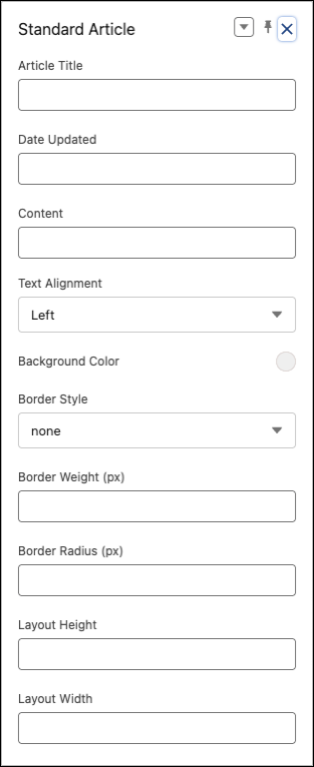
Before you begin to build a custom component, consider your requirements for data validation and user experience for the component’s properties. These requirements determine which property types and editors you need to create and whether a standard solution is sufficient, rather than a custom one.
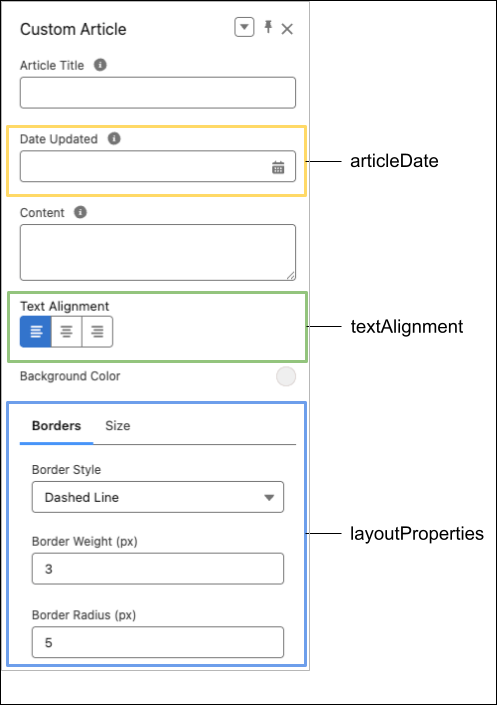
In this example, the Custom Article component demonstrates how you can improve the user experience with custom property types and editors. Download the sample components to see how the articleDate, textAlignment, and layoutProperties are configured in the Standard Article and Custom Article components.
See Also
This release is in preview. Features described here don't become generally available until the latest general availability date that Salesforce announces for this release. Before then, and where features are noted as beta, pilot, or developer preview, we can't guarantee general availability within any particular time frame or at all. Make your purchase decisions only on the basis of generally available products and features.


 j
j