


 j
jRelease Notes
Connect to Open CTI
Demo Adapter
Open CTI and Security
Asynchronous Calls
Sample HTML Page
Sample Code for Using Lightning Message Service with Open CTI
Work with Canvas
Work with Console APIs
Best Practices
Previous Versions
Each implementation of Open CTI can look different. This example shows you how to add CTI functionality to the Salesforce user interface using an HTML page.
This example assumes that you’ve already imported a call center definition file into your Salesforce org. The sample HTML page can be stored on Salesforce as a Visualforce page or on a third-party domain.
Create an HTML page.
Cut and paste the following sample code into your HTML page.
This code demonstrates various functions of Open CTI. Keep in mind that to make calls in Lightning Experience, you must first create a Lightning app and add the Open CTI Softphone utility.
1<html>
2<head>
3      <!-- Imports Open CTI JavaScript library. Point to a valid Salesforce domain. -->
4      <script src="https://domain:port/support/api//interaction.js"></script>
5      <script type="text/javascript">
6             // Callback of API method: isInConsole
7             var isInConsoleCallback = function (response) {
8                  // Returns true if method is executed in Salesforce console, false otherwise.
9                  if (response.success) {
10                      alert('Softphone is in Salesforce console.');
11                  }
12                  else {
13                      alert('Softphone is not in Salesforce console.');
14                  }
15              };
16              // Invokes API method: isInConsole
17              function isInConsole() {
18                       sforce.interaction.isInConsole(isInConsoleCallback);
19              }
20              // Callback of API method: getCallCenterSettings
21              var getCallCenterSettingsCallback = function (response) {
22                     // Result returns call center settings as a JSON string.
23                     if (response.success) {
24                            alert(response.result);
25                     }
26                     else {
27                            alert('Error retrieving call center settings ' + response.error);
28                     }
29              };
30              // Invokes API method: getCallCenterSettings
31              function getCallCenterSettings() {
32                       sforce.interaction.cti.getCallCenterSettings(getCallCenterSettingsCallback);
33              }
34              // Callback of API method: setSoftphoneHeight
35              var setSoftphoneHeightCallback = function (response) {
36                       // Returns true if SoftPhone height was set successfully, false otherwise.
37                      if (response.success) {
38                          alert('Setting softphone height to 300px was successful.');
39                      }
40                      else {
41                         alert('Setting softphone height failed.');
42                     }
43               };
44               // Invokes setSoftphoneHeight API method.
45               function setSoftphoneHeight() {
46                       sforce.interaction.cti.setSoftphoneHeight(300, setSoftphoneHeightCallback);
47               }
48               // Callback of API method: getPageInfo
49               var getPageInfoCallback = function (response) {
50                      if (response.success) {
51                             alert(response.result);
52                      }
53                      else {
54                             alert('Error occured while trying to get page info: ' + response.error);
55                      }
56               }
57               // Invokes API method getPageInfo
58               function getPageInfo() {
59                       sforce.interaction.getPageInfo(getPageInfoCallback);
60               }
61      </script>
62</head>
63<body>
64      <button onclick="isInConsole();">isInConsole</button><br/>
65      <button onclick="getCallCenterSettings();">getCallCenterSettings</button><br/>
66      <button onclick="setSoftphoneHeight();">setSoftphoneHeight(300)</button><br/>
67      <button onclick="getPageInfo();">getPageInfo</button>
68</body>
69</html>1<apex:page >
2 <!-- Begin Default Content -->
3 <h1>Congratulations!</h1>
4 This is your sample page.
5 <!-- End Default Content -->
6<html>
7<head>
8 <!-- Imports Open CTI JavaScript library. Point to a valid Salesforce domain.
9-->
10 <script src="https://domain:port/support/api//lightning/opencti_min.js"></script>
11 <script type="text/javascript">
12 // Callback of API method: setSoftphonePanelHeight
13 var setSoftphonePanelHeightCallback = function(response) {
14 // Returns true if setSoftphonePanelHeight method is executed successfully, false otherwise
15 if (response.success) {
16 alert('setSoftphonePanelHeight is successfully executed.');
17 }
18 else {
19 alert('setSoftphonePanelHeight failed.');
20 }
21 };
22 // Invokes API method: setSoftphonePanelHeight
23 function setSoftphonePanelHeight() {
24 sforce.opencti.setSoftphonePanelHeight({
25 heightPX: 500,
26 callback: setSoftphonePanelHeightCallback
27 });
28 }
29 // Callback of API method: setSoftphonePanelWidth
30 var setSoftphonePanelWidthCallback = function(response) {
31 // Returns true if setSoftphonePanelWidth method is executed successfully, false otherwise
32 if (response.success) {
33 alert('setSoftphonePanelWidth is successfully executed.');
34 }
35 else {
36 alert('setSoftphonePanelWidth failed.');
37 }
38 };
39 // Invokes API method: setSoftphonePanelWidth
40 function setSoftphonePanelWidth() {
41 sforce.opencti.setSoftphonePanelWidth({
42 widthPX: 500,
43 callback: setSoftphonePanelHeightCallback
44 });
45 }
46 // Callback of API method: setSoftphoneItemIcon
47 var setSoftphoneItemIconCallback = function(response) {
48 // Returns true if setSoftphoneItemIcon method is executed successfully, false otherwise
49 if (response.success) {
50 alert('setSoftphoneItemIcon is successfully executed.');
51 }
52 else {
53 alert('setSoftphoneItemIcon failed.');
54 }
55 };
56 // Invokes API method: setSoftphoneItemIcon
57 function setSoftphoneItemIcon() {
58 sforce.opencti.setSoftphoneItemIcon({
59 key: 'call',
60 callback: setSoftphoneItemIconCallback
61 });
62 }
63 // Callback of API method: setSoftphoneItemLabel
64 var setSoftphoneItemLabelCallback = function(response) {
65 // Returns true if setSoftphoneItemLabel method is executed successfully, false otherwise
66 if (response.success) {
67 alert('setSoftphoneItemLabel is successfully executed.');
68 }
69 else {
70 alert('setSoftphoneItemLabel failed.');
71 }
72 };
73 // Invokes API method: setSoftphoneItemLabel
74 function setSoftphoneItemLabel() {
75 sforce.opencti.setSoftphoneItemLabel({
76 Label: 'MySoftphone',
77 callback: setSoftphoneItemLabelCallback
78 });
79 }
80 </script>
81</head>
82<body>
83 <button onclick="setSoftphonePanelHeight();">setSoftphonePanelHeight({heightPX:500})</button><br/>
84 <button onclick="setSoftphonePanelWidth();">setSoftphonePanelWidth({widthPX:500})</button><br/>
85 <button onclick="setSoftphoneItemIcon();">setSoftphoneItemIcon({key:'call'})</button><br/>
86 <button onclick="setSoftphoneItemLabel();">setSoftphoneItemLabel({label:'MySoftphone'})</button>
87</body>
88</html>
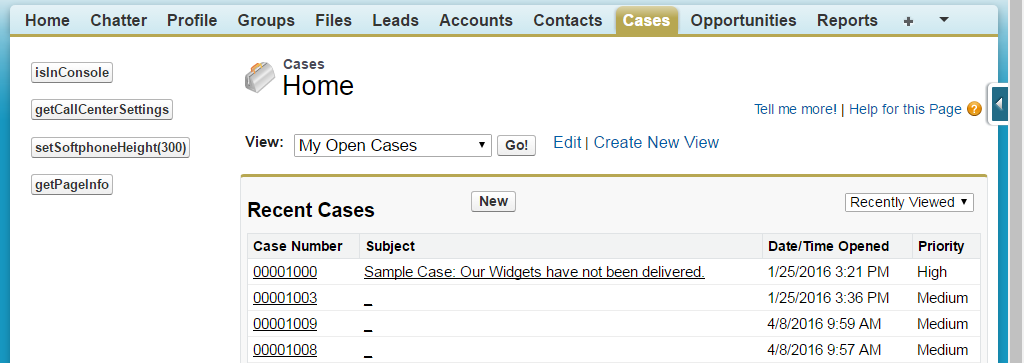
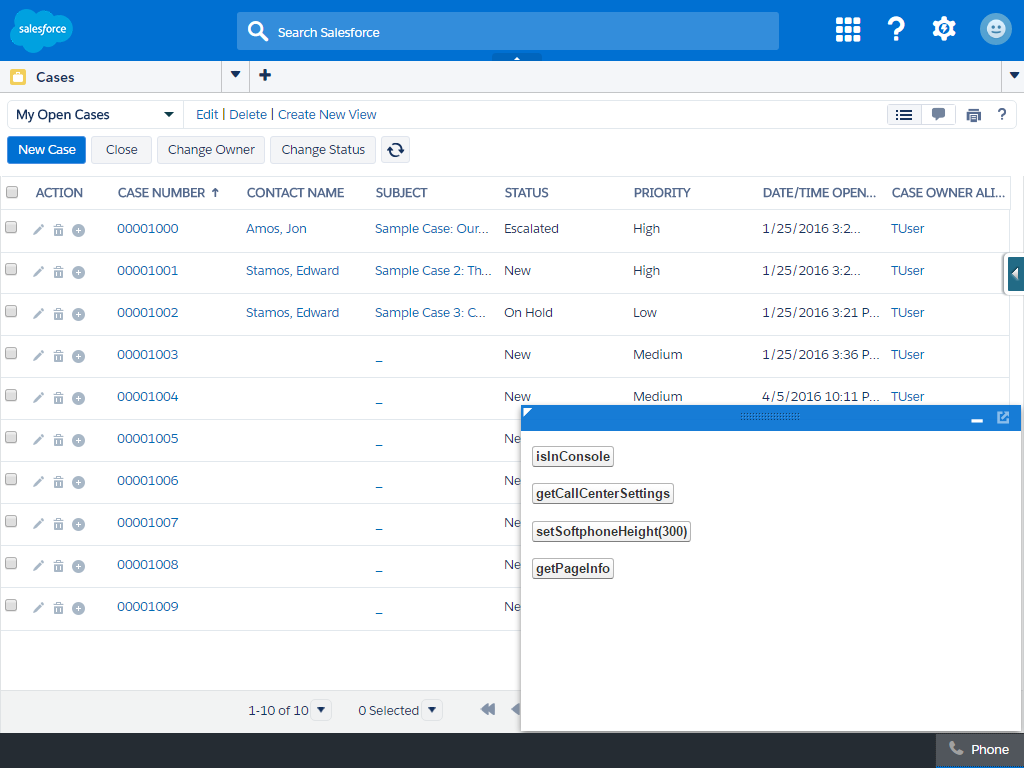
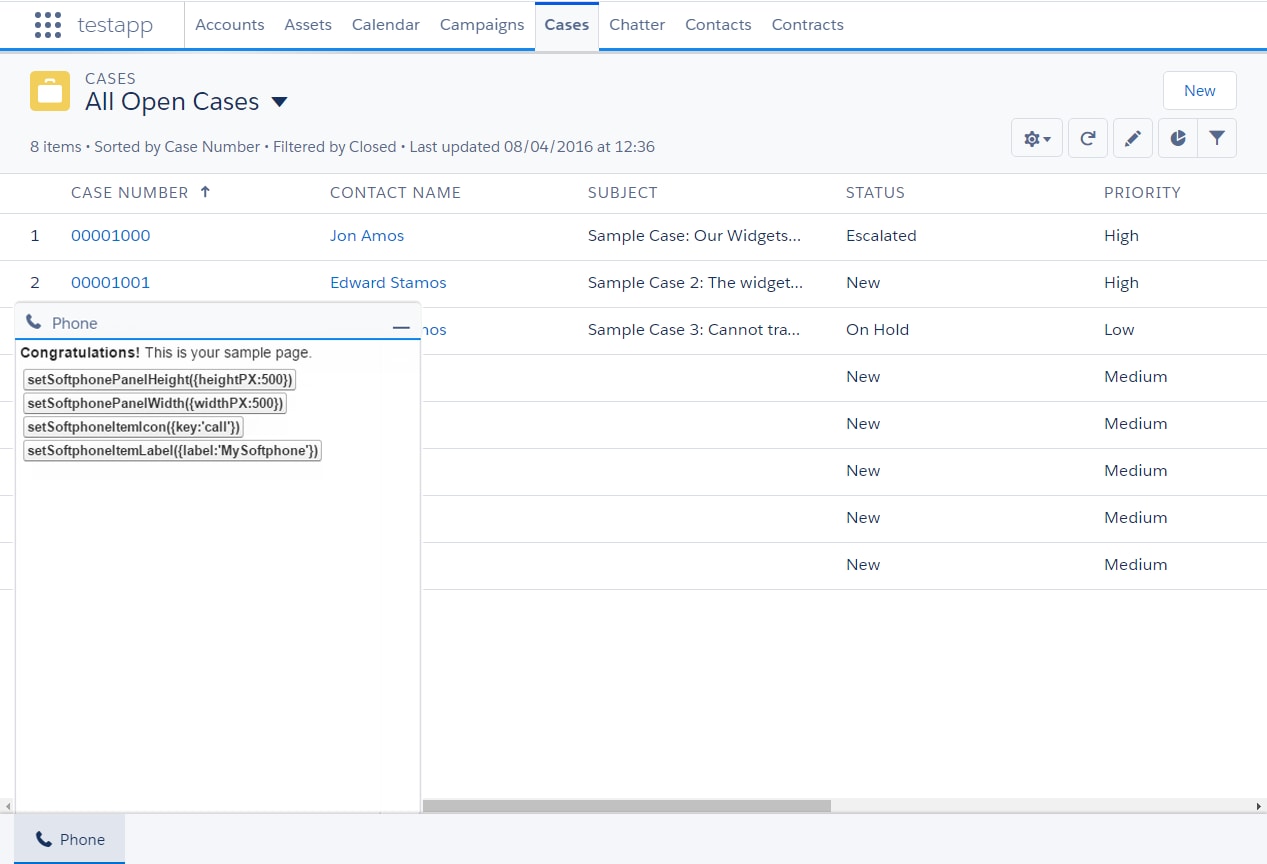
89</apex:page>After you create the HTML page, add the URL to the call center definition file. The softphone is rendered differently depending on your user interface:
j