Cart

The Cart page shows all the items in the cart. Buyers can change the number of items or remove items, calculate the total amount of items in the cart, and add items to the cart to continue shopping.

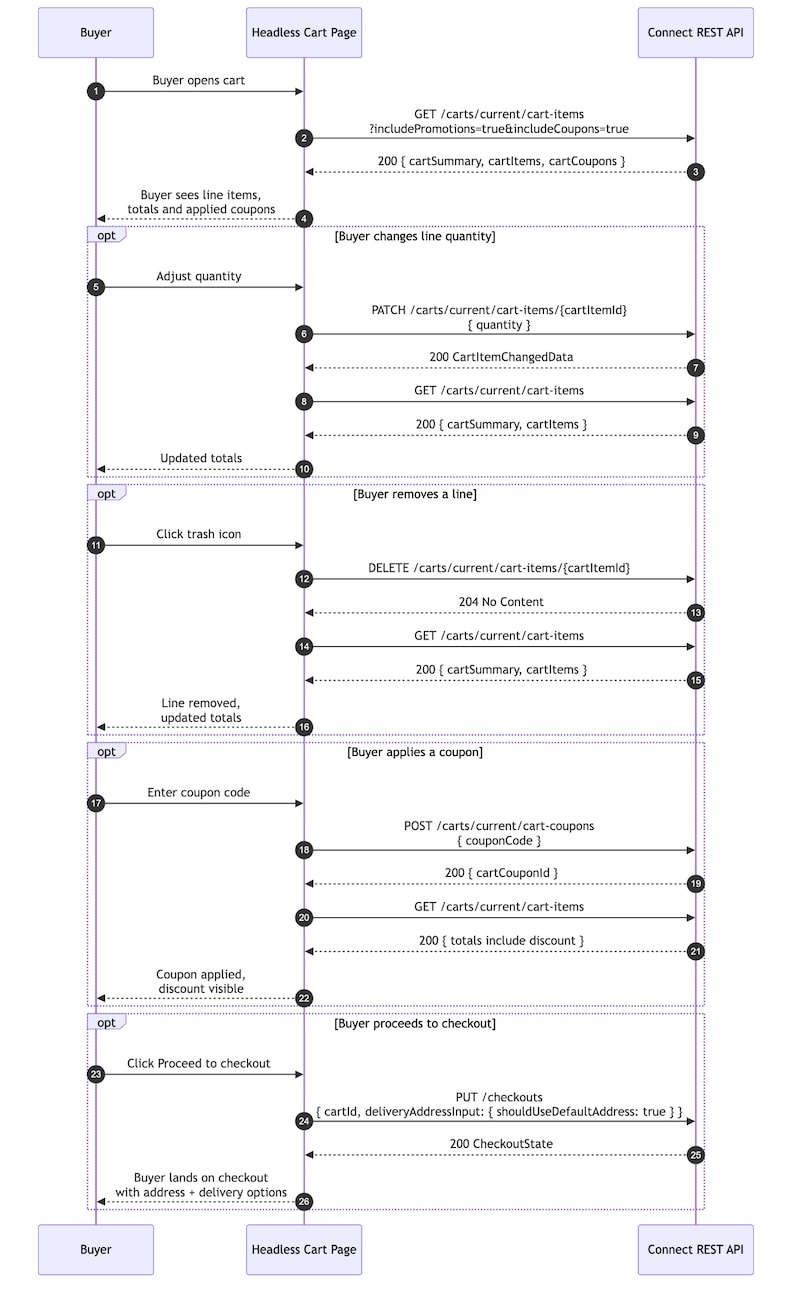
Each buyer action on this page links to a specific Salesforce Commerce Cart REST API operation. This keeps the cart state in sync between the storefront and the commerce backend.

This flow demonstrates how a headless storefront can render cart experiences, including cart item management, pricing, and checkout actions, using B2B Commerce Cart APIs.

Cart Overview Flow

PurposeHTTP MethodEndpoint
Load cart itemsGET/commerce/webstores/{webstoreId}/carts/current/cart-items
Update line quantityPATCH/commerce/webstores/{webstoreId}/carts/current/cart-items/{cartItemId}
Remove line itemsDELETE/commerce/webstores/{webstoreId}/carts/current/cart-items/{cartItemId}
Cart summaryGET/commerce/webstores/{webstoreId}/carts/compact-summary

Render the Cart Page

  1. Load the active cart.

  2. Call the following endpoint to retrieve cart items and cart summary details:

    GET /commerce/webstores/{webstoreId}/carts/current/cart-items?includePromotions=true&includeCoupons=true&productFields=*

  3. Pass the following query parameters:

    • includePromotions=true
    • includeCoupons=true
    • productFields=\*
  4. The productFields=\* parameter is required to hydrate product information for each cart line item. Without this parameter, the response includes only product IDs and pricing data.

  5. Use the response to render:

    • Cart line items
    • Product names
    • Product SKUs
    • Pricing information
    • Promotions
    • Applied coupons
    • Cart totals
  6. Store both the cartSummary and cart item collection in client-side state so other storefront surfaces, such as the cart badge and checkout summary, can reuse the data without additional API requests.

Update Item Quantity

  1. Change the quantity using the line-item quantity selector.

  2. Call the following endpoint to update the cart item quantity:

    PATCH /commerce/webstores/{webstoreId}/carts/current/cart-items/{cartItemId}

    Example request body:

  3. After the request succeeds, refresh the cart summary and cart items to ensure totals and line-item data remain synchronized.

Remove a Cart Item

  1. Select the remove or delete action for a cart line item.

  2. Call the following endpoint to remove the item from the cart:

    DELETE /commerce/webstores/{webstoreId}/carts/current/cart-items/{cartItemId}

    A successful request returns 204 No Content.

  3. Refresh the cart summary and cart item collection after the item is removed.

  4. Re-render the cart page to remove the deleted line item from the UI.

  5. Display a confirmation message or toast notification indicating that the item was removed successfully.

Proceed to Checkout

  1. Select Proceed to Checkout to continue to the checkout flow.

  2. No API request is required during this action. The checkout page initializes its required data when the page loads.