Product Detail Page (PDP)
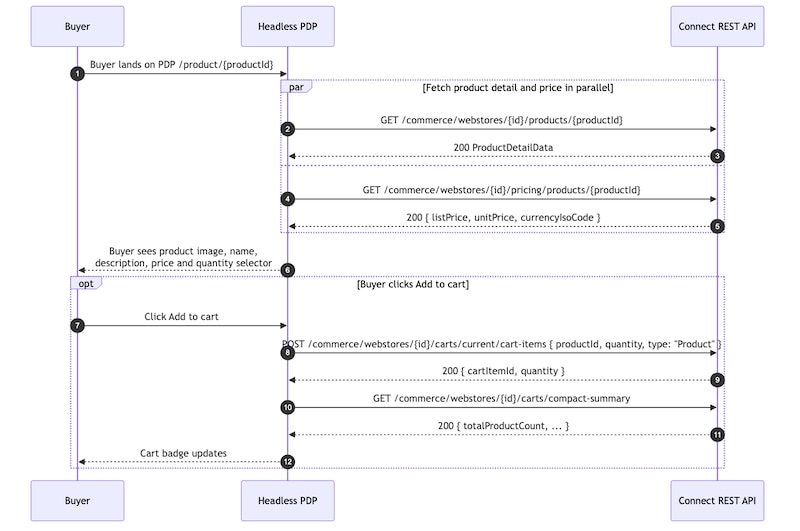
The Product Detail Page (PDP) shows product details, including product image, name, description, pricing, quantity selector, and an Add-to-Cart action. The page performs two parallel API requests — one to retrieve product details and another to retrieve buyer-entitled pricing information.
This flow demonstrates how a headless storefront can render product detail experiences, including buyer-entitled pricing and add-to-cart functionality, using B2B Commerce Product APIs.

| Purpose | HTTP Method | Endpoint |
|---|---|---|
| Get product | GET | /commerce/webstores/{webstoreId}/products/{productId} |
| Get product price | GET | /commerce/webstores/{webstoreId}/pricing/products/{productId} |
| Add to cart | POST | /commerce/webstores/{webstoreId}/carts/current/cart-items |
Render Product Details
-
Load the product detail page.
-
Call the following endpoint to retrieve product details:
-
In parallel, call the following endpoint to retrieve buyer-entitled pricing information:
GET
/commerce/webstores/{webstoreId}/pricing/products/{productId} -
Use the responses to render:
- Product image
- Product name
- Product description
- Product pricing
- Quantity selector
- Add-to-Cart action
-
Handle pricing entitlement failures gracefully. If the pricing endpoint returns
403or404, display an unavailable pricing placeholder instead of failing the entire page load.
Change Product Quantity
-
Update the quantity selector to change the desired purchase quantity.
-
Store the selected quantity in local UI state. No API request is required until the buyer adds the product to the cart.
Add a Product to the Cart
-
Select Add to Cart to add the product to the active cart.
-
Call the following endpoint:
POST
/commerce/webstores/{webstoreId}/carts/current/cart-itemsExample request body:
-
After the request succeeds, refresh the cart summary by calling:
-
Refresh the cart item collection by calling:
GET
/commerce/webstores/{webstoreId}/carts/current/cart-items. -
Use the updated cart responses to synchronize:
- Global cart badge
- Cart summary state
- Cached cart views
-
Show a confirmation message or toast notification indicating that the product was added to the cart successfully.
-
To add a variant selector, call:
GET
/commerce/webstores/{webstoreId}/products/{productId}/childrenRender the returned child variants as a swatch list or variant selector above the quantity selector to enable buyers to switch between product variations.
-
To add wishlist functionality, send:
POST
/commerce/webstores/{webstoreId}/wishlists/{wishlistId}/wishlist-itemsEnable buyers to save products to a wishlist directly from the product detail page.
Wishlist APIs and buyer wishlist flows are outside the scope of this storefront page set.