Orders (History)

The Orders page displays a list of the buyer’s recent orders, including the order number, ordered date, order status, and order total for each entry. This page provides buyers with a centralized view of their order history and order status information.

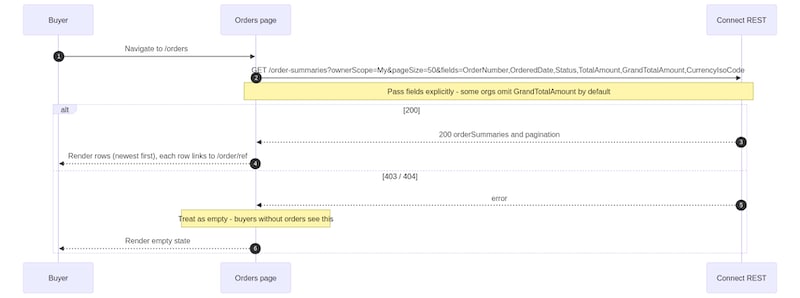
This flow demonstrates how a headless storefront can render order history experiences using B2B Commerce Order Summary APIs.

Orders History Buyer Journey

OperationHTTP MethodEndpoint
List ordersGET/commerce/webstores/{webstoreId}/order-summaries
  1. Call the following endpoint to retrieve the buyer’s order history:

    GET /commerce/webstores/{webstoreId}/order-summaries?ownerScope=My&pageSize=50&fields=OrderNumber,OrderedDate,Status,TotalAmount,GrandTotalAmount,CurrencyIsoCode

  2. Pass the fields query parameter explicitly. Some org configurations omit Grand Total Amount from the default response projection. Specifying the required fields explicitly ensures that the storefront receives all values needed for the order history page.

  3. Use the response to retrieve the orderSummaries collection. The response returns order summaries sorted from newest to oldest.

  4. Handle 403 and 404 responses as empty order-history states. Buyers without existing orders can receive these responses instead of an empty collection.

  5. Read order summary fields defensively when rendering the response. Depending on org configuration, field values can appear in either of the following shapes:

    Flat field structure:

    Wrapped field structure:

  6. Check for both response shapes when rendering table cells to avoid displaying blank values for order details.

  7. Use the response data to render:

    • Order number
    • Ordered date
    • Order status
    • Total amount
    • Grand total amount
    • Currency information
  • To add date-based filtering, pass the public earliestDate and latestDate query parameters in the Order Summaries API request.
  • To add server-side pagination support, read the pagination.nextPageToken value returned in the API response and use it to retrieve the next set of order summaries.