The Order Confirmation page is shown immediately after a successful checkout and order placement. The page presents a summary of the completed order, including:
Order number
Purchased line items
Pricing totals
Shipping address
Payment summary
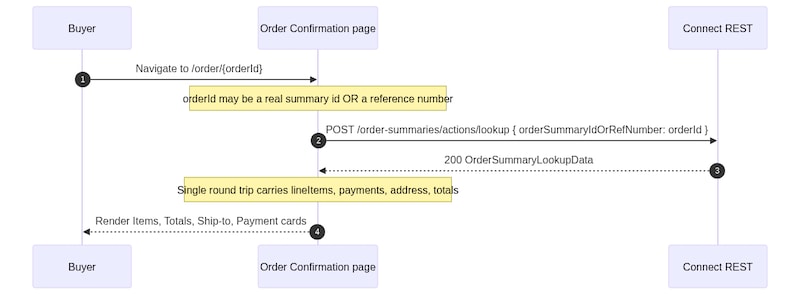
The storefront retrieves the order summary using either the order reference number or the order summary ID, both of which are supported by the Order Summary APIs.
This flow demonstrates how a headless storefront can render order confirmation experiences, including order summaries, purchased items, pricing totals, shipping details, and payment information, using B2B Commerce Order Summary APIs.
A single call to POST /commerce/webstores/{webstoreId}/order-summaries/actions/lookup returns the complete order summary payload required by the Order Confirmation page in a single round trip. Prefer the lookup API approach to reduce network requests and improve page load performance.
Buyer Journey
Render the Order Confirmation Page
Load the order confirmation page.
Call the following endpoint to retrieve the order summary:
Pass either of the following values in orderSummaryIdOrRefNumber:
Order summary ID
Order reference number
Use the POST variant of the lookup endpoint for both authenticated and guest order lookup flows. The endpoint also supports a GET request with the identifier passed as a query parameter, but the POST request provides a consistent implementation path across buyer types.
Use the response to retrieve:
Order line items from deliveryGroups[].lineItems
Payment details from payments[].paymentMethod.fields
Currency information from currencyIsoCode
Order totals from the totals field map
Render the order confirmation experience using the response data.
Display the following sections on the page:
Ordered items
Order totals
Ship-to address
Payment information
Extend the Flow
This flow allows buyers to recreate a previous order by adding items from the original order to an active cart.
Add a View Order Details action to retrieve richer order item metadata using:


 j
j