Storefront (Home)

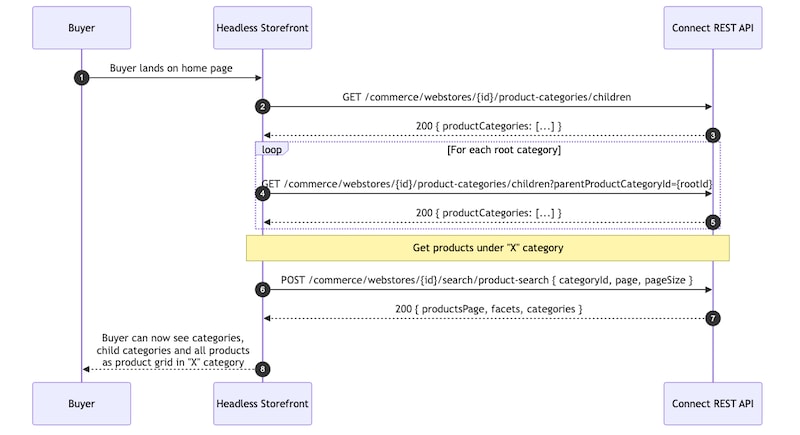
The storefront landing page initializes the buyer experience by loading the category navigation, displaying promotional content, and rendering a featured product grid. The featured products section automatically uses the first available top-level category from the Commerce APIs. This means the storefront can work with different catalog configurations without changing the code.

This flow demonstrates how a headless storefront can orchestrate category discovery and product merchandising experiences using B2B Commerce Product Category APIs.

Storefront Home Buyer Journey

PurposeHTTP MethodEndpoint
Load category menuGET/commerce/webstores/webstoreId/product-categories/children
Search featured productsPOST/commerce/webstores/{webstoreId}/search/product-search
  1. Load the storefront landing page. The storefront calls the following endpoint to retrieve the category menu:

    • GET /commerce/webstores/webstoreId/product-categories/children

    • Pass the following query parameter: addHomeMenuItem=false

    • Setting addHomeMenuItem=false returns actual top-level categories in the response. If this parameter isn’t specified, the API wraps the category hierarchy inside a synthetic Home menu item. The generated Home category ID isn’t supported for product search requests.

  2. Select the first top-level category returned in the category menu response. Use the category ID to run a category-scoped product search.

  3. Call the following endpoint to retrieve products for the selected category:

    POST /commerce/webstores/{webstoreId}/search/product-search

    The product-search endpoint requires at least one of the following request parameters:

    • categoryId
    • searchTerm
  4. Render the storefront landing page using the API responses. Use the category menu response to display category navigation and the product search response to display the product grid.

  • Replace the storefront landing page implementation while continuing to use the /product-categories/children and product-search endpoints for category navigation and product discovery.
  • To configure a specific featured category, use a predefined category ID instead of dynamically selecting the first top-level category from the category menu response.
  • Implement any navigation experience that fits your storefront design. The storefront only depends on the structure of the /product-categories/children response and not on a specific UI component or rendering framework.