Checkout

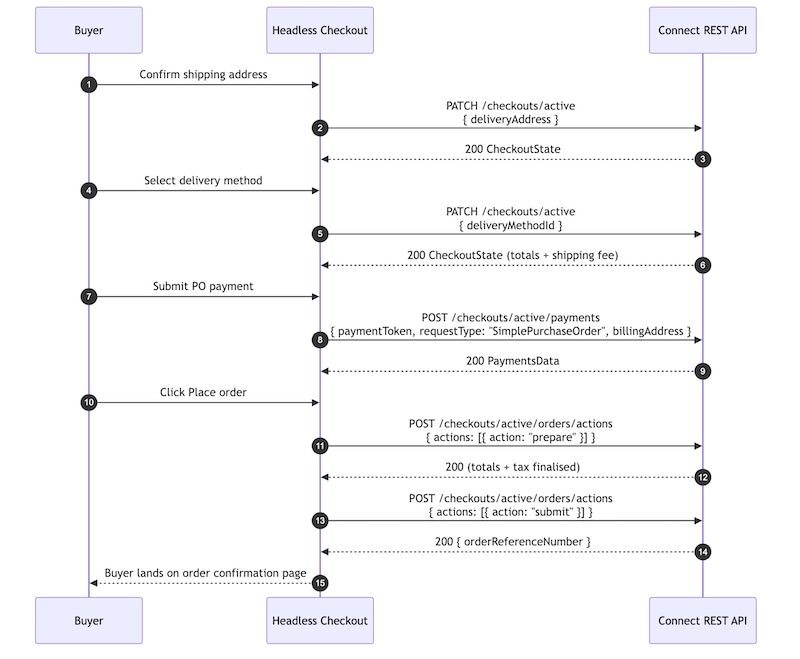
The Checkout page implements a four-step single-page checkout flow:

  • Address
  • Delivery Method
  • Payment
  • Review

Each checkout step advances only after the corresponding server-side API operation completes successfully. An order summary remains visible throughout the checkout flow to provide buyers with continuous visibility into pricing, quantities, shipping, and totals.

When saved buyer addresses are available, the checkout experience displays them as selectable options by default. If no saved addresses exist, the page falls back to a manual address entry form.

This flow demonstrates how a headless storefront can render checkout experiences, including address selection, delivery methods, payment processing, and order submission, using B2B Commerce Checkout APIs. Detailed flow diagrams for each checkout step are provided after this end-to-end flow.

Checkout APIs Flow

OperationHTTP MethodEndpoint
Get active checkoutGET/commerce/webstores/{webstoreId}/checkouts/active
Start checkoutPUT/commerce/webstores/{webstoreId}/checkouts
List saved addressesGET/commerce/webstores/{webstoreId}/accounts/current/addresses
Save new addressPOST/commerce/webstores/{webstoreId}/accounts/current/addresses
Set shipping addressPATCH/commerce/webstores/{webstoreId}/checkouts/active
Pick delivery methodPATCH/commerce/webstores/{webstoreId}/checkouts/active
Authorize PO paymentPOST/commerce/webstores/{webstoreId}/checkouts/active/payments
Place orderPOST/commerce/webstores/{webstoreId}/checkouts/active/orders/actions

Initialize Checkout

  1. Load the checkout experience.

  2. Call the following endpoint to retrieve the active checkout:

    GET /commerce/webstores/{webstoreId}/checkouts/active

  3. Handle a 404 Not Found response as a valid initialization path. A 404 response indicates that no active checkout exists for the current buyer session.

  4. If no active checkout exists, create one by calling:

    PUT /commerce/webstores/{webstoreId}/checkouts

    Example request body:

  5. Set shouldUseDefaultAddress=true to instruct the platform to:

    • Apply the buyer’s default shipping address
    • Preselect an available delivery method
    • Calculate shipping and totals during checkout creation

    This reduces additional checkout update requests later in the flow.

  6. Retrieve the buyer’s saved shipping addresses by calling:

    GET /commerce/webstores/{webstoreId}/accounts/current/addresses?addressType=Shipping

  7. Retrieve cart items for the checkout summary panel by calling:

    GET /commerce/webstores/{webstoreId}/carts/current/cart-items

  8. Use the responses to render:

    • Checkout summary
    • Shipping address selection
    • Delivery methods
    • Cart side panel
    • Order totals

Select a Saved Shipping Address

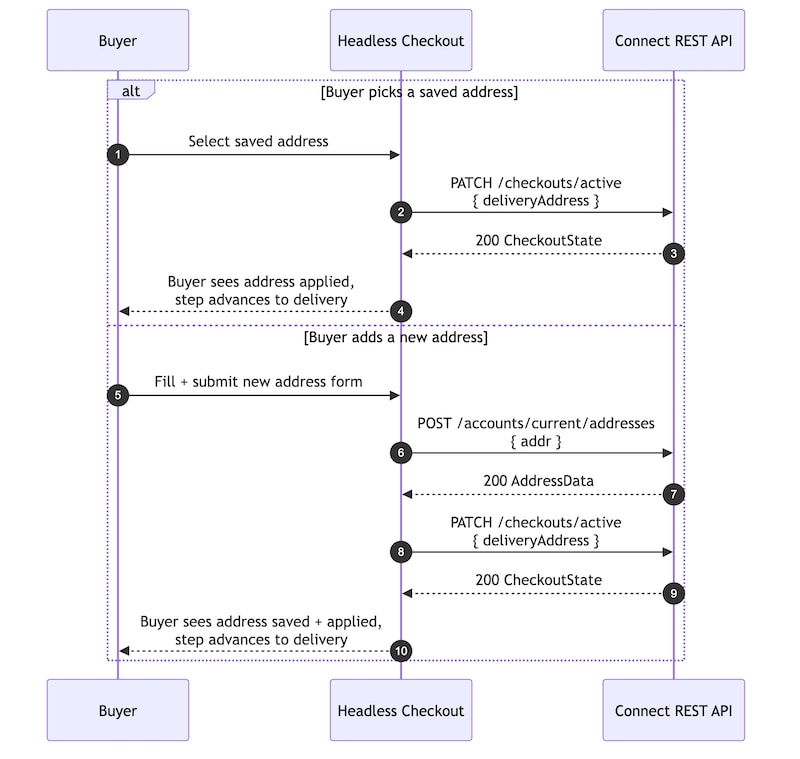
This flow demonstrates how a headless storefront can orchestrate address selection and shipping address management during checkout using B2B Commerce Checkout APIs.

Checkout Address Selection Flow

  1. Select a shipping address from the saved-address list.

  2. Call the following endpoint to apply the address to the active checkout:

    PATCH /commerce/webstores/{webstoreId}/checkouts/active

    Example request body:

  3. Use the deliveryAddress field in the request body. The legacy shippingAddress field isn’t supported by this endpoint.

  4. Use the updated checkout response to refresh checkout totals and delivery information.

  5. Advance the checkout flow to the delivery step.

Add and Apply a New Shipping Address

  1. Enter a new shipping address in the checkout address form.

  2. Save the address to the buyer account by calling:

    POST /commerce/webstores/{webstoreId}/accounts/current/addresses

  3. Allow the platform to validate and normalize the address before applying it to the checkout.

  4. After the address is saved successfully, apply the address to the active checkout by calling:

    PATCH /commerce/webstores/{webstoreId}/checkouts/active

    Example request body:

  5. Save the address before applying it to the checkout to reduce downstream validation failures during checkout updates.

  6. Use the updated checkout response to refresh delivery methods and totals.

  7. Advance the checkout flow to the delivery step.

Select a Delivery Method

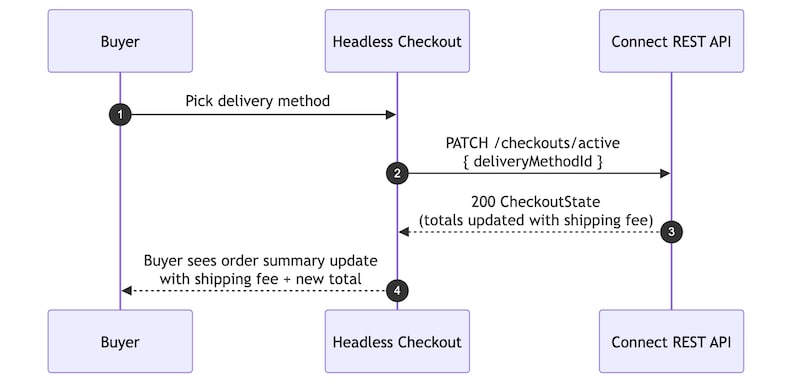
This flow demonstrates how a headless storefront can orchestrate delivery method selection during checkout using B2B Commerce Checkout APIs.

Checkout Delivery Method Flow

  1. Select a delivery method from the list of available shipping options.

  2. Use the delivery methods returned in the checkout response. No additional request is required to retrieve delivery methods.

  3. Call the following endpoint to apply the selected delivery method:

    PATCH /commerce/webstores/{webstoreId}/checkouts/active

    Example request body:

  4. Use the updated CheckoutState response to refresh shipping totals and order summary information.

  5. Advance the checkout flow to the payment step.

Authorize a Purchase Order Payment

  1. Enter a purchase order number and billing address information in the payment form.

  2. Call the following endpoint to authorize the payment:

    POST /commerce/webstores/{webstoreId}/checkouts/active/payments

    Example request body:

  3. Use a single concatenated name value for the billing address. Separate first-name and last-name fields aren’t supported by this endpoint.

  4. Use the payment response to update the checkout payment state.

  5. Advance the checkout flow to the review step.

Place the Order

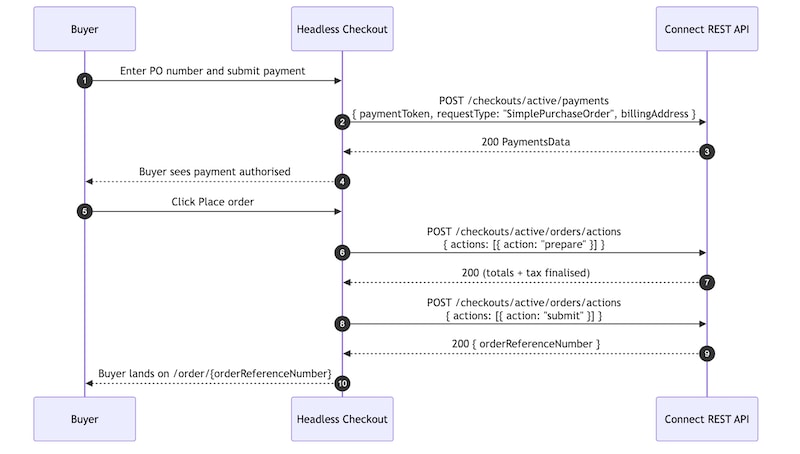
This flow demonstrates how a headless storefront can orchestrate payment processing and order submission during checkout using B2B Commerce Checkout APIs.

Checkout Payment and Place Order Flow

  1. Select Place Order to submit the checkout.

  2. Finalize totals, tax, and checkout calculations by calling:

    POST /commerce/webstores/{webstoreId}/checkouts/active/orders/actions

    Example request body:

  3. After the prepare action succeeds, submit the order by calling the same endpoint again:

    POST /commerce/webstores/{webstoreId}/checkouts/active/orders/actions

    Example request body:

  4. Retrieve the following values from the successful submit response:

    • orderReferenceNumber
    • orderSummaryId
    • salesOrderId
  5. Refresh the cart summary after order submission because the active cart is now empty.

  6. Use the order confirmation page to display order details and confirmation information.

  • Replace the purchase order (PO) payment form with a tokenized card payment integration such as Stripe or another payment gateway. The request body sent to POST /commerce/webstores/{webstoreId}/checkouts/active/payments supports the paymentToken field for tokenized payment flows. Integrate the payment gateway of your choice to generate the token, then update the requestType and payment payload accordingly.
  • Add coupon and promotion support during checkout using POST /commerce/webstores/{webstoreId}/checkouts/active/coupons This enables buyers to apply promotional discounts directly within the checkout experience.
  • Replace the four-step checkout wizard with a fully expanded single-page or accordion-based checkout layout by reading the currentStep value returned from the active checkout response and rendering all checkout sections inline.