The Profile page allows authenticated buyers to view and update their account profile information. The page reads from and updates the underlying Salesforce User record, including fields such as:
First name
Last name
Phone number
Primary address information
The buyer’s email address is displayed as a read-only field and cannot be modified through the storefront profile experience.
This flow demonstrates how a headless storefront can render buyer profile experiences, including account information and profile management workflows.
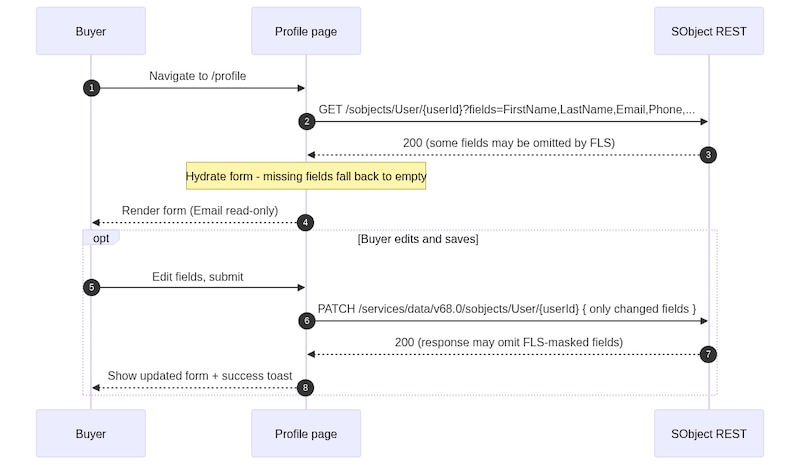
Call the following endpoint when the profile page loads:
GET /services/data/v68.0/sobjects/User/{userId}?fields=FirstName,LastName,Email,Phone,Street,City,State,PostalCode,Country
Use the response to populate the buyer profile form.
Handle missing fields gracefully. Some fields can be omitted from the response because of field-level security (FLS). Default missing values to empty strings or null values instead of treating them as application errors.
Use the retrieved profile data to render:
First name
Last name
Email address
Phone number
Address information
Save Profile Changes
Update the editable profile fields.
Submit the profile update request by calling:
PATCH /services/data/v68.0/sobjects/User/{userId}
Include only modified fields in the request body.
After the update succeeds, merge the submitted field values with the response payload. Some fields can be omitted from the response because of field-level security (FLS). Merging the submitted values prevents masked or restricted fields from disappearing from the profile form after the update.
Refresh the profile state using the merged field values.
Display a confirmation message indicating that the profile was updated successfully.
Choose a Profile API Approach
The storefront can retrieve and update buyer profile information using either SObject REST APIs or Commerce Connect APIs.
Use SObject REST APIs when the storefront requires access to a broader set of User fields.
To add support for additional buyer profile attributes, integrate with the Salesforce Contact record instead of the User record. This pattern is commonly used for B2C storefront implementations where customer profile data is primarily managed on the Contact object.


 j
j