Passwordless Login with Passkeys

Use the Shopper Login and API Access Service (SLAS) to authenticate shoppers securely without passwords using Fast IDentity Online 2 (FIDO2) credentials, also known as passkeys. This feature supports hardware and software-based authenticators such as TouchID, FaceID, and YubiKeys.

Passkeys replace traditional, static passwords with public key cryptography, offering enhanced security against phishing and credential stuffing while providing a faster, smoother login experience.

Before You Begin 

To integrate passwordless login with passkeys, you must have:

  • An active B2C Commerce license.
  • A SLAS client configured for passkeys: You can use either a public or private client. The client ID must be set with site configuration for a WebAuthn Replying Party ID and WebAuthn allowed origins:
    • Relying Party ID: The browser’s origin. For example, example.com.
    • Allowed Origins: A comma-delimited set of accepted origins. For example, https://example.com, https://example.com:8080.
  • Client-side implementation: A frontend application serves as the interface for calling the browser’s WebAuthn API during registration and login flows.

Other Considerations 

  • Shopper Verification: Before a user can register a passkey, their identity must be verified. For example, they can use a one-time password (OTP) email.
  • Browser Support: Passkeys rely on FIDO2 standards, which are supported by major browsers like Chrome, Edge, and Safari.
  • Migration Strategy: You can support a hybrid approach where users continue using passwords while optionally registering Passkeys, or require OTP verification before Passkey registration.

Overview 

To understand how passwordless login with Passkeys works, let’s consider the three primary workflows: shopper verification, registration, and authentication.

1. Shopper Verification (Pre-Registration) 

Before a user can register a Passkey, their identity must be verified.

  1. The shopper logs in or creates an account and requests to register a device (passkey).
  2. SLAS sends a one-time-password (OTP) to the shopper (for example, via email) .
  3. The shopper enters the OTP. Upon successful validation, the system proceeds to the WebAuthn registration flow.

2. Registration 

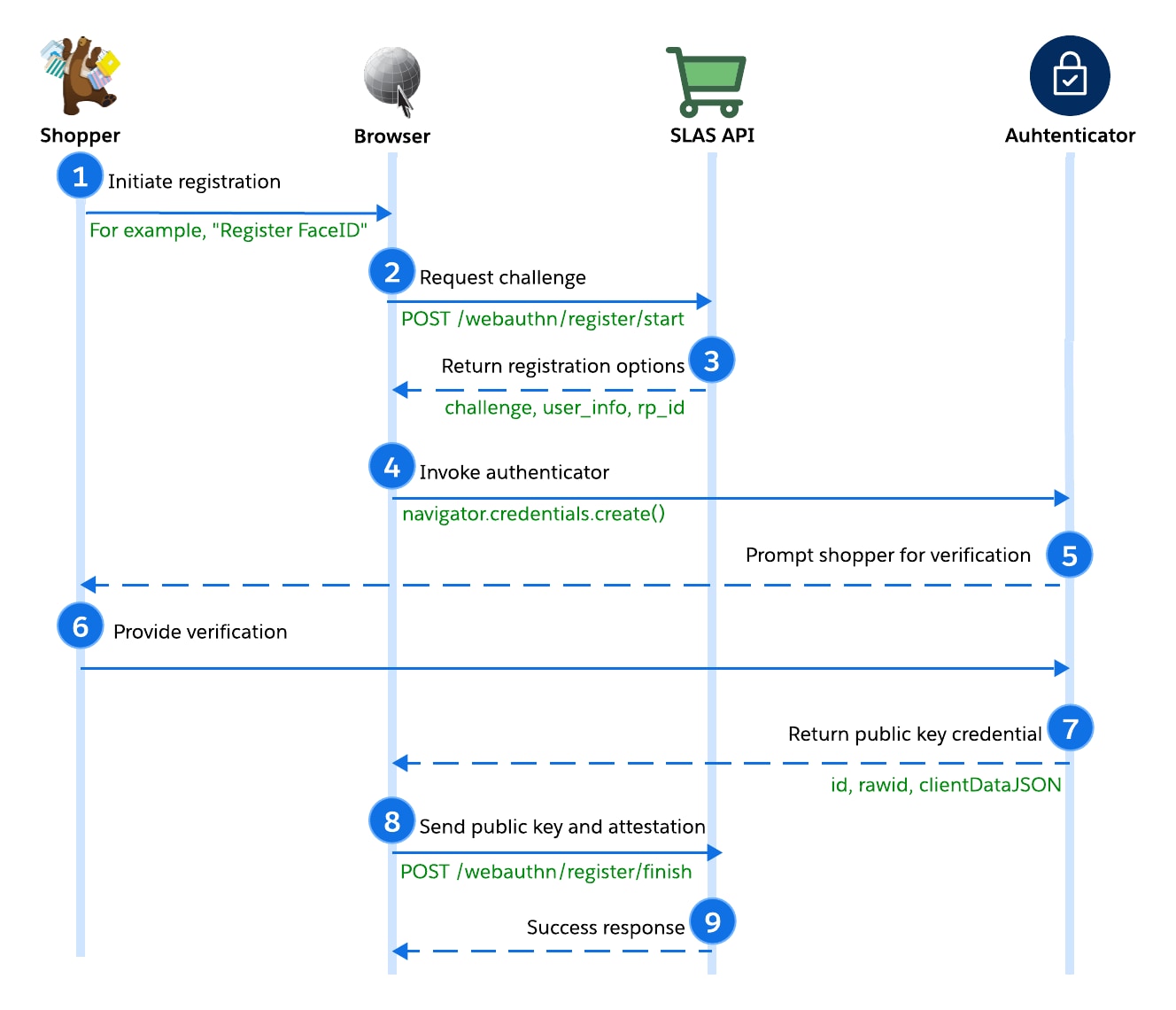
The registration process generates a unique key pair on the shopper’s device. The private key remains securely on the authenticator, while the public key is registered with SLAS.

Passkey registration flow

  1. The shopper initiates registration. For example, they click “Register FaceID.”
  2. The browser (client) requests a registration challenge from SLAS via POST /webauthn/register/start.
  3. SLAS verifies the tenant/client, generates a random challenge, and returns credential options.

The cryptographic challenge is a random string generated by the server to prevent replay attacks. The client must sign this data to prove possession of the private key.

Note

  1. The browser uses the options returned by SLAS to invoke the authenticator, calling navigator.credentials.create().
  2. The authenticator prompts the shopper for verification (biometric/PIN).
  3. The shopper verifies their presence (for example, by providing FaceID).
  4. The authenticator generates and returns a new public key credential.
  5. The browser sends the credential response to SLAS via POST /webauthn/register/finish.
  6. SLAS verifies the challenge, origin, and signature before storing the public key. If successful, returns status 204 to the browser.

3. Authentication 

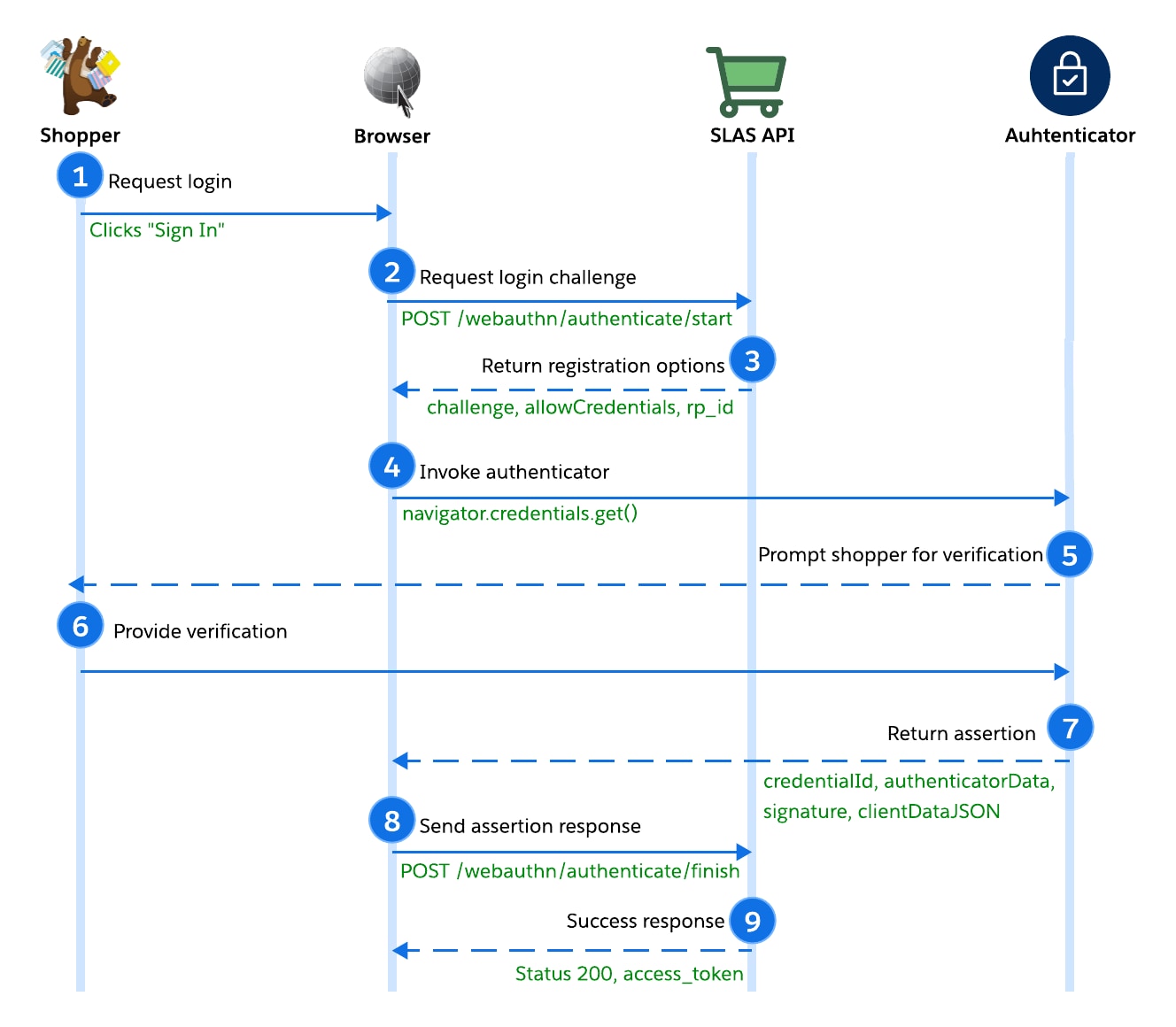
Authentication allows a returning user to log in without a password by signing a challenge with their private key.

Passkey authentication flow

  1. The shopper clicks “Sign In.”
  2. The browser (client) requests the login challenge via POST /webauthn/authenticate/start. The request includes the tenant, SLAS public client_id, and username.
  3. After verifying the tenant and client_id, SLAS returns the authentication options, including the challenge, allowCredentials list, and rpId.
  4. The browser uses the options returned by SLAS to invoke the authenticator, calling navigator.credentials.get().
  5. The authenticator prompts the shopper for verification (biometric/PIN).
  6. The shopper verifies their presence (for example, by providing FaceID).
  7. After signing the challenge using the stored private key, the authenticator returns the assertion. The assertion response includes the credentialId, authenticatorData, signature, and clientDataJSON.

The assertion is a digital signature that proves the user is present and controls the private key.

Note

  1. The browser sends the signature and assertion response to SLAS via POST /webauthn/authenticate/finish.
  2. SLAS verifies the signature against the stored public key. Upon success, SLAS issues a Shopper JWT (access token).

WebAuthn Flow Data 

Here’s a sample of what to expect when making the SLAS WebAuthn calls for passwordless login with passkeys.

1. Authorize - Get the OTP 

Make a POST request to /webauthn/register/authorize. 

Body:

1user_id=luke.skywalke@endor.org&mode=callback&
2callback_uri=https://redirect-url-capture-4b12a4f41b0f.herokuapp.com/redirect
3&channel_id=RefArch

The OTP will be sent to the callback:

1{
2  "email_id": "luke.skywalker@endor.org",
3  "login_id": "luke.skywalker@endor.org",
4  "phone": "",
5  "token": "70699743"
6}

Response: 204

2. Passkey User Registration 

Make a POST request to /webauthn/register/start. 

Body:

1user_id=luke.skywalker@endor.org&pwd_action_token=68592438
2&display_name=Luke Skywalker&channel_id=RefArch

Response:

1{
2  "extensions": {},
3  "attestation": "none",
4  "challenge": "WiiN442Q7aQkHHTflyZ8G7DnnP5WXQAyrU-X54M3aAY",
5  "authenticatorSelection": {
6    "userVerification": "preferred",
7    "requireResidentKey": false,
8    "residentKey": "preferred"
9  },
10  "user": {
11    "name": "luke.skywalker@endor.org",
12    "displayName": "Luke Skywalker",
13    "id": "Kdex2X54z1PGbw49rcJjPenx17YnbXNIix9ME9uVGPk"
14  },
15  "rp": {
16    "id": "sandbox-001.api.commercecloud.salesforce.com",
17    "name": "SLAS Service"
18  },
19  "timeout": 60000,
20  "excludeCredentials": [
21    {
22      "type": "public-key",
23      "id": "ucUhwmQzPMdg9FC3yrcrtAds92D4ZU8ZD1X4svPROJ0"
24    },
25    {
26      "type": "public-key",
27      "id": "OtTgAyl9BQNsF8eIajHm1DO426DYmtZyLWL1wXysafE"
28    },
29    {
30      "type": "public-key",
31      "id": "Tc79vh4RaZEu6eX7Xc0AjgaNq1JzCqLGy8OPxbJc9YU"
32    }
33  ],
34  "pubKeyCredParams": [
35    {
36      "type": "public-key",
37      "alg": -7
38    },
39    {
40      "type": "public-key",
41      "alg": -8
42    },
43    {
44      "type": "public-key",
45      "alg": -35
46    },
47    {
48      "type": "public-key",
49      "alg": -36
50    },
51    {
52      "type": "public-key",
53      "alg": -257
54    },
55    {
56      "type": "public-key",
57      "alg": -258
58    },
59    {
60      "type": "public-key",
61      "alg": -259
62    }
63  ]
64}

Make a POST request to /webauthn/register/finish. 

Body:

1{
2  "credential": {
3    "id": "YciKgFc6MfSIbH5_AodvuhRYXVYYNQo1Rw2fP6BM64w",
4    "rawId": "YciKgFc6MfSIbH5_AodvuhRYXVYYNQo1Rw2fP6BM64w",
5    "type": "public-key",
6    "response": {
7      "clientDataJSON": "eyJ0eXBlIjoid2ViYXV0aG4uY3JlYXRlIiwiY2hhbGxlbmdlIjoiV2lpTjQ0MlE3YVFrSEhUZmx5WjhHN0RublA1V1hRQXlyVS1YNTRNM2FBWSIsIm9yaWdpbiI6Imh0dHBzOi8vc2FuZGJveC0wMDEuYXBpLmNvbW1lcmNlY2xvdWQuc2FsZXNmb3JjZS5jb20iLCJjcm9zc09yaWdpbiI6ZmFsc2V9",
8      "attestationObject": "o2NmbXRkbm9uZWdhdHRTdG10oGhhdXRoRGF0YVik74xNzygcgA3r7qGK8VXzyEJS-hXWYB_uRiq7dWNE_tRFAAAAAQECAwQFBgcIAQIDBAUGBwgAIGHIioBXOjH0iGx-fwKHb7oUWF1WGDUKNUcNnz-gTOuMpQECAyYgASFYIJ9yvOeDFnWL8OIZCpDU8n_yKzolKCf2KXiJW0fDOJ07Ilgg2jovS7RyJIkyZgDJu-d3pXitPruz0HwdqQzpA6wTcyI",
9      "transports": [
10        "internal"
11      ]
12    },
13    "clientExtensionResults": {}
14  },
15  "username": "luke.skywalker@endor.org",
16  "pwd_action_token": "68592438",
17  "channel_id": "RefArch",
18  "client_id": "db0f2332-9b35-40fa-b863-06cecefdb831"
19}

Response:

1{
2  "nickname": "nickname",
3  "username": "luke.skywalker@endor.org",
4  "success": true // Check this. If false, an error is returned.
5}
1Verifying registration...
2
3✓ Registration verified
4
5✅ Registration complete

3. Passkey Authorization 

Make a POST request to /webauthn/authenticate/start. 

Body: user_id=luke.skywalker@endor.org&channel_id=RefArch

Response:

1{
2  "publicKey": {
3    "challenge": "cSpYLgP3YEagwpfi_Fo4cKUi3cUBHDTXAP9ebn7hEy0",
4    "timeout": 60000,
5    "rpId": "sandbox-001.api.commercecloud.salesforce.com",
6    "allowCredentials": [
7      {
8        "type": "public-key",
9        "id": "cAi0lk_jM2QSMUf8e9d81CafxfuTAIAwFcQwnSbqccU"
10      },
11      {
12        "type": "public-key",
13        "id": "OtTgAyl9BQNsF8eIajHm1DO426DYmtZyLWL1wXysafE"
14      },
15      {
16        "type": "public-key",
17        "id": "Tc79vh4RaZEu6eX7Xc0AjgaNq1JzCqLGy8OPxbJc9YU"
18      },
19      {
20        "type": "public-key",
21        "id": "xwTrRcaMr3wJTf79ku1HOH-GBQembpsl72ye40GdOM0"
22      },
23      {
24        "type": "public-key",
25        "id": "oOM5a2kj-MUvd9xwsiwuMyIIE47LbZj8ymocLA3RJdw"
26      },
27      {
28        "type": "public-key",
29        "id": "oceCHEwJqd-o4CV5CSJZlx7HAxkeR9pXbayvvFdgiKU"
30      },
31      {
32        "type": "public-key",
33        "id": "ucUhwmQzPMdg9FC3yrcrtAds92D4ZU8ZD1X4svPROJ0"
34      },
35      {
36        "type": "public-key",
37        "id": "YciKgFc6MfSIbH5_AodvuhRYXVYYNQo1Rw2fP6BM64w"
38      }
39    ],
40    "extensions": {}
41  }
42}

Make a POST request to /webauthn/authenticate/finish. 

Body:

1{
2  "credential": {
3    "id": "i8btf3FFPSWGHlmsWBxb34-Tk4B_XwHf3eeu0DgJf_Y",
4    "rawId": "i8btf3FFPSWGHlmsWBxb34-Tk4B_XwHf3eeu0DgJf_Y",
5    "type": "public-key",
6    "response": {
7      "clientDataJSON": "eyJ0eXBlIjoid2ViYXV0aG4uZ2V0IiwiY2hhbGxlbmdlIjoiSExzSFkxT3dMdklTYjN2eG02TTZtbGZyS2RJRVNQR2o4RFQxY1JZaXZVQSIsIm9yaWdpbiI6Imh0dHBzOi8vc2FuZGJveC0wMDEuYXBpLmNvbW1lcmNlY2xvdWQuc2FsZXNmb3JjZS5jb20iLCJjcm9zc09yaWdpbiI6ZmFsc2V9",
8      "authenticatorData": "74xNzygcgA3r7qGK8VXzyEJS-hXWYB_uRiq7dWNE_tQFAAAAAw",
9      "signature": "MEQCICbTxeDJo94GT2ckDBZUdyaBbaGh1D5GayZ8L3sCh8XZAiAbExKEiUdQzC7q8j77SAcY4iwCXczhO1ZRJF6Dr6yi9w",
10      "userHandle": "Kdex2X54z1PGbw49rcJjPenx17YnbXNIix9ME9uVGPk"
11    },
12    "clientExtensionResults": {}
13  },
14  "user_id": "luke.skywalker@endor.org",
15  "channel_id": "RefArch",
16  "client_id": "db0f2332-9b35-40fa-b863-06cecefdb831"
17}

Response: SLAS tokenResponse

1{
2  "credentialId": "i8btf3FFPSWGHlmsWBxb34-Tk4B_XwHf3eeu0DgJf_Y",
3  "username": "luke.skywalker@endor.org",
4  "success": true, // Check this. If false, an error is returned.
5  "tokenResponse": {
6    "access_token": "eyJ2ZXIiOiIxLjAiLCJqa3UiOiJzbGFzL2Rldi9ibGRtX3N0ZyIsImtpZCI6IjM1MzFlMTJjLTYyMzktNGIwNy1hNzUwLWQ2MTRmMjFiNWM0NiIsInR5cCI6Imp3dCIsImNsdiI6IkoyLjMuNCIsImFsZyI6IkVTMjU2In0.eyJhdXQiOiJHVUlEIiwic2NwIjoic2ZjYy5zaG9wcGVyLW15YWNjb3VudC5iYXNrZXRzIHNmY2Muc2hvcHBlci1teWFjY291bnQucGF5bWVudGluc3RydW1lbnRzIHNmY2Muc2hvcHBlci1jdXN0b21lcnMubG9naW4gc2ZjYy5zaG9wcGVyLW1jcGFnZW50IHNmY2Muc2hvcHBlci1teWFjY291bnQub3JkZXJzIHNmY2Muc2hvcHBlci1wcm9kdWN0bGlzdHMgc2ZjYy5zaG9wcGVyLXByb21vdGlvbnMgb2ZmbGluZSBzZmNjLnNlc3Npb25fYnJpZGdlIHNmY2Muc2hvcHBlci1teWFjY291bnQucGF5bWVudGluc3RydW1lbnRzLnJ3IG9mZmxpbmVfYWNjZXNzIHNmY2Muc2hvcHBlci1teWFjY291bnQucHJvZHVjdGxpc3RzIHNmY2Muc2hvcHBlci1jYXRlZ29yaWVzIGVtYWlsIHNmY2Muc2hvcHBlci1teWFjY291bnQgZnVuY3Rpb25hbF90ZXN0IHNmY2Muc2hvcHBlci1teWFjY291bnQuYWRkcmVzc2VzIHNmY2Muc2hvcHBlci1wcm9kdWN0cyBzZmNjLnRhX2V4dF9vbl9iZWhhbGZfb2Ygc2ZjYy5zaG9wcGVyLW15YWNjb3VudC5ydyBvcGVuaWQgc2ZjYy5wd2RsZXNzX2xvZ2luIHNmY2Muc2hvcHBlci1jb250ZXh0LnJ3IHNmY2Muc2hvcHBlci1jb250ZXh0IHNmY2Muc2hvcHBlci1jdXN0b21lcnMucmVnaXN0ZXIgc2ZjYy5zaG9wcGVyLWJhc2tldHMtb3JkZXJzIHNmY2Muc2hvcHBlci1teWFjY291bnQuYWRkcmVzc2VzLnJ3IHNmY2Muc2hvcHBlci1teWFjY291bnQucHJvZHVjdGxpc3RzLnJ3IHNmY2Muc2hvcHBlci1iYXNrZXRzLW9yZGVycy5ydyBzZmNjLnNob3BwZXItZ2lmdC1jZXJ0aWZpY2F0ZXMgc2ZjYy5zaG9wcGVyLXByb2R1Y3Qtc2VhcmNoIHNmY2MudHNfZXh0X29uX2JlaGFsZl9vZiIsInN1YiI6ImNjLXNsYXM6OmJsZG1fc3RnOjpzY2lkOmRiMGYyMzMyLTliMzUtNDBmYS1iODYzLTA2Y2VjZWZkYjgzMTo6dXNpZDoxYjUzZjEwMi02NjhmLTQ2YmUtOGJkMC1kZWZlMzFlYzQ3ZGQiLCJzc2MiOiJzYW5kYm94LTAwMSIsImN0eCI6InNsYXMiLCJpc3MiOiJzbGFzL2Rldi9ibGRtX3N0ZyIsImlzdCI6MSwiZG50IjoiMCIsImF1ZCI6ImNvbW1lcmNlY2xvdWQvZGV2L2JsZG1fc3RnIiwibmJmIjoxNzY3NjQxMDQ0LCJzdHkiOiJVc2VyIiwiaXNiIjoidWlkbzplY29tOjp1cG46bHVrZS5za3l3YWxrZXJAZW5kb3Iub3JnOjp1aWRuOmx1a2Uuc2t5d2Fsa2VyQGVuZG9yLm9yZzo6Z2NpZDphYmt1Z1prMHdWa2JnUmxIdzJ4R1lZbEtoSjo6cmNpZDphYmI5MmxWSkR1cDR2VVVsOTNJejg5bUNtcDo6bG9naW46cHdkbGVzczo6Y2hpZDpSZWZBcmNoIiwiZXhwIjoxNzY3NjQyODc0LCJpYXQiOjE3Njc2NDEwNzQsImp0aSI6IkMyQzE4MjEwNjY4MDAtMTY5NTY2MzQ0NzU2ODgxOTM4MzAzNzUwMCJ9.LuBtso5cdR3EtlMFGzwokbZnP7qMGk9GhuScTf0dMZeI5jimM9FN57cuzCgnQFJ2nsrQKYJNxG8eE76Wg68www",
7    "id_token": "eyJraWQiOiI3NGU2YjMxZS1lYTczLTQ3OTYtOWRkYi1jMDJmZGI4ZDgwYmUiLCJhbGciOiJSUzI1NiJ9.eyJzdWIiOiJjYy1zbGFzOjpibGRtX3N0Zzo6c2NpZDpkYjBmMjMzMi05YjM1LTQwZmEtYjg2My0wNmNlY2VmZGI4MzE6OnVzaWQ6MWI1M2YxMDItNjY4Zi00NmJlLThiZDAtZGVmZTMxZWM0N2RkIiwiYXVkIjoiZGIwZjIzMzItOWIzNS00MGZhLWI4NjMtMDZjZWNlZmRiODMxIiwiaXNzIjoicWEudXMuc2hvcHBlci5jYy5zYWxlc2ZvcmNlLmNvbSIsIm5hbWUiOiJlY29tIiwiZXhwIjoxNzY3NjQyODc0LCJpYXQiOjE3Njc2NDEwNzQsImVtYWlsIjoiZWNvbSJ9.bQ9af4jmn0tXoXvydYA0nzw3_7WwIckZ_4q9d597GeK5cmIDLXSKXu3gNV-ffnkwhR3OXkf6HfTwgachmFz2X3rqqLgeZ2oeXfpw_pvSc-K4o8GyXGycwQmNqYQzU8wL2DIIxRlfLcNhZxJ2MLp8QVxHLoz7pFAzemzuwzB7rC98gx6b4XLSdccBv4n9jG-J4qI8jh_qfuFQXWfKLnDz-WgUv3Jk7V4R39hqIKwN5D-jz7YtItgj9-2pSM7pMtHjg0CnhGYrNJhtyJ1e0hsAR0BizQVXOK5vCxz4KYhmfhVaTW7dnbRm3Jd-ooVn7c42Z311G56dzaHXPNw8RZkttw",
8    "refresh_token": "llsjyBbKk0E0U_H1fUbBc64i9s7cKzE7sf-azPV9nZA",
9    "expires_in": 1800,
10    "refresh_token_expires_in": 7776000,
11    "token_type": "BEARER",
12    "usid": "1b53f102-668f-46be-8bd0-defe31ec47dd",
13    "customer_id": "abb92lVJDup4vUUl93Iz89mCmp",
14    "enc_user_id": "2b01dab863d4bf9885031cf4f552f24e",
15    "idp_access_token": null,
16    "idp_refresh_token": null,
17    "dnt": 0
18  }
19}
1Verifying authentication...
2
3✓ Authentication verified
4
5✅ Authentication Successful