Passwordless Login with SMS Service Provider
Use SMS to send verification codes to authenticate shoppers with the passwordless login feature of the Shopper Login and API Access Service (SLAS).
This guide includes instructions for integrating passwordless login with SMS by using either Agentforce Marketing or Amazon Simple Notification Service (SNS). SLAS doesn’t support SMS delivery of one-time passwords (OTPs). To have an OTP sent by SMS, use mode=callback and manage the SMS delivery from your callback.
To complete the instructions in this guide, you must have:
- An active B2C Commerce license.
- An SMS service provider. For example, Agentforce Marketing or Amazon SNS.
- Provisioned SMS short or long codes for each country where you have SMS recipients.
- Prior login: A shopper must log in via SLAS at least one time before requesting a passwordless login.
- Registration: The shopper’s phone number must be registered with B2C Commerce.
- Volume limits: Sending SMS message for passwordless login counts towards your overall volume.
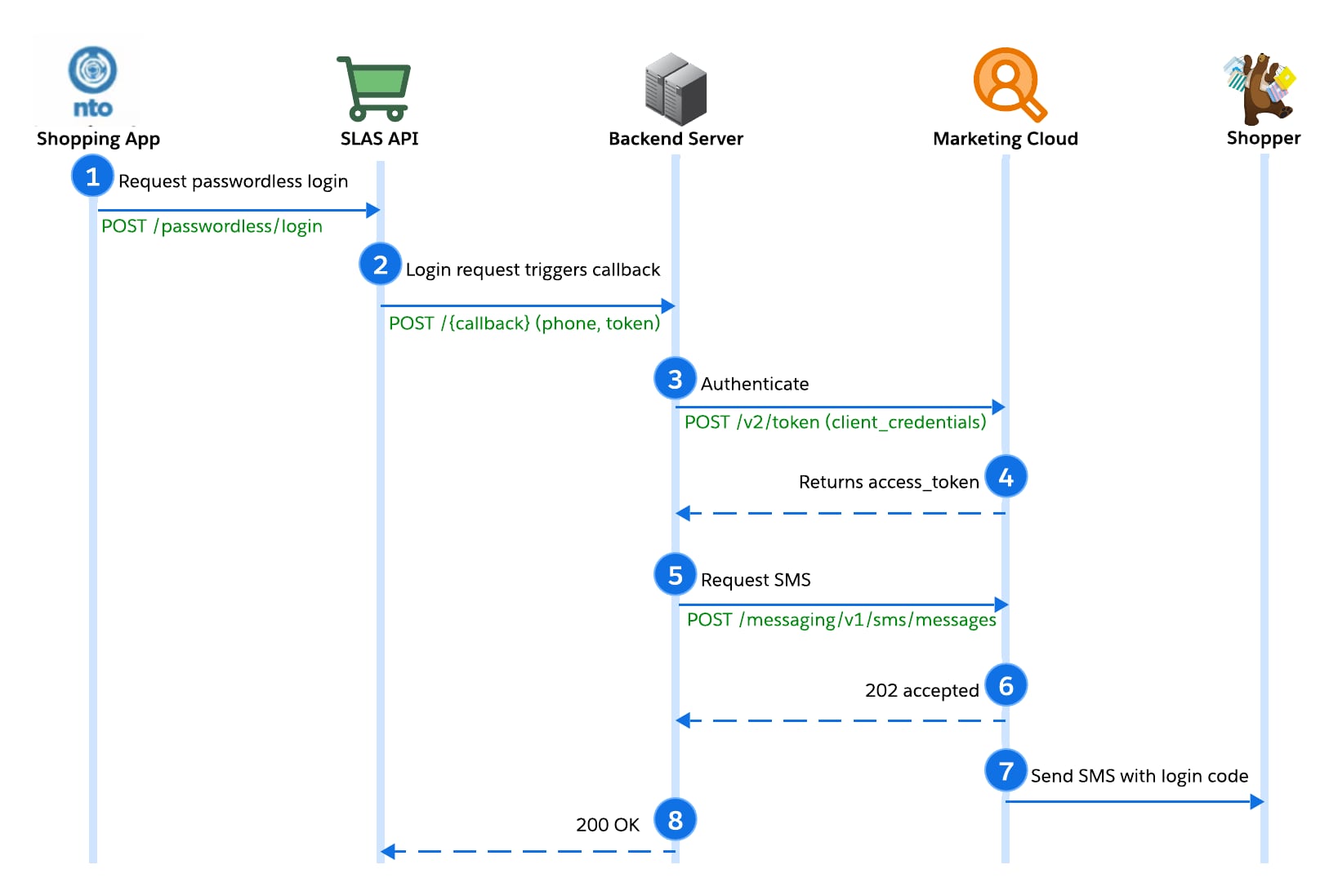
This diagram illustrates the complete lifecycle of a passwordless login request. It begins when the storefront app calls SLAS with mode=callback. SLAS then delegates the OTP delivery to your backend server. Finally, your server authenticates with Agentforce Marketing to dispatch the SMS before returning a success response to SLAS.
- An active Agentforce Marketing license with an SMS subscription.
- Admin access for your Agentforce Marketing instance with permission to install apps.
- An SMS country code and short code for your Agentforce Marketing instance.
👉 To provision an SMS short code, contact your Agentforce Marketing account representative.
Set up a server-to-server integration in Agentforce Marketing. This allows your backend to make API calls to Agentforce Marketing to send SMS messages. See Server-to-Server Integrations with Client Credentials Grant Type in Agentforce Marketing Engagement APIs and Programmatic Languages.
Create a send definition that contains the message template and delivery configuration.
a. Use your Cilent ID and secret to request an access token for Agentforce Marketing. See Access Token for Server-to-Server Integrations in Agentforce Marketing Engagement APIs and Programmatic Languages. For example:
b. Create the SMS definition using the access token received in step 2a. See POST /messaging/v1/sms/definitions in Agentforce Marketing Engagement APIs and Programmatic Languages.
This sample code shows how to configure a backend server for Agentforce Marketing integration. The code handles the HTTP POST request from SLAS and uses Marketing Cloud to send the SMS with the OTP to the user.
This sample code is provided for guidance and isn’t production-ready. Make sure that your code is properly tested before deployment.
After creating the backend server, add the URI to the Callback URL list for your SLAS Private Client. See Configure a SLAS Private Client.
Next, continue to Authorize with SMS.
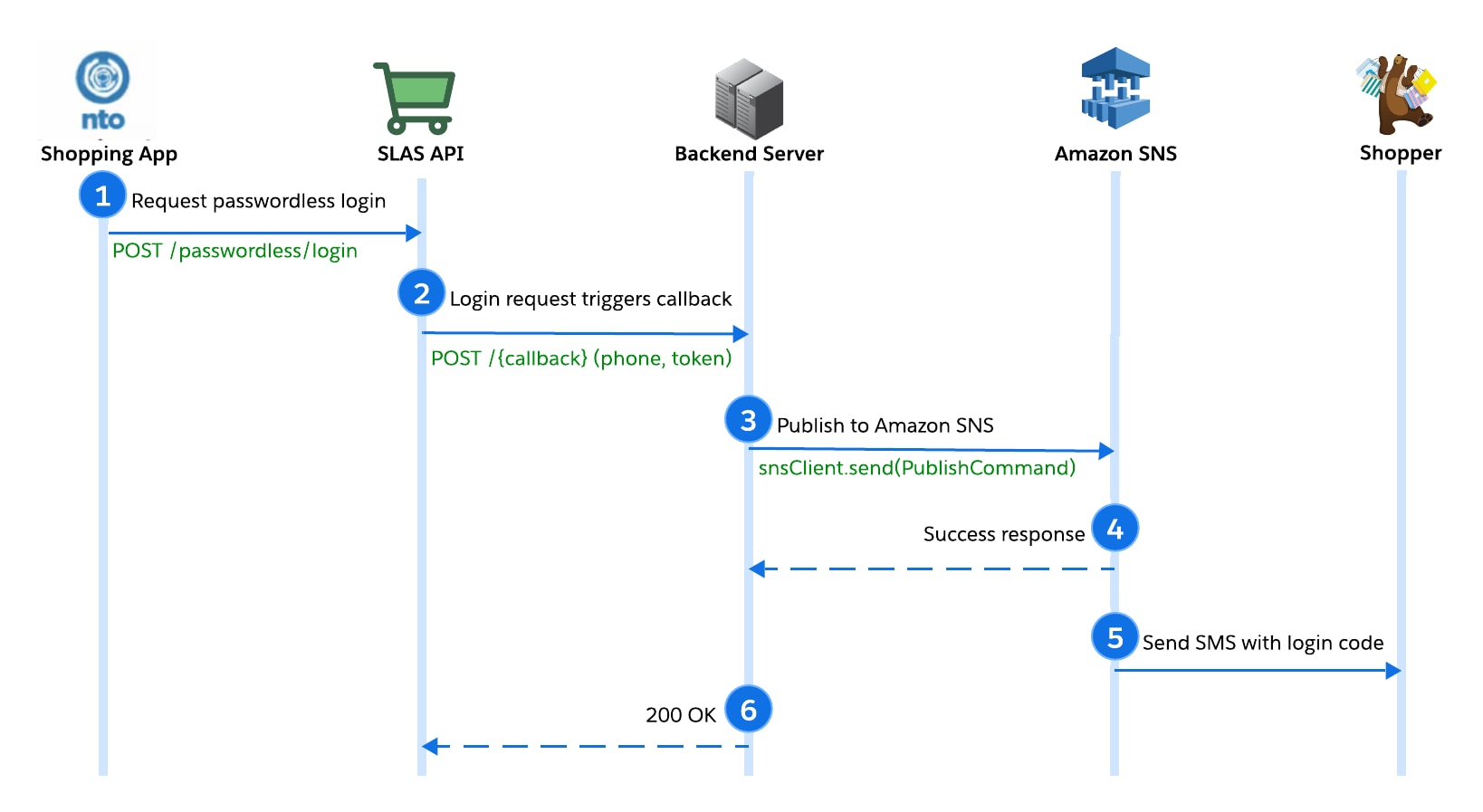
This diagram shows the delivery flow using Amazon SNS. The process starts when the storefront app requests a login. SLAS forwards the token to your backend server, which uses the AWS SDK to publish the message directly to the shopper. Because the SDK handles authentication via configuration, no separate token request is required.
To integrate passwordless login with Amazon SNS, you must have:
- Amazon SNS with production access.
- Provisioned SMS short or long codes in Amazon SNS for each country where you have SMS recipients.
This sample code shows how to configure a backend server for Amazon SNS integration. The code handles the HTTP POST request from SLAS and uses Amazon SNS to send the SMS with the one-time password to the user.
This sample code is provided for guidance and isn’t production-ready. Make sure that your code is properly tested before deployment.
After creating the backend server, add the URI to the Callback URL list for your SLAS Private Client. See Configure a SLAS Private Client.
Next, continue to Authorize with SMS.
To form requests to the SLAS APIs correctly, it helps to set some environment variables first:
| Variable | Example Value | Description |
|---|---|---|
$SFCC_SCAPI_SHORTCODE | kv7kzm78 | Short code for your B2C Commerce instance, not the short code that is provisioned for Agentforce Marketing SMS |
$ORGANIZATION_ID | abcd_s01 | Organization ID for your B2C Commerce instance |
$CHANNEL_ID | SiteGenesis | Site name (also known as channel name) in Business Manager |
$CALLBACK_URI | https://webhook.site/9f44093b-d129-42be-84d3-2f17254df04b | URI for redirection after authorization |
$CLIENT_ID | 872daaa2-412e-40c8-a48a-5a56daaef868 | The SLAS client ID |
$USER_ID | pia.larson | The user ID for logging in the shopper |
$ACCESS_TOKEN | (not provided for security reasons) | Access token from SLAS |
If you’re not using a Unix-based operating system, manually replace the variables later in the curl command provided.
This sample request uses the environment variables set earlier and the authorizePasswordlessCustomer endpoint of the SLAS API (not the same as the SLAS Admin API) to authorize a customer via SMS:
For more details on making API requests for shopper authorization, see the Passwordless Login guide and the SLAS API reference.