


Object Reference for Salesforce and Lightning Platform
 j
jNewer Version Available
PaymentLineInvoice
Supported Calls
create(), describeLayout(), describeSObjects(), getDeleted(), getUpdated(), query(), retrieve(), update(), upsert()
Special Access Rules
To access Commerce Payments entities, your org must have a Salesforce Order Management license with the Payment Platform org permission activated. Commerce Payments entities are available only in Lightning Experience.
Fields
| Field | Details |
|---|---|
| Amount |
|
| AppliedDate |
|
| AssociatedAccountId |
|
| AssociatedPaymentLineId |
|
| Comments |
|
| Date |
|
| EffectiveDate |
|
| EffectiveImpactAmount |
|
| HasBeenUnapplied |
|
| ImpactAmount |
|
| InvoiceId |
|
| PaymentBalance |
|
| PaymentId |
|
| PaymentLineInvoiceNumber |
|
| Type |
|
| UnappliedDate |
|
Usage
Use a payment line to apply all or part of a payment’s balance to an invoice. The PaymentLineInvoice object represents the balance taken from the payment and applied toward the invoice. You can apply a payment’s balance when you create the payment record or afterward. The payment line must have the same currency as the parent payment.
A payment line has an amount, which represents the total amount taken from the payment, and balance, which represents the remaining amount after the payment line has been applied to an invoice. A payment’s amount can’t be less than the sum of all of its payment line amounts.
One payment can have multiple payment lines. A payment line must be related to only payment.
You can create multiple payment lines on a payment apply each line to different invoices on the same account, or to invoices on different accounts.
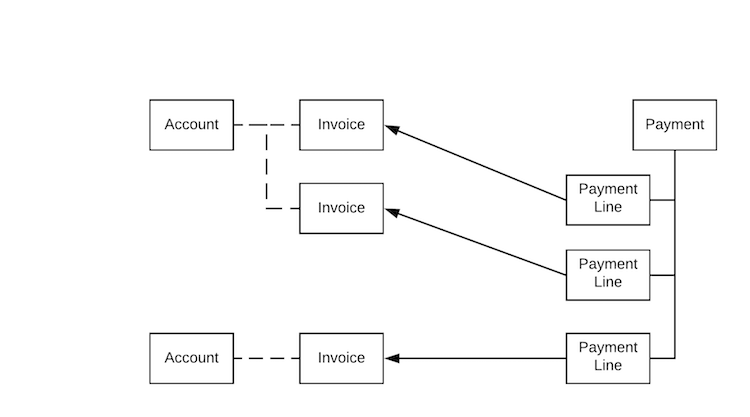
Here’s one way you could use Salesforce API to apply a payment to an invoice using a payment line.