Schedule Appointments by Using Sharing Availability
This use case describes how to create an external website by using the Salesforce Scheduler APIs that your users can use to book appointments using the invitation URL.
Service resources or their assistants can share the period during which they’re available for appointment booking. They can define and share the appointment criteria with the users by creating an invitation URL. Users can book an appointment by going to the invitation URL. The URL takes users to the first week that the service resource is available.
- A wealth manager (contractor) can generate an appointment invitation URL and add the URL to their signature. Prospective clients can use this URL to book appointments.
- An equity portfolio manager (contractor) wants to share their availability three months in the future with an existing client (authenticated consumer) for portfolio review. The equity portfolio manager can generate a URL with a start date that’s three months from the current date, and then share the URL with the client.
To book appointments using an invitation URL, users need access to the invitation record, service territory, work type or work type group, and service resources that are associated with the invitation URL. Admins can provide the required read-only access to the records by using the sharing settings or Apex sharing.
Here are the high-level steps for building an external website by using the Salesforce Scheduler APIs, which are outlined in detail later.
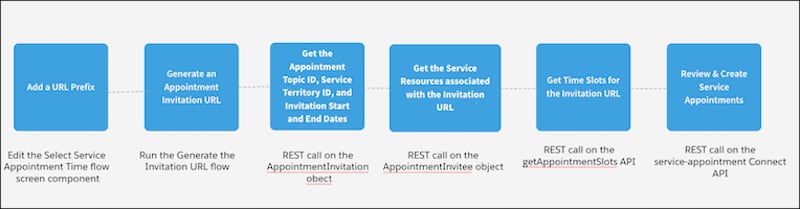
-
Configure Invitation URLs to Open on External Websites
Admins can add a URL prefix to an invitation URL to directly open the invitation on an external website.
-
Generate an Appointment Invitation URL
Only admins can generate invitation URLs. Share the invitation URLs with your users so that the users can use the URLs to quickly book appointments.
-
Retrieve the Invitation Key
Retrieve the unique invitation key from the invitation URL that the user clicks. The invitation URL has two components: the invitation URL prefix and the invitation key. The invitation key is an auto-generated unique identifier.
-
Get the Appointment Invitation Details
An appointment invitation has information that users can use for booking appointments. Use the Query() request to run Salesforce Query Language (SOQL) on the AppointmentInvitation object to retrieve the appointment invitation details, such as the appointment invitation ID, appointment topic ID (work type group ID), appointment topic type, service territory ID, availability start date, and availability end date.
-
Get the Appointment Invitee Details
An appointment invitee has information about the participant and the resources required for creating an appointment invitation URL. Use the Query() request to run Salesforce Query Language (SOQL) on the AppointmentInvitee object to retrieve the appointment invitee details, such as the service territory ID, appointment topic ID, service resource ID, and available booking start and end dates, which you need for retrieving the calendar availability for the invitation URL. You can also retrieve additional details that you need when creating an appointment, such as whether the resources are primary or required.
-
Show Calendar Availability
A time slot is a period in a day when an appointment can be scheduled. Use the getAppointmentSlots API to retrieve the calendar availability of the service resources associated with the appointment invitation.
-
Book Service Appointments
A service appointment is an appointment booked through Salesforce Scheduler. Use the service-appointments API to create an appointment.


 j
j