Create a Single-Resource Appointment
This use case explains how you can build a scheduling website to allow users to book service appointments with a single resource using Salesforce Scheduler APIs.
Before you can use the scheduler developer resources to build the app, set up Salesforce Scheduler for your organization. For more information, see Set Up Salesforce Scheduler.
Here are the high level steps building an external web site by using the Salesforce Scheduler APIs, which are outlined in detail later.
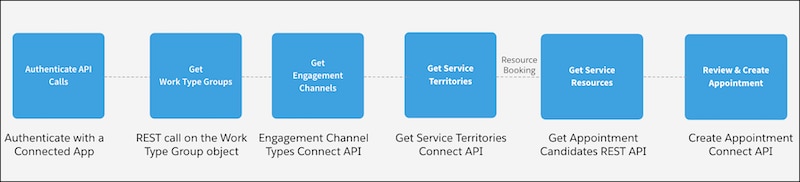
-
Authenticate with a Connected App
The OAuth access token authentication is the most secure way to authenticate SOAP and REST API calls. Before you use Salesforce Scheduler for API-based integration, authenticate the API calls using OAuth.
-
Get Work Type Groups
A work type group represents a general appointment category or topic, such as a home loan or investment. Show your users your work type groups on the landing page by retrieving the list of work type groups from your Salesforce instance. Your users can select a work type group from the list while booking appointments.
-
Get Engagement Channels
An engagement channel is a medium, such as Phone, Video, and In Person that service resources use to meet customers.
-
Get Service Territories
A service territory represents a branch or office location where your service resources (appointment attendees) operate from or meet customers. Show your users your available service territories on the next page on your website by retrieving a list of active service territories from your Salesforce instance. Your users can search for service territories based on user-entered name, city, postal code, or state. Users can also view the distance between two locations, such as between a service territory and the user’s current location.
-
Get Service Resources
A service resource represents an employee from your organization, such as a loan officer, investment advisor, doctor, nurse practitioner, or retail store specialist, who attends appointments with clients.
-
Create Service Appointments
Show your users the details of a service appointment—an appointment booked through Salesforce Scheduler—so that users can review and create the appointment.


 j
j