Schedule Anonymous Appointments with Appointment Distribution
Build a scheduling app by using Salesforce Scheduler APIs to book anonymous service appointments via phone calls and video conferences within a large, virtual service territory. For territories with too many associated resources, use Appointment Distribution to show only the least consumed resources.
Before you begin:
Before building the app, set up Salesforce Scheduler for your org. For more information, see Set Up Salesforce Scheduler.
Appointment distribution helps to maintain balance and avoid situations where one resource is overloaded with all the meetings while others’ calendars remain free.
About this task:
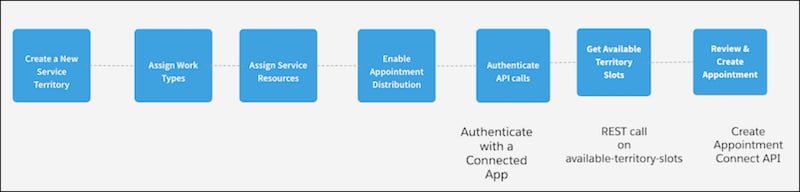
Here’s a high-level overview of how to create an app to schedule anonymous appointments.
For more information on modifying Appointment Distribution, see Modify an Anonymous Appointment.
Create a large, virtual service territory using Salesforce Scheduler and add service resources. Set the new territory as the secondary territory for service resources. You can assign a relatively large number of service resources to the territory. Use the territory exclusively for virtual appointments via phone calls and video conferences.
To choose appointment candidates from the new virtual service territory, assign service resources to the territory in Salesforce Scheduler. Set this new territory as the secondary territory for each service resource.
Make resource selection for territories with relatively large numbers of resources easier by setting Appointment Distribution to show only a short list of least-consumed resources from your resource pool.
A time slot is a period in a day when an appointment can be scheduled. Use the available-territory-slots Connect API to fetch the consolidated availability of each service resource within the selected territory.
A service appointment represents an appointment booked through Salesforce Scheduler. To create an appointment, make a POST request on the service-appointments Connect API.


 j
j