Schedule Appointments by Selecting Location First
This use case explains how you can build a scheduling app to have the service location selection first in your appointment scheduling experience using Salesforce Scheduler APIs.
If you prefer to have the service location selection first, unlike the regular appointment scheduling experience that comes with out-of-the-box scheduler templates, this approach is for you.
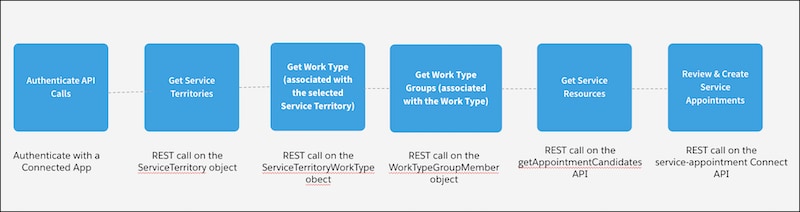
These steps provide a high-level overview of how you can build a scheduling app to have the service location selection first, which is explained in detail in the following sections.
-
Enable Maps and Location Services
Salesforce Scheduler uses maps and location services to search for appointment locations (service territories)..
-
Get Service Territories
Display the available service territories on the first screen of your appointment scheduling app.
-
Get Work Type Groups
Display the work type groups for the appointment.
-
Get Work Type
Default to the work type that is associated with the service territory and work type group.
-
Get Service Resources
Retrieve the available service resources based on the selected work type group or work type, and service territory.
-
Create Service Appointments
The last step in the scheduling application is to show the service appointment details for the user to review and create the appointment.


 j
j