Send additional data with your push notifications using custom keys. Custom keys let you pass information beyond the standard notification title, body, and badge. Additional information can include product IDs, user preferences, tracking parameters, or any data your app needs. When a user taps a notification, your app can extract these custom values from the notification’s userInfo dictionary and use them to navigate to specific content, update the UI, trigger analytics events, or perform other custom logic.
For example, an e-commerce app can include a product ID in a custom key to open the product detail page directly. A news app can pass an article ID to display the full story. Or you can include tracking parameters that third-party analytics tools use to measure campaign effectiveness.
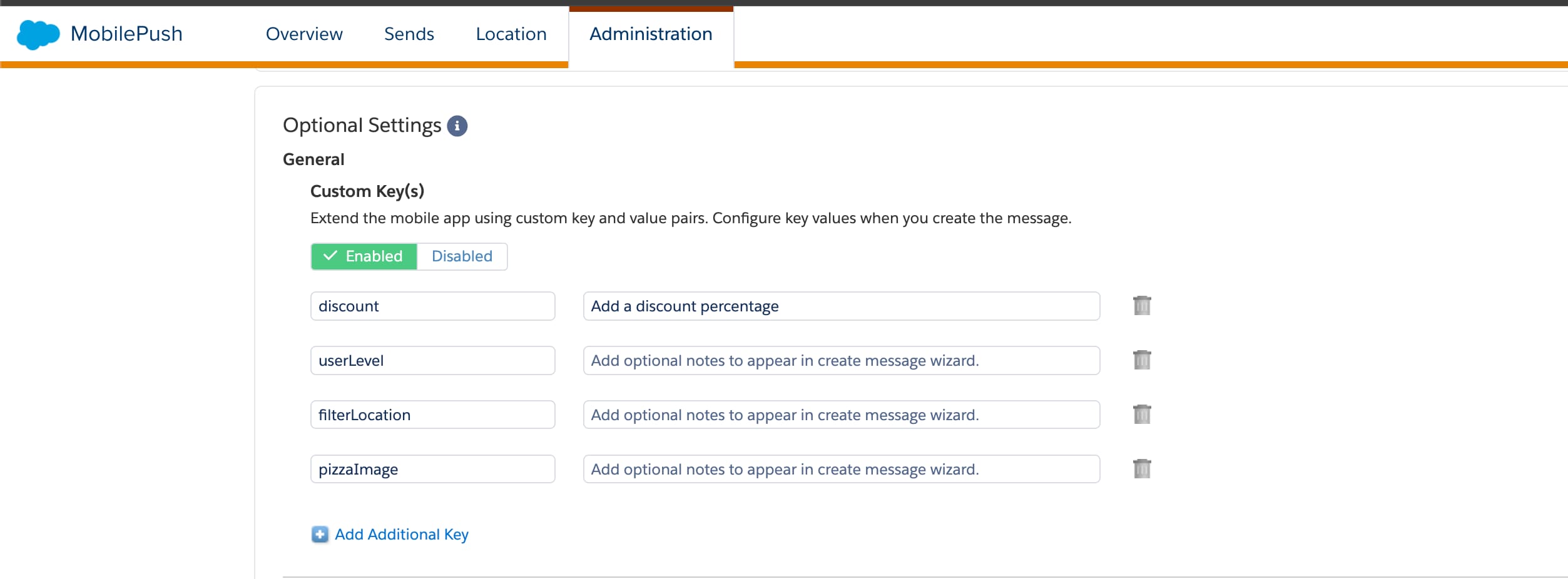
Enable custom keys on the Administration page in Marketing Cloud Engagement Setup before sending notifications with custom data.
Next, implement custom key support in your app by extending your push notification handler to extract the push’s userInfo dictionary and the values it contains.
This code example shows how to handle custom keys using version 10 or later of the SDK.
1// The method is called on the delegate when the user responds to the2// notification by opening the app, dismissing the notification, or choosing a3// UNNotificationAction. Set the delegate before the application returns from4// applicationDidFinishLaunching:.5func userNotificationCenter(6 _ center: UNUserNotificationCenter,7 didReceive response: UNNotificationResponse,8 withCompletionHandler completionHandler: @escaping() ->Void9){10 // tell the SDK about the notification11 PushFeature.requestSdk{ pushFeature in12 pushFeature?.setNotificationResponse(response)13}14 // the dictionary containing custom keys15 let userInfo = response.notification.request.content.userInfo16 let someValue = userInfo["someKey"] as? String17 // App-specific usage18 print(someValue ?? "someValue is nil")19 completionHandler()20}
For version 9 of the SDK, use this code.
1// The method will be called on the delegate when the user responded to the notification by opening the application, dismissing the notification or choosing a UNNotificationAction. The delegate must be set before the application returns from applicationDidFinishLaunching:.2func userNotificationCenter(_ center: UNUserNotificationCenter, didReceive response: UNNotificationResponse, withCompletionHandler completionHandler: @escaping() ->Void){3 // tell the SDK about the notification4 SFMCSdk.requestPushSdk{ mp in5 mp.setNotificationResponse(response)6}7 // the dictionary containing custom keys8 let userInfo = response.notification.request.content.userInfo9 let someValue = userInfo["someKey"] as? String10 // application-specific usage follows11 print(someValue ?? "someValue is nil")12 completionHandler()13}
For version 8.1 of the SDK, use this code.
1// The method will be called on the delegate when the user responded to the notification by opening the application, dismissing the notification or choosing a UNNotificationAction. The delegate must be set before the application returns from applicationDidFinishLaunching:.2func userNotificationCenter(_ center: UNUserNotificationCenter, didReceive response: UNNotificationResponse, withCompletionHandler completionHandler: @escaping() ->Void){3 // tell the SDK about the notification4 SFMCSdk.requestPushSdk{ mp in5 mp.setNotificationRequest(response.notification.request)6}7 // the dictionary containing custom keys8 let userInfo = response.notification.request.content.userInfo9 let someValue = userInfo["someKey"] as? String10 // application-specific usage follows11 print(someValue ?? "someValue is nil")12 completionHandler()13}
For version 8.0 of the SDK, use this code.
1// The method will be called on the delegate when the user responded to the notification by opening the application, dismissing the notification or choosing a UNNotificationAction. The delegate must be set before the application returns from applicationDidFinishLaunching:.2func userNotificationCenter(_ center: UNUserNotificationCenter, didReceive response: UNNotificationResponse, withCompletionHandler completionHandler: @escaping() ->Void){3 // Tell the SDK about the notification4 // See Step 5: Capture Notifications on Launch only for 8.0.x under Migrate to Mobile Push SDK Version 8.x for iOS to capture the notification request.5 mp.setNotificationRequest(response.notification.request)67 // the dictionary containing custom keys8 let userInfo = response.notification.request.content.userInfo9 let someValue = userInfo["someKey"] as? String10 // application-specific usage follows11 print(someValue ?? "someValue is nil")12 completionHandler()13}
For version 7 of the SDK, use this code.
1// The method will be called on the delegate when the user responded to the notification by opening the application, dismissing the notification or choosing a UNNotificationAction. The delegate must be set before the application returns from applicationDidFinishLaunching:.2func userNotificationCenter(_ center: UNUserNotificationCenter, didReceive response: UNNotificationResponse, withCompletionHandler completionHandler: @escaping() ->Void){3 // tell the MarketingCloudSDK about the notification4 MarketingCloudSDK.sharedInstance().sfmc_setNotificationRequest(response.notification.request)5 // the dictionary containing custom keys6 let userInfo = response.notification.request.content.userInfo7 let someValue = userInfo["someKey"] as? String8 // application-specific usage follows9 print(someValue ?? "someValue is nil")10 completionHandler()11}


 j
j