
Appearance
Exercise 3: Vibe Code a Merchant Performance Dashboard
In this exercise, you'll use Agentforce Vibes to build a Merchant Performance Dashboard the way you would work with an AI coding partner: describe the outcome, let the agent inspect context, choose a design, build a first version, test it, and iterate.
TIP
The prompts in this exercise are starting points. If Agentforce Vibes discovers different fields, naming, or metadata in your org, let the agent explain the trade-off, then adjust the next prompt.
Scenario
The Merchant Operations team needs better visibility into how individual storefronts are performing on Pronto. Each Storefront record already tracks its own review performance (Average_Review_Score__c, Total_Reviews__c), and its activity is tracked through related Orders and Reviews. Leadership wants a simple dashboard that helps them spot storefront order volume, revenue, and customer satisfaction trends.
You'll guide Agentforce Vibes to build the dashboard, but you won't hand it a complete blueprint. Instead, you'll ask the agent to inspect the project and recommend the best first-version design based on the Salesforce metadata it can see, then keep it inside clear boundaries so it builds only what you asked for.
Step 1: Explore the Project and Choose a Design
Open the Agentforce Vibes Sidebar.
Toggle from Chat mode to Plan mode.

Use this prompt to ask the agent to inspect the project before it builds anything:
txtI want to build a Merchant Performance Dashboard that helps merchant operations leaders understand storefront order volume, revenue, and customer satisfaction. Before making any changes, explore this Salesforce DX project and the connected org context. Use the available Salesforce metadata, MCP servers, and skills to understand what already exists. Look for relevant objects, fields, record types, permission sets, Lightning Web Components, Apex classes, tabs, and any existing storefront, order, or review-related metadata. Recommend 2 or 3 possible first-version designs for the dashboard. For each design, explain: - What merchant operations question it answers - Which Salesforce data it would use - What the first useful version should include - Any assumptions or risks Do not edit files yet.Review the dashboard designs that the agent returns.
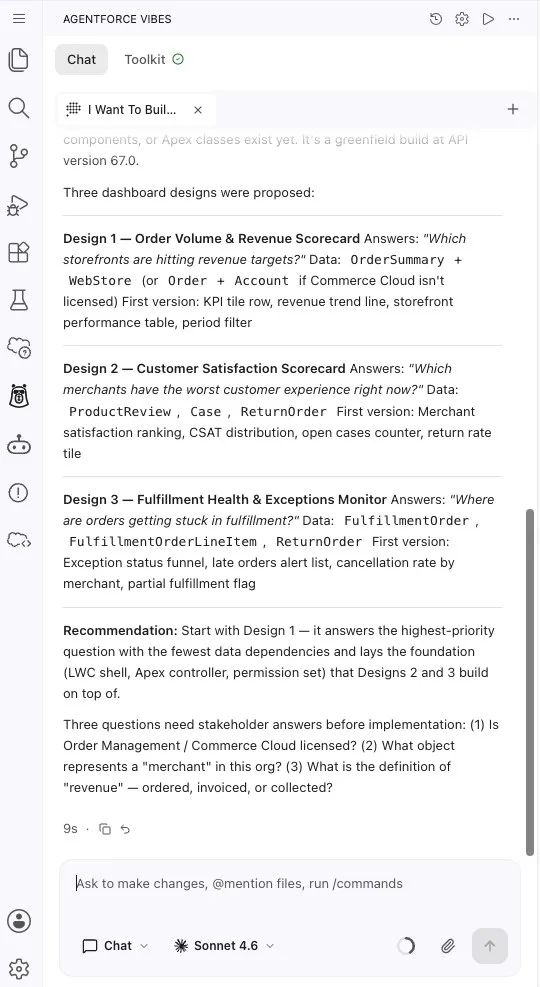
The agent proposes a few different options for the dashboard. You can select one now, or use the next prompt to ask the agent which option is the strongest first version with this prompt:
txtWhich dashboard design gives merchant operations leadership the most useful first version with the least implementation risk, and why? Recommend the simplest version that still uses live Salesforce data.Your dashboard may look different from another attendee's dashboard. The exact result depends on the LLM response, the design you choose, and the follow-up prompts you give Agentforce Vibes.
Step 2: Ask for a Lightweight Build Plan
Stay in Plan mode.
Use this prompt to turn the chosen direction into an implementation plan:
txtLet's build the recommended Merchant Performance Dashboard design. Keep the first version small and testable. Use existing metadata only. Do not create new custom fields or custom objects. Do not modify existing Lightning web components, Apex classes, or objects. Plan one new Lightning web component called merchantPerformanceDashboard, one Apex class called MerchantPerformanceController that reads Storefront__c, Order__c and Review__c, one custom tab, and one permission set. Plan the smallest useful version of the app. Include: - The user experience - The Salesforce objects and fields you expect to use - The files you expect to create or update - How the Lightning Web Component will get data - How permissions and tab access should work - The order you recommend building it in Keep the plan practical. Do not write code yet.Review the plan and look for these checkpoints:
- It uses existing
Storefront__c,Order__c, andReview__cmetadata. - It explains any assumptions instead of hiding them.
- It starts with a simple dashboard experience.
- It avoids unnecessary custom fields.
- It includes a deployable Lightning Web Component, Apex data service, tab, and permissions path.
If the plan is too complex, ask the agent to revise it with this prompt:
txtSimplify this plan for a first release. Keep only what is needed to show storefront KPIs and a useful storefront table.- It uses existing
Step 3: Build the First Useful Version
Switch from Plan mode to Chat mode by clicking Approve Plan.
If the agent does not automatically start building after you approve the plan, use this optional prompt to ask the agent to build the first version:
txtBuild the first useful version of the Merchant Performance Dashboard from the plan. Create the smallest deployable implementation that shows storefront performance from live Salesforce data. Create only these new files, and do not modify any existing file: - A Lightning web component called merchantPerformanceDashboard - An Apex class called MerchantPerformanceController, declared with sharing, with a single @AuraEnabled(cacheable=true) method that reads the existing fields on Storefront__c, Order__c and Review__c - A custom tab labeled Merchant Performance for the component - A permission set called Merchant_Performance_Dashboard_Access that grants access to the Apex class and the tab, and read access to the fields the dashboard uses Before editing, briefly summarize the files you will create. Do not create custom fields, custom objects, or flows. Do not create test classes unless I ask. If you need to make an assumption, add a short note in the response.The agent may deploy the first draft on its own while it builds.
Notice that the agent uses the tools available to it to create and deploy the first draft.
If the agent builds the app but does not deploy it, use this prompt:
txtDeploy the Merchant Performance Dashboard changes to my target org.After deployment completes, you should see a deployment confirmation.
Expand the Validate your changes list above the chat input.
Select Preview Locally next to the dashboard component file.
If prompted, press Enter to approve the component preview.
TIP
If you don't see the Validate your changes list or the Preview Locally button doesn't open the preview, right-click the dashboard component's folder or its
.htmlfile in the Explorer and select SFDX: Open in Lightning Preview. You can also ask the agent:Open the dashboard component in Lightning Preview.The preview opens a rendered version of the component. Your component may look different from the one built by your instructor or other attendees because the agent can make different design and implementation choices based on your prompts.
Step 4: Open and Test the App
Ask the agent to assign the dashboard permission set to your user so you can test the app in the org.
txtAssign the Merchant_Performance_Dashboard_Access permission set to my user in my target org so that I can test it. Do not change any metadata.Click the Open Default Org in Browser button in the status bar.
Open the App Launcher.
Search for
Merchant Performance, then select the dashboard tab.Review the page and ask yourself:
- Does the dashboard load without errors?
- Do the KPIs and table use live Salesforce data?
- Does the page show storefront-level metrics such as total orders, revenue, and average review score?
- Does the page explain what the numbers mean?
- Is there an obvious next improvement?
If you see errors or anything incorrect, return to the agent, paste in what you see, and ask it to make adjustments.
The agent can decode errors, explain what went wrong, and update the dashboard at your command.
Step 5: Iterate from What You See
Choose one improvement based on the dashboard you tested.
Good options include:
- Improve empty and error states.
- Add a chart for order volume or revenue trends.
- Add row-level actions for storefront follow-up.
- Add a simple way to flag a storefront for review-score follow-up.
Ask the agent to propose the smallest safe improvement.
txtBased on the current Merchant Performance Dashboard, recommend one small improvement that would make the app more useful for a merchant operations leader. Keep the improvement small enough to build, deploy, and test quickly. Explain what you would change and why before editing files.Pick one improvement and ask the agent to build it.
txtBuild that improvement. Keep the change focused and update only the merchantPerformanceDashboard component and MerchantPerformanceController files. Do not create new custom fields or objects. After making the change, summarize what I should test.Deploy the update.
txtDeploy the latest dashboard changes to my target org.Refresh the dashboard and verify the improvement.
Summary
- You used Plan mode to ask Agentforce Vibes to inspect project and org context before building.
- You reviewed dashboard design options and chose a first-version implementation path.
- You asked the agent to build a thin, deployable first version.
- You deployed and tested the app in Salesforce.
- You practiced the vibe coding loop by choosing one improvement based on what you saw.
You now have a working pattern for building with Agentforce Vibes: describe the outcome, inspect context, build a testable slice, and iterate from evidence.