
Appearance
Exercise 2: Explore Pronto
In this exercise, you'll explore the Pronto Salesforce implementation to understand the data and workflows you'll use throughout this workshop.
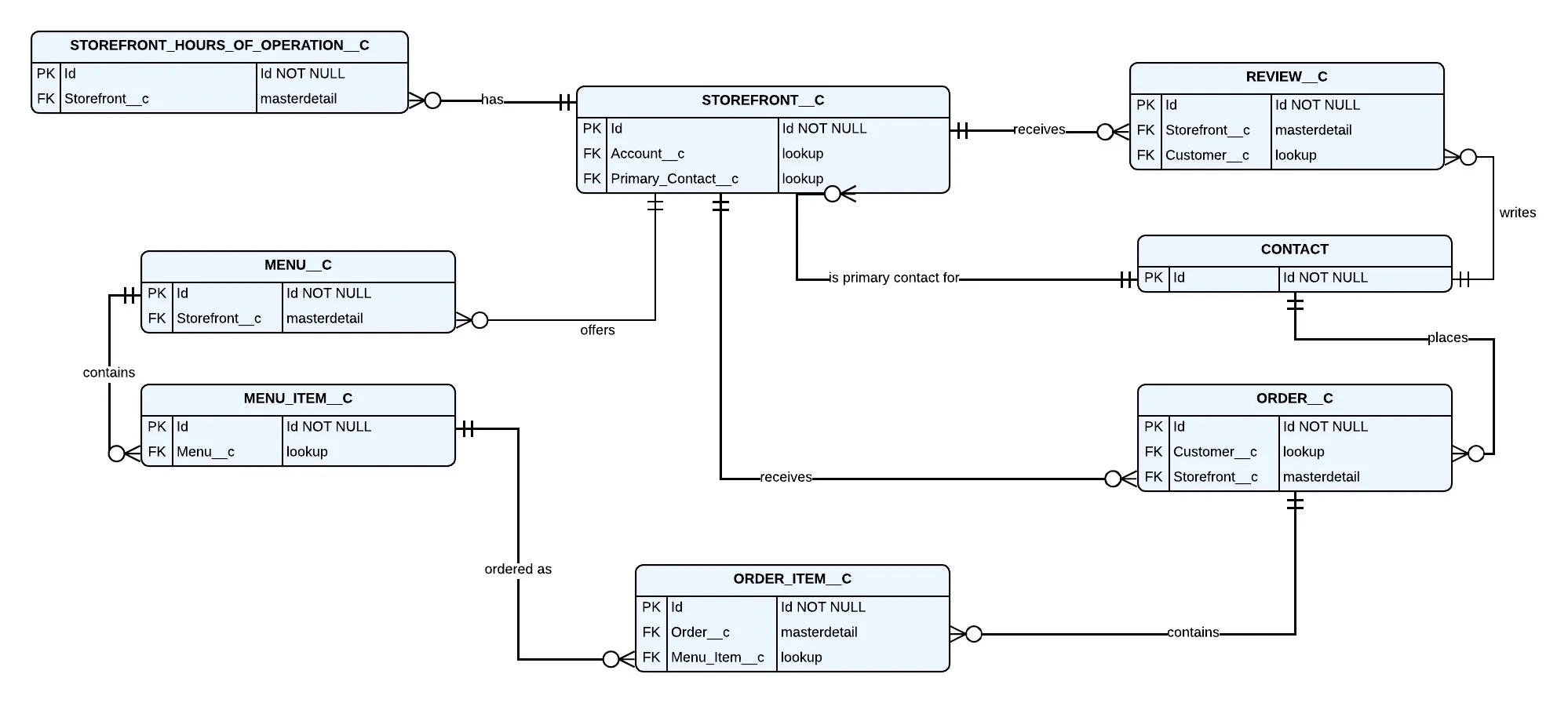
Before you begin, here's a quick orientation to Pronto's data model:
- Storefronts (
Storefront__c) represent restaurants with their operating hours (Storefront_Hours_of_Operation__c). - Contacts represent customers.
- Reviews (
Review__c) are feedback customers leave about a storefront. Order__candOrder_Item__chold customer orders.Menu__candMenu_Item__chold the menu information associated to a storefront.
Step 1: Explore Storefronts
In the App Launcher, open the Pronto Merchant Management app.
Open the Storefronts tab.
Review the list of storefronts. Notice the Average Review Score and Total Reviews fields that summarize related Review records.
Open the Urban Table Downtown storefront record.
Review its fields and related lists, including its related Orders and Reviews. You'll reference this data model throughout the exercises.
Step 2: Explore Customers
In addition to storefront data, Pronto tracks customer profiles in the Contact object and the orders and reviews tied to them.
Use global search to find the contact Ethan Kim.
Click the Ethan Kim contact record in the search results to open it.
On the contact record, review the related lists, including Orders and Reviews.
Note how this maps to real customer behavior:
- Orders represent the meals this customer has ordered from different storefronts.
- Reviews represent the feedback this customer left after past orders, the same reviews that roll up into each storefront's
Average_Review_Score__c.
Step 3: Explore Orders
Pronto tracks order information using two custom objects:
Order__crepresents a single customer order placed at a storefront. Key fields include Status (for example Draft, Confirmed, Processed, Out for Delivery, Delivered, or Canceled), Total Amount, and a lookup to Storefront.Order_Item__crepresents an individual line item on an order (a menu item and quantity), related back to its parentOrder__c.
In the App Launcher, open the Customer Orders tab (or search for order records using global search).
Open any order record and review its fields, including Status, Total Amount, and the Storefront lookup.
Scroll to the related list of Order Items and open one to see the menu item and quantity captured on the line item.
Return to the Urban Table Downtown storefront record and look for its related Orders. This is the same relationship you'll query and render later in the workshop.
Summary
You have explored Pronto's data model and learned about the key objects and their relationships. You've also browsed through some of the sample data that ships with the org.