
Appearance
Exercise 1: Set Up and See the Baseline
In this exercise, you'll prepare your org and Agentforce Vibes for HXL, start the one piece of setup that takes a while to propagate, and see what the Employee_Assistant agent does today. That plain-text answer is the "before" state you'll compare against once your widget is live.
Step 1: Enable the Headless Experience Layer (Beta)
- In Setup, search for
headlessin the Quick Find box. - Select Headless Experience Layer Settings under Feature Settings.
- Toggle Headless Experience Layer (Beta) to On. If it's already On, continue to the next step.
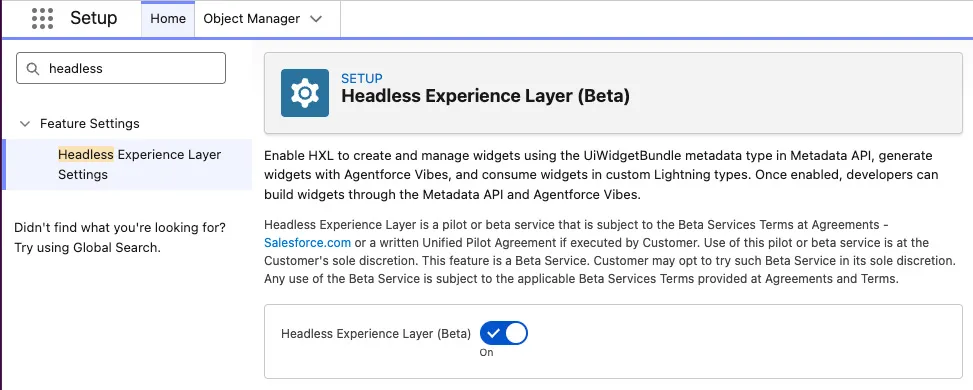
This lets you deploy UiWidgetBundle metadata and reference widgets from custom Lightning Types. It's a beta feature, subject to Salesforce's Beta Services Terms.
Step 2: Prepare Agentforce Vibes
Already using Agentforce Vibes in this org?
If you've already launched Agentforce Vibes, activated its MCP servers, and set Bypass mode, open Agentforce Vibes and skip to substep 5.
From Setup, in the Quick Find box, enter
MCP Servers, then select MCP Servers under API Catalog. Click Salesforce Servers, then open each of these servers and click Activate, skipping any that are already active:- salesforce-api-context
- metadata-experts
- Headless360 (H360) MCP Server
Agentforce Vibes and its skills use these servers to inspect your org's data model and metadata.
Open the Setup Menu, click Agentforce Vibes, and accept the Terms and Conditions. Initialization takes a few minutes: Vibes creates a Salesforce DX project and authorizes your org for you.
If the Agentforce Vibes Sidebar prompts you, click I agree to the terms, then Enable Agentforce. The sidebar can take a few minutes to load; don't reload the page while it does.
Click the Settings icon (the gear labelled Agentforce: Settings in the sidebar header; if the panel doesn't open, click it again), change Default session mode to Bypass (trust all), and click Back. This lets the agent retrieve, deploy, and run CLI commands on your behalf for this workshop. Vibes can reset this setting when it reloads, so each exercise starts by checking it again.
Select the Toolkit tab, then click Skills. Confirm that the preconfigured
sf-skillsincludeplatform-lightning-type-widget-coordinate,platform-mcp-tool-widget-coordinate,platform-widget-generate, andagentforce-generate. The skills are in the collapsed Platform group; expand it or use the Toolkit search box. Click Back. Every prompt in this module names the skill it needs, so Vibes doesn't have to search for one.Open the Integrated Terminal with the Toggle Panel button at the top right (
CTRL+`may not work in the browser) and run these two commands. The first makes the agent's CLI commands (includingsf agent) current. The second installs the AgentScript SDK that theagentforce-generateskill uses to compile the agent in Exercise 3. The later exercises don't update or install anything.shsf update node /home/codebuilder/.local/share/code-server/User/globalStorage/salesforce.salesforcedx-einstein-gpt/v4/skills/Skills-Salesforce/agentforce-generate/scripts/setup-agentscript-sdk.mjs --npm --jsonThe second command prints a JSON result with the installed SDK version.
Step 3: Create an External Client App for MCP Clients
In Exercise 4, you'll render your widget in the AIforce Playground, an external MCP client. MCP clients authenticate through an External Client App (ECA), and a new ECA can take up to 30 minutes to become available. Create it now so it's ready by the time you need it.
Already have an External Client App for the AIforce Playground?
If you've already created the Workshop MCP Client ECA in this org, skip to Step 4.
Verify your email. In Setup > Users, click Edit next to EPIC, OrgFarm, replace the Email value with your own, and click Save. Open the "Finish changing your Salesforce account's email address" email and click the link to verify. You need a verified email to reveal the ECA's consumer secret later.
Create a permission set. In Setup > Permission Sets, click New, set Label to
MCP Client User(the API name auto-fills), and click Save. Click Manage Assignments > Add Assignments, select EPIC, OrgFarm, and click Assign.Create the ECA. In Setup > External Client App Manager, click New External Client App and set:
Setting Value External Client App Name Workshop MCP ClientAPI Name Workshop_MCP_ClientContact Email Your email address Enable OAuth Checked Callback URL https://mcp-playground-360-lb-75bfc079c1f3.herokuapp.com/oauth/sf/callbackSelected OAuth Scopes Perform requests at any time (refresh_token, offline_access) and Access Salesforce hosted MCP servers (mcp_api) Issue JSON Web Token (JWT)-based access tokens for named users Checked Double-check these values, then click Create.
Restrict access. On the Policies tab, click Edit and expand OAuth Policies. Set Permitted Users to Admin approved users are pre-authorized and click OK. Move MCP Client User to Selected Permission Sets, then click Save.
You'll copy the consumer key and secret in Exercise 4.
Step 4: See What the Agent Does Today
In your org, open the Agentforce conversation panel and make sure the panel is titled Employee Assistant. If a first-use Agentforce Memory dialog or a You're about to use Agentforce screen appears, dismiss it (Got It).
Ask the agent:
txtTell me about Artisan's Edge Uptown.Observe the response. The agent calls its
getStorefrontFromNameaction and reads the result back as plain text. The wording varies, but you should see the address and average review score, something like:txtArtisan's Edge Uptown is located at 404 Uptown Way, Dallas, TX 75201. It has an average review score of 4.4 out of 5 from 5 reviews.Ask about a storefront in a different status, for example
Tell me about Harvest Grill., which is Suspended. Every answer looks the same: a sentence with no visual structure and no way to act on it beyond typing another message.
The action already returns everything a card needs. What's missing is a way to render that data as anything other than a sentence, and that's the gap HXL closes.
Summary
You enabled the Headless Experience Layer, prepared Agentforce Vibes and its HXL skills, started the External Client App you'll need for MCP clients, and captured the agent's plain-text baseline for getStorefrontFromName.