Modernized Storefront Experience in Storefront Next
Storefront Next delivers a modernized ecommerce experience through the Market Street template. The Product Listing Page (PLP), Product Detail Page (PDP), and My Account page provide an enterprise-grade default interface with comprehensive core commerce capabilities, rich media galleries, advanced discovery controls, AI assistance, and omnichannel integrations.
For implementers, these pages establish a full-feature blueprint that accelerates implementation for the broader integration ecosystem—ratings providers, loyalty programs, Buy Now Pay Later (BNPL) services, store inventory systems, and AI conversational assistants.
Benefits
Strong first impression for shoppers: The modern PDP and PLP experiences match the expectations set by flagship brands. A new Storefront Next storefront immediately presents a credible, polished experience, which increases the overall conversion rate.
Fast time to value: Implementers and merchants start with a proven blueprint instead of rebuilding standard patterns. Because the basic UX scaffolding is already in place, project teams can focus on brand differentiation and integration rather than basic page construction.
UI components for ecosystem integrations: The storefront exposes standard, stable UI components for ratings, loyalty programs, BNPL providers, and store inventory. These shells give independent software vendors (ISVs) consistent placements to target, minimizing one-off custom front-end work.
Vertical storefront foundation: A comprehensive but generic PDP and PLP create a reusable base across industries. Implementers can specialize and configure this foundation for verticals like luxury beauty, fashion, or electronics with minimal duplication of effort.
Some components, such as delivery estimate, ratings, and reviews, are a prototype of the intended storefront experience. They aren’t connected to B2C Commerce for data persistence. Although these components render in the UI, their data is temporary and is lost when the page refreshes. To connect these prototyped components to a third-party service, modify their corresponding extensions. See Extend Storefront Next with Features and Prototyped UI Components.
Note
Product Listing Page (PLP) Features
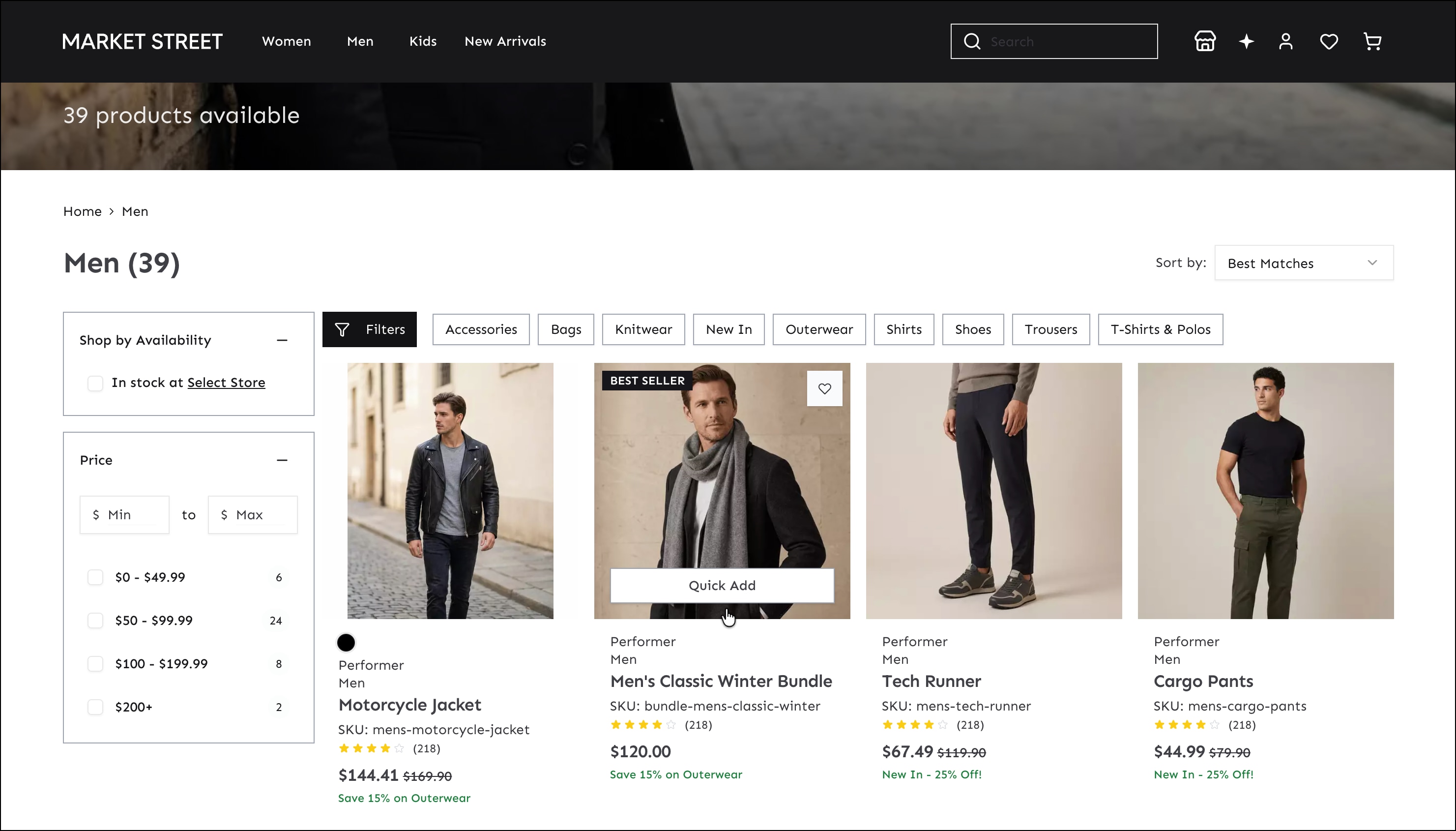
The PLP offers a rich browsing interface that enables shoppers to find products quickly, increasing conversion rates.
Discovery
Enriched product tiles: Display ratings, review counts (provided by a ratings service), and badges that identify items that are new, on sale, online-only, limited editions, or on promotion.
Filtering: Filter by a store selected in Store Locator and by specific product criteria.
Sorting: Sort products by best matches, price, top sellers, and so on.
Omnichannel: If a store inventory integration is active, view store availability and in-store pickup badges on product tiles.
Merchandising: Use defined content slots above and within the product grid for banners, quizzes, and editorial content.
Shopper Agent: Access an AI-assisted shopping experience that helps shoppers discover products through a conversational chat interface. Enable and configure Shopper Agent before it’s available in Storefront Next. See Agentforce Shopper Agent for B2C Storefronts in Salesforce Help.
Purchasing
Quick add: View a mini-PDP popup to add a product to the cart without navigating to the full detail page.
Product Detail Page (PDP) Features
The PDP gives shoppers detailed product information and flexible purchasing options, which implementers can provide by using payment providers.
Discovery
View ratings summary and review count, and an optional AI-generated summary review using provider data. The ratings and reviews section supports pagination or load-more behavior.
View product recommendations. Implementers can provide data sources for recommendations through adapters.
View recently viewed items displayed as product tiles.
Check availability and inventory status: in stock, low stock, out of stock, backorder, and pre-order states.
Purchasing
Add the product to the wishlist.
View a delivery estimate.
Choose delivery or in-store pickup, or split an order across both fulfillment methods.
Select a payment option, including payment plans and express payments such as Apple Pay, Google Pay, and Venmo. Implementers can provide payment services through adapters for payment providers, including BNPL providers.
My Account Page Features
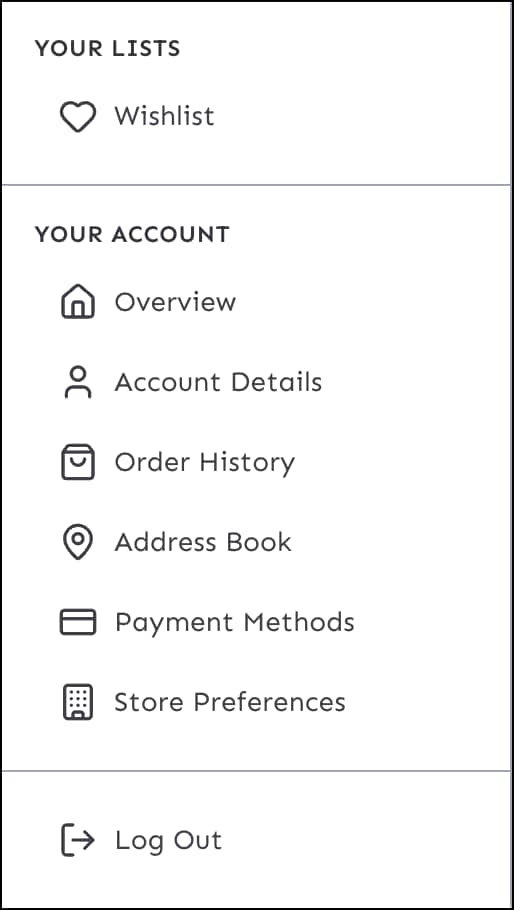
The My Account page is a one-stop shop for managing all aspects of the shopping experience. From this page, shoppers can:
View recent orders and product recommendations from the overview page.
View and manage their wishlist.
View full order history.
Manage saved addresses.
Add and manage payment methods.
View store preferences, including their preferred store and authorized pickup contacts.
Buy Online, Pick Up in Store and Multiple Shipments
Storefront Next supports multiple fulfillment options. Shoppers can mix delivery and in-store pickup, and can ship items to multiple addresses in a single order. Both options are available in the checkout page.
The buy online pick up in-store feature requires store locator. These two features are default extensions in Storefront Next, along with multiple shipments. They’re available when you create a storefront with the default extensions. See Enhance Shopper Experience with Store Locator and In-Store Pickup.
Adapters for Implementing Data Sources
With the adapter design pattern, implementers can provide or replace data source implementations of Product Detail Page (PDP), Product List Page (PLP), and My Account page features with third-party services. Examples of such features are loyalty and product reviews. Features don’t have to be tightly coupled to specific services or have concrete implementations. Implementers provide adapters by implementing an interface and adding data source implementations, and then packaging adapters in custom cartridges. Admins can install the cartridges in a B2C Commerce instance.


 j
j